
|

|
WebOTX Manual V10.1 (第7版) 目次を表示 |
|
|
|
WebOTX Manual V10.1 (第7版) 目次を表示 |
Memo
MVC2とはMVCアーキテクチャをWebアプリケーションに適用したものです。JSP
Model 2アーキテクチャとも呼ばれています。
Memo
Webプロジェクトとは、Developer's
Studio での、Webアプリケーション作成用のプロジェクトです。
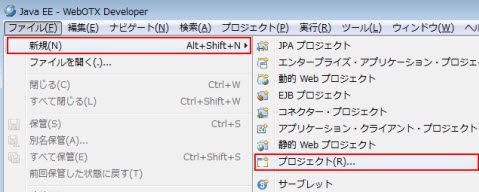
図2.1.1.1-1
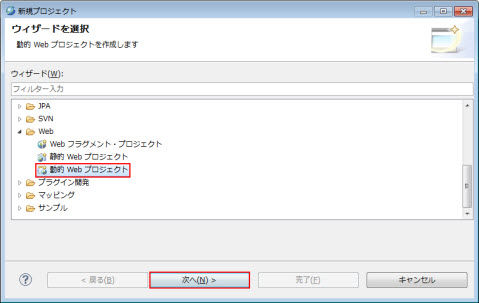
図2.1.1.1-2
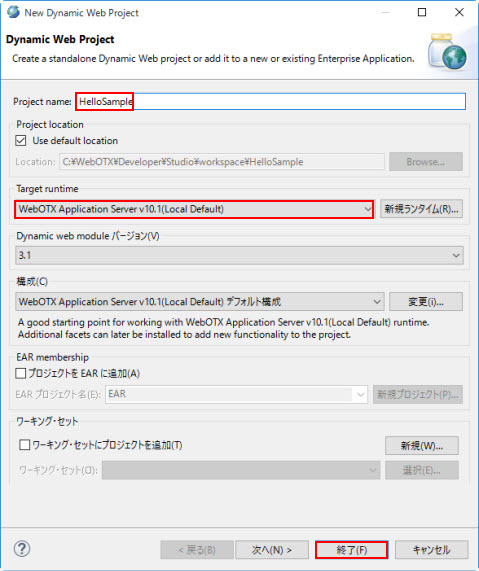
図2.1.1.1-3
Memo
関連付けられたパースペクティブを開きますか? というダイアログが表示された場合は
はいでJava EEパースペクティブを開くことをお勧めします。(常にJava
EEパースペクティブを利用する場合は 常にこの設定を使用するをONにしてください。)

図2.1.1.1-4
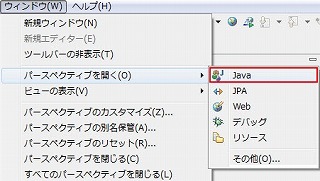
図2.1.1.1-5
Memo
実行支援ライブラリを利用する場合は、Javaパースペクティブである必要があります。
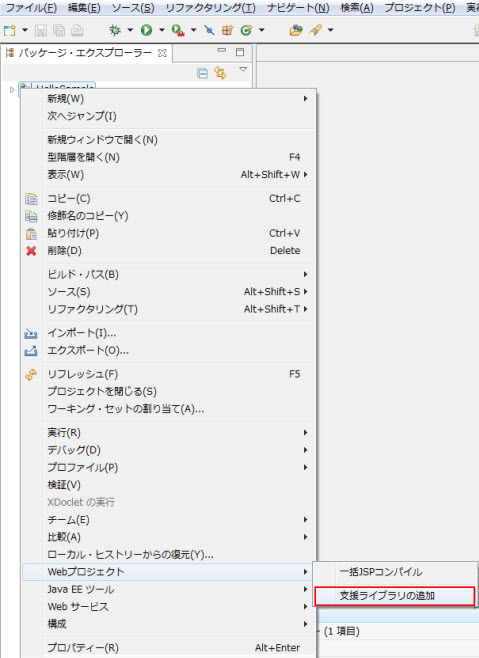
図2.1.1.1-6
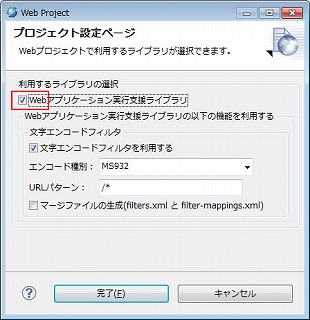
図2.1.1.1-7
Memo
下図は、Java EEパスペクティブ(プロジェクト・エクスプローラー)の場合です。
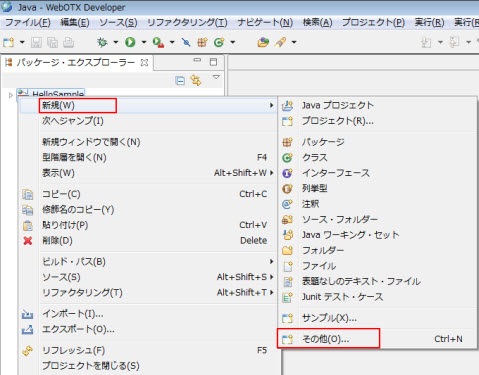
図2.1.1.2-1
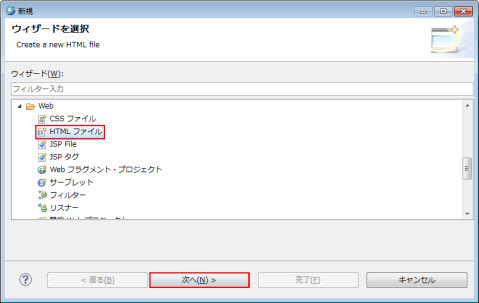
図2.1.1.2-2
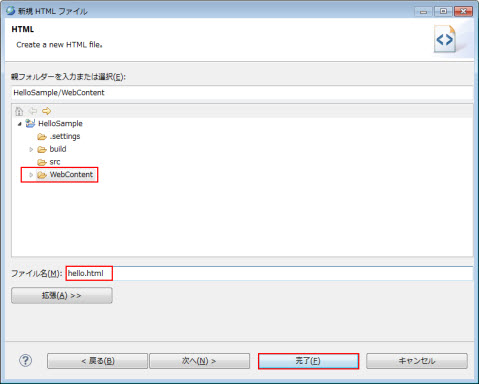
図2.1.1.2-3
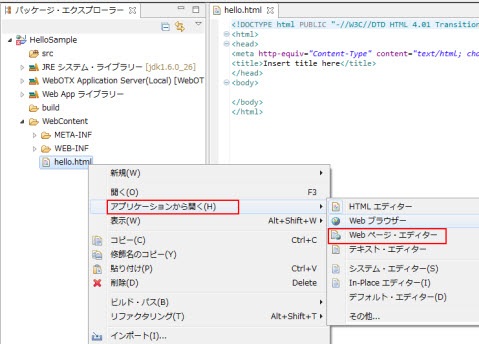
図2.1.1.2-4
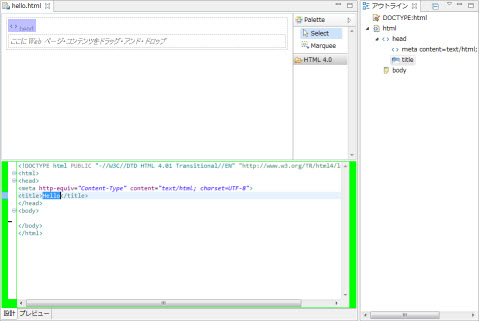
図2.1.1.2-5
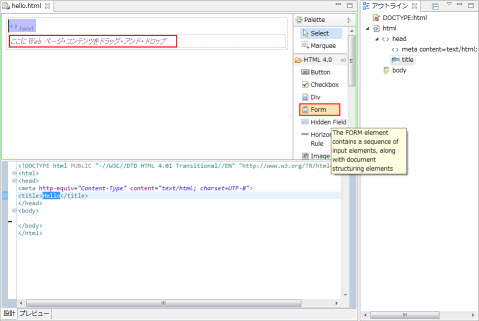
図2.1.1.2-6
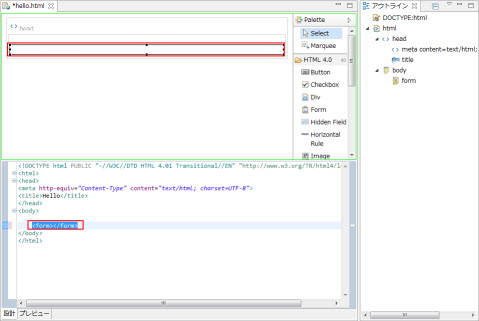
図2.1.1.2-7
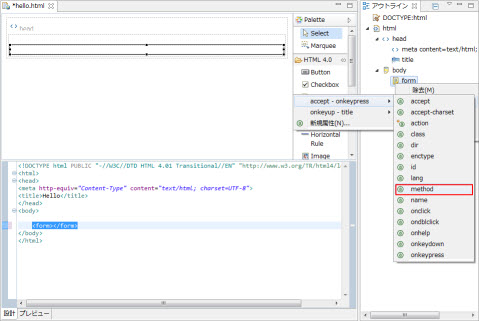
図2.1.1.2-8
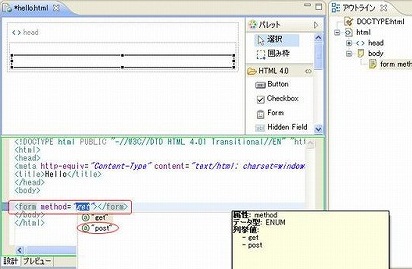
図2.1.1.2-9
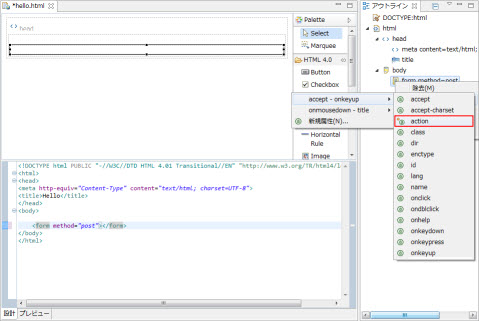
図2.1.1.2-10
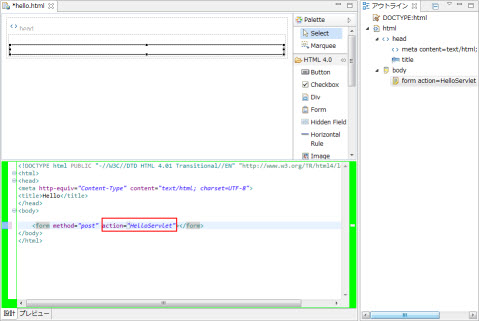
図2.1.1.2-11
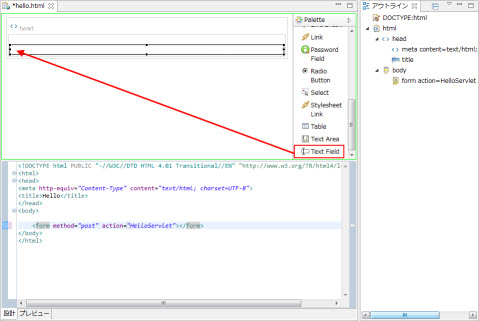
図2.1.1.2-12
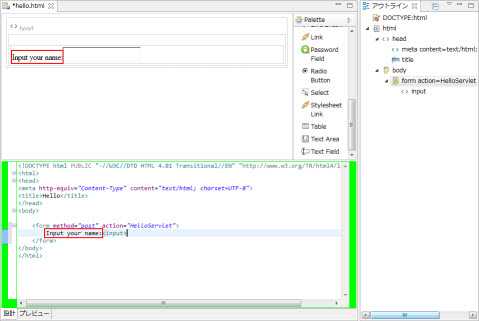
図2.1.1.2-13
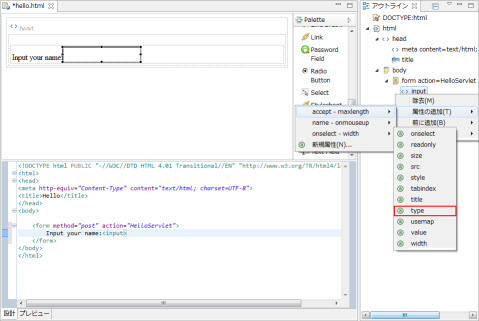
図2.1.1.2-14
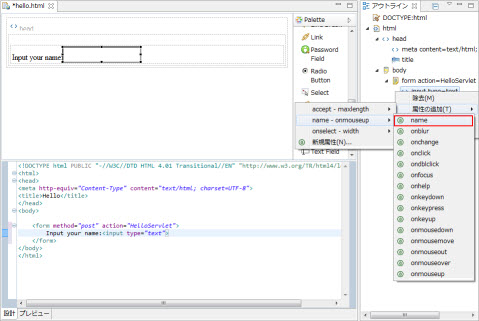
図2.1.1.2-15
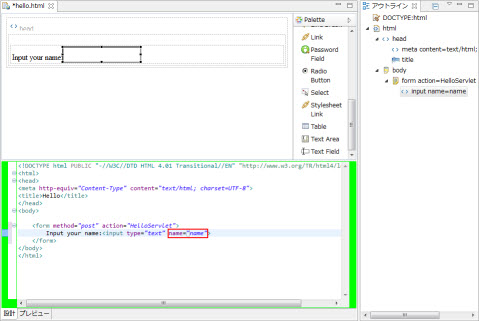
図2.1.1.2-16
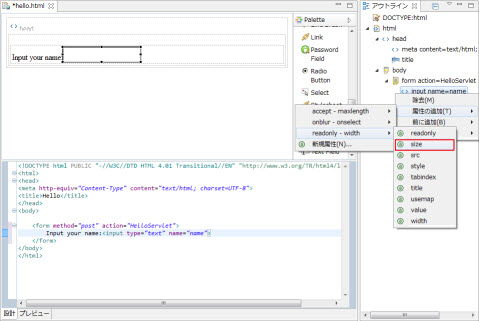
図2.1.1.2-17
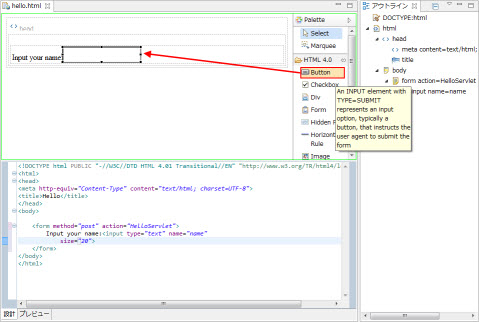
図2.1.1.2-18
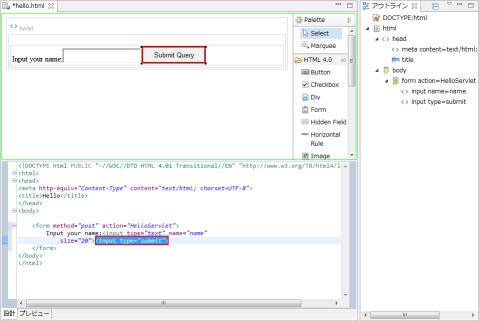
図2.1.1.2-19
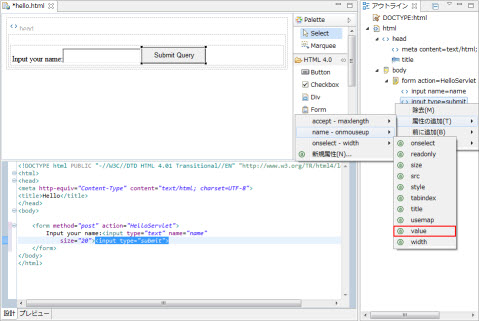
図2.1.1.2-20
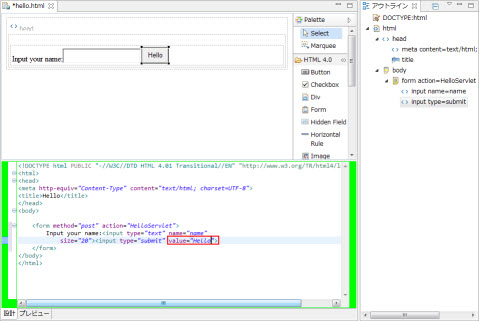
図2.1.1.2-21
<!DOCTYPE html PUBLIC "-//W3C//DTD HTML 4.01 Transitional//EN" "http://www.w3.org/TR/html4/loose.dtd">
<html>
  <head>
    <meta http-equiv="Content-Type" content="text/html; charset=windows-31j">
    <title>Hello</title>
  </head>
  <body>
    <form method="post" action="HelloServlet">
        Input your name: <input type="text" name="name"
            size="20"><input type="submit" value="Hello">
    </form>
  </body>
</html>
Memo
赤色部分が、修正あるいは追加する個所です。
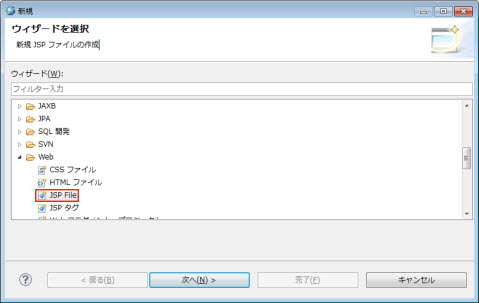
図2.1.1.3-1
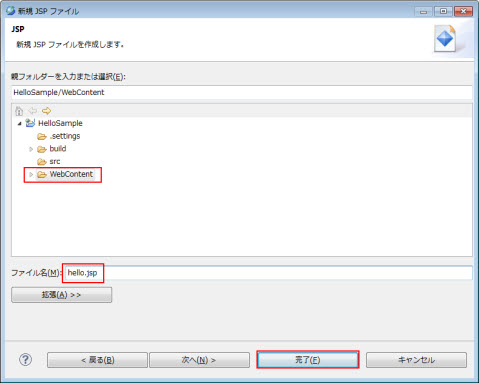
図2.1.1.3-2
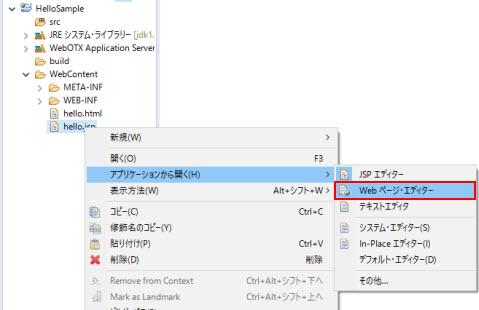
図2.1.1.3-3
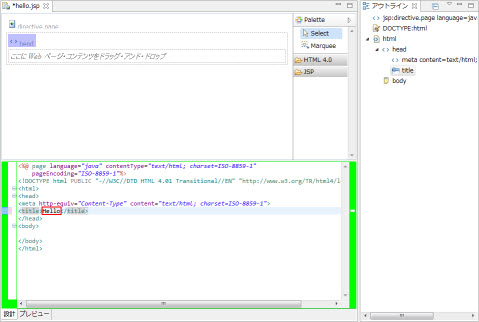
図2.1.1.3-4
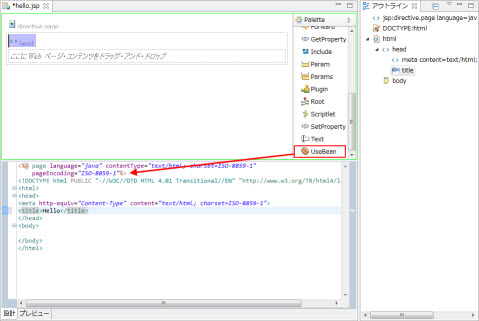
図2.1.1.3-5
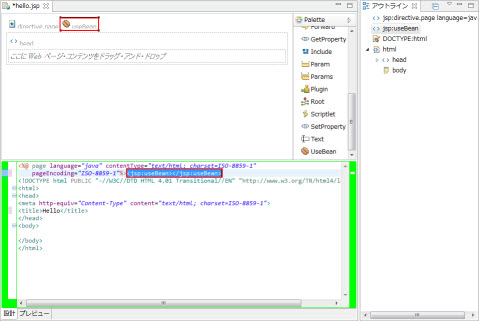
図2.1.1.3-6
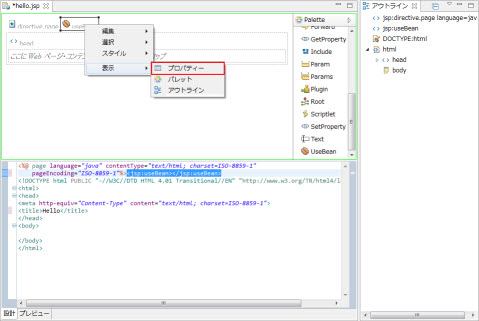
図2.1.1.3-7
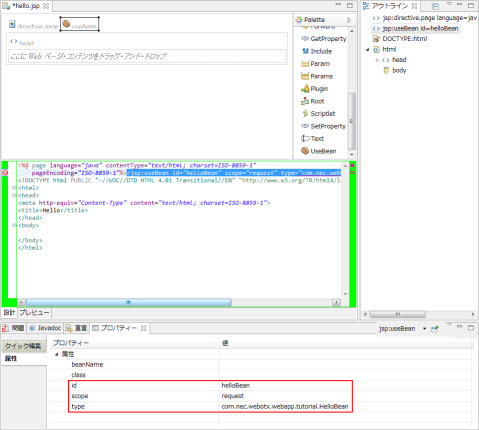
図2.1.1.3-8
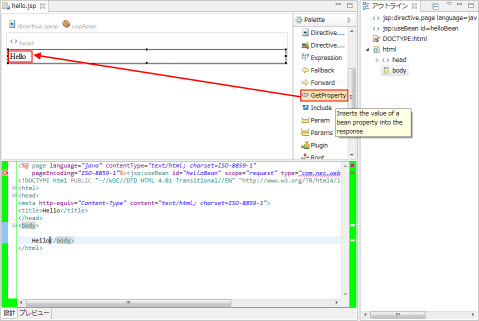
図2.1.1.3-9
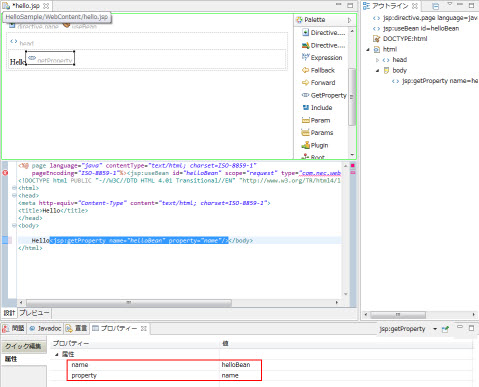
図2.1.1.3-10
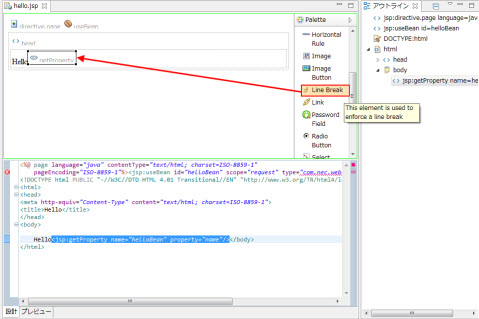
図2.1.1.3-11
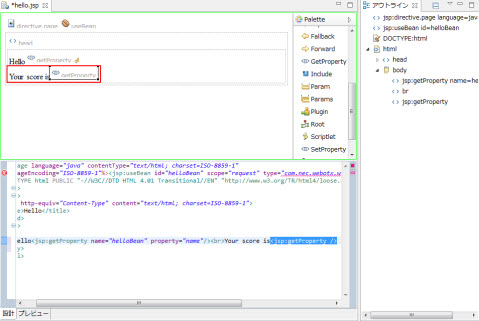
図2.1.1.3-12
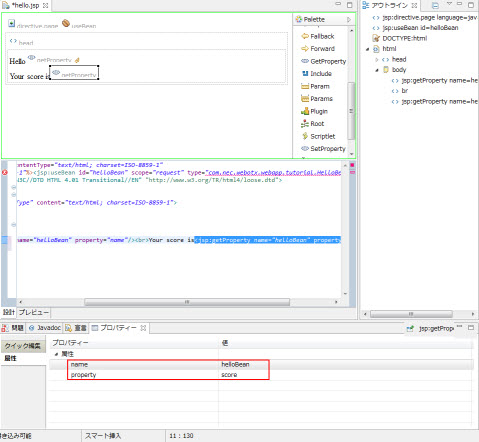
図2.1.1.3-13
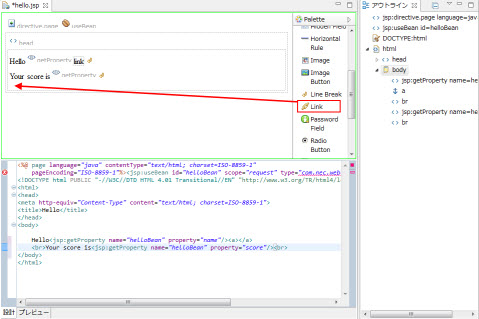
図2.1.1.3-14
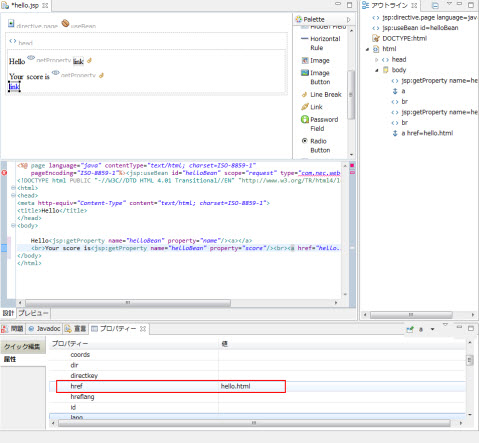
図2.1.1.3-15
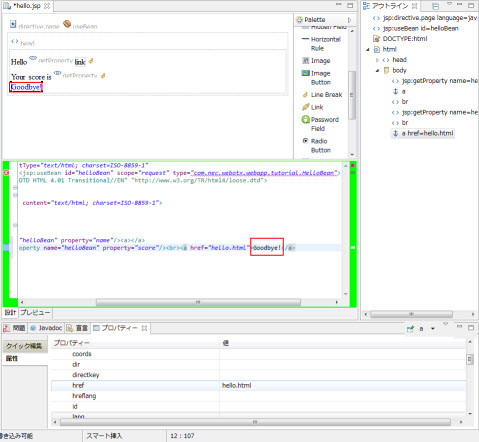
図2.1.1.3-16
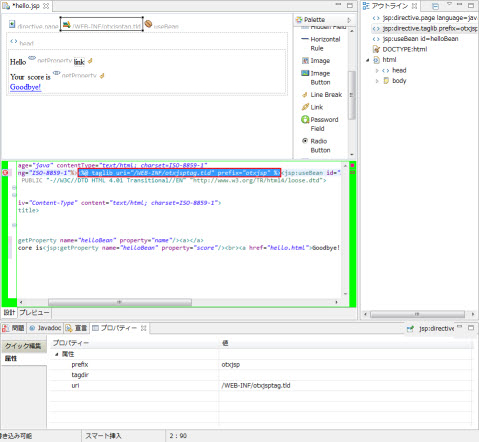
図2.1.1.3-17
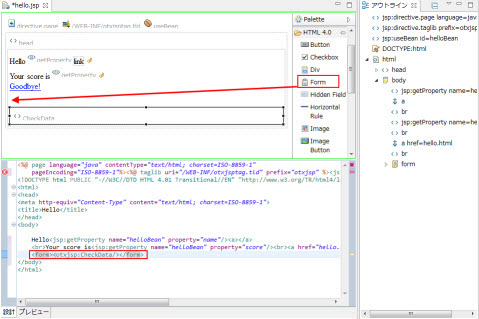
図2.1.1.3-18
<%@ page language="java" contentType="text/html; charset=windows-31j"
        pageEncoding="windows-31j"%>
<%@ taglib uri="/WEB-INF/otxjsptag.tld" prefix="otxjsp" %>
<jsp:useBean id="helloBean" scope="request"
        type="com.nec.webotx.webapp.tutorial.HelloBean"></jsp:useBean>
<!DOCTYPE html PUBLIC "-//W3C//DTD HTML 4.01 Transitional//EN" "http://www.w3.org/TR/html4/loose.dtd">
<html>
  <head>
    <meta http-equiv="Content-Type" content="text/html; charset=windows-31j">
    <title>Hello</title>
  </head>
  <body>

    Hello<jsp:getProperty name="helloBean" property="name" /><br>
    Your score is
    <jsp:getProperty name="helloBean" property="score" />.
    <br>
    <a href="hello.html">Goodbye!</a>
    <form><otxjsp:CheckData/></form>
  </body>
</html>
Memo
赤色部分が、修正あるいは追加する箇所です。
Memo
1行目のpageEncodingの値はJSPファイルのエンコード形式を示すため、エディタのテキストファイルエンコードの設定により変動します。
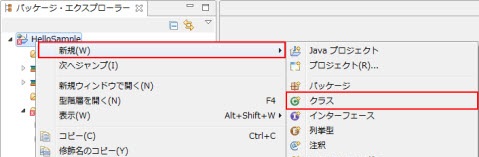
図2.1.1.4-1
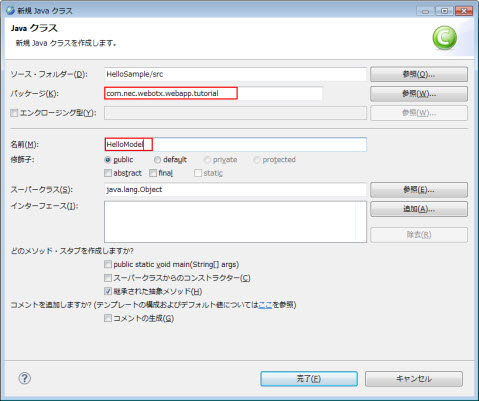
図2.1.1.4-2
package com.nec.webotx.webapp.tutorial;

public class HelloModel
{
  public int getScore(String name) {
    int sum = 0;
    char[] cArray = name.toCharArray();
    for (int i = 0; i < cArray.length; i++) {
      sum += cArray[i];
    }
    return (sum % 10) + 1;
  }
}
Memo
ここでのビジネスロジックは、名前から1~10までの点数を取得するといった処理を行っています。
Memo
ビジネスロジック用のクラスは、サーブレット用APIをimportしない汎用的なクラスとして作成する事が望ましいです。
図2.1.1.5-1
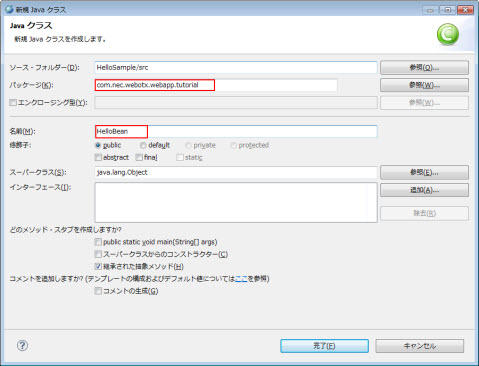
図2.1.1.5-2
package com.nec.webotx.webapp.tutorial;

public class HelloBean{

  private String name;

  private int score;
}
ソースの中にフォーカスを移動させ、メニュー ソース >
GetterおよびSetterの生成 を選択します。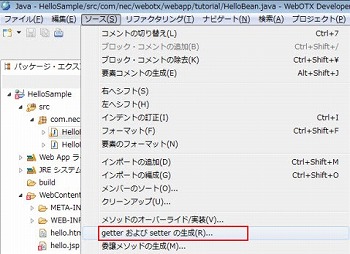
図2.1.1.5-3
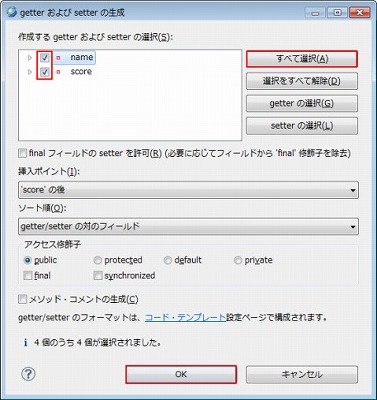
図2.1.1.5-4
package com.nec.webotx.webapp.tutorial;

public class HelloBean {

  private String name;

  private int score;

  public String getName() {
     return name;
  }

  public void setName(String name) {
    this.name = name;
  }

  public int getScore() {
    return score;
  }

  public void setScore(int score) {
    this.score = score;
  }
}
Memo
このBeanはServlet(MVCのControl)とJSP(MVCのView)とのインタフェースとなります。
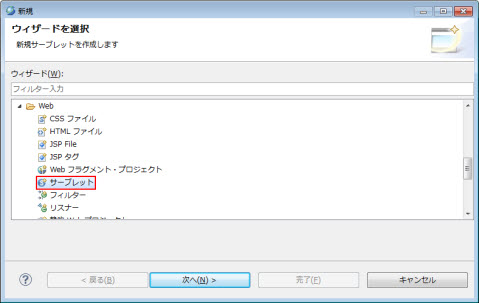
図2.1.1.6-1
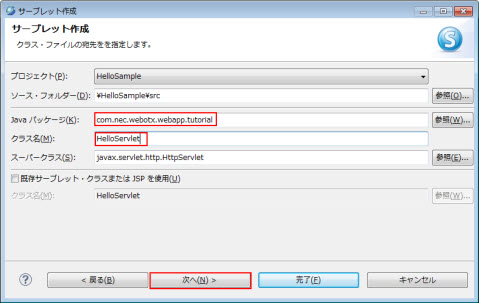
図2.1.1.6-2
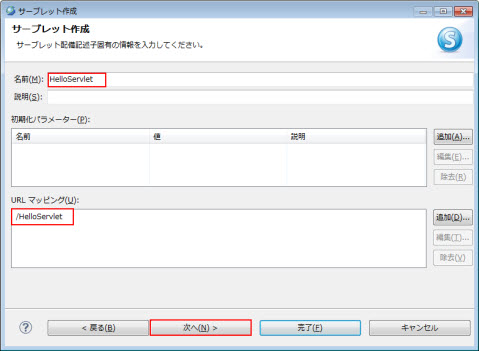
図2.1.1.6-3
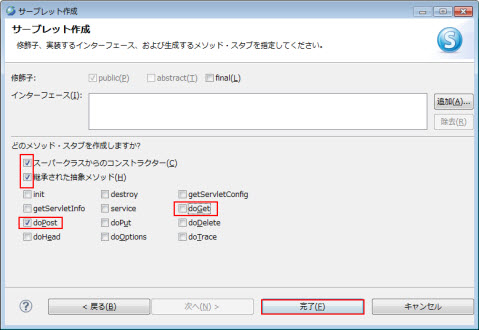
図2.1.1.6-4
package com.nec.webotx.webapp.tutorial;

import java.io.IOException;
import javax.servlet.ServletException;
import javax.servlet.http.HttpServlet;
import javax.servlet.http.HttpServletRequest;
import javax.servlet.http.HttpServletResponse;

/**
 * Servlet implementation class HelloServlet
 */
@WebServlet("/HelloServlet")
public class HelloServlet extends HttpServlet {
  private static final long serialVersionUID = 1L;

  /**
   * @see HttpServlet#HttpServlet()
   */
  public HelloServlet() {
      super();
      // TODO Auto-generated constructor stub
  }

  /**
   * @see HttpServlet#doPost(HttpServletRequest request, HttpServletResponse response)
   */
  protected void doPost(HttpServletRequest request, HttpServletResponse response) throws ServletException, IOException {

    request.setCharacterEncoding("windows-31j");
    response.setContentType("text/html;charset=windows-31j");

    HelloModel model = new HelloModel();

    //リクエストパラメータからnameの値を取得
    String name = request.getParameter("name");

    //ビジネスロジックを実装
    int score = model.getScore(name);

    //Beanを利用
    HelloBean bean = new HelloBean();


    bean.setName(name);
    bean.setScore(score);

    //リクエストにhelloBeanという名前でBeanを設定
    request.setAttribute("helloBean", bean);

    //hello.jspへforwardする
    request.getRequestDispatcher("/hello.jsp").forward(request, response);
  }

}

図2.1.2-1
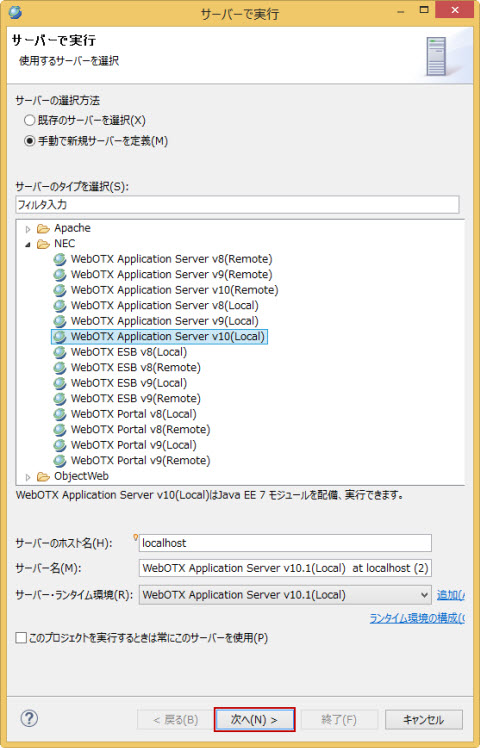
図2.1.2-2
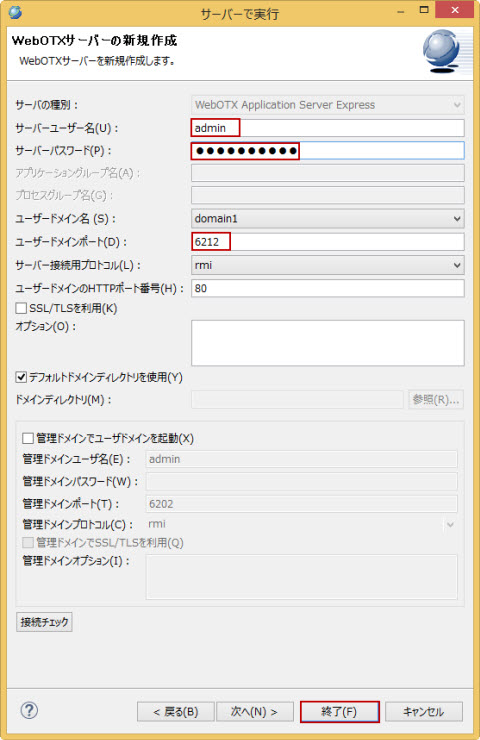
図2.1.2-3
Memo
配備されたWebアプリケーションの確認は、メニュー
ウィンドウ > ビューの表示 > その他からサーバー >
サーバーを選択してサーバービューを表示して確認してください。
Memo
再配備したい場合は、対象サーバー上で右クリックメニュー公開を選択してください。
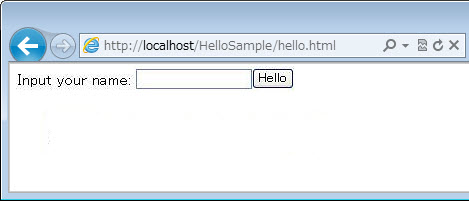
図2.1.3-1
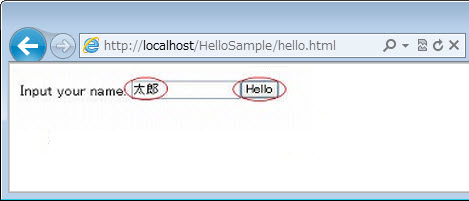
図2.1.3-2
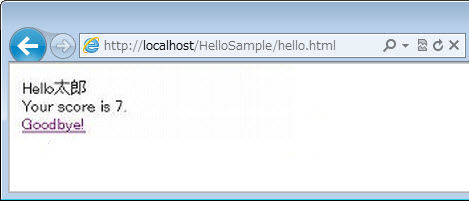
図2.1.3-3
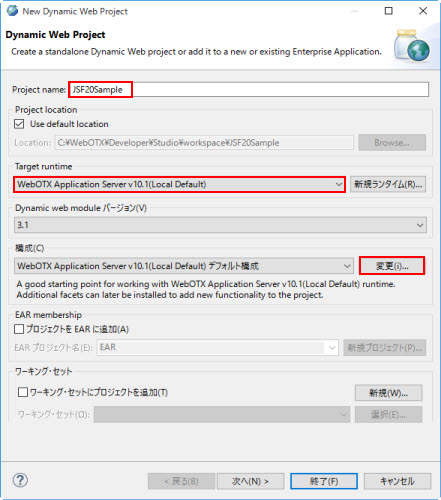
図2.1.4.1-1
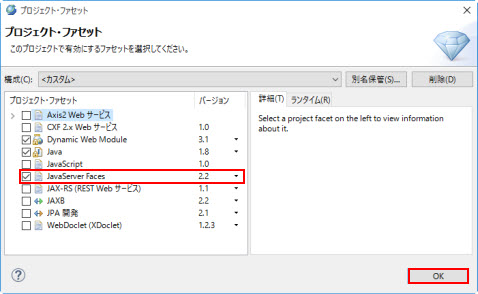
図2.1.4.1-2
| プロジェクト名 | JSF20Sample |
| ターゲット・ランタイム | WebOTX Application Server v10.1(Local Default) |
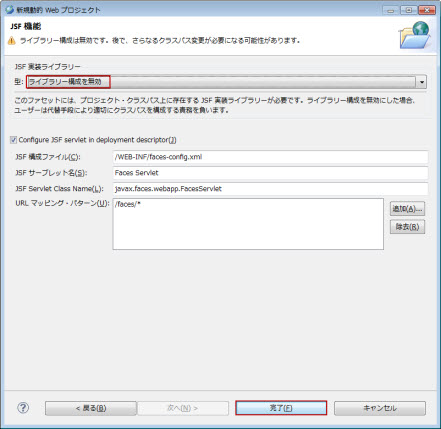
図2.1.4.1-3
Memo
ライブラリ構成を無効にする指定は、Webコンテナが保有する、JSF2.2 のライブラリを利用する事を意味します。
それ以外のライブラリを利用する場合は、ここで指定します。その手順については、
[他バージョンの JSF の開発]をご覧ください。
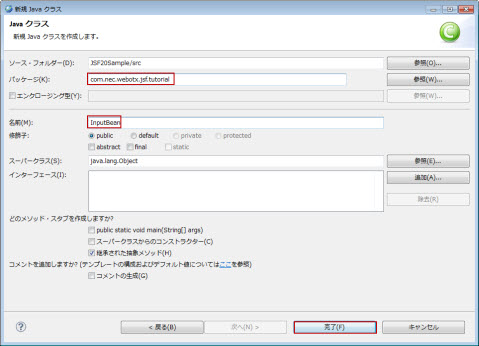
図2.1.4.2-1
| パッケージ | com.nec.webotx.jsf.tutorial |
| 名前 | InputBean |
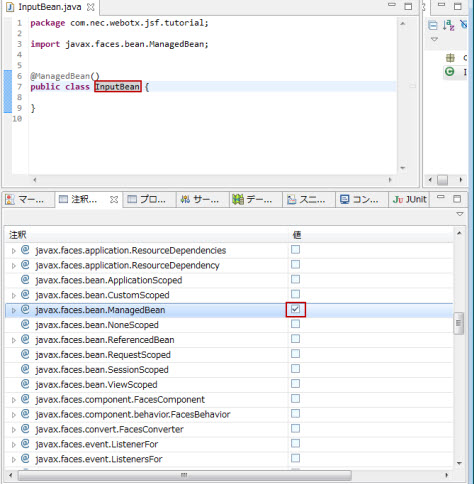
図2.1.4.2-2
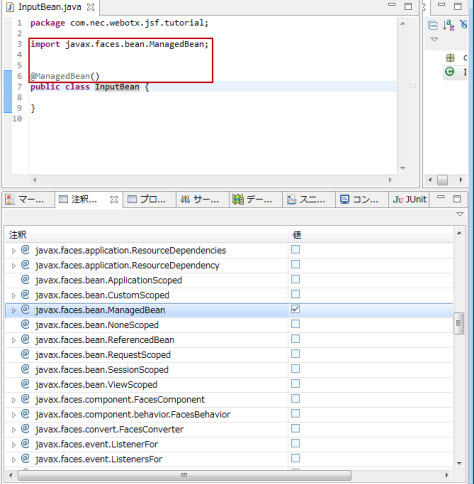
図2.1.4.2-3
package com.nec.webotx.jsf.tutorial;

@ManagedBean()
public class InputBean {
    private int capital = 1000;
    private int year = 1;
    private double rate = 0.1;
    private int interest;
}
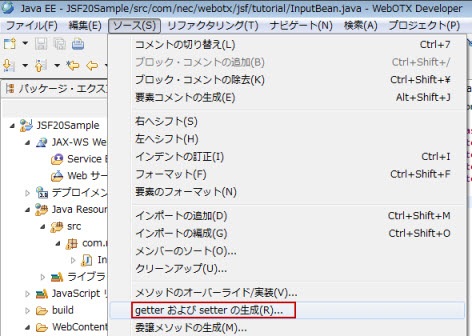
図2.1.4.2-4
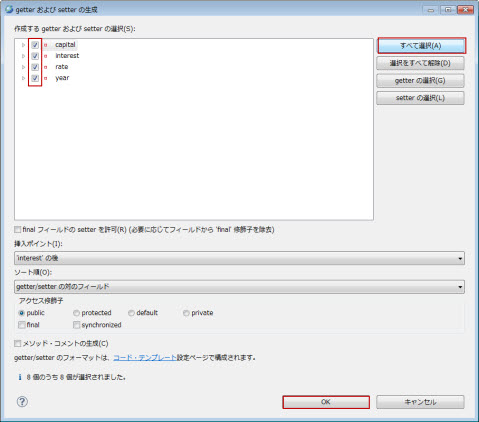
図2.1.4.2-5
package com.nec.webotx.jsf.tutorial;

import javax.faces.bean.ManagedBean;

@ManagedBean()
public class InputBean {
    private int capital = 1000;
    private int year = 1;
    private double rate = 0.1;
    private int interest;

    public int getCapital() {
        return capital;
    }

    public void setCapital(int capital) {
        this.capital = capital;
    }

    public int getYear() {
        return year;
    }

    public void setYear(int year) {
        this.year = year;
    }

    public double getRate() {
        return rate;
    }

    public void setRate(double rate) {
        this.rate = rate;
    }

    public int getInterest() {
        return interest;
    }

    public void setInterest(int interest) {
        this.interest = interest;
    }
}
    public String count() {
        double interestValue = capital * (Math.pow(rate / 100 + 1, year) - 1);
        this.interest = (int) Math.round(interestValue);
        return "input";
    }
Caution
count()メソッドの返却値には、処理後の遷移先ページ名前を指定します。
後述のinput.xhtmlへ遷移させるので、ファイル名inputを返却値とします。(拡張子.xhtmlは省略します。)
package com.nec.webotx.jsf.tutorial;

import javax.faces.bean.ManagedBean;

@ManagedBean()
public class InputBean {
    private int capital = 1000;
    private int year = 1;
    private double rate = 0.1;
    private int interest;

    public int getCapital() {
        return capital;
    }

    public void setCapital(int capital) {
        this.capital = capital;
    }

    public int getYear() {
        return year;
    }

    public void setYear(int year) {
        this.year = year;
    }

    public double getRate() {
        return rate;
    }

    public void setRate(double rate) {
        this.rate = rate;
    }

    public int getInterest() {
        return interest;
    }

    public void setInterest(int interest) {
        this.interest = interest;
    }

    public String count() {
        double interestValue = capital * (Math.pow(rate / 100 + 1, year) - 1);
        this.interest = (int) Math.round(interestValue);
        return "input";
    }
}
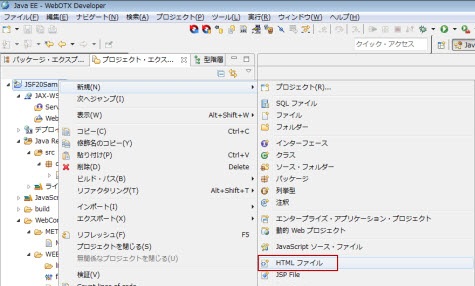
図2.1.4.3-1
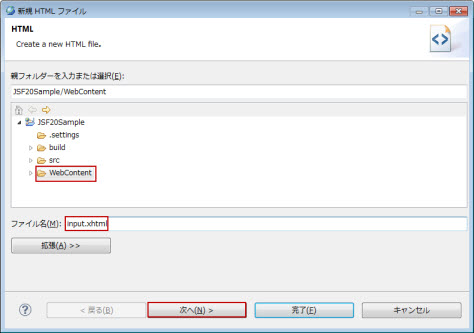
図2.1.4.3-2
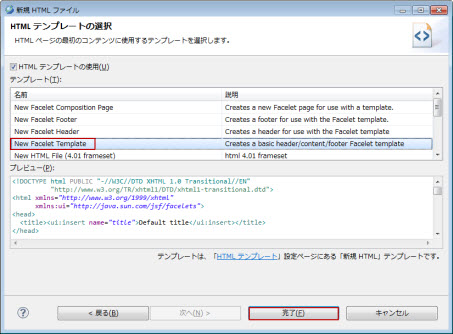
図2.1.4.3-3
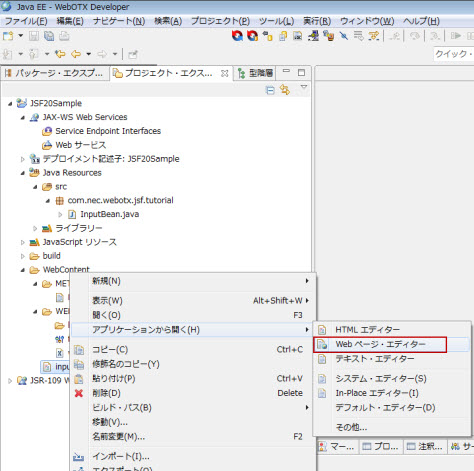
図2.1.4.3-4
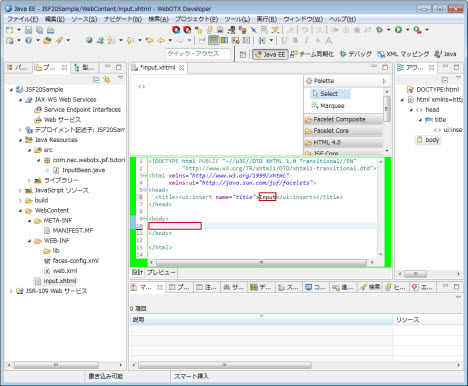
図2.1.4.3-5
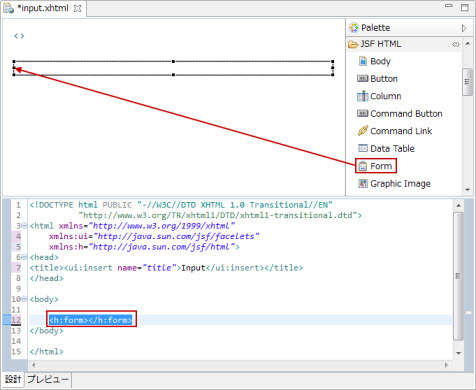
図2.1.4.3-6
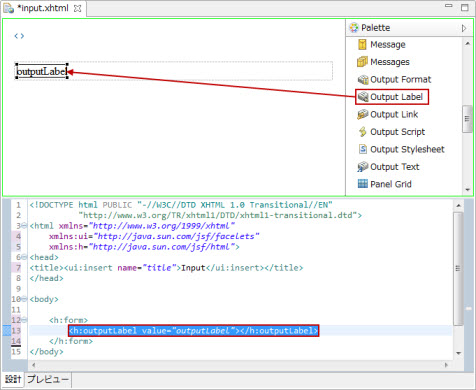
図2.1.4.3-7
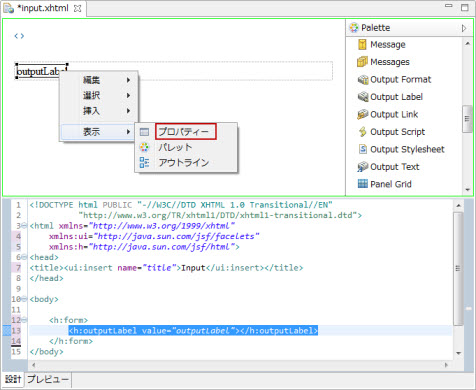
図2.1.4.3-8
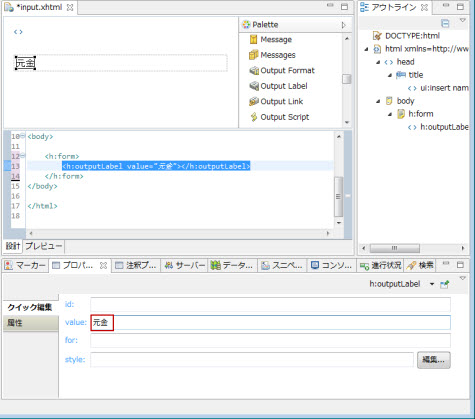
図2.1.4.3-9
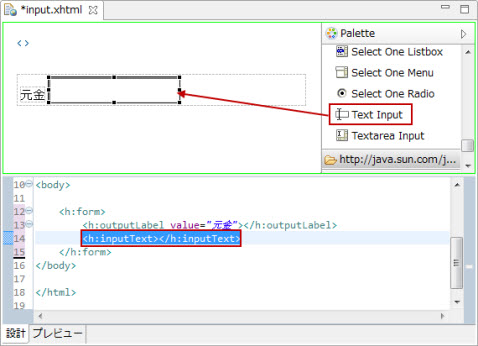
図2.1.4.3-10
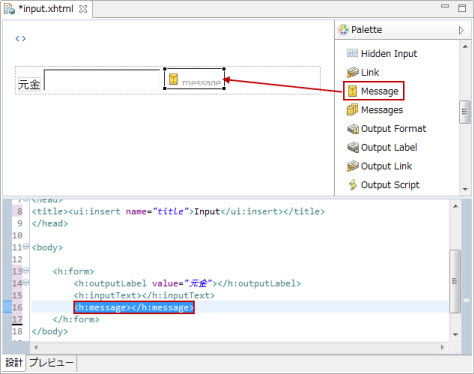
図2.1.4.3-11
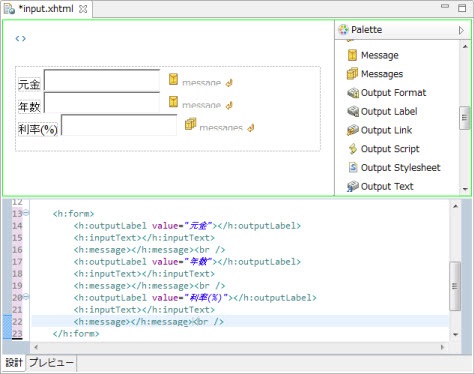
図2.1.4.3-12
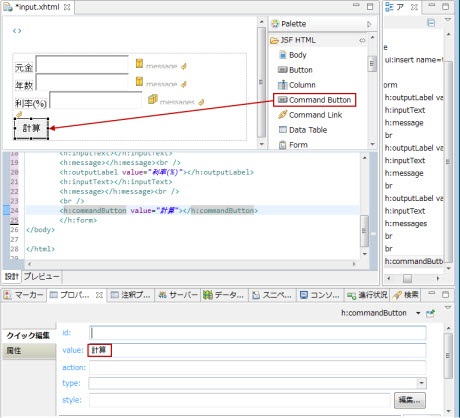
図2.1.4.3-13
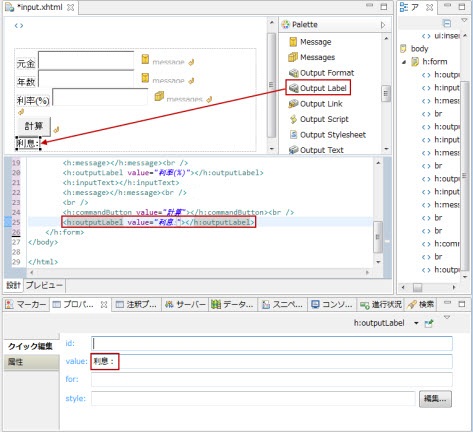
図2.1.4.3-14
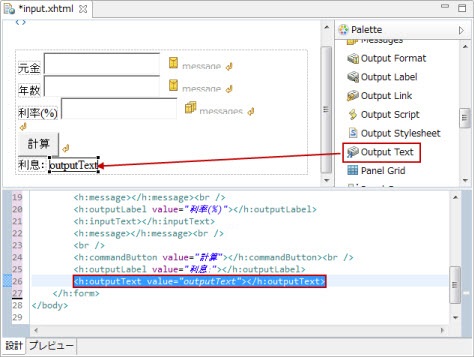
図2.1.4.3-15
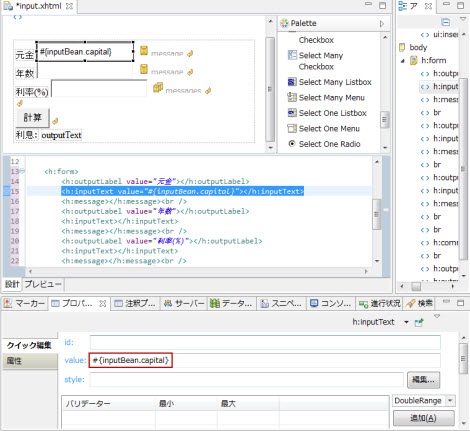
図2.1.4.3-16
@ManagedBean()
public class InputBean {
    private double capital = 1000;
に対応する指定です。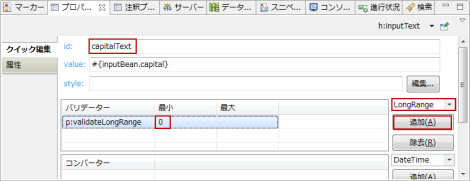
図2.1.4.3-17
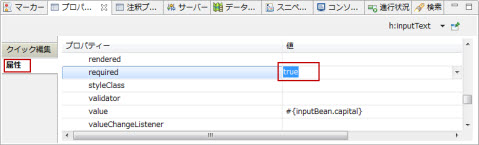
図2.1.4.3-18
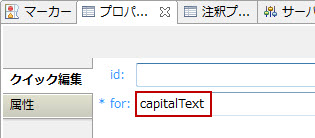
図2.1.4.3-19
| メッセージ種類 | 説明 | 設定方法 |
|---|---|---|
| 型変換のエラーメッセージ | コンポーネントに適用されたコンバータによる、型変換エラーのメッセージです。 ManagedBeanのフィールドの型定義によって検査します。常に有効です。 |
converterMessage属性の値を設定します。 |
| 必須検査のエラーメッセージ | コンポーネントの必須バリデータによる、検証エラーのメッセージです。 requiered属性の値がtrueの場合、有効です。 |
requiredMessage属性の値を設定します。 |
| バリデータのエラーメッセージ | コンポーネントに適用されたバリデータによる、検証エラーのメッセージです。 クイック編集でバリデーターを指定した場合、有効です。 |
validatorMessage属性の値を設定します。 |
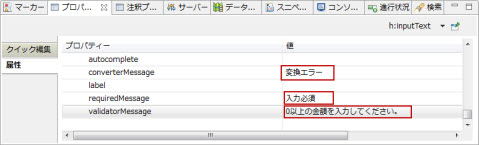
図2.1.4.3-20
| 属性 | 値 |
|---|---|
| 部品 | inputText |
| value | #{inputBean.year} |
| id | yearText |
| required | true |
| 妥当性判定条件 | p:validateLongRange minimum="1" |
| converterMessage | 変換エラー |
| requiredMessage | 入力必須 |
| validatorMessage | 1以上の年数を入力してください。 |
| 属性 | 値 |
|---|---|
| 部品 | message |
| for | yearText |
| 属性 | 値 |
|---|---|
| 部品 | inputText |
| value | #{inputBean.rate} |
| id | rateText |
| required | true |
| 妥当性判定条件 | p:validateLongRange minimum="0" maximum="100" |
| converterMessage | 変換エラー |
| requiredMessage | 入力必須 |
| validatorMessage | 利率は 0~100 の範囲内で指定してください。 |
| 属性 | 値 |
|---|---|
| 部品 | message |
| for | rateText |
| 属性 | 値 | 説明 |
|---|---|---|
| 部品 | commandButton | |
| action | #{inputBean.count} | inputBeanのcount()メソッドを呼び出します。 |
| type | submit |
| 属性 | 値 |
|---|---|
| 部品 | outputText |
| value | #{inputBean.interest} |
<!DOCTYPE html PUBLIC "-//W3C//DTD XHTML 1.0 Transitional//EN"
          "http://www.w3.org/TR/xhtml1/DTD/xhtml1-transitional.dtd">
<html xmlns="http://www.w3.org/1999/xhtml"
  xmlns:ui="http://java.sun.com/jsf/facelets"
  xmlns:h="http://java.sun.com/jsf/html"
  xmlns:p="http://java.sun.com/jsf/core">
<head>
<title><ui:insert name="title">Input</ui:insert></title>
</head>

<body>
  <h:form>
    <h:outputLabel value="元金"></h:outputLabel>
    <h:inputText value="#{inputBean.capital}" id="capitalText" required="true" converterMessage="変換エラー" requiredMessage="入力必須" validatorMessage="0以上の金額を入力してください。"><p:validateLongRange minimum="0"></p:validateLongRange></h:inputText>
    <h:message for="capitalText"></h:message><br />
    <h:outputLabel value="年数"></h:outputLabel>
    <h:inputText value="#{inputBean.year}" id="yearText" required="true" converterMessage="変換エラー" requiredMessage="入力必須" validatorMessage="1以上の年数を入力してください。"><p:validateLongRange minimum="1"></p:validateLongRange></h:inputText>
    <h:message for="yearText"></h:message><br />
    <h:outputLabel value="利率(%)"></h:outputLabel>
    <h:inputText value="#{inputBean.rate}" id="rateText" required="true" converterMessage="変換エラー" requiredMessage="入力必須" validatorMessage="利率は 0~100 の範囲内で指定してください。"><p:validateLongRange minimum="0" maximum="100"></p:validateLongRange></h:inputText>
    <h:message for="rateText"></h:message><br />
    <br />
    <h:commandButton value="計算" action="#{inputBean.count}" type="submit"></h:commandButton><br />
    <h:outputLabel value="利息:"></h:outputLabel>
    <h:outputText value="#{inputBean.interest}"></h:outputText>
  </h:form>
</body>

</html>
プロジェクト・エクスプローラ・ビューでinput.xhtmlを選択した状態で右クリックメニュー 実行 > サーバーで実行 を選択します。
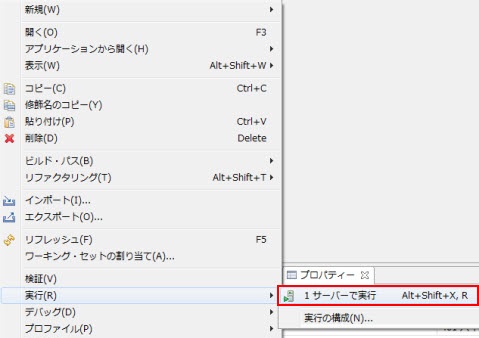
図2.1.5-1
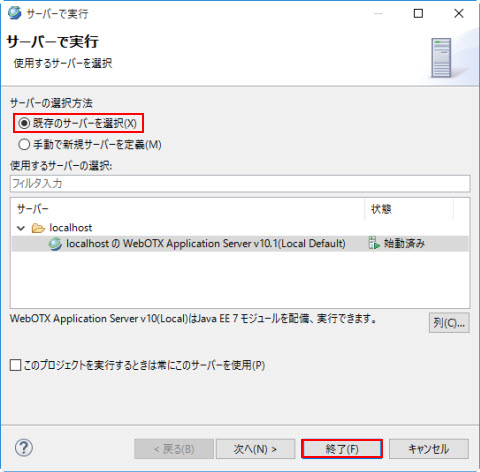
図2.1.5-2
図2.1.5-3
図2.1.5-4
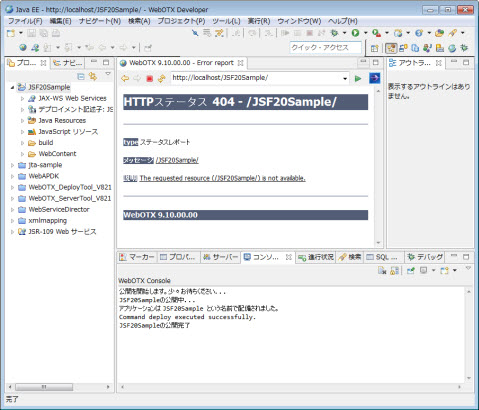
図2.1.5-5
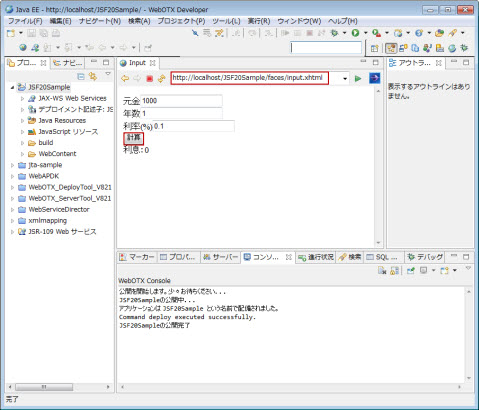
図2.1.5-6
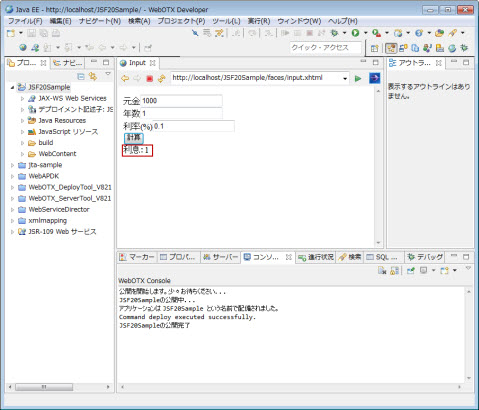
図2.1.5-7
http://localhost/JSF20Sample/faces/input.xhtml
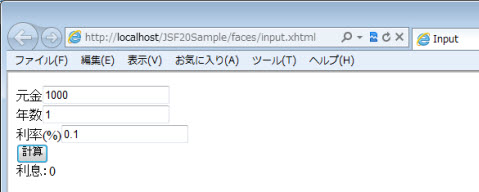
図2.1.6-1
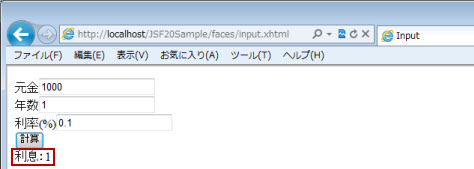
図2.1.6-2
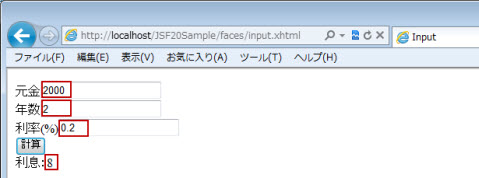
図2.1.6-3
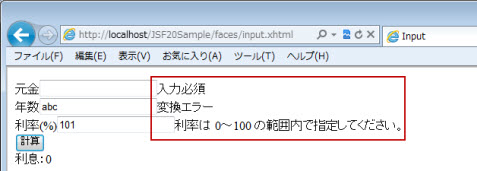
図2.1.6-4
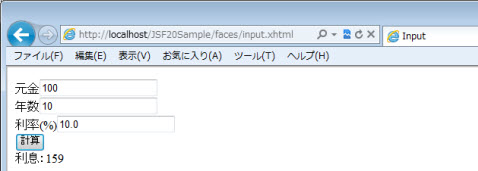
図2.1.6-5
<!DOCTYPE html PUBLIC "-//W3C//DTD XHTML 1.0 Transitional//EN"
          "http://www.w3.org/TR/xhtml1/DTD/xhtml1-transitional.dtd">
<html xmlns="http://www.w3.org/1999/xhtml"
  xmlns:ui="http://java.sun.com/jsf/facelets"
  xmlns:h="http://java.sun.com/jsf/html"
  xmlns:p="http://java.sun.com/jsf/core">
<head>
<title><ui:insert name="title">Input</ui:insert></title>
<h:outputScript name="jsf.js" library="javax.faces"></h:outputScript>
</head>
<body>
  <h:form>
    <h:outputLabel value="元金"></h:outputLabel>
    <h:inputText value="#{inputBean.capital}" id="capitalText" required="true" converterMessage="変換エラー" requiredMessage="入力必須" validatorMessage="0以上の金額を入力してください。"><p:validateLongRange minimum="0"></p:validateLongRange></h:inputText>
    <h:message for="capitalText"></h:message><br />
    <h:outputLabel value="年数"></h:outputLabel>
    <h:inputText value="#{inputBean.year}" id="yearText" required="true" converterMessage="変換エラー" requiredMessage="入力必須" validatorMessage="1以上の年数を入力してください。"><p:validateLongRange minimum="1"></p:validateLongRange></h:inputText>
    <h:message for="yearText"></h:message><br />
    <h:outputLabel value="利率(%)"></h:outputLabel>
    <h:inputText value="#{inputBean.rate}" id="rateText" required="true" converterMessage="変換エラー" requiredMessage="入力必須" validatorMessage="利率は 0~100 の範囲内で指定してください。"><p:validateLongRange minimum="0" maximum="100"></p:validateLongRange></h:inputText>
    <h:message for="rateText"></h:message>
    <br />
    <h:commandButton value="計算" action="#{inputBean.count}" type="submit">
      <p:ajax execute="capitalText yearText rateText" render="result"></p:ajax>
    </h:commandButton><br />
    <h:outputLabel value="利息:"></h:outputLabel>
    <h:outputText value="#{inputBean.interest}" id="result"></h:outputText>
  </h:form>
</body>
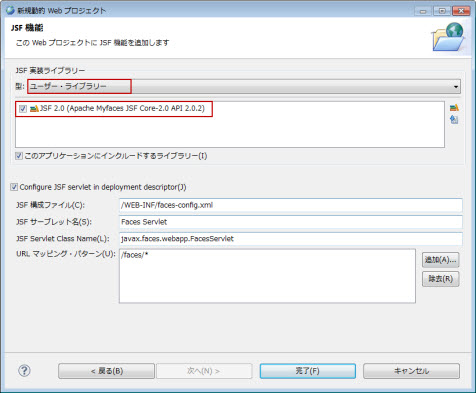
図2.1.8-1
<?xml version="1.0" encoding="UTF-8"?>
<nec-web-app>
  <context-root>context_name</context-root>
  <class-loader delegate="false"/>
  <property name="useBundledJsf" value="true"/>
</nec-web-app>
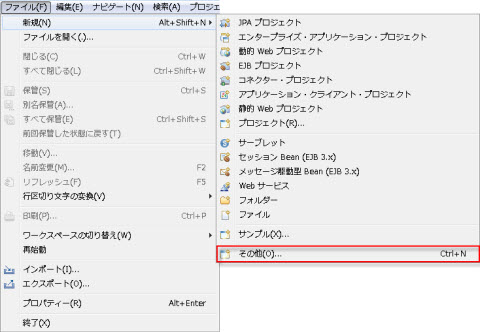
図2.1.9.1-1
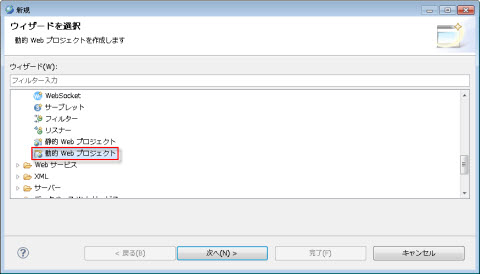
図2.1.9.1-2
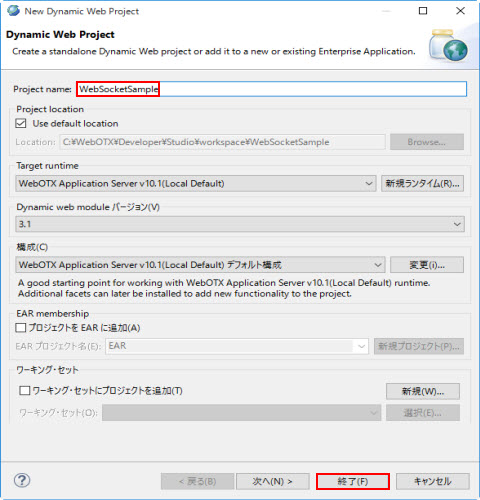
図2.1.9.1-3
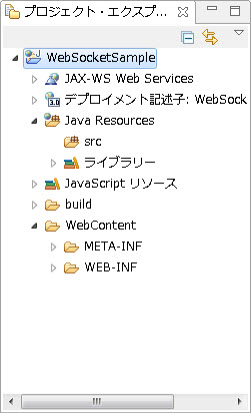
図2.1.9.1-4
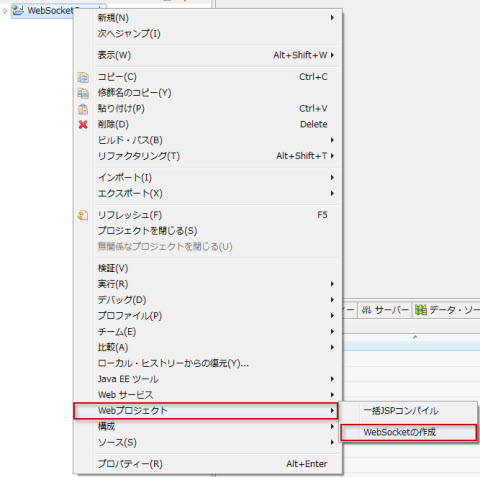
図2.1.9.3-1
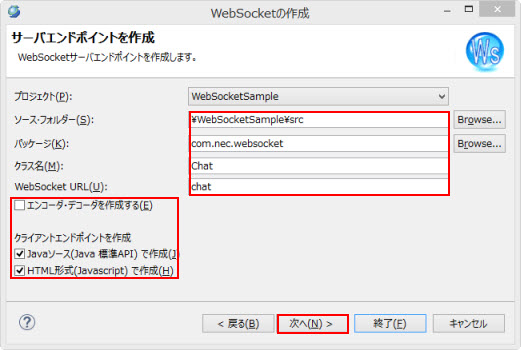
図2.1.9.3-2
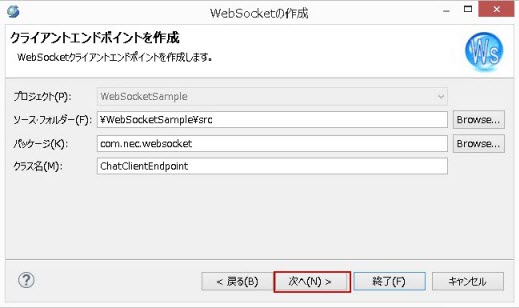
図2.1.9.3-3
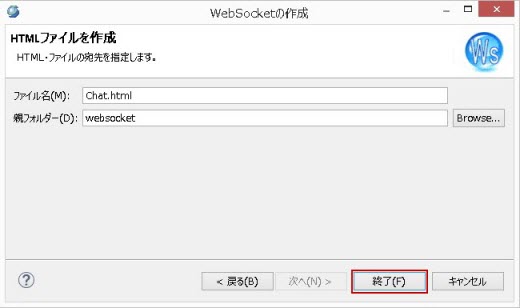
図2.1.9.3-4
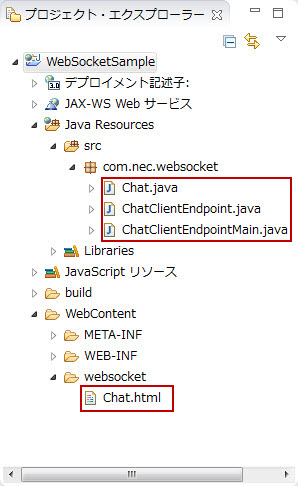
図2.1.9.3-5
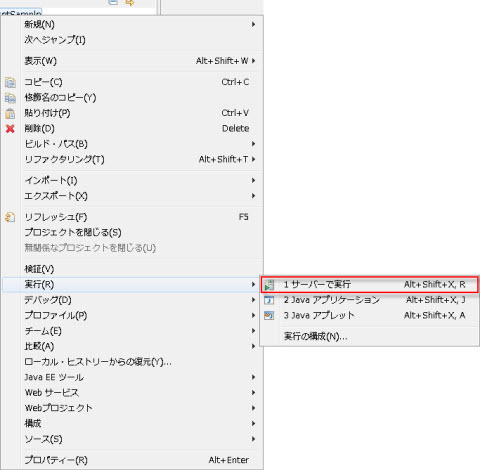
図2.1.10-1
図2.1.10-2
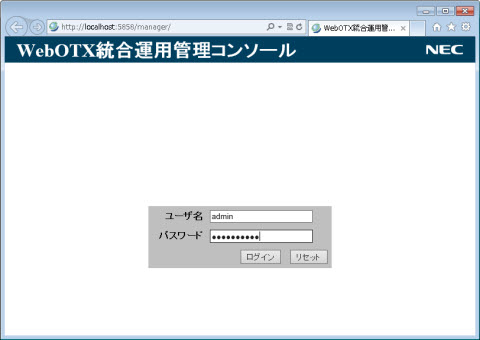
図2.1.11-1
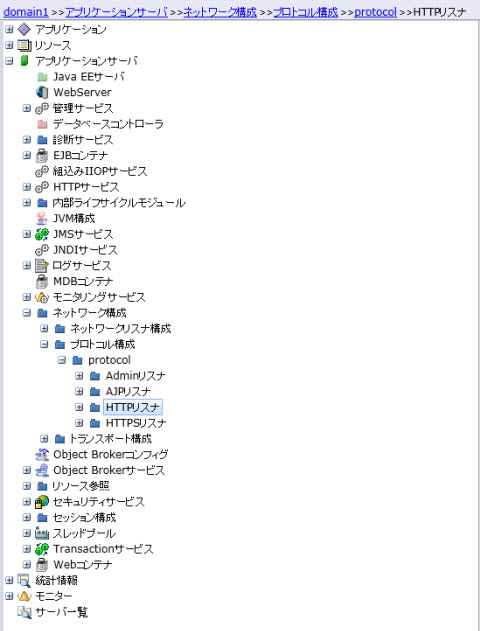
図2.1.11-2
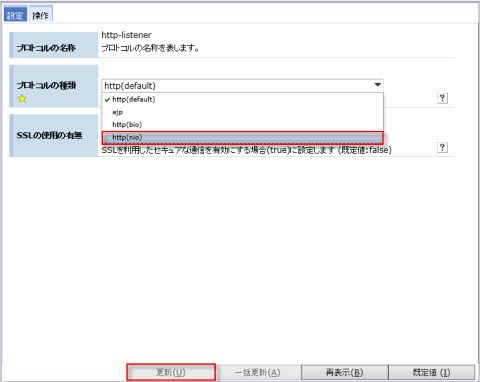
図2.1.11-3
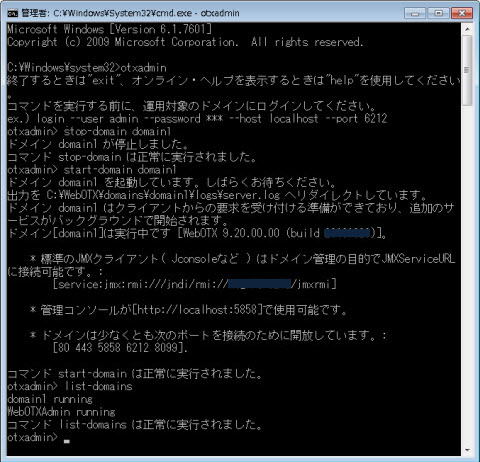
図2.1.11-4
Memo
WebSocket以外のアプリケーションで利用しない場合は、WebSocketアプリケーション実行後、HTTPリスナを http(default) に戻して下さい。
Memo
本サンプルは、WebSocketをサポートしているブラウザー(例:IE10以上、FireFox24以上)で実行してください。
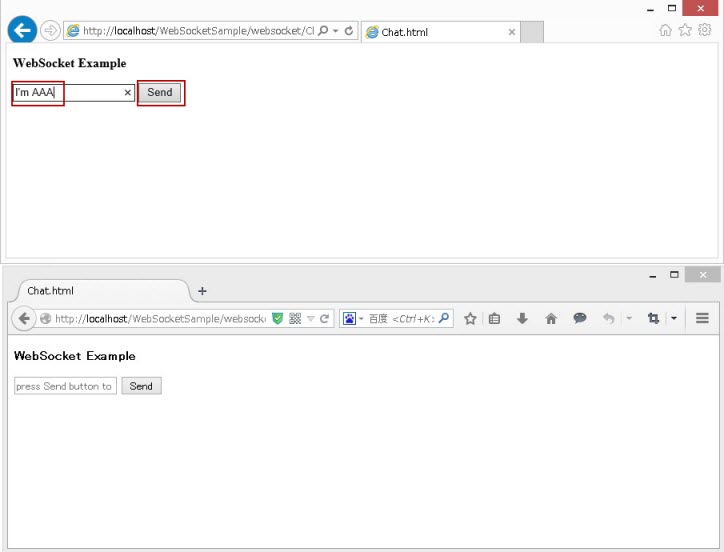
図2.1.11-5
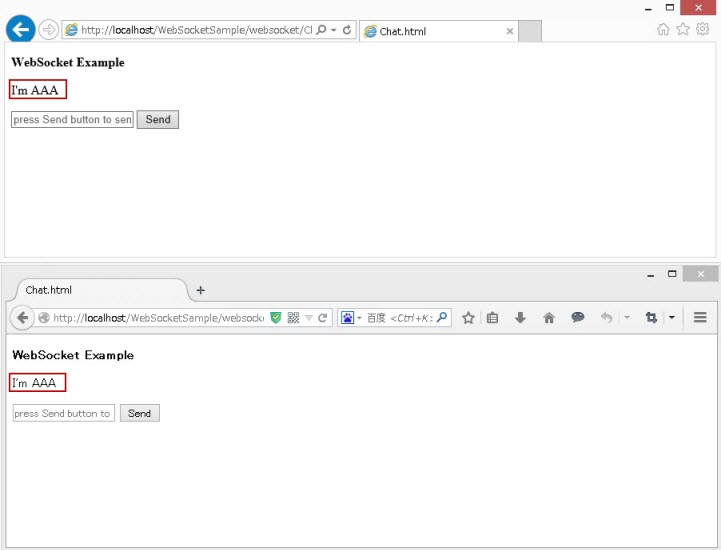
図2.1.11-6
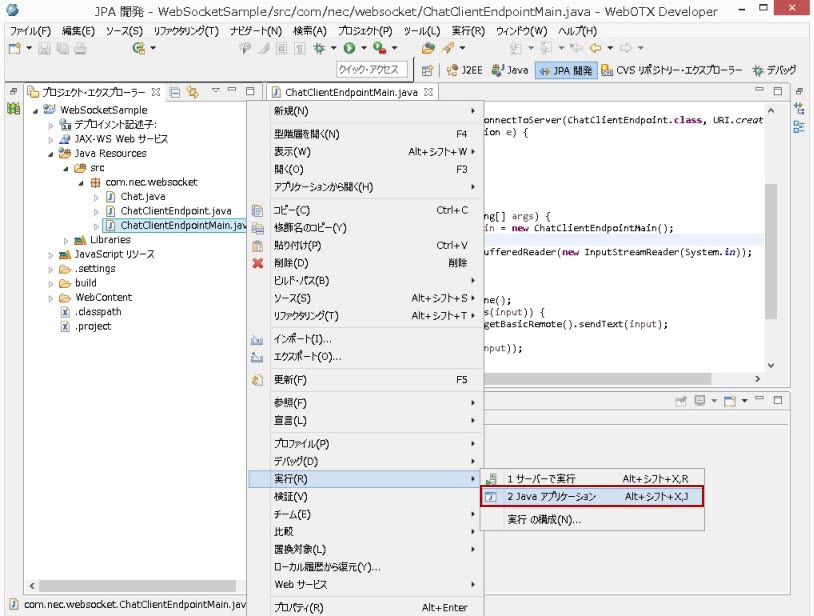
図2.1.11-7
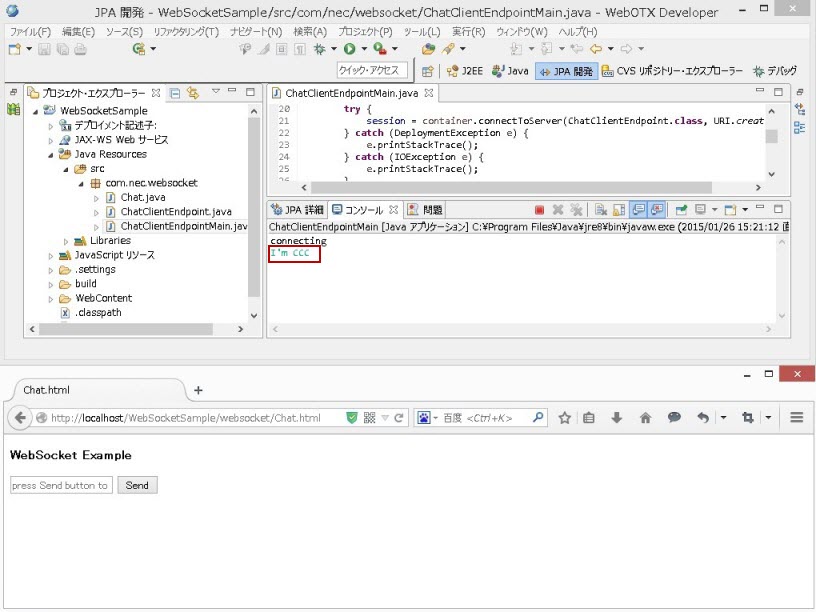
図2.1.11-8
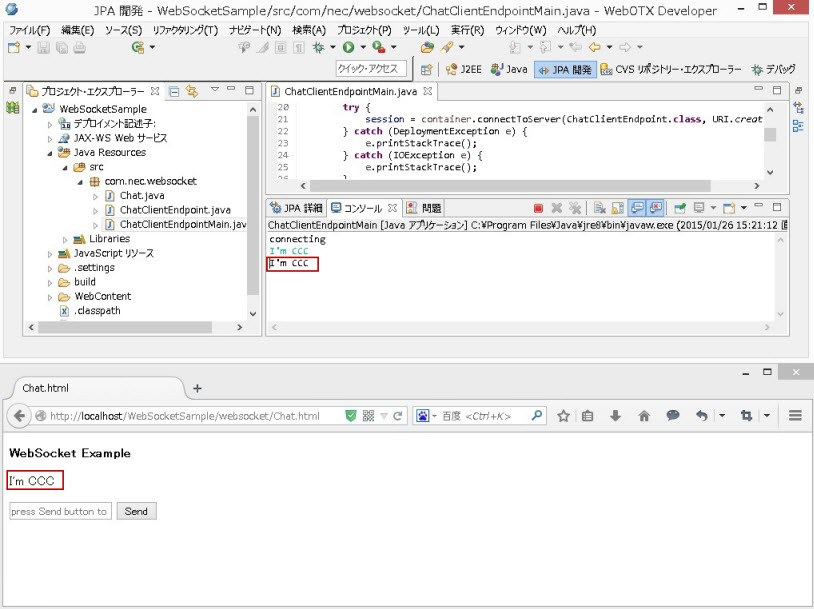
図2.1.11-9
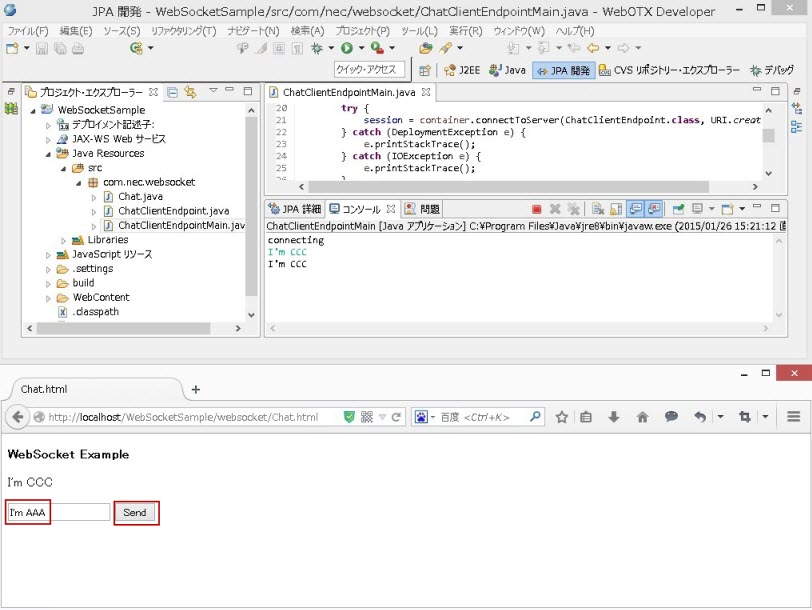
図2.1.11-10
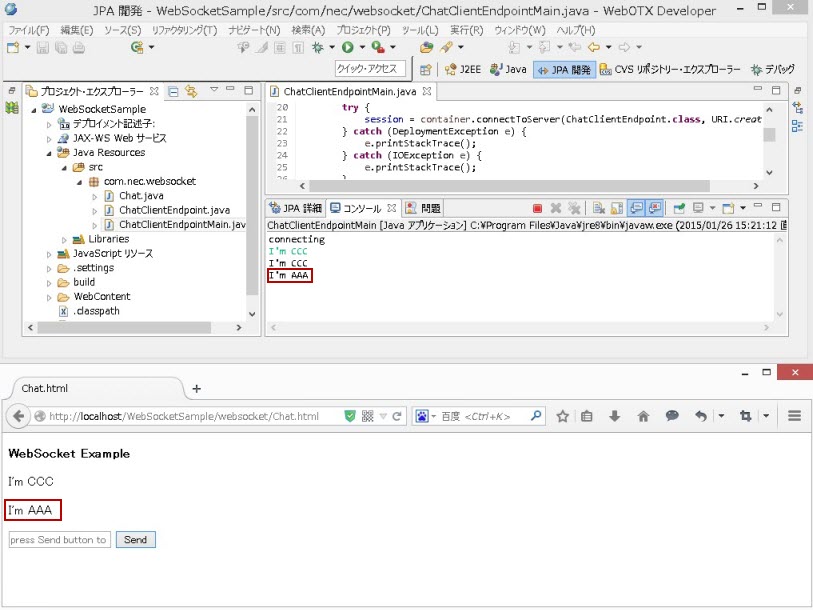
図2.1.11-11
Memo
以降の説明は、jQuery 1.9.1とjQuery Mobile 1.3.2 を利用した場合を例にとっています。サンプルコード等は
ご利用になるバージョンに合わせ適宜変更して下さい。
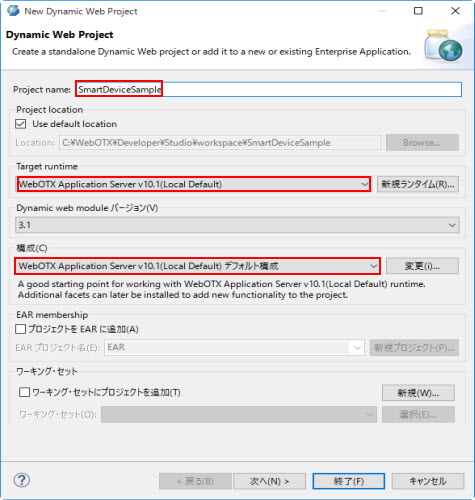
図2.1.12.2-1
| 項目 | 値 |
|---|---|
| プロジェクト名 | SmartDeviceSample |
| ターゲット・ランタイム | WebOTX Application Server v10.1(Local Default) |
| 構成 | WebOTX Application Server v10.1(Local Default)デフォルト構成 |
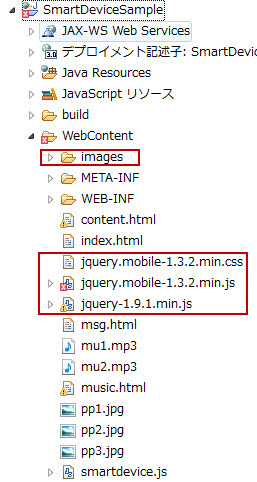
図2.1.12.3-1
Memo
jquery.mobile-1.3.2.min.jsにコンパイルエラーがありますが、サンプルの実行に影響がありません。
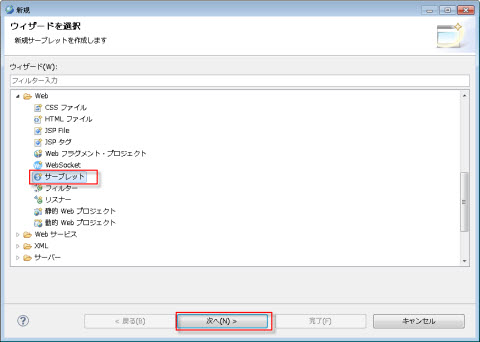
図2.1.12.4-1
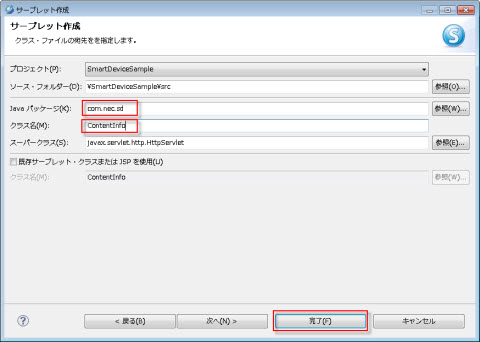
図2.1.12.4-2
| クラス名 | ContentInfo |
| javaパッケージ | com.nec.sd |
package com.nec.sd;

import java.io.IOException;
import java.util.ArrayList;
import java.util.List;

import javax.servlet.ServletException;
import javax.servlet.annotation.WebServlet;
import javax.servlet.http.HttpServlet;
import javax.servlet.http.HttpServletRequest;
import javax.servlet.http.HttpServletResponse;
import javax.servlet.http.HttpSession;

/**
 * Servlet implementation class ContentInfo
 */
@WebServlet("/ContentInfo")
public class ContentInfo extends HttpServlet {
	private static final long serialVersionUID = 1L;

    /**
     * @see HttpServlet#HttpServlet()
     */
    public ContentInfo() {
        super();
        // TODO Auto-generated constructor stub
    }

	/**
	 * @see HttpServlet#doGet(HttpServletRequest request, HttpServletResponse response)
	 */
	protected void doGet(HttpServletRequest request, HttpServletResponse response) throws ServletException, IOException {

		List<String> pictureList = new ArrayList<String>();
		List<String> musicList = new ArrayList<String>();

		HttpSession session = request.getSession();

		pictureList.add("pp1");
		pictureList.add("pp2");
		pictureList.add("pp3");

		musicList.add("mu1");
		musicList.add("mu2");

		session.setAttribute("picture", pictureList);
		session.setAttribute("music", musicList);

		request.getRequestDispatcher("/msg.html").forward(request, response);
	}

}
それから、pp1.jpg、pp2.jpg 、pp3.jpg、mu1.mp3、mu2.mp3を対象プロジェクトの WebContent フォルダに入れます。
Memo
pp1.jpg、pp2.jpg 、pp3.jpg、mu1.mp3、mu2.mp3は SmartDeviceのサンプル の SmartDeviceSample.zip の WebContent フォルダにあります。
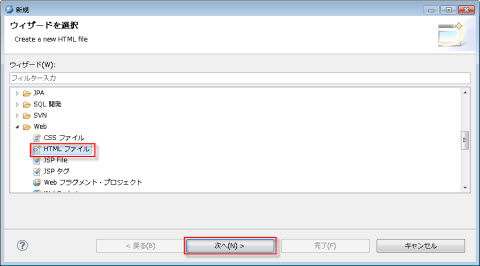
図2.1.12.5-1
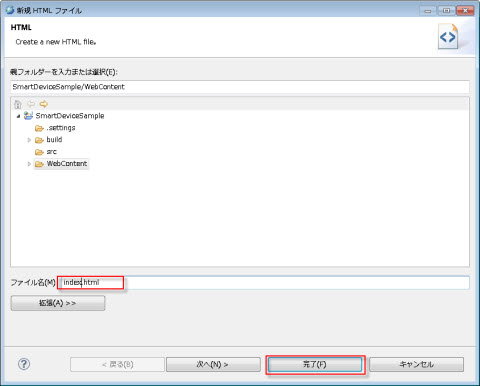
図2.1.12.5-2
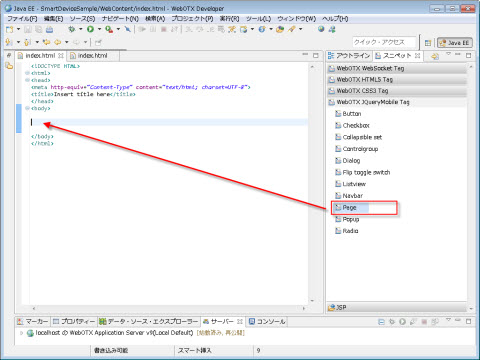
図2.1.12.5-3
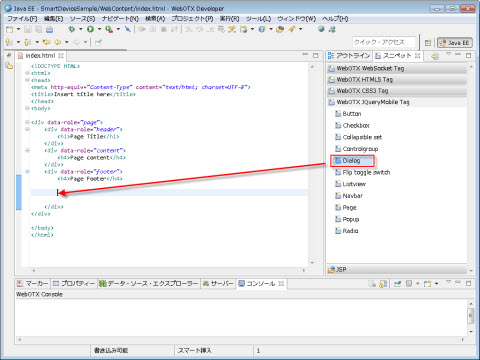
図2.1.12.5-4
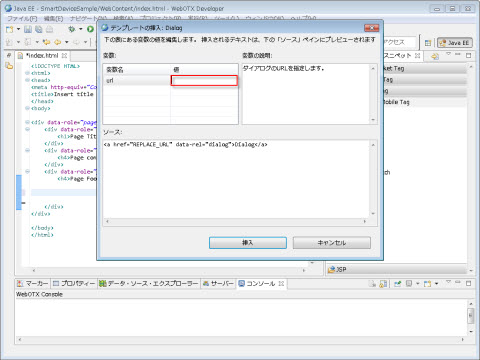
図2.1.12.5-5
<!DOCTYPE HTML>
<html>
<head>
<title>Smart Device Sample</title>
<meta http-equiv="Content-Type" content="text/html; charset=UTF-8">
<meta http-equiv="Content-type" name="viewport"
	content="initial-scale=1.0, maximum-scale=1.0, user-scalable=no, width=device-width">
<meta name="viewport" content="width=device-width, initial-scale=1">
<meta http-equiv="pragma" content="no-cache">
<meta http-equiv="cache-control" content="no-cache">
<meta http-equiv="expires" content="0">
<link rel="stylesheet" href="./jquery.mobile-1.3.2.min.css" />
<script type="text/javascript" src="./jquery-1.9.1.min.js"></script>
<script type="text/javascript" src="./jquery.mobile-1.3.2.min.js"></script>
<script type="text/javascript" src="./smartdevice.js"></script>
</head>
<body onload="loadName()">
	<div data-role="page" id="pa">
		<div data-role="header" data-position="fixed">
			<h1>Smart Device Sample</h1>
		</div>
		<div data-role="content" id="content">
			<label for="username" id="lab"><strong>User name:</strong></label>
			<input type="text" id="username" placeholder="input user name" onchange="validate();"/>
			<p></p>
			<label for="fw_1">Save user name:</label>
			<select name="fw_" id="fw" data-role="slider" onchange="change();">
				<option value="No">No</option>
				<option value="Yes">Yes</option>
			</select>
		</div>
		<div data-role="footer" data-position="fixed">
			<div data-role="navbar">
				<ul>
					<li><a href="" data-role="button" data-rel="dialog" data-transition="slide" rel="external" onclick="logIn();">Login</a></li>
				</ul>
			</div>
		</div>
	</div>
</body>
</html>
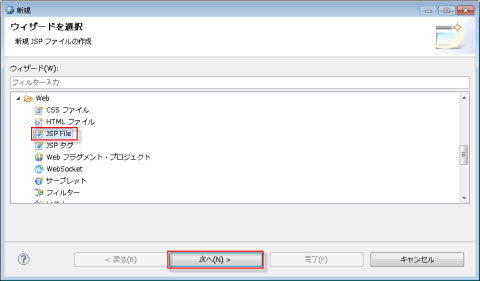
図2.1.12.6-1
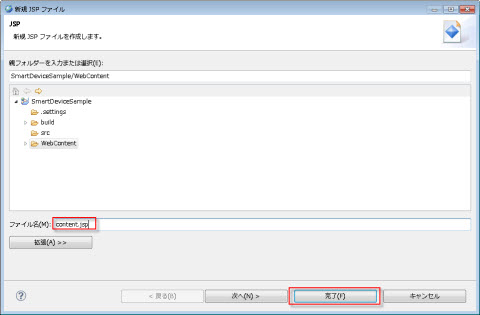
図2.1.12.6-2
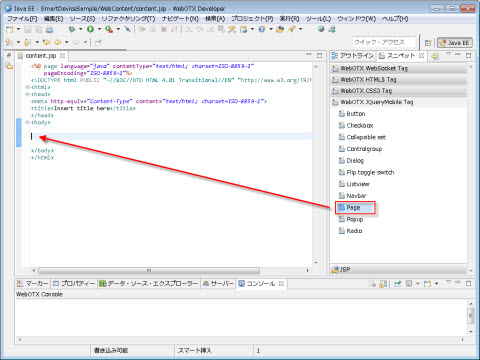
図2.1.12.6-3
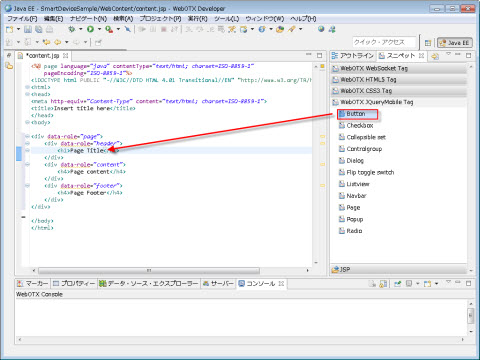
図2.1.12.6-4
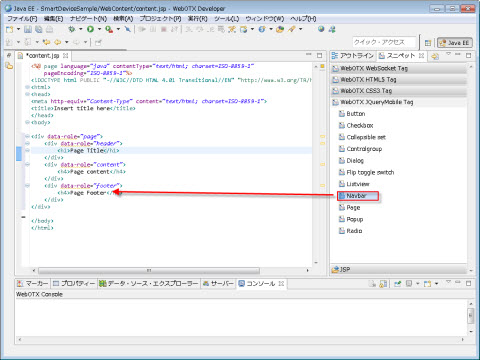
図2.1.12.6-5
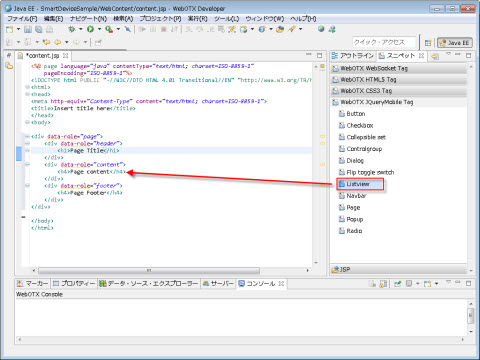
図2.1.12.6-6
<%@ page language="java" contentType="text/html; charset=UTF-8"
    pageEncoding="UTF-8"%>
<%@ taglib uri="http://java.sun.com/jsp/jstl/core" prefix="c"%>
<!DOCTYPE HTML>
<html>
<head>
<title>Smart Device Sample</title>
<meta http-equiv="Content-Type" content="text/html; charset=UTF-8">
<meta http-equiv="Content-type" name="viewport"
	content="initial-scale=1.0, maximum-scale=1.0, user-scalable=no, width=device-width">
<meta name="viewport" content="width=device-width, initial-scale=1">
<meta http-equiv="pragma" content="no-cache">
<meta http-equiv="cache-control" content="no-cache">
<meta http-equiv="expires" content="0">
<link rel="stylesheet" href="./jquery.mobile-1.3.2.min.css" />
<script type="text/javascript" src="./jquery-1.9.1.min.js"></script>
<script type="text/javascript" src="./jquery.mobile-1.3.2.min.js"></script>
<script type="text/javascript" src="./smartdevice.js"></script>
</head>
<body onload="loadName()">
<div data-role="page" id="content">
		<div data-role="header">
            <h1>Smart Device Sample</h1>
			<a href="" data-role="button" data-icon="gear" data-transition="fade" onclick="logOut()">Logout</a>
        </div>
		<p><p>
		<p><strong>Image Show</strong></p>
		<p><p>
		<div data-role="Content">
			<ul data-role="listview" data-filter="true" data-filter-placeholder="Search..." data-split-theme="d">
				<c:forEach items="${sessionScope.picture}" var="row" >
					<li>
						<a href="#${row}" data-rel="popup" data-position-to="window" data-transition="pop">
							<img src="${row}.jpg" />
							<h3>Picture : ${row}</h3>
							<p>${row}</p>
						</a>
						<div data-role="popup" id="${row}" class="photopopup" data-overlay-theme="a" data-corners="false" data-tolerance="30,15">
							<a href="#content" data-rel="back" data-role="button" data-theme="a" data-icon="delete" data-iconpos="notext" class="ui-btn-right"> Close</a>
							<img src="${row}.jpg" alt="${row}" width="200">
						</div>
					</li>
				</c:forEach>
			</ul>
		</div>
		<div data-role="footer" data-position="fixed">
			<div data-role="navbar">
				<ul>
					<li>
						<a href="content.jsp" class="ui-btn-active" data-transition="fade">Image</a>
					</li>
					<li>
						<a href="music.jsp" data-transition="fade">Music</a>
					</li>
				</ul>
			</div>
		</div>
	</div>
</body>
</html>
<%@ page language="java" contentType="text/html; charset=UTF-8"
    pageEncoding="UTF-8"%>
<%@ taglib uri="http://java.sun.com/jsp/jstl/core" prefix="c"%>
<!DOCTYPE HTML>
<html>
<head>
<title>Smart Device Sample</title>
<meta http-equiv="Content-Type" content="text/html; charset=UTF-8">
<meta http-equiv="Content-type" name="viewport"
	content="initial-scale=1.0, maximum-scale=1.0, user-scalable=no, width=device-width">
<meta name="viewport" content="width=device-width, initial-scale=1">
<meta http-equiv="pragma" content="no-cache">
<meta http-equiv="cache-control" content="no-cache">
<meta http-equiv="expires" content="0">
<link rel="stylesheet" href="./jquery.mobile-1.3.2.min.css" />
<script type="text/javascript" src="./jquery-1.9.1.min.js"></script>
<script type="text/javascript" src="./jquery.mobile-1.3.2.min.js"></script>
<script type="text/javascript" src="./smartdevice.js"></script>
</head>
<body>

<div data-role="page" id="mu">
		<div data-role="header" data-position="fixed">
			<h1>Smart Device Sample</h1>
			<a href="" data-role="button" data-icon="gear" data-transition="fade" onclick="logOut()">Logout</a>
		</div>
		<p><p>
		<p><strong>Music Show</strong></p>
		<p><p>
		<div data-role="content" id="content">
			<ul data-role="listview" data-split-theme="d">
				<c:forEach items="${sessionScope.music}" var="row" >
					<li>
						<a href="#${row}" data-rel="popup" data-position-to="window" data-transition="pop">
							<h3>Music : ${row}</h3>
							<p>${row}</p>
						</a>
						<div data-role="popup" id="${row}" class="photopopup" data-overlay-theme="a" data-corners="false" data-tolerance="30,15">
							<a href="#content" data-rel="back" data-role="button" data-theme="a" data-icon="delete" data-iconpos="notext" class="ui-btn-right"> Close</a>
							<audio controls="controls">
								<source src="${row}.mp3" type="audio/mp3" />
							</audio>
						</div>
					</li>
				</c:forEach>
			</ul>
		</div>
		<div data-role="footer" data-position="fixed">
			<div data-role="navbar">
				<ul>
					<li>
						<a href="content.jsp" data-transition="fade">Image</a>
					</li>
					<li>
						<a href="music.jsp" class="ui-btn-active" data-transition="fade">Music</a>
					</li>
				</ul>
			</div>
		</div>
	</div>
</body>
</html>
<!DOCTYPE HTML>
<html>
<head>
<title>Smart Device Sample</title>
<meta http-equiv="Content-Type" content="text/html; charset=UTF-8">
<meta http-equiv="Content-type" name="viewport"
	content="initial-scale=1.0, maximum-scale=1.0, user-scalable=no, width=device-width">
<meta name="viewport" content="width=device-width, initial-scale=1">
<meta http-equiv="pragma" content="no-cache">
<meta http-equiv="cache-control" content="no-cache">
<meta http-equiv="expires" content="0">
<link rel="stylesheet" href="./jquery.mobile-1.3.2.min.css" />
<script type="text/javascript" src="./jquery-1.9.1.min.js"></script>
<script type="text/javascript" src="./jquery.mobile-1.3.2.min.js"></script>
<script type="text/javascript" src="./smartdevice.js"></script>
</head>
<body onload="msg();">

	<div data-role="dialog" id="msg">
		<div data-role="header" data-theme="d">
			<h1>Notice</h1>
		</div>
		<div data-role="content" data-theme="c">
			<p id="ps"></p>
		</div>
		<div data-role="footer" data-position="fixed" data-theme="d">
			<a href="" data-role="button" data-transition="slide"
				onclick="jump();">OK</a>
		</div>
	</div>

</body>
</html>
var storage = window.localStorage;
if (!storage) {
	alert("Your browser does not support localStorage.");
}
function loadName() {
	storage.setItem("msg", "");
	var is = storage.getItem("save");
	var us = storage.getItem("user");
	if (is != null) {
		$("#fw").val(is);
		$("#fw").slider('refresh');
	}
	if (is == "Yes" && us != null) {
		$("#username").val(us);
	}
	if (us == null) {
		storage.setItem("msg", "user name empty!");
	} else {
		storage.setItem("msg", "Welcome " + us + "!");
	}

	var useri = $("#username").val();
	if ((useri == null) || (useri == "")) {
		storage.setItem("msg", "user name empty!");
	}
}
function validate() {
	var useri = $("#username").val();
	if (useri == "") {
		storage.setItem("msg", "user name empty!");
		return;
	} else {
		storage.setItem("user", useri);
		storage.setItem("msg", "Welcome " + useri + "!");
		return;
	}
}
function change() {
	var val = $("#fw").val();
	if (val != "") {
		storage.setItem("save", val);
	}
}
function jump() {
	var text = storage.getItem("msg");
	if ((text == "user name empty!") || (text == "")) {
		window.location.href='index.html';
	} else {
		window.location.href='content.jsp';
	}
	storage.setItem("msg", "");
}
function msg() {
	var msg = storage.getItem("msg");
	if ((msg != null) && (msg != "")) {

		$("#ps").text(msg);
	} else {
		$("#ps").text("user name empty!");
	}
}
function logOut(){
	window.location.href='index.html';
}
function logIn(){
	window.location.href = "/SmartDeviceSample/ContentInfo";
}
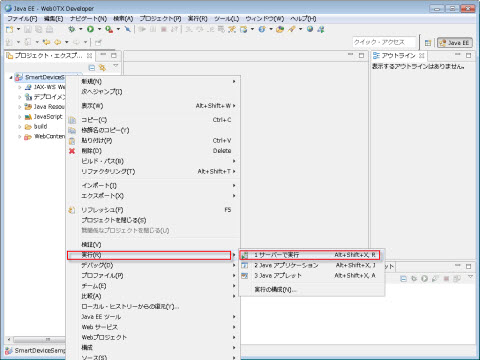
図2.1.13-1
図2.1.13-2
Caution
事前に「ADT Bundle for Windows」という Android SDK をダウンロードして、インストールする必要があります。
「ADT Bundle for Windows」のダウンロード、及びインストール、設定方法 の詳細は[シミュレータでのテスト実行]を参照してください。
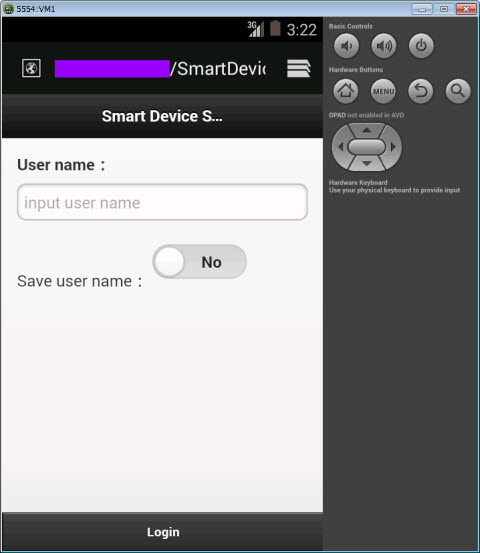
図2.1.14-1
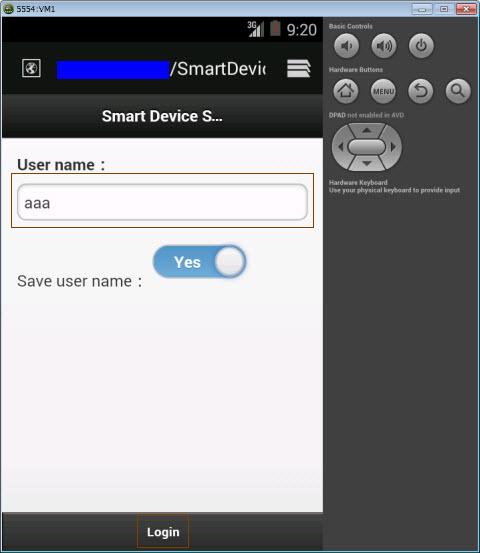
図2.1.14-2
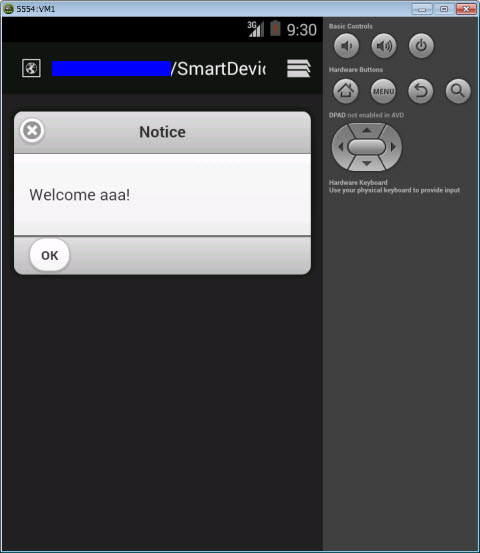
図2.1.14-3
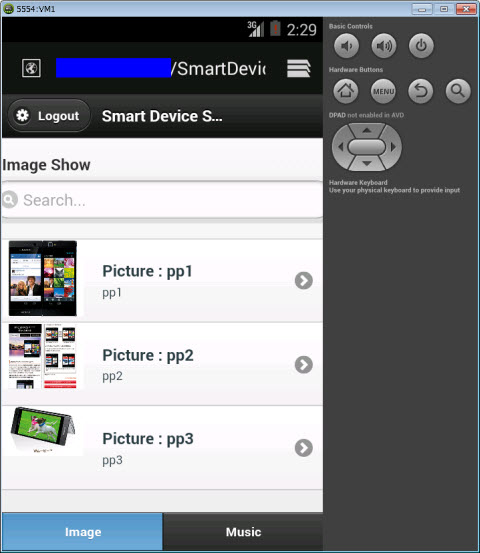
図2.1.14-4
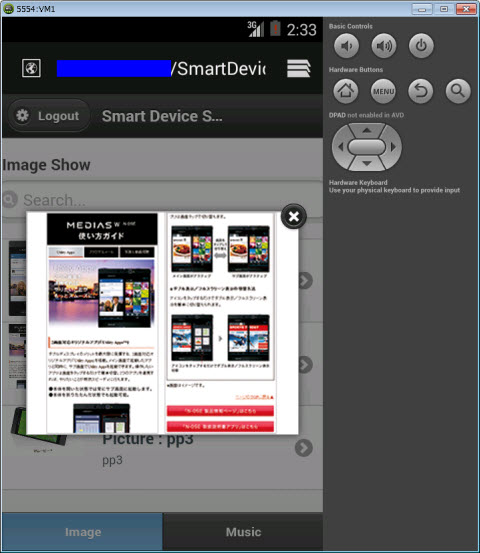
図2.1.14-5
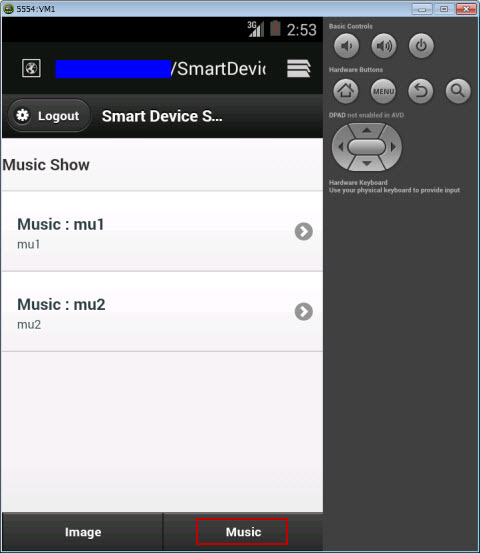
図2.1.14-6
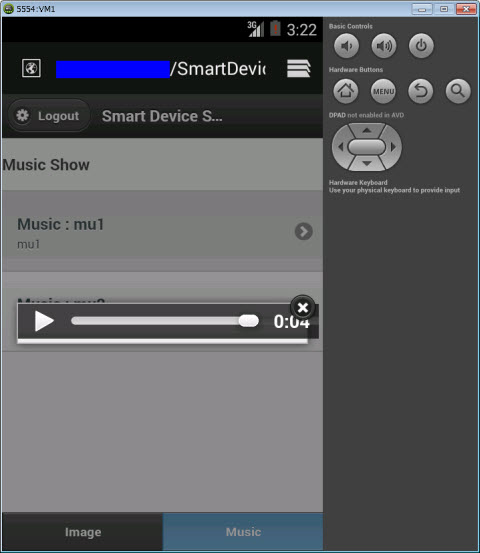
図2.1.14-7
図2.1.14-8