
|

|
WebOTX Manual V10.4 (第4版) 目次を表示 |
|
|
|
WebOTX Manual V10.4 (第4版) 目次を表示 |
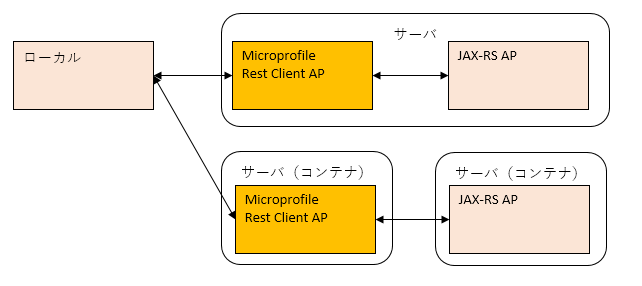
Memo
どちらにも属さないプロバイダクラス登録方法
独自に作成したプロバイダクラスの登録方法は、上記にそれぞれ存在しますが、それとは別に、プロバイダ構成ファイルにプロバイダクラス名を記載し、サービスローダによりロードさせる方法があります。これには登録方法をソースに記載しないという利点があります。上記それぞれでの登録方法の代わりに使用することができます。
| 名称 | 必須 | 説明 | アノテーション名 |
|---|---|---|---|
| RegisterRestClient | ○ | CDI管理Beanとして管理されるインタフェースに付与します。 | @RegisterRestClient |
| RestClient | ○ | CDIでインジェクトしたクラスをMicroProfile Rest Clientとしてインスタンス化します。 | @RestClient |
| RegisterProvider | - | 独自に作成したプロバイダクラスを登録するようにMicroProfile Rest Client実装コードに指示します。 例) @RegisterProvider(CustomExceptionMapper.class) public interface RestClientInterface { |
@RegisterProvider |
| 名称 | 説明 | アノテーション名 |
|---|---|---|
| Path | 詳細はURIテンプレートを参照してください。 | @Path |
| Inject | CDI管理Beanをインジェクトします。 | @Inject |
| 名称 | スコープのライフサイクル | アノテーション名 |
|---|---|---|
| Dependent | インジェクト先のBeanのライフサイクルに準ずる。デフォルト。 | @Dependent |
| RequestScoped | 1リクエストの間 | @RequestScoped |
| SessionScoped | 1セッションの間 | @SessionScoped |
| ApplicationScoped | アプリケーションの開始から終了まで | @ApplicationScoped |
| ConversationScoped | リクエスト以上セッション以下の範囲で、開始・終了をアプリケーションで明示する。 | @ConversationScoped |
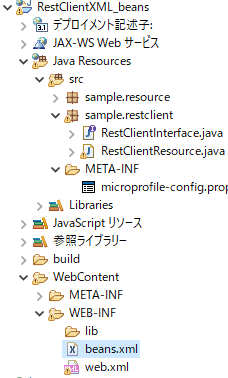
<?xml version="1.0" encoding="UTF-8"?>
<beans xmlns="http://xmlns.jcp.org/xml/ns/javaee"
       xmlns:xsi="http://www.w3.org/2001/XMLSchema-instance"
       xsi:schemaLocation="http://xmlns.jcp.org/xml/ns/javaee http://xmlns.jcp.org/xml/ns/javaee/beans_1_1.xsd"
       bean-discovery-mode="all">
</beans>
このうち、設定項目は bean-discovery-mode で、設定値は以下の通りです。| 設定値 | 説明 |
|---|---|
| annotated | スコープアノテーションが付与されたクラスのみを CDI管理Beanとする。 |
| all | クラスパス上の全てのクラスをCDI Beanとする。スコープアノテーションがないクラスは@Dependentが付与されているとみなす。 |
| none | 全てのクラスを CDI Beanとしない。 |
Caution
上記でスコープアノテーションを付与する方法を採用した場合、次の注意点があります。
スコープアノテーションを省略した場合、@Dependentアノテーションがデフォルトとなります。
一方、beans.xmlがない場合、bean-discovery-mode属性のデフォルト値はannotatedとなります。annotatedはスコープアノテーションが付与されたクラスのみを CDI管理Beanとします。したがって、対象クラスをCDI管理Beanとしたい場合は、スコープアノテーションを明示する必要があります。
| メソッド名 | 必須 | 引数 | 説明 |
|---|---|---|---|
| newBuilder | ○ | - | RestClientBuilder APIのインスタンスを生成します。 |
| baseUrl(baseUri) | ○ | ベースURL(URI)(※) | JAX-RS アプリケーションにアクセスするためのベースURL(URI)(※)を指定します。CDIを使用する場合のmicroprofile-config.propertiesの設定に該当します。 |
| register | - | プロバイダクラス | 独自に作成したプロバイダクラスを指定します。CDIを使用する場合の@RegisterProviderアノテーションに該当します。 |
| executorService | - | ExecutorServiceの独自実装クラス | 非同期処理でExecutorServiceを独自実装する場合に指定します。 |
| property | - | (String)プロパティ名, (Object)値 |
新しいプロパティを設定したり、既存のプロパティ値を変更したりします。 |
| build | ○ | インターフェース | 実装するインターフェースを指定し、クライアントをインスタンス化します。 |
| メソッド名 | 引数 | 戻り値 | 説明 |
|---|---|---|---|
| getPriority | - | int | 独自例外Mapperクラスの優先順位を返します。 |
| handles | (int)HTTPステータスコード (MultivaluedMap<String, Object>)ヘッダー |
boolean | レスポンスのHTTPステータスコードやヘッダーの内容により、独自例外Mapperクラスで扱うかどうかを返します。 |
| toThrowable | (Response)レスポンス | 例外インスタンス | handlesメソッドの条件に該当するレスポンスの内容に基づき、例外レスポンスを返します。 |
@Provider
public class CustomExceptionMapper implements ResponseExceptionMapper<CustomBaseException> {
    @Override
    public boolean handles(int status, MultivaluedMap<String, Object> headers) {
        return status == 404 || status == 409;
    }

    @Override
    public CustomBaseException toThrowable(Response response) {
        switch (response) {
            case 404:
                return new CustomUnknownUrlException();
            case 409:
                return new CustomConfrictDataException();
        }
        return null;
    }
}
public interface CustomAsyncClient {
    @GET
    public CompletionStage<Response> getAsync();
}
返却されたCompletionStageは、CompletableFuture型に変換することで、処理結果をget()メソッドで取得できます。型変換はCompletionStage#toCompletableFuture()メソッドを使用します。
CompletableFuture<Response> future = customAsyncClient.getAsync().toCompletableFuture();
Response res = future.get();
| 項目 | 値 |
|---|---|
| プロジェクト名 | RestClientXML |
package sample.restclient;

import org.eclipse.microprofile.rest.client.inject.RegisterRestClient;

import sample.resource.Customer;

@RegisterRestClient
public interface RestClientInterface {
    public Customer getCustomerList(String id);
}
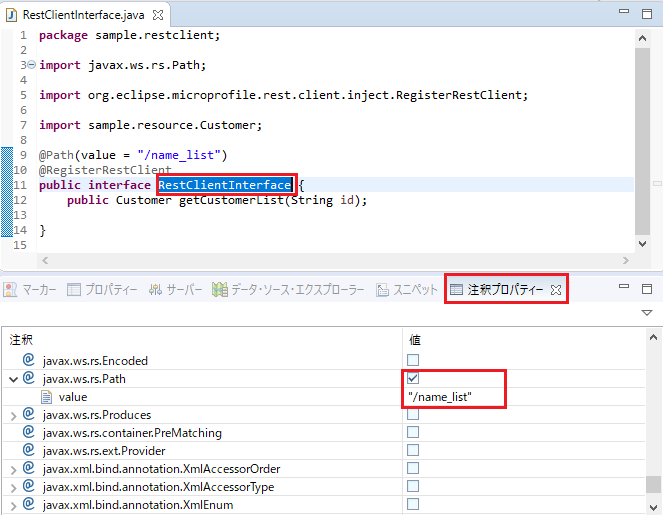
クラス名RestClientInterfaceを選択し、注釈プロパティービューでアノテーション@Pathを追加し、そのvalue属性の値を"/name_list"に設定します。value属性の値はJAX-RS アプリケーションでクラスに設定した@Pathのvalue属性の値と同じ内容を設定します。
package sample.restclient;

import javax.ws.rs.GET;
import javax.ws.rs.Path;
import javax.ws.rs.PathParam;
import javax.ws.rs.Produces;

import org.eclipse.microprofile.rest.client.inject.RegisterRestClient;

import sample.resource.Customer;

@Path(value = "/name_list")
@RegisterRestClient
public interface RestClientInterface {
    @Produces(value = { "application/xml" })
    @GET
    @Path(value = "{id}")
    public Customer getCustomerList(@PathParam(value = "id") String id);
}
package sample.restclient;

import org.eclipse.microprofile.rest.client.inject.RestClient;

import sample.resource.Customer;

public class RestClientResource {

    @RestClient
    RestClientInterface itf;

    public Customer getCustomerList(String id) {
        Customer custom = itf.getCustomerList(id);
        return custom;
    }
}
RestClientInterfaceの場合と同様に、注釈プロパティービューを使い、以下のようにアノテーションを追加します。
package sample.restclient;

import javax.enterprise.context.RequestScoped;
import javax.inject.Inject;
import javax.ws.rs.GET;
import javax.ws.rs.Path;
import javax.ws.rs.PathParam;
import javax.ws.rs.Produces;

import org.eclipse.microprofile.rest.client.inject.RestClient;

import sample.resource.Customer;

@Path("/client")
@RequestScoped
public class RestClientResource {

    @Inject
    @RestClient
    RestClientInterface itf;

    @Produces(value = { "application/xml" })
    @GET
    @Path(value = "{id}")
    public Customer getCustomerList(@PathParam(value = "id") String id) {
        Customer custom = itf.getCustomerList(id);
        return custom;
    }
}
<?xml version="1.0" encoding="UTF-8"?>
<web-app xmlns:xsi="http://www.w3.org/2001/XMLSchema-instance" xmlns="http://java.sun.com/xml/ns/javaee" xsi:schemaLocation="http://java.sun.com/xml/ns/javaee http://java.sun.com/xml/ns/javaee/web-app_3_0.xsd" id="WebApp_ID" version="3.0">
  <display-name>RestClientXML</display-name>
  <welcome-file-list>
    <welcome-file>index.html</welcome-file>
    <welcome-file>index.htm</welcome-file>
    <welcome-file>index.jsp</welcome-file>
    <welcome-file>default.html</welcome-file>
    <welcome-file>default.htm</welcome-file>
    <welcome-file>default.jsp</welcome-file>
  </welcome-file-list>
  <servlet>
    <servlet-name>JAX-RS Servlet</servlet-name>
    <servlet-class>org.glassfish.jersey.servlet.ServletContainer</servlet-class>
    <init-param>
      <param-name>jersey.config.server.provider.classnames</param-name>
      <param-value>sample.restclient.RestClientResource</param-value>
    </init-param>
    <load-on-startup>1</load-on-startup>
  </servlet>
  <servlet-mapping>
    <servlet-name>JAX-RS Servlet</servlet-name>
    <url-pattern>/*</url-pattern>
  </servlet-mapping>
</web-app>
Caution
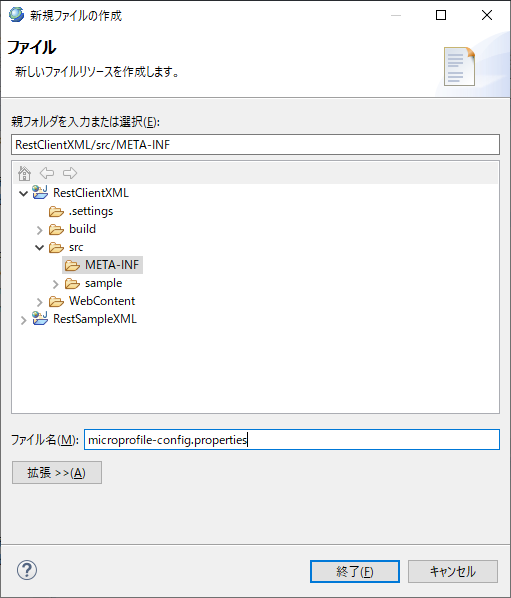
microprofile-config_propertiesへの記述はSourceタブで行ってください。Propertiesタブに記述すると、ベースURL/URIに意図せずエスケープ文字が追加され、正しいURL/URIとして認識されなくなります。
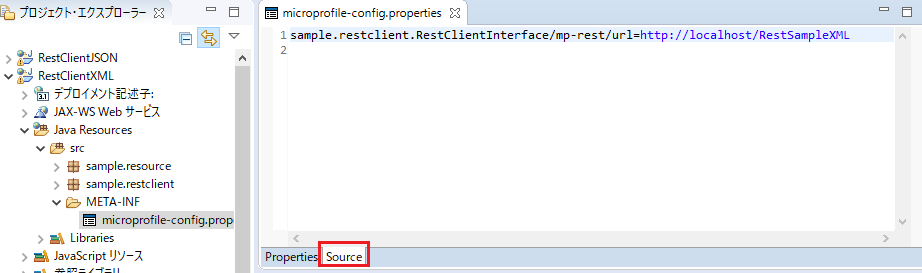
| 項目 | 値 |
|---|---|
| プロジェクト名 | RestClientXMLByBuilder |
package sample.restclient;

import java.net.URL;

import org.eclipse.microprofile.rest.client.RestClientBuilder;

import sample.resource.Customer;

public class RestClientResource {
    public Customer getCustomerList(String id) {
        URL apUrl = null;
        try {
            apUrl = new URL("http://localhost/Hello");
        } catch (Exception e) {
            e.printStackTrace();
            return null;
        }

        RestClientInterface itf = RestClientBuilder.newBuilder()
                                                   .baseUrl(apUrl)
                                                   .build(RestClientInterface.class);
        Customer custom = itf.getCustomerList(id);

        return custom;
    }
}
CDI使用時の[ルートリソースクラスの作成]を参照して、注釈プロパティービューを使い、アノテーションを追加してください。
package sample.restclient;

import java.net.URL;

import javax.ws.rs.GET;
import javax.ws.rs.Path;
import javax.ws.rs.PathParam;
import javax.ws.rs.Produces;

import org.eclipse.microprofile.rest.client.RestClientBuilder;

import sample.resource.Customer;

@Path(value = "client")
public class RestClientResource {
    @Produces(value = { "application/xml" })
    @GET
    @Path(value = "{id}")
    public Customer getCustomerList(@PathParam(value = "id") String id) {
        URL apUrl = null;
        try {
            apUrl = new URL("http://localhost/Hello");
        } catch (Exception e) {
            e.printStackTrace();
            return null;
        }

        RestClientInterface itf = RestClientBuilder.newBuilder()
                                                   .baseUrl(apUrl)
                                                   .build(RestClientInterface.class);
        Customer custom = itf.getCustomerList(id);

        return custom;
    }
}
package sample.restclient;

import javax.ws.rs.GET;
import javax.ws.rs.Path;
import javax.ws.rs.PathParam;
import javax.ws.rs.Produces;

import org.eclipse.microprofile.rest.client.inject.RegisterRestClient;

import sample.resource.Customer;

@Path(value = "/name_list")
@RegisterRestClient
public interface RestClientInterface {
    @Produces(value = { "application/json" })
    @GET
    @Path(value = "{id}")
    public Customer getCustomerList(@PathParam(value = "id") String id);
}
CustomerResourceクラス
package sample.restclient;

import javax.enterprise.context.RequestScoped;
import javax.inject.Inject;
import javax.ws.rs.GET;
import javax.ws.rs.Path;
import javax.ws.rs.PathParam;
import javax.ws.rs.Produces;

import org.eclipse.microprofile.rest.client.inject.RestClient;

import sample.resource.Customer;

@Path("/client")
@RequestScoped
public class RestClientResource {

    @Inject
    @RestClient
    RestClientInterface itf;

    @Produces(value = { "application/json" })
    @GET
    @Path(value = "{id}")
    public Customer getCustomerList(@PathParam(value = "id") String id) {
        Customer custom = itf.getCustomerList(id);
        return custom;
    }
}