
|

|
WebOTX Manual V11.1 (第6版) 目次を表示 |
|
|
|
WebOTX Manual V11.1 (第6版) 目次を表示 |
Memo
どちらにも属さないプロバイダクラス登録方法
独自に作成したプロバイダクラスの登録方法は、上記にそれぞれ存在しますが、それとは別に、プロバイダ構成ファイルにプロバイダクラス名を記載し、サービスローダによりロードさせる方法があります。これには登録方法をソースに記載しないという利点があります。上記それぞれでの登録方法の代わりに使用することができます。
| 名称 | 必須 | 説明 | アノテーション名 | |
|---|---|---|---|---|
| プロパティ必須 | プロパティ名 | プロパティ説明 | ||
| ClientHeaderParam | - | HTTPリクエストヘッダを設定します。 | @ClientHeaderParam | |
| ○ | name | HTTPヘッダ名を設定します。 | ||
| ○ | value | HTTPヘッダ値を設定します。固定値だけでなく、取得メソッドを設定することもできます。取得メソッドを使用する場合は下記の条件を満たす必要があります。
@ClientHeaderParam(name=HttpHeaders.CONTENT_LANGUAGE, value="{getLanguage}") String contentLang(String subject); default String getLanguage() { return ...; } |
||
| - | required | HTTPヘッダ値を取得するメソッドが例外を投げた場合に要求を中止する(true:デフォルト)か、単にこのHTTPヘッダをスキップするか(false)を設定します。falseに設定した時に例外が発生した場合、クライアント要求は続行するが、このアノテーションで設定したHTTPヘッダは送信されません。 | ||
| RegisterClientHeaders | - | HTTPリクエストヘッダを更新します。デフォルトのプロパティを使用した場合、 org.eclipse.microprofile.rest.client.propagateHeaders構成プロパティに記載されたすべてのヘッダが更新されます。 | @RegisterClientHeaders | |
| - | value | ClientHeadersFactoryインタフェースの実装クラスを設定します。(デフォルト:DefaultClientHeadersFactoryImpl) | ||
| RegisterRestClient | ○ | このアノテーションをCDI管理Beanとして管理されるインタフェースに付与します。 | @RegisterRestClient | |
| - | baseUri | microprofile-config.propertiesでベースURIを設定する代わりにプロパティでベースURIを設定することができます。 例) @RegisterRestClient(baseUri="http://localhost:8080/sample") public interface RestClientInterface { |
||
| - | configKey | microprofile-config.propertiesに定義する際、完全修飾クラス名の代わりにconfigKeyの設定値を使用できます。 例) @RegisterRestClient(configKey="myClient") public interface RestClientInterface { microprofile-config.properties内部 myClient/mp-rest/url=http://localhost:8080/sample |
||
| RestClient | ○ | CDIでインジェクトしたクラスをMicroProfile Rest Clientとしてインスタンス化します。 | @RestClient | |
| RegisterProvider | - | 独自に作成したプロバイダクラスを登録するようにMicroProfile Rest Client実装コードに指示します。 例) @RegisterProvider(CustomExceptionMapper.class) public interface RestClientInterface { |
@RegisterProvider | |
| 名称 | 説明 | アノテーション名 |
|---|---|---|
| Path | 詳細は[Webサービスアプリケーション > プログラミング・開発ガイド > RESTful Webサービス > URIテンプレート]を参照してください。 | @Path |
| Inject | CDI管理Beanをインジェクトします。 | @Inject |
| 名称 | 説明 | デフォルト | アノテーション名 |
|---|---|---|---|
| Consumes | リソースが受け付けるMIMEタイプを指定します。 | application/json | @Consumes |
| Produces | リソースから返されるMIMEタイプを指定します。 | application/json | @Produces |
| 名称 | スコープのライフサイクル | アノテーション名 |
|---|---|---|
| Dependent | インジェクト先のBeanのライフサイクルに準ずる。デフォルト。 | @Dependent |
| RequestScoped | 1リクエストの間 | @RequestScoped |
| SessionScoped | 1セッションの間 | @SessionScoped |
| ApplicationScoped | アプリケーションの開始から終了まで | @ApplicationScoped |
| ConversationScoped | リクエスト以上セッション以下の範囲で、開始・終了をアプリケーションで明示する。 | @ConversationScoped |
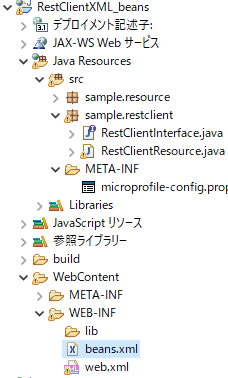
<?xml version="1.0" encoding="UTF-8"?>
<beans xmlns="http://xmlns.jcp.org/xml/ns/javaee"
       xmlns:xsi="http://www.w3.org/2001/XMLSchema-instance"
       xsi:schemaLocation="http://xmlns.jcp.org/xml/ns/javaee http://xmlns.jcp.org/xml/ns/javaee/beans_1_1.xsd"
       bean-discovery-mode="all">
</beans>
このうち、設定項目は bean-discovery-mode で、設定値は以下の通りです。| 設定値 | 説明 |
|---|---|
| annotated | スコープアノテーションが付与されたクラスのみを CDI管理Beanとする。 |
| all | クラスパス上の全てのクラスをCDI Beanとする。スコープアノテーションがないクラスは@Dependentが付与されているとみなす。 |
| none | 全てのクラスを CDI Beanとしない。 |
Caution
上記でスコープアノテーションを付与する方法を採用した場合、次の注意点があります。
スコープアノテーションを省略した場合、@Dependentアノテーションがデフォルトとなります。
一方、beans.xmlがない場合、bean-discovery-mode属性のデフォルト値はannotatedとなります。annotatedはスコープアノテーションが付与されたクラスのみを CDI管理Beanとします。したがって、対象クラスをCDI管理Beanとしたい場合は、スコープアノテーションを明示する必要があります。
| メソッド名 | 必須 | 引数 | 説明 |
|---|---|---|---|
| newBuilder | ○ | - | RestClientBuilder APIのインスタンスを生成します。 |
| baseUrl(baseUri) | ○ | ベースURL(URI)(※) | JAX-RS アプリケーションにアクセスするためのベースURL(URI)(※)を指定します。CDIを使用する場合のmicroprofile-config.propertiesの設定に該当します。 |
| connectTimeout | - | (long)待機する最大時間, (java.util.concurrent.TimeUnit)単位 |
JAX-RS APへの接続を待機するためのタイムアウトを指定します。 |
| executorService | - | ExecutorServiceの独自実装クラス | 非同期処理でExecutorServiceを独自実装する場合に指定します。 |
| followRedirects | - | (boolean)HTTPリダイレクト応答に従うかどうか。従う:true、従わない:false | MicroProfile Rest Clientインスタンスは、デフォルトではリダイレクト応答(HTTPステータスコード300番台)に自動的には従いません。リダイレクト応答に自動的に従うようにするには、trueを設定する必要があります。 |
| hostnameVerifier | - | (javax.net.ssl.HostnameVerifier)カスタムクラス | URLのホスト名とサーバの識別ホスト名の不一致で失敗するSSL接続を許可するかどうかを設定します。 |
| keyStore | - | (java.security.KeyStore)キーストア, (String)キーストアパスワード |
クライアント側のキー ストアを指定します。 |
| property | - | (String)プロパティ名, (Object)値 |
新しいプロパティを設定したり、既存のプロパティ値を変更したりします。 |
| proxyAddress | - | (String)プロキシホスト名/IPアドレス, (int)プロキシポート番号 |
クライアント インスタンスからのリクエストに使用する HTTPプロキシのホスト名/IP アドレスとポートを指定します。 |
| queryParamStyle | - | (org.eclipse.microprofile.rest.client.ext.QueryParamStyle)クエリパラメータスタイル(列挙型) | 1つのクエリパラメータに対して、複数の値を持つ場合、送信する際のクエリパラメータのフォーマットを指定します。指定可能なクエリパラメータスタイルは次の3種類があります。
|
| readTimeout | - | (long)待機する最大時間, (java.util.concurrent.TimeUnit)単位 |
JAX-RS APからの応答を待機するためのタイムアウトを指定します。 |
| register | - | プロバイダクラス | 独自に作成したプロバイダクラスを指定します。CDIを使用する場合の@RegisterProviderアノテーションに該当します。 |
| sslContext | - | (javax.net.ssl.SSLContext)SSLコンテキスト | MicroProfile Rest ClientアプリからJAX-RSアプリにSSLでアクセスする際に使用する、SSLコンテキストを指定します。 |
| trustStore | - | (java.security.KeyStore)トラストストア | クライアント側のトラストストアを設定します。デフォルトではJVMのトラストストアを使用しますが、カスタムのトラストストアを設定して使用することができます。その場合、トラストストアをKeyStoreオブジェクトで読み込み、trustStore()メソッドに引数で渡す必要があります。 例) KeyStore trustStore = readTrustStore(); RestClientBuilder.newBuilder() .trustStore(trustStore) |
| build | ○ | MicroProfile Rest Clientインターフェース | 実装するインターフェースを指定し、クライアントをインスタンス化します。 |
public interface QueryClient {
    Response sendMultiValues(@QueryParam("myParam") List<String> values);
}
QueryClient client = RestClientBuilder.newBuilder()
                                      .baseUri(someUri)
                                      .queryParamStyle(QueryParamStyle.COMMA_SEPARATED)
                                      .build(QueryClient.class);
Response response = client.sendMultiValues(Collections.asList("abc", "mno", "xyz"));
上記の設定により、"myParam=abc,mno,xyz"という形式でHTTPリクエストのクエリパラメータが生成されます。
| メソッド名 | 引数 | 戻り値 | 説明 |
|---|---|---|---|
| getPriority | - | int | 独自例外Mapperクラスの優先順位を返します。 |
| handles | (int)HTTPステータスコード (javax.ws.rs.core.MultivaluedMap<String, Object>)ヘッダー |
boolean | レスポンスのHTTPステータスコードやヘッダーの内容により、独自例外Mapperクラスで扱うかどうかを返します。 |
| toThrowable | (javax.ws.rs.core.Response)レスポンス | 例外インスタンス | handlesメソッドの条件に該当するレスポンスの内容に基づき、例外レスポンスを返します。 |
@Provider
public class CustomExceptionMapper implements ResponseExceptionMapper<CustomBaseException> {
    @Override
    public boolean handles(int status, MultivaluedMap<String, Object> headers) {
        return status == 404 || status == 409;
    }

    @Override
    public CustomBaseException toThrowable(Response response) {
        switch (response) {
            case 404:
                return new CustomUnknownUrlException();
            case 409:
                return new CustomConfrictDataException();
        }
        return null;
    }
}
public interface CustomAsyncClient {
    @GET
    public CompletionStage<Response> getAsync();
}
返却されたCompletionStageは、CompletableFuture型に変換することで、処理結果をget()メソッドで取得できます。型変換はCompletionStage#toCompletableFuture()メソッドを使用します。CompletableFuture<Response> future = customAsyncClient.getAsync().toCompletableFuture(); Response res = future.get();
public interface MySseClient {
    @GET
    @Path("ssetest")
    @Produces(MediaType.SERVER_SENT_EVENTS)
    public Publisher<InboundSseEvent> getEvents();
}
呼出しメソッド
public void testSseClient() {
    MySseClient client = RestClientBuilder.newBuilder().baseUri(someUri).build(MySseClient.class);
    Publisher<InboundSseEvent> publisher = client.getEvents();
    publisher.subscribe(new Subscriber<InboundSseEvent>(){ ... });
INFO MICROPROFILE - OTX31070045: Closing a class org.jboss.resteasy.client.jaxrs.engines.ApacheHttpClient43Engine instance for you. Please close clients yourself.クローズ処理の例を記載します。
public interface SimpleRestClient extends AutoCloseable {
public class SimpleRestEndpoint {
    @Inject
    @RestClient
    SimpleRestClient client;

    @GET
    @Path(value = "{id}")
    public Customer getCustomerList(@PathParam(value = "id") String id) {
        Customer custom = null;
        try (SimpleRestClient c = client) {
            custom = c.getCustomerList(id);
        } catch (Exception e) {
            e.printStackTrace();
       }
        return custom;
    }
| 項目 | 値 |
|---|---|
| プロジェクト名 | RestClientXML |
package sample.restclient;

import org.eclipse.microprofile.rest.client.inject.RegisterRestClient;

import sample.resource.Customer;

@RegisterRestClient
public interface RestClientInterface extends AutoCloseable {
    public Customer getCustomerList(String id);
}
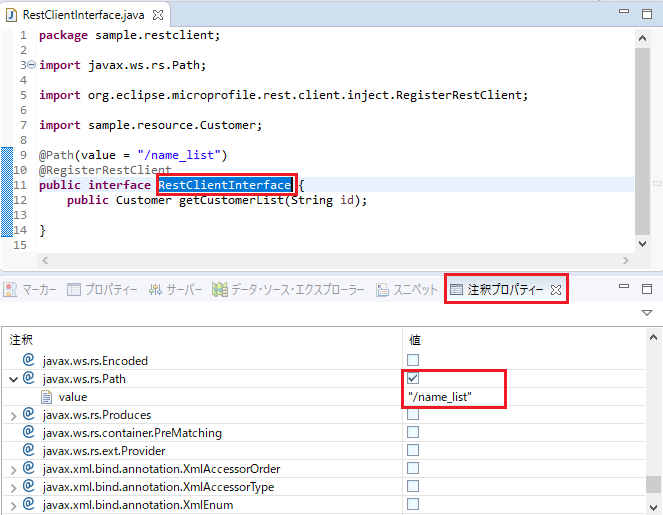
クラス名RestClientInterfaceを選択し、注釈プロパティービューでアノテーション@Pathを追加し、そのvalue属性の値を"/name_list"に設定します。value属性の値はJAX-RS アプリケーションでクラスに設定した@Pathのvalue属性の値と同じ内容を設定します。
package sample.restclient;

import javax.ws.rs.GET;
import javax.ws.rs.Path;
import javax.ws.rs.PathParam;
import javax.ws.rs.Produces;

import org.eclipse.microprofile.rest.client.inject.RegisterRestClient;

import sample.resource.Customer;

@Path(value = "/name_list")
@RegisterRestClient
public interface RestClientInterface extends AutoCloseable {
    @Produces(value = { "application/xml" })
    @GET
    @Path(value = "{id}")
    public Customer getCustomerList(@PathParam(value = "id") String id);
}
package sample.restclient;

import org.eclipse.microprofile.rest.client.inject.RestClient;

import sample.resource.Customer;

public class RestClientResource {

    @RestClient
    RestClientInterface client;

    public Customer getCustomerList(String id) {
        Customer custom = null;
        try (RestClientInterface c = client) {
            custom = c.getCustomerList(id);
        } catch (Exception e) {
            e.printStackTrace();
        }
        return custom;
    }
}
RestClientInterfaceの場合と同様に、注釈プロパティービューを使い、以下のようにアノテーションを追加します。
package sample.restclient;

import javax.enterprise.context.RequestScoped;
import javax.inject.Inject;
import javax.ws.rs.GET;
import javax.ws.rs.Path;
import javax.ws.rs.PathParam;
import javax.ws.rs.Produces;

import org.eclipse.microprofile.rest.client.inject.RestClient;

import sample.resource.Customer;

@Path("client")
@RequestScoped
public class RestClientResource {

    @Inject
    @RestClient
    RestClientInterface client;

    @Produces(value = { "application/xml" })
    @GET
    @Path(value = "{id}")
    public Customer getCustomerList(@PathParam(value = "id") String id) {
        Customer custom = null;
        try (RestClientInterface c = client) {
            custom = c.getCustomerList(id);
        } catch (Exception e) {
            e.printStackTrace();
        }
        return custom;
    }
}
<?xml version="1.0" encoding="UTF-8"?>
<web-app xmlns:xsi="http://www.w3.org/2001/XMLSchema-instance" xmlns="http://xmlns.jcp.org/xml/ns/javaee" xsi:schemaLocation="http://xmlns.jcp.org/xml/ns/javaee http://xmlns.jcp.org/xml/ns/javaee/web-app_4_0.xsd" id="WebApp_ID" version="4.0">
  <display-name>RestClientXML</display-name>
  <welcome-file-list>
    <welcome-file>index.html</welcome-file>
    <welcome-file>index.htm</welcome-file>
    <welcome-file>index.jsp</welcome-file>
    <welcome-file>default.html</welcome-file>
    <welcome-file>default.htm</welcome-file>
    <welcome-file>default.jsp</welcome-file>
  </welcome-file-list>
  <servlet>
    <servlet-name>JAX-RS Servlet</servlet-name>
    <servlet-class>org.glassfish.jersey.servlet.ServletContainer</servlet-class>
    <init-param>
      <param-name>jersey.config.server.provider.classnames</param-name>
      <param-value>sample.restclient.RestClientResource</param-value>
    </init-param>
    <load-on-startup>1</load-on-startup>
  </servlet>
  <servlet-mapping>
    <servlet-name>JAX-RS Servlet</servlet-name>
    <url-pattern>/*</url-pattern>
  </servlet-mapping>
</web-app>
Caution
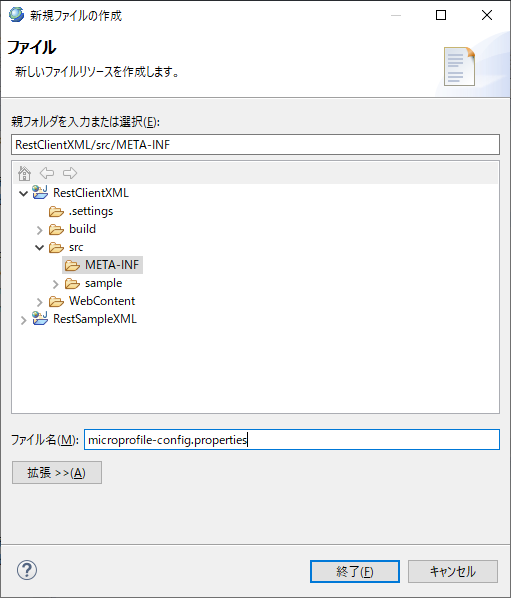
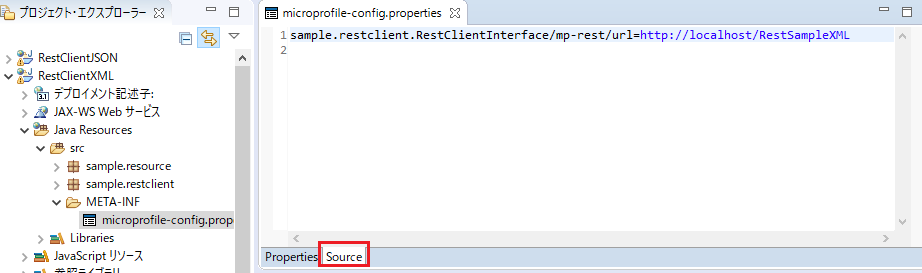
microprofile-config_propertiesへの記述はSourceタブで行ってください。Propertiesタブに記述すると、ベースURL/URIに意図せずエスケープ文字が追加され、正しいURL/URIとして認識されなくなります。
| 項目 | 値 |
|---|---|
| プロジェクト名 | RestClientXMLByBuilder |
package sample.restclient;

import java.net.URL;

import org.eclipse.microprofile.rest.client.RestClientBuilder;

import sample.resource.Customer;

public class RestClientResource {
    public Customer getCustomerList(String id) {
        URL apUrl = null;
        try {
            apUrl = new URL("http://localhost/RestSampleXML");
        } catch (Exception e) {
            e.printStackTrace();
            return null;
        }

        RestClientInterface client = RestClientBuilder.newBuilder()
                                                      .baseUrl(apUrl)
                                                      .build(RestClientInterface.class);
        Customer custom = null;
        try (RestClientInterface c = client) {
            custom = c.getCustomerList(id);
        } catch (Exception e) {
            e.printStackTrace();
        }
        return custom;
    }
}
CDI使用時の[ルートリソースクラスの作成]を参照して、注釈プロパティービューを使い、アノテーションを追加してください。
package sample.restclient;

import java.net.URL;

import javax.ws.rs.GET;
import javax.ws.rs.Path;
import javax.ws.rs.PathParam;
import javax.ws.rs.Produces;

import org.eclipse.microprofile.rest.client.RestClientBuilder;

import sample.resource.Customer;

@Path(value = "client")
public class RestClientResource {
    @Produces(value = { "application/xml" })
    @GET
    @Path(value = "{id}")
    public Customer getCustomerList(@PathParam(value = "id") String id) {
        URL apUrl = null;
        try {
            apUrl = new URL("http://localhost/RestSampleXML");
        } catch (Exception e) {
            e.printStackTrace();
            return null;
        }

        RestClientInterface client = RestClientBuilder.newBuilder()
                                                      .baseUrl(apUrl)
                                                      .build(RestClientInterface.class);
        Customer custom = null;
        try (RestClientInterface c = client) {
            custom = c.getCustomerList(id);
        } catch (Exception e) {
            e.printStackTrace();
        }
        return custom;
    }
}
package sample.restclient;

import javax.ws.rs.GET;
import javax.ws.rs.Path;
import javax.ws.rs.PathParam;
import javax.ws.rs.Produces;

import org.eclipse.microprofile.rest.client.inject.RegisterRestClient;

import sample.resource.Customer;

@Path(value = "/name_list")
@RegisterRestClient
public interface RestClientInterface extends AutoCloseable {
    @Produces(value = { "application/json" })
    @GET
    @Path(value = "{id}")
    public Customer getCustomerList(@PathParam(value = "id") String id);
}
CustomerResourceクラス
package sample.restclient;

import javax.enterprise.context.RequestScoped;
import javax.inject.Inject;
import javax.ws.rs.GET;
import javax.ws.rs.Path;
import javax.ws.rs.PathParam;
import javax.ws.rs.Produces;

import org.eclipse.microprofile.rest.client.inject.RestClient;

import sample.resource.Customer;

@Path("/client")
@RequestScoped
public class RestClientResource {

    @Inject
    @RestClient
    RestClientInterface client;

    @Produces(value = { "application/json" })
    @GET
    @Path(value = "{id}")
    public Customer getCustomerList(@PathParam(value = "id") String id) {
        Customer custom = null;
        try (RestClientInterface c = client) {
            custom = c.getCustomerList(id);
        } catch (Exception e) {
            e.printStackTrace();
        }
        return custom;
    }
}