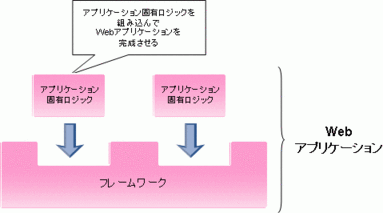
図2.6.4.2-1
フレームワークは、Webアプリケーションを作成する上で必要となる共通的な機能や構造を提供します。 アプリケーションの共通的なメイン部分が提供されており、開発者はアプリケーション固有のロジックをフレームワークに組み込むことで、Webアプリケーションを作成することができます。
図2.6.4.2-1
フレームワークは、Web アプリケーションの画面制御や、エラーのハンドリングをしてくれるため、Webアプリケーションの開発工数を削減できます。 また、フレームワークに沿って、開発したアプリケーションは再利用性が高まります。
「MVCモデル2」Web アプリケーションのスケルトンです。 MVCモデル2とは下記のMVCとモデル2の考え方を組み合わせた物として提案されています。
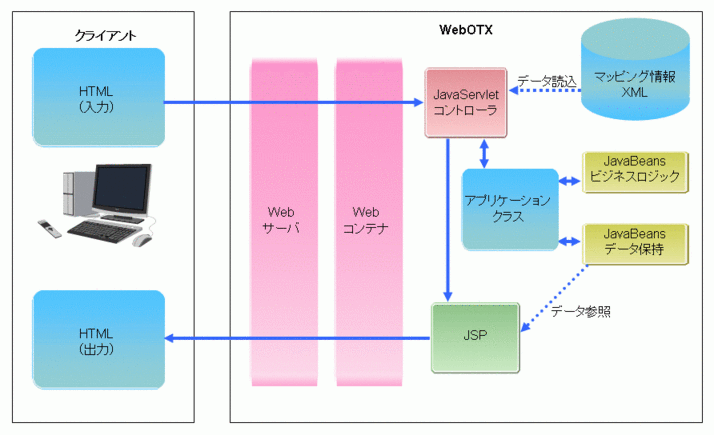
図2.6.4.2-2
Strutsは定義ファイル(struts-config.xml)を設定することで、リクエストによる処理の振り分け、画面遷移の制御等を行います。
Strutsを使用したサンプルアプリケーション(StrutsSample)の開発手順を記述します。
1. シナリオ作成Strutsを用いたサンプルWebアプリケーションを作成します。
サンプルの処理概要は
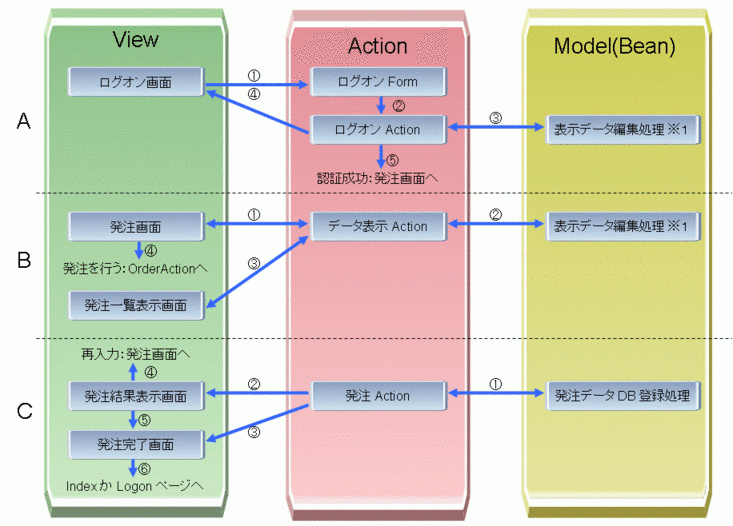
図2.6.4.3-1
サンプルの処理概要を3つの処理(A,B,C)に分けてMVCモデルに当てはめていきます。
ログオン処理(A)
注文データ入力処理(B)
注文データDB登録処理(C)
MVCに当てはめた各部品を作成していきます。
サンプルWebアプリケーションのファイル構成は次のようになります。
サンプルWebアプリケーションの処理概要図は以下の通りです。
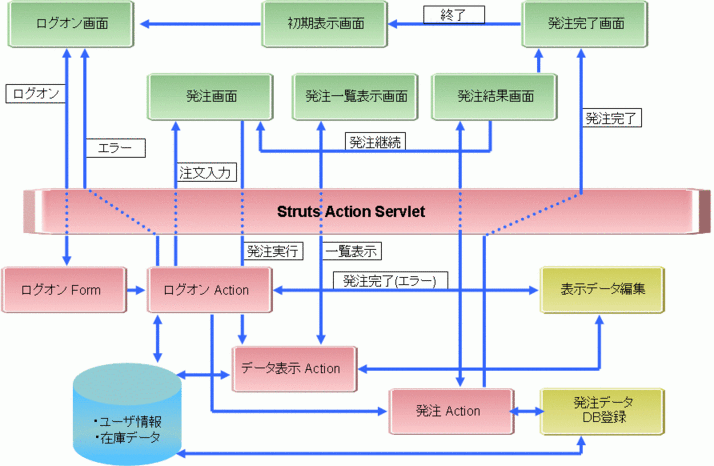
図2.6.4.3-2
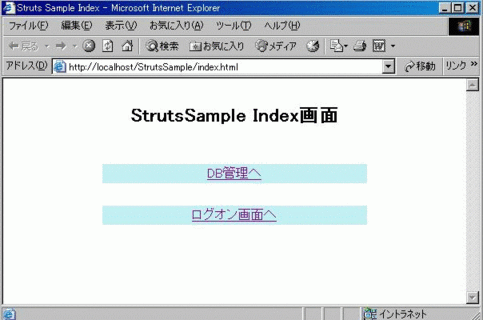
図2.6.4.3-3
1) StrutsSampleの初期表示画面です。
2) 「ログオン画面へ」を選択するとログオン画面に遷移します。
2. ログオン画面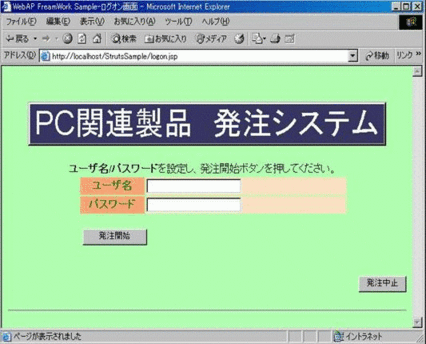
図2.6.4.3-4
1) サンプル実行時に起動される画面で、ユーザ名、パスワードを入力します。
| ユーザ名 | パスワード |
|---|---|
| User_1 | Pass_1 |
| User_2 | Pass_2 |
2) 「発注開始」ボタンをクリックすると、ログオンAction(LogonAction.class)にリクエストを送信します。
3) 「発注中止」ボタンをクリックすると、発注処理終了画面(entryEnd.jsp)に遷移し発注処理を中断します。
4) 使用しているStrutsの機能
errorタグを使用しエラーメッセージを表示した場合の画面を次に示します。
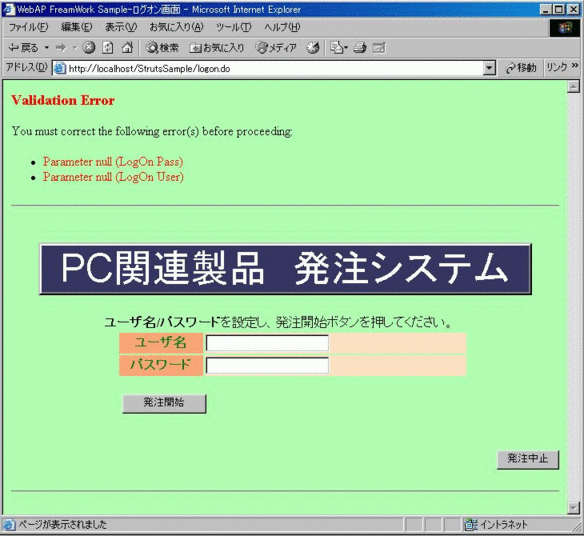
図2.6.4.3-5
ログオン画面(logon.jsp)のソースファイルを次に表示します。
<%@ page language="java" contentType="text/html;charset=UTF-8"%>
<%@ taglib uri="WEB-INF/struts-bean.tld"  prefix="bean" %>
<%@ taglib uri="WEB-INF/struts-html.tld"  prefix="html" %>

<html:html locale="true">
<head>  <title><bean:message key="logon.wtitle"/></title>  <html:base/>  </head>
<body bgcolor="#B0FFB0">
<html:errors/><br><br>
<CENTER><DIV style="background-color:#363562; width:90%; border-style :outset" align=center>
    <FONT size=42 color=white face="arial"><bean:message key="system.title"/></FONT>
</DIV></CENTER>
<form name="form1" METHOD="POST" ACTION="logon.do">
    <div align="center"><center>
    <table width="458" >
        <tr><td COLSPAN="3" width="450" align="right"/></tr>
        <tr>
          <td COLSPAN="3" width="450" align="left">
            <strong><bean:message key="word.user"/></strong>/<strong><bean:message key="word.pass"/></strong>
                    <bean:message key="logon.message1"/>
          </td>
        </tr>
        <tr>
          <td width="27" height="25"></td>
          <th width=103 height=25 nowrap bgcolor="#FFA477">
              <FONT color=green><bean:message key="word.user"/></FONT>
          </th>
          <td width=328 height=25 bgcolor="#FFE0C1"><input type="text" name="username"/></td>
        </tr>
        <tr>
          <td width="27" height="25"></td>
          <th  width=103 height=25 nowrap bgcolor="#FFA477">
              <FONT color=green><bean:message key="word.pass"/></font>
          </td>
          <td width="328" bgcolor="#FFE0C1" height="25"><input type="text" name="password"/></td>
        </tr>
        <tr>
          <td width="27" ></td>
          <td COLSPAN="2" valign="top" width="431" nowrap >
            <table border="0"  width="100%" height="65">
              <tr aligen="center">
                <td width="45%" aligen="rigth"><input type="submit"
                     value="<bean:message key="logon.button1"/>"/></td>
              </tr>
            </table>
          </td>
        </tr>
        <tr>
    </table>
    </center></div>
</form>
<form name="form2" method="POST" action="entryEnd.jsp">
    <div align="right">
        <input type="submit" value="<bean:message key="logon.button2"/>"/>
    </div>
</form>

<hr>
</body>
</html:html>
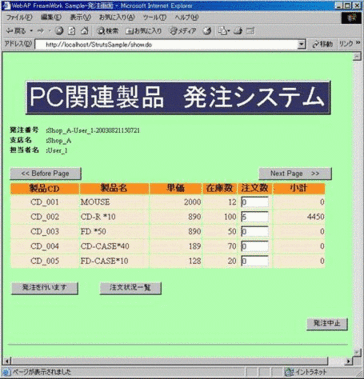
図2.6.4.3-6
1) ログオンAction(LogonAction.class)で生成されたログオン情報、表示データを元に画面を表示します。
2) 「Next/Before Page」ボタンをクリックすると、次/前ページの表示をデータ表示Action(ShowAction.class)にリクエストします。
3) 注文数に値が入力された場合、注文数(注文データ)の保存をデータ表示Action(ShowAction.class)にリクエストします。
4) 「注文状況一覧」ボタンをクリックすると、注文データ一覧の表示をデータ表示Action(ShowAction.class)にリクエストします。
5) 「発注を行います」ボタンをクリックすると、発注のリクエストを発注Action処理(OrderAction.class)に送信します。
6) 「発注中止ボタン」をクリックすると、発注処理終了画面(entryEnd.jsp)に遷移し発注処理を中断します。
7) 使用しているStrutsの機能
発注画面(order.jsp)のソースファイルを次に表示します。
<%@ page import="java.util.Hashtable" contentType="text/html;charset=UTF-8"%>
<%@ taglib uri="WEB-INF/struts-bean.tld"  prefix="bean" %>
<%@ taglib uri="WEB-INF/struts-html.tld"  prefix="html" %>

<html:html locale="true">
<head>
  <title><bean:message key="order.wtitle"/></title>
  <SCRIPT LANGUAGE="JavaScript">
    function fncchange(f){
        f.submit();
    }
  </SCRIPT>
  <html:base/>
</head>
<body bgcolor="#B0FFB0">

<html:errors/><br><br>

<CENTER><DIV style="background-color:#363562; width:90%; border-style :outset" align=center>
    <font size=42 color=white face="arial"><bean:message key="system.title"/></font>
</DIV></CENTER>
<br>

<%
    boolean errChk     = false;
    String _shop       = null;
    String _clerk      = null;
    String _orderno    = null;
    int    _shownum    = 0;
    int    _ordernum   = 0;

    String[] logonInfo = (String[])pageContext.getAttribute( "AttrLogOnInfo", pageContext.SESSION_SCOPE );
    if( logonInfo == null ) {
        errChk = true;
    } else {
        _shop       = logonInfo[0];
        _clerk      = logonInfo[1];
        _orderno    = logonInfo[2];
    }

    Integer _objInteger    = (Integer)pageContext.getAttribute( "AttrShowNum", pageContext.SESSION_SCOPE );
    if( _objInteger == null ) {
        errChk = true;
    } else {
        _shownum = _objInteger.intValue();
    }
    String[] _showproduct  = (String[])pageContext.getAttribute( "AttrShowProduct", pageContext.SESSION_SCOPE );
    String[] _showprodname = (String[])pageContext.getAttribute( "AttrShowProdName", pageContext.SESSION_SCOPE );
    Long[] _showprice      = (Long[])pageContext.getAttribute( "AttrShowPrice", pageContext.SESSION_SCOPE );
    Long[] _showstoks      = (Long[])pageContext.getAttribute( "AttrShowStoks", pageContext.SESSION_SCOPE );
    Hashtable _orderdata   = (Hashtable)pageContext.getAttribute("AttrOrderData", pageContext.SESSION_SCOPE );
    if( _showproduct == null || _showprodname == null || _showprice == null ||
        _showstoks == null   || _orderdata == null ) {
        errChk = true;
    }

%>
                                                                                                    <%
if( errChk ) {                                                                                      %>
  <center><bean:message key="error.system.paramerr"/></center>                                      <%
} else {                                                                                            %>
  <center><div align="center">
  <table border="0" width="678">
    <tr><td width="10%" nowrap><small><strong><bean:message key="word.orderno"/></strong></small></td>
        <td width="90%"><small><strong>:</strong><%=_orderno%></small></td></tr>
    <tr><td width="10%" nowrap><small><strong><bean:message key="word.branch"/></strong></small></td>
        <td width="90%"><small><strong>:</strong><%=_shop%></small></td></tr>
    <tr><td width="10%" nowrap><small><strong><bean:message key="word.charge"/></strong></small></td>
        <td width="90%"><small><strong>:</strong><%=_clerk%></small></td></tr>
  </table><br>
  <table border="0" width="678">
    <tr >
      <form name="orderform1" method="POST" action="show.do">
        <td width="70%" nowrap>
          <input type="submit" value="<< Before Page"><input type="hidden" name="REQ_KIND" value="BEFOR">
        </td>
      </form>
      <form name="orderform2" method="POST" action="show.do">
        <td width="30%" nowrap>
          <input type="submit" value="Next Page    >>"><input type="hidden" name="REQ_KIND" value="NEXT">
        </td>
      </form>
    </tr>

    <tr>
      <td COLSPAN="2" width="670" >
        <table border="0" width="100%">
          <tr>
            <th nowrap width="20%" bgcolor="#FF8F20"><bean:message key="word.product"/></th>
            <th nowrap width="20%" bgcolor="#FF8F20"><bean:message key="word.prdname"/></th>
            <th nowrap width="15%" bgcolor="#FF8F20"><bean:message key="word.price"/></th>
            <th nowrap width="10%" bgcolor="#FF8F20"><bean:message key="word.stoks"/></th>
            <th nowrap width="10%" bgcolor="#FF8F20"><bean:message key="word.ordernum"/></th>
            <th nowrap width="15%" bgcolor="#FF8F20"><bean:message key="word.subtotal"/></th>
          </tr>
<%        for(int cnt=0; cnt < _shownum; cnt++) {
              _objInteger = (Integer)_orderdata.get(_showproduct[cnt]);
              if( _objInteger != null ) {
                  _ordernum = _objInteger.intValue();
              } else {
                  _ordernum = 0;
              }                                                                                 %>
              <tr>
                <td nowrap width="20%" bgcolor="#FFE9D2" align="center"><%=_showproduct[cnt]%></td>
                <td nowrap width="20%" bgcolor="#FFE9D2"><%=_showprodname[cnt]%></td>
                <td nowrap width="15%" bgcolor="#FFE9D2" align="right"><%=_showprice[cnt]%></td>
                <td nowrap width="10%" bgcolor="#FFE9D2" align="right"><%=_showstoks[cnt]%></td>
                <form name="orderform3" method="POST" action="show.do">
                    <td nowrap width="10%" bgcolor="#FFE9D2">
                      <div align="center"><p><input NAME="REQ_VALUE2" TYPE="text" SIZE="3" align="right"
                                              value="<%=_ordernum%>"  onChange="fncchange(this.form)"></div>
                    </td>
                    <td nowrap width="15%" bgcolor="#FFE9D2" align="right">
                        <%=new Long(_ordernum*_showprice[cnt].longValue())%></td>
                    <td nowrap width="0%">
                        <input name="REQ_KIND" type="hidden" value="SETORDER"></td>
                    <td nowrap width="0%">
                        <input name="REQ_VALUE1" type="hidden" value="<%=_showproduct[cnt]%>"></td>
                </form>
              </tr>                                                                             <%
          }                                                                                     %>
        </table>
      </td>
    </tr>
    <tr height="16"><td></td></tr>
      <tr>
        <td COLSPAN="2" >
          <table border="0" width="100%" height="16">
            <td nowrap width="25%" method="POST" height="16">
              <form name="orderform4" action="order.do">
                <input type="submit" size="150" value="<bean:message key="order.button1"/>"/>
              </form>
            </td>
            <td nowrap width="75%" height="16" align="left">
              <form name="orderform5" method="POST" action="show.do">
                <input type="submit" size="150" value="<bean:message key="order.button2"/>"/>
                <input type="hidden" name="REQ_KIND" value="ORDERLIST">
              </form>
            </td>
          </table>
        </td>
      </tr>
  </table>
  </div></center>                                                                                 <%
}                                                                                                 %>
<form name="form2" METHOD="POST" ACTION="entryEnd.jsp">
    <div align="right">
        <input type="submit" value="<bean:message key="logon.button2"/>"/>
    </div>
</form>

<hr align="center">
</body>
</html:html>
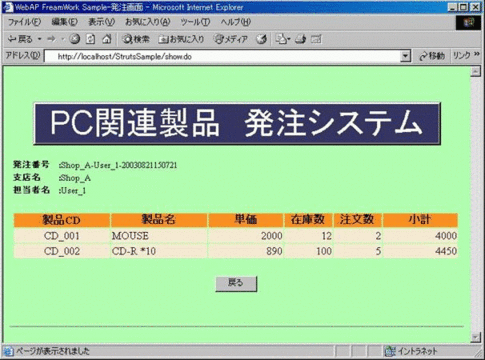
図2.6.4.3-7
1) データ表示Action(ShowAction.class)で生成された一覧データを元に画面を表示します。
2) 「戻る」ボタンクリックでデータ表示Action(ShowAction.class)に発注画面表示をリクエストします。
3) 使用しているStruts機能
発注一覧表示画面(orderlist.jsp)のソースを次に表示します。
<%@ page import="java.util.Hashtable" contentType="text/html;charset=UTF-8"%>
<%@ taglib uri="WEB-INF/struts-bean.tld"  prefix="bean" %>
<%@ taglib uri="WEB-INF/struts-html.tld"  prefix="html" %>

<html:html locale="true">
<head>
  <title><bean:message key="order.wtitle"/></title>
  <SCRIPT LANGUAGE="JavaScript">
    function fncchange(f){
        f.submit();
    }
  </SCRIPT>
  <html:base/>
</head>
<body bgcolor="#B0FFB0">

<html:errors/><br><br>

<CENTER><DIV style="background-color:#363562; width:90%; border-style :outset" align=center>
    <font size=42 color=white face="arial"><bean:message key="system.title"/></font>
</DIV></CENTER>
<br>

<%
    boolean errChk    = false;
    String  _shop     = null;
    String  _clerk    = null;
    String  _orderno  = null;
    int     _ordernum = 0;
    int     _shownum  = 0;

    String[] logonInfo = (String[])pageContext.getAttribute( "AttrLogOnInfo", pageContext.SESSION_SCOPE );
    if( logonInfo == null ) {
        errChk = true;
    } else {
        _shop       = logonInfo[0];
        _clerk      = logonInfo[1];
        _orderno    = logonInfo[2];
    }

    Integer _objInteger    = (Integer)pageContext.getAttribute( "AttrShowNum", pageContext.SESSION_SCOPE );
    String[] _showproduct  = (String[])pageContext.getAttribute( "AttrShowProduct", pageContext.SESSION_SCOPE );
    String[] _showprodname = (String[])pageContext.getAttribute( "AttrShowProdName", pageContext.SESSION_SCOPE );
    Long[] _showprice      = (Long[])pageContext.getAttribute( "AttrShowPrice", pageContext.SESSION_SCOPE );
    Long[] _showstoks      = (Long[])pageContext.getAttribute( "AttrShowStoks", pageContext.SESSION_SCOPE );
    Hashtable _orderdata   = (Hashtable)pageContext.getAttribute("AttrOrderData", pageContext.SESSION_SCOPE );
    if( _objInteger == null || _showproduct == null || _showprodname == null ||
        _showprice == null  || _showstoks == null   || _orderdata == null ) {
        errChk = true;
    } else {
        _shownum = _objInteger.intValue();
    }
%>

                                                                                                    <%
if( errChk ) {                                                                                      %>
    <center><bean:message key="error.system.paramerr"/></center>
    <form name="form2" METHOD="POST" ACTION="entryEnd.jsp">
        <div align="right">
          <input type="submit" value="<bean:message key="logon.button2"/>"/>
        </div>
    </form>
                                                                                                    <%
} else {                                                                                            %>
    <center><div align="center">
    <table border="0" width="678">
        <tr>
          <td width="10%" nowrap><small><strong><bean:message key="word.orderno"/></strong></small></td>
          <td width="90%"><small><strong>:</strong><%=_orderno%></small></td>
        </tr>
        <tr>
          <td width="10%" nowrap><small><strong><bean:message key="word.branch"/></strong></small></td>
          <td width="90%"><small><strong>:</strong><%=_shop%></small></td>
        </tr>
        <tr>
          <td width="10%" nowrap><small><strong><bean:message key="word.charge"/></strong></small></td>
          <td width="90%"><small><strong>:</strong><%=_clerk%></small></td>
        </tr>
    </table><br>
    <table border="0" width="678">
        <tr>
          <td COLSPAN="2" width="670" >
            <table border="0" width="100%">
              <tr>
                <th nowrap width="20%" bgcolor="#FF8F20"><bean:message key="word.product"/></th>
                <th nowrap width="20%" bgcolor="#FF8F20"><bean:message key="word.prdname"/></th>
                <th nowrap width="15%" bgcolor="#FF8F20"><bean:message key="word.price"/></th>
                <th nowrap width="10%" bgcolor="#FF8F20"><bean:message key="word.stoks"/></th>
                <th nowrap width="10%" bgcolor="#FF8F20"><bean:message key="word.ordernum"/></th>
                <th nowrap width="15%" bgcolor="#FF8F20"><bean:message key="word.subtotal"/></th>
              </tr>
                                                                                                    <%
              for(int cnt=0; cnt < _shownum; cnt++) {
                  _objInteger = (Integer)_orderdata.get(_showproduct[cnt]);
                  if( _objInteger != null ) {
                      _ordernum = _objInteger.intValue();
                  } else {
                      _ordernum = 0;
                  }                                                                                 %>
                  <tr>
                    <td nowrap width="20%" bgcolor="#FFE9D2" align="center"><%=_showproduct[cnt]%></td>
                    <td nowrap width="20%" bgcolor="#FFE9D2"><%=_showprodname[cnt]%></td>
                    <td nowrap width="15%" bgcolor="#FFE9D2" align="right"><%=_showprice[cnt]%></td>
                    <td nowrap width="10%" bgcolor="#FFE9D2" align="right"><%=_showstoks[cnt]%></td>
                    <td nowrap width="10%" bgcolor="#FFE9D2" align="right"><%=_ordernum%></td>
                    <td nowrap width="15%" bgcolor="#FFE9D2" align="right"><%=new Long(_ordernum*_showprice[cnt].longValue())%></td>
                  </tr>                                                                             <%
              }                                                                                     %>
            </table>
          </td>
        </tr>
        <tr height="16"><td></td></tr>
        <tr>
          <td COLSPAN="2" >
            <table border="0" width="100%" height="16">
              <td nowrap width="75%" height="16" align="center">
                <form name="form13" method="POST" action="show.do">
                  <input type="submit" size="150" value="<bean:message key="orderlist.button1"/>"/>
                  <input type="hidden" name="REQ_KIND" value="RESHOW">
                </form>
              </td>
            </table>
          </td>
        </tr>
    </table>
    </div></center>                                                                                <%
}                                                                                                   %>

<br>
<hr align="center">
</body>
</html:html>
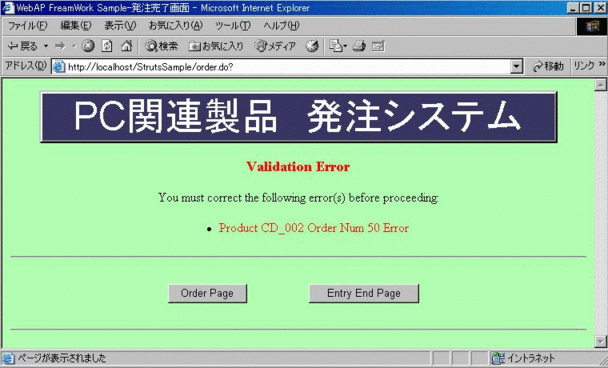
図2.6.4.3-8
1) 発注に失敗したデータの一覧を表示します。
2) 「Order Page」ボタンをクリックするとデータ表示Action(ShowDataAction.class)に発注画面表示をリクエストし、処理を継続します。
3) 「EntryEnd Page」ボタンをクリックすると発注完了画面(entryEnd.jsp)に遷移します。
4) 使用しているStrutsの機能
発注結果表示画面(entryResult.jsp)のソースを次に表示します。
<%@ page language="java" contentType="text/html;charset=UTF-8"%>
<%@ page import="java.util.*" %>
<%@ taglib uri="WEB-INF/struts-bean.tld"  prefix="bean" %>
<%@ taglib uri="WEB-INF/struts-html.tld"  prefix="html" %>

<html:html locale="true">
<head>
<title><bean:message key="end.wtitle"/></title>
<html:base/>
</head>
<body bgcolor="#B0FFB0">

<CENTER><DIV style="background-color:#363562; width:90%; border-style :outset" align=center>
    <FONT size=42 color=white face="arial"><bean:message key="system.title"/></FONT>
</DIV></CENTER><br>
<center>
<html:errors/>
</center>

<center>
  <table border="0" width="678" >
    <tr>
      <td width="25%" height="18"></td>
      <td width="75%" height="18" align="right"></td>
    </tr>

    <tr>
      <td width="20%" ></td>
      <td valign="top" width="80%" nowrap >
        <table border="0"  width="100%" height="16">
          <td nowrap width="35%" height="16">
            <form name="form1" action="order.jsp">
                <input type="submit" border="0" width="125" value="Order Page"/>
            </form>
          </td>
          <td nowrap width="65%" height="16">
            <form name="form2" action="entryEnd.jsp">
                <input type="submit" border="0" width="125" value="Entry End Page"/>
            </form>
          </td>
        </table>
      </td>
    </tr>
  </table>
</center>

<hr>
</body>
</html:html>
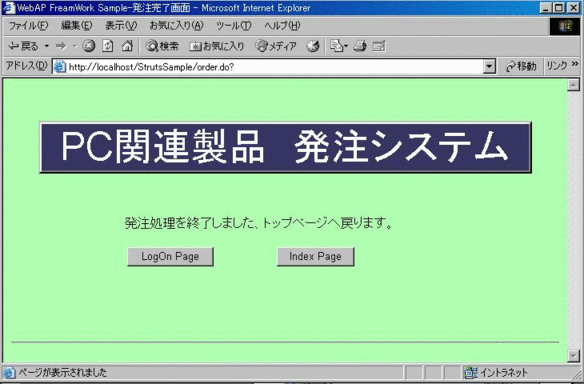
図2.6.4.3-9
1) 発注処理に使用した一時データ(ログオン情報、注文データ等)を削除します。
2) 「LogOn Page」ボタンをクリックするとログオン画面(logon.jsp)に遷移します
3) 「Index Page」ボタンをクリックすると初期表示画面(index.html)に遷移します
4) 使用しているStrutsの機能
発注完了画面(entryEnd.jsp)のソースを次に表示します。
<%@ page language="java" contentType="text/html;charset=UTF-8"%>
<%@ taglib uri="WEB-INF/struts-bean.tld"  prefix="bean" %>
<%@ taglib uri="WEB-INF/struts-html.tld"  prefix="html" %>

<html:html locale="true">
<head>
<title><bean:message key="end.wtitle"/></title>
<html:base/>
</head>
<body bgcolor="#B0FFB0">

<html:errors/><br><br>

<%
    // Attribute Info clear
    pageContext.removeAttribute( "AttrLogOnInfo",    pageContext.SESSION_SCOPE );
    pageContext.removeAttribute( "AttrShowNum",      pageContext.SESSION_SCOPE );
    pageContext.removeAttribute( "AttrShowProduct",  pageContext.SESSION_SCOPE );
    pageContext.removeAttribute( "AttrShowProdName", pageContext.SESSION_SCOPE );
    pageContext.removeAttribute( "AttrShowPrice",    pageContext.SESSION_SCOPE );
    pageContext.removeAttribute( "AttrShowStoks",    pageContext.SESSION_SCOPE );
    pageContext.removeAttribute( "AttrOrderData",    pageContext.SESSION_SCOPE );
    pageContext.removeAttribute( "AttrTotalRec",     pageContext.SESSION_SCOPE );
    pageContext.removeAttribute( "AttrNowPage",      pageContext.SESSION_SCOPE );
%>

<CENTER><DIV style="background-color:#363562; width:90%; border-style :outset" align=center>
    <FONT size=42 color=white face="arial"><bean:message key="system.title"/></FONT>
</DIV></CENTER><br>

<center>
  <table border="0" width="678" height="184">
    <tr>
      <td width="20%" height="18"></td>
      <td width="80%" height="18" align="right"></td>
    </tr>

    <tr><td></td><td><bean:message key="end.message1"/></td></tr>

    <tr>
      <td width="20%" ></td>
      <td valign="top" width="80%" nowrap >
        <table border="0"  width="100%" height="16">
          <td nowrap width="35%" height="16">
            <form name="form1" action="logon.jsp">
                <input type="submit" border="0" width="125" value="LogOn Page"/>
            </form>
          </td>
          <td nowrap width="65%" height="16">
            <form name="form2" action="index.html">
                <input type="submit" border="0" width="125" value="Index Page"/>
            </form>
          </td>
        </table>
      </td>
    </tr>
  </table>
</center>

<hr>
</body>
</html:html>
StrutsのActionServletで受信したリクエストの振り分け先としてActionクラスを継承したアプリケーションクラスを作成します。 またFormクラスを継承したクラスはアプリケーションクラスが呼び出される前に入力をチェックするために呼び出されます。
1. ログオンForm1) ログオン画面でユーザ名、パスワードが入力されている(nullでない)かチェックします。
2) 入力の確認ができたらログオンAction(LogonAction.class)に遷移します。
3) 使用しているStrutsの機能
ログオンForm(LogonForm.class)のソースを次に表示します。
package jp.co.nec.WebOTX.StrutsSample;

import javax.servlet.http.HttpServletRequest;
import org.apache.struts.action.ActionError;
import org.apache.struts.action.ActionErrors;
import org.apache.struts.action.ActionForm;
import org.apache.struts.action.ActionMapping;

/**
 * Form bean for the user profile page.  This form has the following fields,
 * with default values in square brackets:
 * <ul>
 * <li><b>password</b> - Entered password value
 * <li><b>username</b> - Entered username value
 * </ul>
 *
 * @author Craig R. McClanahan
 * @version $Revision: 1.3 $ $Date$
 */

public final class LogonForm extends ActionForm {

    // --------------------------------------------------- Instance Variables

    /**
     * The password.
     */
    private String password = null;

    /**
     * The username.
     */
    private String username = null;

    // ----------------------------------------------------------- Properties
    /**
     * Return the password.
     */
    public String getPassword() {
        return (this.password);
    }

    /**
     * Set the password.
     *
     * @param password The new password
     */
    public void setPassword(String password) {
        this.password = password;
    }

    /**
     * Return the username.
     */
    public String getUsername() {
        return (this.username);
    }

    /**
     * Set the username.
     *
     * @param username The new username
     */
    public void setUsername(String username) {
        this.username = username;
    }
    // --------------------------------------------------------- Public Methods

    /**
     * Reset all properties to their default values.
     * @param mapping The mapping used to select this instance
     * @param request The servlet request we are processing
     */
    public void reset(ActionMapping mapping, HttpServletRequest request) {
        this.password = null;
        this.username = null;
    }

    /**
     * Validate the properties that have been set from this HTTP request,
     * and return an <code>ActionErrors</code> object that encapsulates any
     * validation errors that have been found.  If no errors are found, return
     * <code>null</code> or an <code>ActionErrors</code> object with no
     * recorded error messages.
     *
     * @param mapping The mapping used to select this instance
     * @param request The servlet request we are processing
     */
    public ActionErrors validate(ActionMapping mapping,
                                 HttpServletRequest request) {
        ActionErrors errors = new ActionErrors();
        if ((username == null) || (username.length() < 1))
            errors.add("username", new ActionError("error.username.required"));
        if ((password == null) || (password.length() < 1))
            errors.add("password", new ActionError("error.password.required"));

        return errors;
    }
}
1) ログオン画面で指定されたログオン情報を元に発注番号を生成、保存します。
2) 表示データ編集処理(EditShowData.class)にて発注画面(order.jsp)で表示するデータを生成します
3) 使用しているStrutsの機能
ログオンAction(LogonAction.class)のソースを次に表示します。
package jp.co.nec.WebOTX.StrutsSample;

import java.io.*;
import java.sql.Timestamp;
import java.text.DateFormat;
import java.text.SimpleDateFormat;

import java.util.Locale;
import java.util.Hashtable;
import javax.servlet.http.HttpServletRequest;
import javax.servlet.http.HttpSession;
import javax.servlet.http.HttpServletResponse;
import javax.servlet.*;
import org.apache.struts.action.Action;
import org.apache.struts.action.ActionError;
import org.apache.struts.action.ActionErrors;
import org.apache.struts.action.ActionForm;
import org.apache.struts.action.ActionForward;
import org.apache.struts.action.ActionMapping;
//import org.apache.struts.util.AppException;
import org.apache.struts.util.MessageResources;
//import org.apache.commons.beanutils.PropertyUtils;

import java.sql.*;
import java.util.Vector;

public final class LogonAction extends Action {
    // ----------------------------------------------------- Instance Variables

    /**
     * The <code>Log</code> instance for this application.
     */
//    private Log log =
//        LogFactory.getLog("struts.sample");

    // --------------------------------------------------------- Public Methods

    /**
     * Process the specified HTTP request, and create the corresponding HTTP
     * response (or forward to another web component that will create it).
     * Return an <code>ActionForward</code> instance describing where and how
     * control should be forwarded, or <code>null</code> if the response has
     * already been completed.
     *
     * @param mapping The ActionMapping used to select this instance
     * @param actionForm The optional ActionForm bean for this request (if any)
     * @param request The HTTP request we are processing
     * @param response The HTTP response we are creating
     *
     * @exception Exception if business logic throws an exception
     */
    public ActionForward perform(ActionMapping mapping,
//    public ActionForward execute(ActionMapping mapping,
                                 ActionForm form,
                                 HttpServletRequest request,
                                 HttpServletResponse response)
        throws IOException, ServletException {

        // Extract attributes we will need
        Locale locale = getLocale(request);
        MessageResources messages = getResources();

        // Validate the request parameters specified by the user
        ActionErrors errors = new ActionErrors();

        GenericServlet pservlet = (GenericServlet)getServlet();
        ServletContext servcon = pservlet.getServletContext();
        HttpSession session = request.getSession();


        String user = request.getParameter("username");
        String pass = request.getParameter("password");

        String[] dbInfo = null;  // DB接続情報
        String dbDriver = null;  // JDBCドライバ名
        String dbUrl    = null;  // DBへのURL
        String dbUserid = null;  // ユーザ名
        String dbPasswd = null;  // パスワード

        dbInfo = (String[])session.getAttribute( "AttrDBInfo" );
        if( dbInfo == null ) {
            dbInfo = new String[4];

            dbInfo[0] = dbDriver = servcon.getInitParameter( "dbDriver" );
            dbInfo[1] = dbUrl    = servcon.getInitParameter( "dbURL" );
            dbInfo[2] = dbUserid = servcon.getInitParameter( "dbUserId" );
            dbInfo[3] = dbPasswd = servcon.getInitParameter( "dbPassword" );

            session.setAttribute( "AttrDBInfo", dbInfo );
        } else {
            dbDriver = dbInfo[0];
            dbUrl    = dbInfo[1];
            dbUserid = dbInfo[2];
            dbPasswd = dbInfo[3];
        }

        Connection conn = null;
        Statement  stmt = null;
        ResultSet  rset = null;

        // 在庫テーブルのコネクション生成
        try {
            Class.forName( dbDriver );
            conn = DriverManager.getConnection( dbUrl, dbUserid, dbPasswd );
            stmt = conn.createStatement(ResultSet.TYPE_SCROLL_INSENSITIVE,ResultSet.CONCUR_READ_ONLY);
        } catch (Exception e) {  //SQLException / ClassNotFoundException / Exception
            try {  // DB Objectクローズ
                if( stmt != null ) {  stmt.close();  }
                if( conn != null ) {  conn.close();  }
            } catch(SQLException se) {  }
            throw new ServletException(e.toString());
        }

        Vector UserInfo = new Vector();
        try {
            String sqlStr = "SELECT * FROM WEBCONT_USERINFO";
            rset = stmt.executeQuery( sqlStr );
            for( ; rset.next()==true; ) {
                String userinfo[] = new String[3];
                userinfo[0] = rset.getString( 1 ).trim();
                userinfo[1] = rset.getString( 2 ).trim();
                userinfo[2] = rset.getString( 3 ).trim();
                UserInfo.add( userinfo );
            }
            rset.close();
        } catch (Exception e) {  //SQLException
            throw new ServletException(e.toString());
        }

        boolean boo = false;
        String logoninfo[] = new String[3];
        for( int cnt = 0; cnt < UserInfo.size(); cnt++ ) {
            String userinfo[] = (String[])UserInfo.get( cnt );
            if( userinfo[0].equals(user) && userinfo[1].equals(pass) ) {
                logoninfo[0] = userinfo[2];
                logoninfo[1] = userinfo[0];
                Timestamp times = new Timestamp(System.currentTimeMillis());
                DateFormat fmt = new SimpleDateFormat("yyyyMMddHHmmss");
                logoninfo[2] = userinfo[2] + "-" +  userinfo[0] + "-" + fmt.format(times);
                boo = true;
                session.setAttribute( "AttrLogOnInfo", logoninfo );
            }
        }

        if( !boo ) {
            errors.add(ActionErrors.GLOBAL_ERROR,
                           new ActionError("error.logon.err", "logon error(user or pass)" ));
            saveErrors(request, errors);
            return (new ActionForward(mapping.getInput()));
        }

        session.setAttribute( "AttrOrderData", new Hashtable() );

        try {
            EditShowData edShowData = new EditShowData( servcon, request );
            session.setAttribute( "AttrNowPage", new Integer(1));
            edShowData.getShowData( request );
        } catch (IOException ie) {
            errors.add(ActionErrors.GLOBAL_ERROR,
                           new ActionError("error.logon.dberr", ie.toString() ));
            saveErrors(request, errors);
            return (new ActionForward(mapping.getInput()));
        }

        // Forward control to the specified success URI
        return mapping.findForward( "success" );
    }
}
1) 発注画面表示が要求された場合、表示ページ数を元に表示データ編集処理(EditShowData.class)にて表示データを生成します
2) 次/前ページの表示を要求された場合、表示ページ数を更新して表示データ編集処理(EditShowData.class)にて発注画面(order.jsp)表示データを生成します
3) 注文数が入力された場合、注文数を製品コードをキーに注文データとして保存します。また注文数に0が設定された場合、該当するデータを削除します
4) 注文状況一覧が入力された場合、表示データ編集処理(EditShowData.class)にて注文データを元に表示する一覧データを生成します
5) 使用しているStrutsの機能
データ表示Action(ShowDataAction.class)のソースを次に表示します。
package jp.co.nec.WebOTX.StrutsSample;

import java.io.*;
import java.util.Hashtable;
import java.sql.Timestamp;
import java.text.DateFormat;
import java.text.SimpleDateFormat;

import java.util.Locale;
import javax.servlet.http.HttpServletRequest;
import javax.servlet.http.HttpSession;
import javax.servlet.http.HttpServletResponse;
import javax.servlet.*;
import org.apache.struts.action.Action;
import org.apache.struts.action.ActionError;
import org.apache.struts.action.ActionErrors;
import org.apache.struts.action.ActionForm;
import org.apache.struts.action.ActionForward;
import org.apache.struts.action.ActionMapping;
//import org.apache.struts.util.AppException;
import org.apache.struts.util.MessageResources;
//import org.apache.commons.beanutils.PropertyUtils;

/**
 * Implementation of <strong>Action</strong> that validates a user logon.
 *
 * @author Craig R. McClanahan
 * @version $Revision: 1.3 $ $Date$
 */
public final class ShowAction extends Action {

    // ----------------------------------------------------- Instance Variables

    /**
     * The <code>Log</code> instance for this application.
     */

    // --------------------------------------------------------- Public Methods

    /**
     * Process the specified HTTP request, and create the corresponding HTTP
     * response (or forward to another web component that will create it).
     * Return an <code>ActionForward</code> instance describing where and how
     * control should be forwarded, or <code>null</code> if the response has
     * already been completed.
     *
     * @param mapping The ActionMapping used to select this instance
     * @param actionForm The optional ActionForm bean for this request (if any)
     * @param request The HTTP request we are processing
     * @param response The HTTP response we are creating
     *
     * @exception Exception if business logic throws an exception
     */
    public ActionForward perform(ActionMapping mapping,
                                 ActionForm form,
                                 HttpServletRequest request,
                                 HttpServletResponse response)
        throws IOException, ServletException {

        // Extract attributes we will need
        Locale locale = getLocale(request);
        MessageResources messages = getResources();

        // Validate the request parameters specified by the user
        ActionErrors errors = new ActionErrors();

        GenericServlet pservlet = (GenericServlet)getServlet();
        ServletContext servcon = pservlet.getServletContext();
        HttpSession session = request.getSession();
        String reqKind   = request.getParameter("REQ_KIND");

        if( reqKind.equals("SETORDER")) {
            String reqValue1 = request.getParameter("REQ_VALUE1");
            String reqValue2 = request.getParameter("REQ_VALUE2");
            Integer objInteger = null;

            if( reqValue1 == null || reqValue2 == null ) {
                errors.add(ActionErrors.GLOBAL_ERROR,
                               new ActionError("error.show.paramerr", reqValue1, reqValue2));
                saveErrors(request, errors);
                return (new ActionForward(mapping.getInput()));
            }

            try {
                objInteger = new Integer( reqValue2 );
            } catch(Exception e) {
                errors.add(ActionErrors.GLOBAL_ERROR,
                               new ActionError("error.show.numerr", reqValue2));
                saveErrors(request, errors);
                return (new ActionForward(mapping.getInput()));
            }

            Hashtable orderData = (Hashtable)session.getAttribute("AttrOrderData");
            if( orderData == null ) {
                orderData = new Hashtable();
            }

            if( objInteger.intValue() == 0 ) {
                orderData.remove( reqValue1 );
            } else {
                orderData.put( reqValue1, objInteger );
            }
            session.setAttribute("AttrOrderData", orderData);
        } else if( reqKind.equals("NEXT")) {
            Integer nowPage  = (Integer)session.getAttribute("AttrNowPage");
            Long totalRec = (Long)session.getAttribute("AttrTotalRec");
            int nowRec = ((nowPage.intValue()-1)*5)+1;
            if( (nowRec + 5) <= totalRec.intValue() ) {
                // 次のページに表示するデータ有
                nowPage = new Integer(nowPage.intValue()+1);
                // 表示ページ数更新
                session.setAttribute( "AttrNowPage", nowPage );
            }

            try {
                EditShowData edShowData = new EditShowData( servcon,request );
                edShowData.getShowData( request );
            } catch (IOException ie) {
                errors.add(ActionErrors.GLOBAL_ERROR,
                           new ActionError("error.show.dberr", ie.toString() ));
                saveErrors(request, errors);
                return (new ActionForward(mapping.getInput()));
            }
        } else if( reqKind.equals("BEFOR")) {
            Integer objInteger = (Integer)session.getAttribute("AttrNowPage");
            int nowPage = objInteger.intValue();
            if( (nowPage - 1) >= 1 ) {
                // 戻るページ有
                nowPage = nowPage - 1;
                // 表示ページ数更新
                session.setAttribute( "AttrNowPage", new Integer(nowPage) );
            }

            try {
                EditShowData edShowData = new EditShowData( servcon, request );
                edShowData.getShowData( request );
            } catch (IOException ie) {
                errors.add(ActionErrors.GLOBAL_ERROR,
                           new ActionError("error.show.dberr", ie.toString() ));
                saveErrors(request, errors);
                return (new ActionForward(mapping.getInput()));
            }
        } else if( reqKind.equals("ORDERLIST")) {
            try {
                EditShowData edShowData = new EditShowData( servcon, request );
                edShowData.getListData( request );
            } catch (IOException ie) {
                errors.add(ActionErrors.GLOBAL_ERROR,
                           new ActionError("error.show.dberr", ie.toString() ));
                saveErrors(request, errors);
                return (new ActionForward(mapping.getInput()));
            }

            // 一覧表示画面へ
            return (mapping.findForward("orderlist"));
        } else if( reqKind.equals("RESHOW")) {
            try {
                EditShowData edShowData = new EditShowData( servcon, request );
                edShowData.getShowData( request );
            } catch (IOException ie) {
                errors.add(ActionErrors.GLOBAL_ERROR,
                           new ActionError("error.show.dberr", ie.toString() ));
                saveErrors(request, errors);
                return (new ActionForward(mapping.getInput()));
            }
        } else {
            errors.add(ActionErrors.GLOBAL_ERROR,
                           new ActionError("error.show.kinderr", reqKind));
            saveErrors(request, errors);
            return (new ActionForward(mapping.getInput()));
        }

        // Forward control to the specified success URI
        return mapping.findForward( "success" );
    }
}
1) 注文データを発注データDB登録処理(DBOrderData.class)にてデータベースに登録します。
2) 発注処理が正常に終了した場合表示する画面を発注終了画面(entryEnd.jsp)に遷移します。 正常に終了しないデータがあった場合ActionErrorsオブジェクトにエラーになった商品データ一覧を作成し、発注結果表示画面(entryResult.jsp)に遷移します。
3) 使用しているStrutsの機能
発注処理Action(OrderAction.class)のソースを次に表示します。
package jp.co.nec.WebOTX.StrutsSample;

import java.sql.Timestamp;
import java.text.DateFormat;
import java.text.SimpleDateFormat;

import java.io.*;
import java.util.Locale;
import java.util.*;
import javax.servlet.http.HttpServletRequest;
import javax.servlet.http.HttpSession;
import javax.servlet.http.HttpServletResponse;
import javax.servlet.*;
//import org.apache.commons.logging.Log;
//import org.apache.commons.logging.LogFactory;
import org.apache.struts.action.Action;
import org.apache.struts.action.ActionError;
import org.apache.struts.action.ActionErrors;
import org.apache.struts.action.ActionForm;
import org.apache.struts.action.ActionForward;
import org.apache.struts.action.ActionMapping;
//import org.apache.struts.util.AppException;
import org.apache.struts.util.MessageResources;
//import org.apache.commons.beanutils.PropertyUtils;

/**
 * Implementation of <strong>Action</strong> that validates a user logon.
 *
 * @author Craig R. McClanahan
 * @version $Revision: 1.3 $ $Date$
 */
public final class OrderAction extends Action {

    // ----------------------------------------------------- Instance Variables

    /**
     * The <code>Log</code> instance for this application.
     */
//    private Log log =
//        LogFactory.getLog("struts.sample");

    // --------------------------------------------------------- Public Methods

    /**
     * Process the specified HTTP request, and create the corresponding HTTP
     * response (or forward to another web component that will create it).
     * Return an <code>ActionForward</code> instance describing where and how
     * control should be forwarded, or <code>null</code> if the response has
     * already been completed.
     *
     * @param mapping The ActionMapping used to select this instance
     * @param actionForm The optional ActionForm bean for this request (if any)
     * @param request The HTTP request we are processing
     * @param response The HTTP response we are creating
     *
     * @exception Exception if business logic throws an exception
     */
    public ActionForward perform(ActionMapping mapping,
                                 ActionForm form,
                                 HttpServletRequest request,
                                 HttpServletResponse response)
        throws IOException, ServletException {

        // Extract attributes we will need
        Locale locale = getLocale(request);
        MessageResources messages = getResources();

        // Validate the request parameters specified by the user
        ActionErrors errors = new ActionErrors();

        GenericServlet pservlet = (GenericServlet)getServlet();
        ServletContext servcon = pservlet.getServletContext();
        HttpSession session = request.getSession();

        try{
            DBOrderData dbOrder = new DBOrderData( servcon, request );
            dbOrder.errorData.clear();
            dbOrder.entryData( request );

            if( dbOrder.errorData.size() > 0 ) {
                session.setAttribute("AttrOrderData", dbOrder.errorData);
                Enumeration enu = dbOrder.errorData.keys();
                for( ; enu.hasMoreElements() ; ) {
                    String  keyname  = (String)enu.nextElement();
                    Integer ordernum = (Integer)dbOrder.errorData.get(keyname);

                    errors.add(ActionErrors.GLOBAL_ERROR,
                           new ActionError("error.order.orderNum", keyname, ordernum));
                    saveErrors(request, errors);
                }
                return mapping.findForward("result");
            }
        } catch(Exception e) {
            errors.add(ActionErrors.GLOBAL_ERROR,
                       new ActionError("error.order.dberr", e.toString()));
            saveErrors(request, errors);
            return mapping.findForward("end");
        }

        // Forward control to the specified success URI
        return mapping.findForward("end");

    }
}
1) 呼び出し元で指定されたページ数を元に発注画面(order.jsp)に表示するデータを生成、保存します。
2) 注文データを元に注文状況一覧画面(orderlist.jsp)に表示するデータ一覧を生成、保存します。
表示データ編集処理(EditShowData.class)のソースを次に表示します。
package jp.co.nec.WebOTX.StrutsSample;

import javax.servlet.http.HttpServletRequest;
import javax.servlet.http.HttpSession;
import javax.servlet.http.HttpServletResponse;
import javax.servlet.*;

import java.io.*;
import java.util.Hashtable;
import java.util.Enumeration;
import java.util.Arrays;
import java.sql.*;
import java.sql.Date.*;
import java.sql.SQLException;

public final class EditShowData {

    // ----------------------------------------------------- Instance Variables

    /**
     * The <code>Log</code> instance for this application.
     */
    String[] dbInfo = null;  // DB接続情報
    String dbDriver = null;  // JDBCドライバ名
    String dbUrl    = null;  // DBへのURL
    String dbUserid = null;  // ユーザ名
    String dbPasswd = null;  // パスワード

    public EditShowData( ServletContext servcon,
                              HttpServletRequest request )
            throws IOException {

        initDBInfo( servcon, request );
    }

    // --------------------------------------------------------- Public Methods

    public void initDBInfo( ServletContext servcon,
                            HttpServletRequest request )
            throws IOException {

        Connection conn = null;
        Statement  stmt = null;
        ResultSet  rset = null;
        HttpSession session = request.getSession();

        // DB情報の取得
        dbInfo = (String[])session.getAttribute( "AttrDBInfo" );
        if( dbInfo == null ) {
            dbInfo = new String[4];

            dbInfo[0] = dbDriver = servcon.getInitParameter( "dbDriver" );
            dbInfo[1] = dbUrl    = servcon.getInitParameter( "dbURL" );
            dbInfo[2] = dbUserid = servcon.getInitParameter( "dbUserId" );
            dbInfo[3] = dbPasswd = servcon.getInitParameter( "dbPassword" );
            session.setAttribute( "AttrDBInfo", dbInfo );
        } else {
            dbDriver = dbInfo[0];
            dbUrl    = dbInfo[1];
            dbUserid = dbInfo[2];
            dbPasswd = dbInfo[3];
        }

        Long totalRec = (Long)session.getAttribute("AttrTotalRec");
        if( totalRec != null ) {
            return;
        }

        // 在庫テーブルのコネクション生成
        try {
            Class.forName( dbDriver );
            conn = DriverManager.getConnection( dbUrl, dbUserid, dbPasswd );
            stmt = conn.createStatement(ResultSet.TYPE_SCROLL_INSENSITIVE,ResultSet.CONCUR_READ_ONLY);
        } catch (Exception e) {  //SQLException / ClassNotFound / Exception
            try {  // DB Objectクローズ
                if( stmt != null ) {  stmt.close();  }
                if( conn != null ) {  conn.close();  }
            } catch(SQLException se) {  }
            throw new IOException(e.toString());
        }

        try {
            // 在庫テーブルのレコード数抽出
            rset = stmt.executeQuery("SELECT COUNT(*) from WEBCONT_WAREHOUSE");
            rset.next();
            long recNum = rset.getLong(1);
            session.setAttribute("AttrTotalRec", new Long(recNum));
        } catch (SQLException e) {
            throw new IOException(e.toString());
        } finally {
            try {
                // DB Objectクローズ
                rset.close();
                stmt.close();
                conn.close();
            } catch(SQLException se) {  }
        }
    }

    public void getShowData( HttpServletRequest request )
            throws IOException {

        Connection conn = null;
        Statement  stmt = null;
        ResultSet  rset = null;
        HttpSession session = request.getSession();

        // 在庫テーブルのコネクション生成
        try {
            Class.forName( dbDriver );
            conn = DriverManager.getConnection( dbUrl, dbUserid, dbPasswd );
            stmt = conn.createStatement(ResultSet.TYPE_SCROLL_INSENSITIVE,ResultSet.CONCUR_READ_ONLY);
        } catch (Exception e) {  //SQLException / ClassNotFound / Exception
            try {  // DB Objectクローズ
                if( stmt != null ) {  stmt.close();  }
                if( conn != null ) {  conn.close();  }
            } catch(SQLException se) {  }
            throw new IOException(e.toString());
        }

        Integer nowPage  = null;  // 現在表示ページ
        int     startRec = 0;     // 表示開始レコード

        // 表示開始レコード算出
        nowPage = (Integer)session.getAttribute("AttrNowPage");
        if( nowPage == null ) {
            nowPage = new Integer(1);
        }
        startRec = 1 + ((nowPage.intValue()-1) * 5);

        String rset_c1     = null;  // 製品CD
        String rset_c2     = null;  // 製品名
        long   rset_c3     = 0;     // 単価
        long   rset_c4     = 0;     // 在庫数
        int    cnt         = 0;     // カウンタ
        String attrName    = null;
        Integer orderNum   = null;

        String[] product  = new String[5];
        String[] prodname = new String[5];
        Long[]   price    = new Long[5];
        Long[]   stoks    = new Long[5];

        try {
            // 在庫テーブルの抽出
            rset = stmt.executeQuery( "SELECT * from WEBCONT_WAREHOUSE" );
            // 開始レコードの設定
            if (startRec == 1) {
                rset.beforeFirst();
            } else {
                rset.absolute(startRec-1);
            }

            // 表示データクリア
            session.removeAttribute( "AttrShowNum" );
            session.removeAttribute( "AttrShowProduct" );
            session.removeAttribute( "AttrShowProdName" );
            session.removeAttribute( "AttrShowPrice" );
            session.removeAttribute( "AttrShowStoks" );

            for( cnt = 0; cnt < 5 && (rset.next()==true); cnt++) {

                // 在庫データの取得
                rset_c1 = rset.getString(1);
                rset_c1 = rset_c1.trim();
                rset_c2 = rset.getString(2);
                rset_c2 = rset_c2.trim();
                rset_c3 = rset.getLong(3);
                rset_c4 = rset.getLong(4);

                // 在庫データの設定
                product[cnt] = rset_c1;
                prodname[cnt] = rset_c2;
                price[cnt] = new Long(rset_c3);
                stoks[cnt] = new Long(rset_c4);
            }

            session.setAttribute( "AttrShowNum", new Integer(cnt));
            session.setAttribute( "AttrShowProduct", product );
            session.setAttribute( "AttrShowProdName", prodname );
            session.setAttribute( "AttrShowPrice", price );
            session.setAttribute( "AttrShowStoks", stoks );
        } catch (SQLException e) {
            throw new IOException(e.toString());
        } finally {
            try {
                // DB Objectクローズ
                rset.close();
                stmt.close();
                conn.close();
            } catch(SQLException se) {  }
        }

        return;
    }


    public void getListData( HttpServletRequest request )
            throws IOException {

        Connection conn = null;
        Statement  stmt = null;
        ResultSet  rset = null;
        HttpSession session = request.getSession();

        // 在庫テーブルのコネクション生成
        try {
            Class.forName( dbDriver );
            conn = DriverManager.getConnection( dbUrl, dbUserid, dbPasswd );
            stmt = conn.createStatement(ResultSet.TYPE_SCROLL_INSENSITIVE,ResultSet.CONCUR_READ_ONLY);
        } catch (Exception e) {  //SQLException / ClassNotFound / Exception
            try {  // DB Objectクローズ
                if( stmt != null ) {  stmt.close();  }
                if( conn != null ) {  conn.close();  }
            } catch(SQLException se) {}

            throw new IOException(e.toString());
        }

        Hashtable orderData = (Hashtable)session.getAttribute( "AttrOrderData" );
        int orderNum  = orderData.size();

        // 現在表示データ保存
        Integer  rbkNum      = (Integer)session.getAttribute( "AttrShowNum" );
        String[] rbkProduct  = (String[])session.getAttribute( "AttrShowProduct" );
        String[] rbkProdName = (String[])session.getAttribute( "AttrShowProdName" );
        Long[]   rbkPrice    = (Long[])session.getAttribute( "AttrShowPrice" );
        Long[]   rbkStoks    = (Long[])session.getAttribute( "AttrShowStoks" );

        // 表示データクリア
        session.removeAttribute( "AttrShowNum" );
        session.removeAttribute( "AttrShowProduct" );
        session.removeAttribute( "AttrShowProdName" );
        session.removeAttribute( "AttrShowPrice" );
        session.removeAttribute( "AttrShowStoks" );

        Enumeration enu = orderData.keys();
        String[] sortprod = new String[orderNum];
        String[] product  = new String[orderNum];
        String[] prodname = new String[orderNum];
        Long[]   price    = new Long[orderNum];
        Long[]   stoks    = new Long[orderNum];
        int    cnt        = 0;     // カウンタ
        String sqlStr     = null;
        String rset_c1    = null;  // 製品CD
        String rset_c2    = null;  // 製品名
        long   rset_c3    = 0;     // 単価
        long   rset_c4    = 0;     // 在庫数
        int orderCnt      = 0;

        try {
            for( cnt = 0; cnt < orderNum; cnt++) {
                sortprod[cnt] = (String)enu.nextElement();
            }
            Arrays.sort(sortprod);
            for( cnt = 0; cnt < orderNum; cnt++) {
                rset_c1 = sortprod[cnt];
                sqlStr = "SELECT * FROM WEBCONT_WAREHOUSE WHERE PRODUCT_ID LIKE '" + rset_c1 +"'";
                rset = stmt.executeQuery( sqlStr );
                if ( !rset.first() ) {
                    continue;
                }
                // 在庫データの取得
                rset_c1 = rset_c1.trim();
                rset_c2 = rset.getString(2);
                rset_c2 = rset_c2.trim();
                rset_c3 = rset.getLong(3);
                rset_c4 = rset.getLong(4);
                // 在庫データの設定
                product[orderCnt]  = rset_c1;
                prodname[orderCnt] = rset_c2;
                price[orderCnt]    = new Long(rset_c3);
                stoks[orderCnt]    = new Long(rset_c4);
                orderCnt++;
            }

            // 表示データの更新
            session.setAttribute( "AttrShowNum", new Integer(orderCnt));
            session.setAttribute( "AttrShowProduct", product );
            session.setAttribute( "AttrShowProdName", prodname );
            session.setAttribute( "AttrShowPrice", price );
            session.setAttribute( "AttrShowStoks", stoks );

            // DB Objectクローズ
            if( rset != null ) rset.close();
        } catch (SQLException e) {
            // 現在表示データの復帰
            session.setAttribute( "AttrShowNum",      rbkNum );
            session.setAttribute( "AttrShowProduct",  rbkProduct );
            session.setAttribute( "AttrShowProdName", rbkProdName );
            session.setAttribute( "AttrShowPrice",    rbkPrice );
            session.setAttribute( "AttrShowStoks",    rbkStoks );
            throw new IOException(e.getMessage());
        } finally {
            try {  // DB Objectクローズ
                stmt.close();
                conn.close();
            } catch(SQLException se) {  }
        }

        return;
    }
}
1) 注文データを元に発注済データの登録と在庫管理テーブルの更新を行います。
発注データDB登録処理(DBOrderData.class)のソースを次に表示します。
package jp.co.nec.WebOTX.StrutsSample;

import javax.servlet.http.HttpServletRequest;
import javax.servlet.http.HttpSession;
import javax.servlet.http.HttpServletResponse;
import javax.servlet.*;

import java.io.*;
import java.util.Hashtable;
import java.util.Enumeration;
import java.util.Arrays;
import java.sql.*;
import java.sql.Date.*;
import java.sql.SQLException;

public final class DBOrderData {

    // ----------------------------------------------------- Instance Variables
    /**
     * The <code>Log</code> instance for this application.
     */
    String[] dbInfo = null;  // DB接続情報
    String dbDriver = null;  // JDBCドライバ名
    String dbUrl    = null;  // DBへのURL
    String dbUserid = null;  // ユーザ名
    String dbPasswd = null;  // パスワード
    Hashtable errorData = new Hashtable();

    public DBOrderData( ServletContext servcon,
                            HttpServletRequest request )
            throws IOException {

        initDBInfo( servcon, request );
    }

    // --------------------------------------------------------- Public Methods

    public void initDBInfo( ServletContext servcon,
                            HttpServletRequest request )
            throws IOException {

        Connection conn = null;
        Statement  stmt = null;
        ResultSet  rset = null;

        HttpSession session = request.getSession();

        // DB情報の取得
        dbInfo = (String[])session.getAttribute( "AttrDBInfo" );
        if( dbInfo == null ) {
            dbInfo = new String[4];

            dbInfo[0] = dbDriver = servcon.getInitParameter( "dbDriver" );
            dbInfo[1] = dbUrl    = servcon.getInitParameter( "dbURL" );
            dbInfo[2] = dbUserid = servcon.getInitParameter( "dbUserId" );
            dbInfo[3] = dbPasswd = servcon.getInitParameter( "dbPassword" );
            session.setAttribute( "AttrDBInfo", dbInfo );
        } else {
            dbDriver = dbInfo[0];
            dbUrl    = dbInfo[1];
            dbUserid = dbInfo[2];
            dbPasswd = dbInfo[3];
        }
    }

    public void entryData( HttpServletRequest request )
            throws IOException {

        Connection conn = null;
        Statement  stmt = null;
        ResultSet  rset = null;
        PreparedStatement  od_stmt = null;
        HttpSession session = request.getSession();

        // 在庫テーブルのコネクション生成
        try {
            Class.forName( dbDriver );
            conn = DriverManager.getConnection( dbUrl, dbUserid, dbPasswd );
            stmt = conn.createStatement(ResultSet.TYPE_SCROLL_INSENSITIVE,ResultSet.CONCUR_READ_ONLY);
        } catch (Exception e) {  //SQLException / ClassNotFound / Exception
            try {
                // DB Objectクローズ
                if( stmt != null ) {  stmt.close();  }
                if( conn != null ) {  conn.close();  }
            } catch(SQLException se) { }
            throw new IOException(e.toString());
        }

        Hashtable orderData = (Hashtable)session.getAttribute("AttrOrderData");
        if( orderData == null ) {
            return;
        }

        String rset_c1     = null;  // 製品CD
        String rset_c2     = null;  // 製品名
        long   rset_c3     = 0;     // 単価
        long   rset_c4     = 0;     // 在庫数
        long   sub_total   = 0;     // 小計
        Timestamp  nowtim  = null;  // 日時刻
        Integer orderNum   = null;  // 注文数
        String sqlStr      = null;  // 実行SQL文

        String[] logonInfo = (String[])session.getAttribute("AttrLogOnInfo");
        if( logonInfo == null ) {
            throw new IOException("not found logon data");
        }

        Enumeration enu = orderData.keys();

        try {
            for( ; enu.hasMoreElements(); ) {
                rset_c1 = (String)enu.nextElement();
                // 在庫データより該当データを抽出
                sqlStr = "SELECT * FROM WEBCONT_WAREHOUSE WHERE PRODUCT_ID LIKE '" + rset_c1 +"'";

                // 自動コミットを解除
                conn.setAutoCommit( false );

                // 在庫テーブルの抽出
                rset = stmt.executeQuery( sqlStr );
                rset.beforeFirst();

                if( rset.next() != true ) {
                    // 自動コミットを復活
                    conn.setAutoCommit( true );
                    continue;
                }

                // 発注データ有無チェック
                if( orderData.get( rset_c1 ) == null ) {
                    // 自動コミットを復活
                    conn.setAutoCommit( true );
                    continue;
                }

                rset_c2 = rset.getString(2);
                rset_c2 = rset_c2.trim();
                rset_c3 = rset.getLong(3);
                rset_c4 = rset.getLong(4);

                orderNum = (Integer)orderData.get( rset_c1 );
                rset_c4 = rset_c4 - orderNum.longValue();
                if( rset_c4 < 0 ) {
                    errorData.put( rset_c1, orderNum );

                    // 自動コミットを復活
                    conn.setAutoCommit( true );
                    continue;
                }

                // 検索結果クローズ
                rset.close();

                // 在庫テーブルの在庫数更新
                sqlStr = "UPDATE WEBCONT_WAREHOUSE SET STOCK_NUM='" +
                          new Long(rset_c4).toString() +
                         "' WHERE PRODUCT_ID='" + rset_c1 + "'";
                stmt.executeQuery( sqlStr );

                // 発注済みデータの登録
                sqlStr = "INSERT INTO WEBCONT_ORDER(ORDER_SHOP," + "ORDER_CLERK," +
                                               "ORDER_NO," + "ORDER_DATE," +
                                               "PRODUCT_ID," + "PRODUCT_NAME," +
                                               "UNIT_PRICE," + "ORDER_NUM,SUB_TOTAL)" +
                                " values (?,?,?,?,?,?,?,?,?)";
                // INSERT (注文店/注文者/注文番号/注文日付/製品CD/製品名/単価/注文数/小計)
                od_stmt = conn.prepareStatement( sqlStr );

                sub_total    = orderNum.longValue() * rset_c3; // 小計計算
                nowtim = new Timestamp(System.currentTimeMillis());
                od_stmt.setString( 1, logonInfo[0] );        // 発注店設定
                od_stmt.setString( 2, logonInfo[1] );        // 発注者設定
                od_stmt.setString( 3, logonInfo[2] );        // 発注番号設定
                od_stmt.setTimestamp( 4, nowtim );           // 注文日設定
                od_stmt.setString( 5, rset_c1 );             // 製品CD設定
                od_stmt.setString( 6, rset_c2 );             // 製品名設定
                od_stmt.setLong( 7, rset_c3 );               // 単価設定
                od_stmt.setLong( 8, orderNum.longValue() );  // 注文数設定
                od_stmt.setLong( 9, sub_total );             // 小計設定
                // 設定実行
                od_stmt.execute();

                // ステートメントクローズ
                od_stmt.close();

                // コミットを行う
                conn.commit();

                // 自動コミットを復活
                conn.setAutoCommit( true );

                // 発注済みデータを発注データより削除
                orderData.remove( rset_c1 );
            }

        } catch (Exception e) {
            try {
                conn.rollback();
            } catch(SQLException e2) {
                throw new IOException("DBOrder rollback NG");
            }
            throw new IOException(e.toString());
        } finally {
            try {
                // 自動コミットを復活
                conn.setAutoCommit( true );

                // DB Objectクローズ
                stmt.close();
                conn.close();
            } catch(SQLException se) { }
        }

        return;
    }
}
ユーザ情報、発注データを保存するためにデータベースを使用します。今回はOracleとそのJDBCドライバを使用しデータの読み書きを行います。 JDBC ドライバのファイル(今回はclasses12.zip)をテスト用サーバのクラスパスに登録しておく必要があります。
try {
  Class.forName( "DBのドライバ名" ); // (1)
  Connection conn = DriverManager.getConnection("DBのURL","DBのユーザ名", "DBのパスワード" ); // (2)
  Statement stmt = conn.createStatement(ResultSet.TYPE_SCROLL_INSENSITIVE,ResultSet.CONCUR_READ_ONLY); // (3)
} catch (SQLException e) {
:
サンプルで使用するOracleDBのテーブル情報は以下の通り。
| 製品ID | 製品名 | 単価 | 在庫数 |
|---|---|---|---|
| PRODUCT_ID | PRODUCT_NAME | UNIT_PRICE | STOCK_NUM |
| char(32) | char(32) | number | number |
| 発注店 | 担当者 | 発注番号 | 発注日 | 製品ID | 製品名 | 単価 | 注文数 | 小計 |
|---|---|---|---|---|---|---|---|---|
| ORDER_SHOP | ORDER_CLERK | ORDER_NO | ORDER_DATE | PRODUCT_ID | PRODUCT_NAME | UNIT_PRICE | ORDER_NUM | SUB_TOTAL |
| char(32) | char(32) | char(64) | Date | char(10) | char(32) | number | Number | number |
| ユーザ名 | パスワード | 担当店 |
|---|---|---|
| INFO_USER | INFO_PASS | INFO_SHOP |
| char(32) | char(32) | char(32) |
Struts定義ファイル(struts-config.xml)を作成します。 HTTPからのリクエストを振り分ける、またレスポンスとして処理するファイルを決定するために、 struts-config.xmlファイルを設定する必要があります。
今回のサンプルWebアプリケーションの定義ファイルは次のようになります。
例) struts-config.xmlの設定例
<?xml version="1.0" encoding="ISO-8859-1" ?>

<!DOCTYPE struts-config PUBLIC
          "-//Apache Software Foundation//DTD Struts Configuration 1.1//EN"
          "http://jakarta.apache.org/struts/dtds/struts-config_1_1.dtd">

<struts-config>
  <!-- ========== Form Bean Definitions =================================== -->
  <form-beans>
    <!-- Logon form bean -->
    <form-bean      name="logonForm"
                    type="jp.co.nec.WebOTX.StrutsSample.LogonForm"/>
  </form-beans>

  <!-- ========== Global Forward Definitions ============================== -->
  <global-forwards>
        <forward name="success"              path="/order.jsp"/>
        <forward name="end"                  path="/entryEnd.jsp"/>
  </global-forwards>

  <!-- ========== Action Mapping Definitions ============================== -->
  <action-mappings>
    <action    path="/logon"
               type="jp.co.nec.WebOTX.StrutsSample.LogonAction"
               name="logonForm"
               scope="request"
               input="/logon.jsp">
      <forward name="success"              path="/order.jsp"/>
    </action>

    <action    path="/show"
               type="jp.co.nec.WebOTX.StrutsSample.ShowAction"
               scope="request"
               input="/order.jsp">
      <forward name="success"              path="/order.jsp"/>
      <forward name="orderlist"            path="/orderlist.jsp"/>
    </action>

    <action    path="/order"
               type="jp.co.nec.WebOTX.StrutsSample.OrderAction"
               scope="request"
               input="/order.jsp">
      <forward name="success"              path="/order.jsp"/>
      <forward name="result"               path="/entryResult.jsp"/>
    </action>

  </action-mappings>

    <message-resources parameter="jp.co.nec.WebOTX.StrutsSample.ApplicationResources"/>

</struts-config>
各要素について解説します。
WebAPの定義ファイル(web.xml)ファイルを作成します。 ここではポイントとなるServletのマッピングについて記述します。
web.xmlの設定
<?xml version="1.0" encoding="ISO-8859-1"?>

<!DOCTYPE web-app
    PUBLIC "-//Sun Microsystems, Inc.//DTD Web Application 2.3//EN"
    "http://java.sun.com/dtd/web-app_2_3.dtd">

<web-app>
    <context-param>
        <param-name>dbURL</param-name>
        <param-value>jdbc:oracle:thin:@servername:1521:orcl</param-value>
    </context-param>
    <context-param>
        <param-name>dbDriver</param-name>
        <param-value>oracle.jdbc.driver.OracleDriver</param-value>
    </context-param>
    <context-param>
        <param-name>dbUserId</param-name>
        <param-value>scott</param-value>
    </context-param>
    <context-param>
        <param-name>dbPassword</param-name>
        <param-value>tiger</param-value>
    </context-param>

    <!-- Standard Action Servlet Configuration (with debugging) -->
    <servlet>
      <servlet-name>action</servlet-name>
      <servlet-class>org.apache.struts.action.ActionServlet</servlet-class>
      <init-param>
        <param-name>config</param-name>
        <param-value>/WEB-INF/struts-config.xml</param-value>
      </init-param>
      <init-param>
        <param-name>debug</param-name>
        <param-value>0</param-value>
      </init-param>
      <init-param>
        <param-name>detail</param-name>
        <param-value>0</param-value>
      </init-param>
      <init-param>
        <param-name>validate</param-name>
        <param-value>true</param-value>
      </init-param>
      <load-on-startup>2</load-on-startup>
    </servlet>

    <servlet-mapping>
        <servlet-name>action</servlet-name>
        <url-pattern>*.do</url-pattern>
    </servlet-mapping>

    <session-config>
        <session-timeout>30</session-timeout>
    </session-config>

    <!-- The Usual Welcome File List -->
    <welcome-file-list>
        <welcome-file>index.jsp</welcome-file>
        <welcome-file>index.html</welcome-file>
        <welcome-file>index.htm</welcome-file>
    </welcome-file-list>

    <!-- Struts Tag Library Descriptors -->
    <taglib>
        <taglib-uri>http://struts-bean</taglib-uri>
        <taglib-location>/WEB-INF/struts-bean.tld</taglib-location>
    </taglib>
    <taglib>
        <taglib-uri>http://struts-html</taglib-uri>
        <taglib-location>/WEB-INF/struts-html.tld</taglib-location>
    </taglib>
    <taglib>
        <taglib-uri>http://struts-logic</taglib-uri>
        <taglib-location>/WEB-INF/struts-logic.tld</taglib-location>
    </taglib>
    <taglib>
        <taglib-uri>http://struts-template</taglib-uri>
        <taglib-location>/WEB-INF/struts-template.tld</taglib-location>
    </taglib>

</web-app>
<servlet-mapping>の設定によりURLの最後が.doでリクエストされた場合、全てStrutsのActionServletクラスが受信することになります。 ActionServletクラスは.doの前の部分とStruts定義ファイル(struts-config.xml)を使用し、振り分け先のアプリケーションクラスを決定します。
Webブラウザより運用管理コンソールを呼び出します。
と入力してください。
ユーザ名、パスワードを要求された場合、admin/adminadmin を入力してください。 運用管理コンソールが表示されたら、画面左のツリーより「アプリケーション」を選択します。 アプリケーションの配備画面が表示されます。 「コンポーネントタイプ」から「Webコンポーネント」を選択し、「ファイル」に struts-sample.war を指定します。 「詳細項目の表示」をクリックし、詳細項目表示後、「コンポーネント名」に「struts」を指定、「コンテキストルート」に「/struts」を指定して配備を実行してください。
以上でWebアプリケーション「struts-example」が配備されます。
ブラウザより http://localhost/struts/ にアクセスします。
ログオン画面の表示確認
ログオン失敗の確認
ログオン成功の確認
発注画面表示の確認
発注商品選択の確認
発注データ一覧画面
発注処理の確認
発注処理で在庫データ不足により発注に失敗した商品があった場合、発注結果表示画面がが表示されることを確認します。
発注完了画面が表示されることを確認します。
DBへのコネクション生成は時間のかかる処理です。 このコネクションをあらかじめ生成して、データソースとしてJNDIに登録しておき、使用時に呼び出すことで、生成にかかる時間を短縮することができます。 プログラム中でコネクションを使用するときは、JNDIからコネクション(データソース)を取得(lookup)することで、コネクションを取得します。