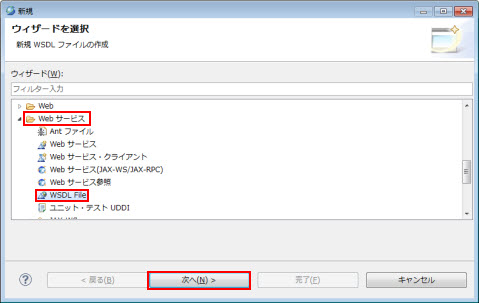
図1.2.4.1-1
図1.2.4.1-1
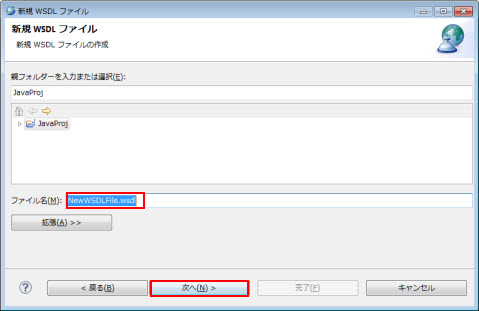
図1.2.4.1-2
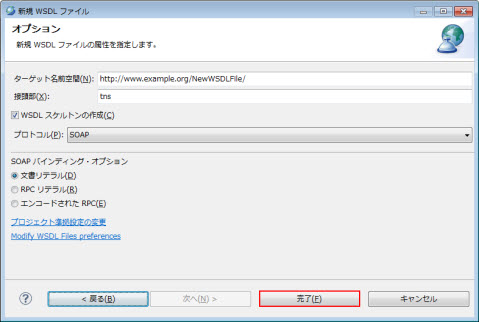
図1.2.4.1-3
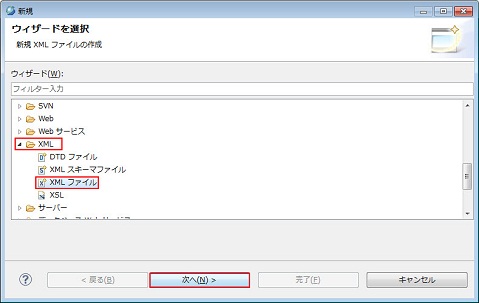
図1.2.4.1-4
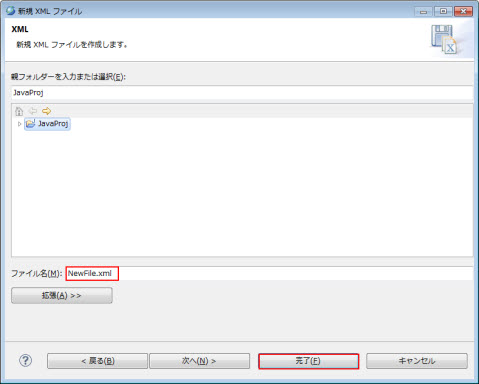
図1.2.4.1-5
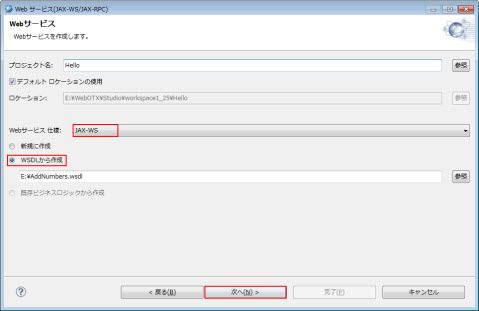
図1.2.4.2-1
Caution
指定したプロジェクトにウィザードで作成したWebサービスが既に存在している場合、Webサービスを生成することができません。
Caution
プロジェクトには動的WebプロジェクトとEJBプロジェクト
のみを指定できます。
Memo
プロジェクト名に含めてはいけない文字を含めると、エラーメッセージが表示されます。
Memo
<WebOTX_DIR>はWebOTXのインストールルートディレクトリのことです。
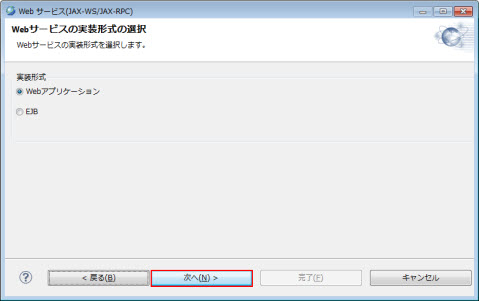
図1.2.4.2-2
Memo
Webアプリケーションを選択した場合、動的Webプロジェクトを生成します。EJBを選択した場合、EJB
プロジェクトを生成します。
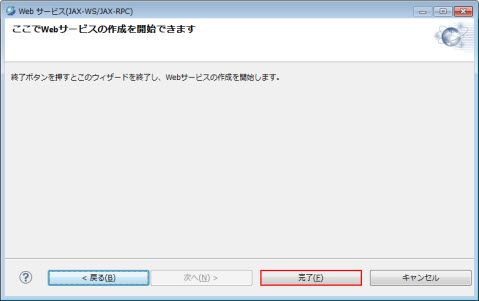
図1.2.4.2-3
Caution
WSDLファイル中で別のファイルをインポートした場合、インポートされるファイルを<ワークスペース>\<プロジェクト>\WebContent\WEB-INF\wsdl\フォルダ手動的にコピーする必要があります。コピー先は、wsdl
フォルダをルートにしての相対パス上にコピーします。
例えば、
--------wsdl ファイル--------
…
<types>
<xsd:schema>
<xsd:import
namespace=http://packagename/
schemaLocation="ext/TestServiceService_schema1.xsd"/>
</xsd:schema>
</types>
…
--------wsdl ファイル--------
「TestServiceService_schema1.xsd」ファイルをwsdl/ext
フォルダ配下にコピーします。
Memo
ファイルをインポートできるタグは以下の通りです:
wsdl:import
xsd:import
xsd:include
Memo
コピー後、WSDLファイルの解析エラーが解消されない場合は、WSDLファイルの右クリックメニュー
検証 を選択してください。
Memo
ロジックを作成する際に、アノテーションエディタを使用するとアノテーションの入力が簡単に行えます。アノテーションエディタについては、[ アプリケーション開発ガイド(共通) > 8. アノテーション定義支援ツール ]を参照して下さい。
Memo
<WebOTX_DIR>はWebOTXのインストールディレクトリに読み替えてください。
| ディレクトリ | ファイル |
|---|---|
| src/sample/ | Hello.java |
| WebContent/WEB-INF/ | nec-jaxws.xml web.xml |
package sample;

import javax.jws.WebService;

@WebService(targetNamespace ="http://sample", serviceName = "Hello")
public class Hello {
  public String sayHello(String name) {
    return "Hello " + name + "!";
  }
}
2. 配備するクラスの作成src> apt -d ../WebContent/WEB-INF/classes sample/Hello.javaaptコマンドの詳細に関しては、本ガイドの [ 1.2.12. コマンドリファレンス > 1.2.12.3. apt ] を参照してください。これにより、次のファイルが生成されます
| ディレクトリ | ファイル |
|---|---|
| src/sample/jaxws | SayHello.java SayHelloResponse.java |
| WebContent/WEB-INF/classes/sample/ | Hello.class |
| WebContent/WEB-INF/classes/sample/jaxws | SayHello.class SayHelloResponse.class |
<?xml version="1.0" encoding="UTF-8"?>
<endpoints xmlns="http://www.nec.com/WebOTX/xml/ns/jax-ws/ri/runtime" version="2.0">
  <endpoint
    name="Hello"
    implementation="sample.Hello"
    url-pattern="/hello"/>
</endpoints>
| <endpoint>の属性 | 説明 |
|---|---|
| name | Webサービスエンドポイントの識別子を指定します。 |
| implementation | Webサービスエンドポイントの実装クラス名を指定します。 |
| url-pattern | WebサービスエンドポイントへアクセスするためのURLを指定します。 |
<?xml version="1.0" encoding="UTF-8"?>
<web-app xmlns:xsi="http://www.w3.org/2001/XMLSchema-instance"
xmlns="http://java.sun.com/xml/ns/javaee"
xmlns:web="http://java.sun.com/xml/ns/javaee/web-app_2_5.xsd"
xsi:schemaLocation="http://java.sun.com/xml/ns/javaee http://java.sun.com/xml/ns/javaee/web-app_3_0.xsd"
version="3.0">
  <display-name>Hello Service Endpoint</display-name>
  <listener>
    <listener-class>com.nec.webotx.webservice.xml.ws.transport.http.servlet.WSServletContextListener</listener-class>
  </listener>
  <servlet>
    <display-name>HelloServlet</display-name>
    <servlet-name>HelloServlet</servlet-name>
    <servlet-class>com.nec.webotx.webservice.xml.ws.transport.http.servlet.WSServlet</servlet-class>
    <load-on-startup>1</load-on-startup>
  </servlet>
  <servlet-mapping>
    <servlet-name>HelloServlet</servlet-name>
    <url-pattern>/hello</url-pattern>
  </servlet-mapping>
  <session-config>
    <session-timeout>60</session-timeout>
  </session-config>
</web-app>
最後に、サーバアプリケーションと各種設定ファイルをWARファイルにアーカイブします。WARファイルに含めるファイルは次のように配置します。| ディレクトリ | ファイル |
|---|---|
| WebContent/WEB-INF/ | nec-jaxws.xml, web.xml |
| WebContent/WEB-INF/classes/ | サーバアプリケーションのクラスファイル |
WebContent> jar cvf ../hellows.war WEB-INF
| ディレクトリ | ファイル |
|---|---|
| src/sample/ | HelloImpl.java |
| WebContent/WEB-INF/ | nec-jaxws.xml web.xml |
| WebContent/WEB-INF/wsdl/ | hello.wsdl |
<?xml version="1.0" encoding="UTF-8"?>
<definitions xmlns="http://schemas.xmlsoap.org/wsdl/"
 xmlns:tns="http://sample" xmlns:xsd="http://www.w3.org/2001/XMLSchema" xmlns:soap="http://schemas.xmlsoap.org/wsdl/soap/"
 targetNamespace="http://sample" name="Hello">
  <types>
    <xs:schema version="1.0"
     targetNamespace="http://sample" xmlns:tns="http://sample" xmlns:xs="http://www.w3.org/2001/XMLSchema">
      <xs:element name="sayHello" type="tns:sayHello"/>
      <xs:element name="sayHelloResponse" type="tns:sayHelloResponse"/>
      <xs:complexType name="sayHello">
        <xs:sequence>
          <xs:element name="arg0" type="xs:string" minOccurs="0"/>
        </xs:sequence>
      </xs:complexType>
      <xs:complexType name="sayHelloResponse">
        <xs:sequence>
          <xs:element name="return" type="xs:string" minOccurs="0"/>
        </xs:sequence>
      </xs:complexType>
    </xs:schema>
  </types>
  <message name="sayHello">
    <part name="parameters" element="tns:sayHello"/>
  </message>
  <message name="sayHelloResponse">
    <part name="parameters" element="tns:sayHelloResponse"/>
  </message>
  <portType name="Hello">
    <operation name="sayHello">
      <input message="tns:sayHello"/>
      <output message="tns:sayHelloResponse"/>
    </operation>
  </portType>
  <binding name="HelloPortBinding" type="tns:Hello">
    <soap:binding transport="http://schemas.xmlsoap.org/soap/http" style="document"/>
    <operation name="sayHello">
      <soap:operation soapAction=""/>
      <input>
        <soap:body use="literal"/>
      </input>
      <output>
        <soap:body use="literal"/>
      </output>
    </operation>
  </binding>
  <service name="Hello">
    <port name="HelloPort" binding="tns:HelloPortBinding">
      <soap:address xmlns:soap12="http://schemas.xmlsoap.org/wsdl/soap12/" xmlns:wsdl="http://schemas.xmlsoap.org/wsdl/" location="http://localhost:80/hellows/hello"/>
    </port>
  </service>
</definitions>
Caution
WSDLファイルの次のホスト名およびポート番号を環境に合わせて変更してください。
location="http://localhost:80/hellows/hello"
また、クライアントアプリケーションを作成する場合は、「1.4.1.6. WSDLファイルから作成したクライアントについて」を参照してください。
src> wsimport -d ../WebContent/WEB-INF/classes -s . -keep ../WebContent/WEB-INF/wsdl/hello.wsdlwsimportコマンドの詳細に関しては、本ガイドの [ 1.2.12. コマンドリファレンス > 1.2.12.1. wsimport ] を参照してください。これにより、次のファイルが生成されます
| ディレクトリ | ファイル |
|---|---|
| src/sample/ | Hello.java Hello_Service.java SayHello.java SayHelloResponse.java ObjectFactory.java package-info.java |
| WebContent/WEB-INF/classes/sample/ | Hello.class Hello_Service.class SayHello.class SayHelloResponse.class ObjectFactory.class package-info.class |
package sample;

import javax.jws.WebMethod;
import javax.jws.WebParam;
import javax.jws.WebResult;
import javax.jws.WebService;
import javax.xml.bind.annotation.XmlSeeAlso;
import javax.xml.ws.RequestWrapper;
import javax.xml.ws.ResponseWrapper;

@WebService(name = "Hello",targetNamespace ="http://sample")
@XmlSeeAlso({
  ObjectFactory.class
})
public interface Hello {
  @WebMethod
  @WebResult(targetNamespace = "")
  @RequestWrapper(localName =
    "sayHello", targetNamespace ="http://sample", className = "sample.SayHello")
  @ResponseWrapper(localName =
    "sayHelloResponse", targetNamespace= "http://sample",
    className ="sample.SayHelloResponse")

  public String sayHello(
    @WebParam(name = "arg0", targetNamespace = "")
    String arg0);
}
3. サービスエンドポイントインタフェースの実装
package sample;

import javax.jws.WebService;

@WebService(endpointInterface = "sample.Hello")
public class HelloImpl {
  public String sayHello(String name) {
    return "Hello " + name + " !";
  }
}
実装クラスではWebServiceアノテーションを記述し、endpointInterfaceにはwsimportコマンドで自動生成されたサービスエンドポイントインタフェースのクラス名をフルパッケージで指定してください。src> javac -d ../WebContent/WEB-INF/classes sample/HelloImpl.javaWebサーバに配備するためのwarを作成します。エンドポイントの定義ファイルnec-jaxws.xmlは次のようになります。
<?xml version="1.0" encoding="UTF-8"?>
<endpoints xmlns="http://www.nec.com/WebOTX/xml/ns/jax-ws/ri/runtime" version="2.0">
  <endpoint
    name="Hello"
    interface="sample.Hello"
    implementation="sample.HelloImpl"
    wsdl="WEB-INF/wsdl/hello.wsdl"
    service="{http://sample}Hello"
    port="{http://sample}HelloPort"
    url-pattern="/hello"/>
</endpoints>
| <endpoint>の属性 | 説明 |
|---|---|
| name | Webサービスエンドポイントの識別子を指定します。 |
| interface | 自動生成されたサービスエンドポイントインタフェースを指定します。 |
| implementation | Webサービスエンドポイントの実装クラス名を指定します。 |
| wsdl | wsimportで指定したWSDLファイルを指定します。 |
| service | WSDLファイルのservice要素のname属性に記述した、エンドポイントのサービス名を指定します。 |
| port | WSDLファイルのport要素のname属性に記述した、エンドポイントのポート名を指定します。 |
| url-pattern | WebサービスエンドポイントへアクセスするためのURLを指定します。 |
<?xml version="1.0" encoding="UTF-8"?>
<web-app xmlns:xsi="http://www.w3.org/2001/XMLSchema-instance"
xmlns="http://java.sun.com/xml/ns/javaee"
xmlns:web="http://java.sun.com/xml/ns/javaee/web-app_2_5.xsd"
xsi:schemaLocation="http://java.sun.com/xml/ns/javaee http://java.sun.com/xml/ns/javaee/web-app_3_0.xsd"
version="3.0">
  <display-name>Hello Service Endpoint</display-name>
  <listener>
    <listener-class>com.nec.webotx.webservice.xml.ws.transport.http.servlet.WSServletContextListener</listener-class>
  </listener>
  <servlet>
    <display-name>HelloServlet</display-name>
    <servlet-name>HelloServlet</servlet-name>
    <servlet-class>com.nec.webotx.webservice.xml.ws.transport.http.servlet.WSServlet</servlet-class>
    <load-on-startup>1</load-on-startup>
  </servlet>
  <servlet-mapping>
    <servlet-name>HelloServlet</servlet-name>
    <url-pattern>/hello</url-pattern>
  </servlet-mapping>
  <session-config>
    <session-timeout>60</session-timeout>
  </session-config>
</web-app>
最後に、サーバアプリケーションと各種設定ファイルをWARファイルにアーカイブします。WARファイルに含めるファイルは次のように配置します。| ディレクトリ | ファイル |
|---|---|
| WebContent/WEB-INF/ | nec-jaxws.xml, web.xml |
| WebContent/WEB-INF/wsdl/ | hello.wsdl |
| WebContent/WEB-INF/classes/ | サーバアプリケーションのクラスファイル |
WebContent> jar cvf ../hellows.war WEB-INF
Memo
JAX-RPCは旧互換のための機能です。
Memo
「\」はWindowsのパス区切り文字です。UNIXでは「/」に読み替えてください。
Memo
<WebOTX_DIR>はWebOTXのインストールルートフォルダ(ディレクトリ)です。
PATH変数に追加する
CLASSPATH変数に追加する
Memo
<J2SE_DIR>はJ2SESDKのインストールルートフォルダ(ディレクトリ)です。
<?xml version="1.0" encoding="UTF-8" ?>
<configuration xmlns="http://java.sun.com/xml/ns/jax-rpc/ri/config">
 <wsdl location="WSDLファイル名" packageName="生成するクラスのパッケージ名" />
</configuration>
[foo@webotx ~]$ wscompile -gen:server -d クラスファイル出力先 -s ソースコード出力先 -keep 設定ファイル名
<?xml version="1.0" encoding="UTF-8"?>
<web-app xmlns:xsi="http://www.w3.org/2001/XMLSchema-instance"
xmlns="http://java.sun.com/xml/ns/javaee"
xmlns:web="http://java.sun.com/xml/ns/javaee/web-app_2_5.xsd"
xsi:schemaLocation="http://java.sun.com/xml/ns/javaee http://java.sun.com/xml/ns/javaee/web-app_3_0.xsd"
version="3.0">
  <servlet>
    <servlet-name>任意のサーブレット名</servlet-name>
    <servlet-class>ビジネスロジックのクラス名(パッケージ名つき)</servlet-class>
  </servlet>
  <servlet-mapping>
    <servlet-name>任意のサーブレット名</servlet-name>
    <url-pattern>/ビジネスロジックに関連付けるURL</url-pattern>
  </servlet-mapping>
</web-app>
<?xml version="1.0" encoding="UTF-8" ?>
<webservices xmlns="http://java.sun.com/xml/ns/javaee"
  xmlns:xsi="http://www.w3.org/2001/XMLSchema-instance"
  xsi:schemaLocation="http://java.sun.com/xml/ns/javaee
  http://java.sun.com/xml/ns/javaee/javaee_web_services_1_2.xsd" version="1.2">
  <webservice-description>
    <webservice-description-name>Web サービス名(WSDLを参照)</webservice-description-name>
    <wsdl-file>WSDL ファイルのURL(相対パス)</wsdl-file>
    <jaxrpc-mapping-file>WSEE マッピングファイルのURL(相対パス)</jaxrpc-mapping-file>
    <port-component>
      <port-component-name>任意のポートコンポーネント名</port-component-name>
      <wsdl-port xmlns:ns="ポートの名前空間URI">ns:ポート名</wsdl-port>
      <service-endpoint-interface>サービスエンドポイントクラス名</service-endpoint-interface>
      <service-impl-bean>
        <servlet-link>任意のサーブレット名</servlet-link>
      </service-impl-bean>
    </port-component>
  </webservice-description>
</webservices>
<?xml version="1.0" encoding="UTF-8"?>
<ejb-jar xmlns="http://java.sun.com/xml/ns/javaee"
  xmlns:xml="http://www.w3.org/XML/1998/namespace"
  xmlns:xsi="http://www.w3.org/2001/XMLSchema-instance"
  xsi:schemaLocation="http://java.sun.com/xml/ns/javaee
  http://java.sun.com/xml/ns/javaee/ejb-jar_3_1.xsd" version="3.1">
  <description xml:lang="ja">任意のEJBアーカイブ名</description>
  <enterprise-beans>
    <session>
      <ejb-name>任意のEJB名</ejb-name>
      <service-endpoint>サービスエンドポイントインタフェースクラス名</service-endpoint>
      <ejb-class>EJB クラス名</ejb-class>
      <session-type>Stateless</session-type>
      <transaction-type>Container</transaction-type>
       <security-identity>
         <use-caller-identity/>
      </security-identity>
    </session>
  </enterprise-beans>
</ejb-jar>
service-encpoint要素には、サービスエンドポイントインタフェースのクラス名をパッケージ名つきで記述します。
<?xml version="1.0" encoding="UTF-8"?>
<webservices xmlns="http://java.sun.com/xml/ns/javaee"
 xmlns:xsi="http://www.w3.org/2001/XMLSchema-instance"
 xsi:schemaLocation="http://java.sun.com/xml/ns/javaee
 http://java.sun.com/xml/ns/javaee/javaee_web_services_1_2.xsd" version="1.2">
  <webservice-description>
    <webservice-description-name>Web サービス名(WSDLを参照)</webservice-description-name>
    <wsdl-file>WSDL ファイルのURL(相対パス)</wsdl-file>
    <jaxrpc-mapping-file>WSEE マッピングファイルのURL(相対パス)</jaxrpc-mapping-file>
    <port-component>
      <port-component-name>任意のポートコンポーネント名</port-component-name>
      <wsdl-port xmlns:ns="ポートの名前空間URI">ns:ポート名</wsdl-port>
      <service-endpoint-interface>サービスエンドポイントクラス名</service-endpoint-interface>
      <service-impl-bean>
        <ejb-link>任意のEJB名</ejb-link>
      </service-impl-bean>
    </port-component>
  </webservice-description>
</webservices>