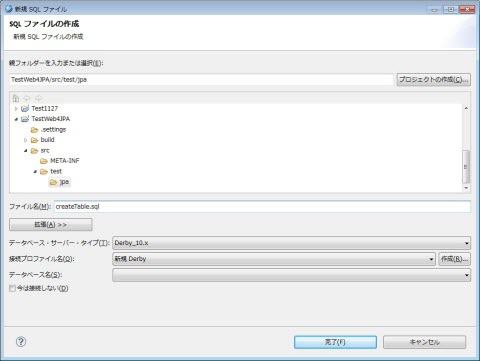
図10.1.1.1-1
図10.1.1.1-1
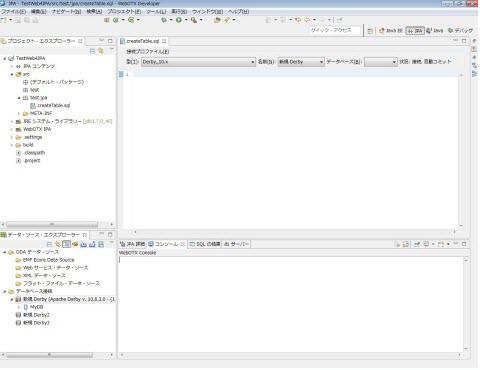
図10.1.1.1-2
| 属性 | 値 |
|---|---|
| タイプ | Derby_10.x |
| 名前 | 新規 Derby |
| データベース | MyDB |
drop table STUDENT;
create table STUDENT (
  ID integer not null primary key,
  MYLOCK integer,
  NAME VARCHAR(30),
  SPORT VARCHAR(30)
);
insert into STUDENT values(100, 10, 'WangHaidong', 'BasketBall');
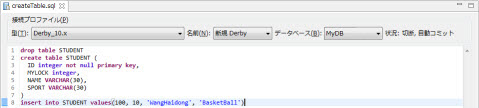
図10.1.1.1-3
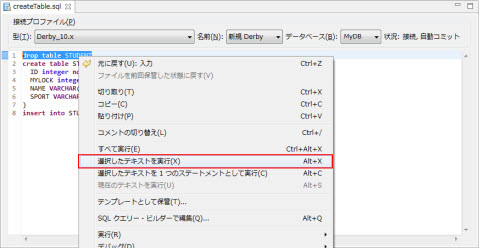
図10.1.1.1-4
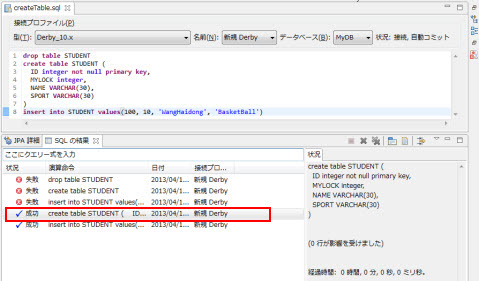
図10.1.1.1-5
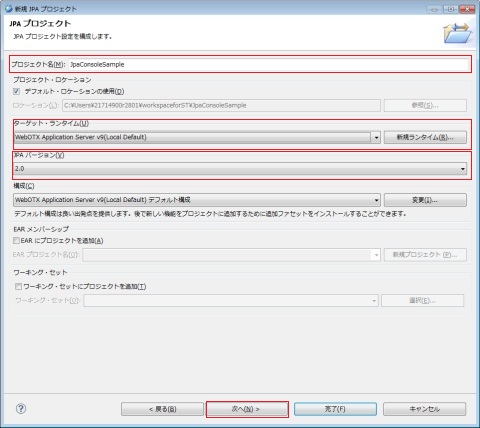
図10.1.2.1-1
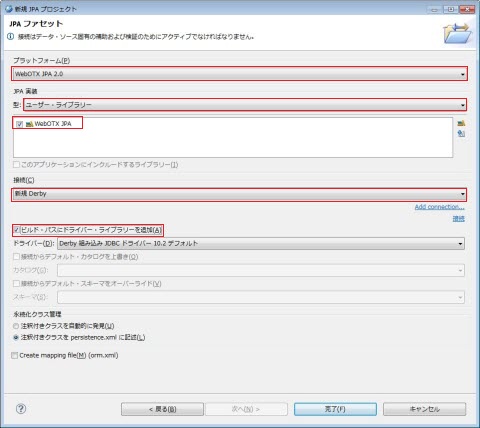
図10.1.2.1-2
Memo
ユーザー・ライブラリーに何もリストされていない場合、
[10.2.1.1. JPAライブラリーのコンフィグレーション]を参照してWebOTX JPAライブラリーを追加してください。
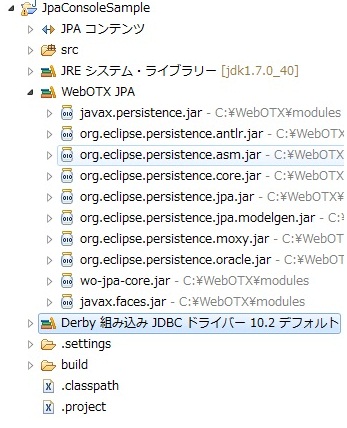
図10.1.2.1-3
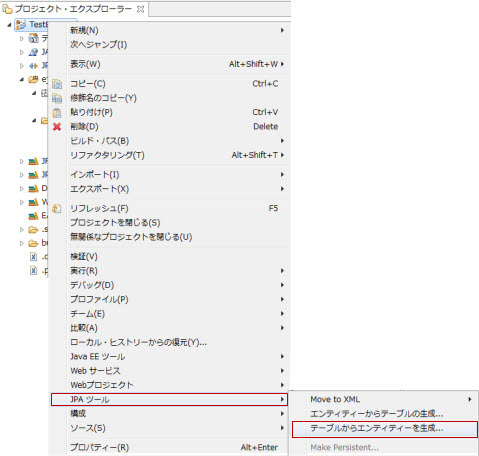
図10.1.2.2-1
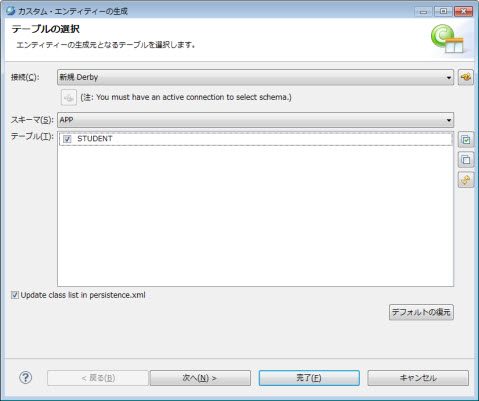
図10.1.2.2-2
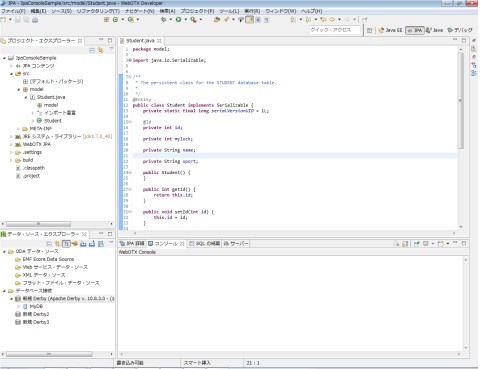
図10.1.2.2-3
Memo
データベースの準備が前提となりますので、[10.1.1.3. テーブルの生成]
が実施済みである必要があります。
他のプロジェクトなどで、既に実施済みの場合は不要です。
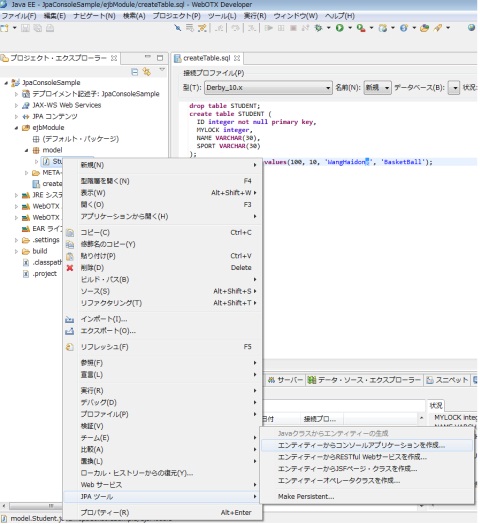
図10.1.2.3-1
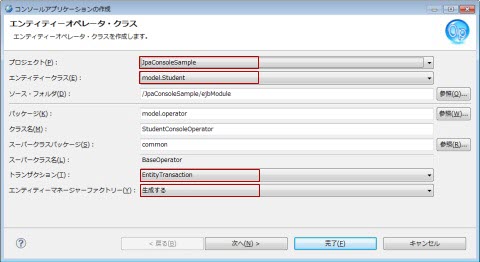
図10.1.2.3-2
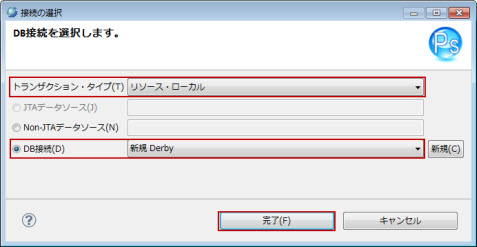
図10.1.2.3-3
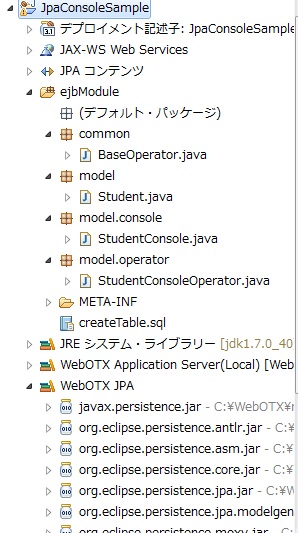
図10.1.2.3-4
Memo
コンソールアプリケーションの作成ウィザード等で、既にDB接続を設定している場合、再度、persistence.xmlへDB接続を設定する必要はありません。その場合、次の[10.1.2.5. ビルド・パスの変更及びライブラリーの追加]の節に進んでください。
図10.1.2.4-1
<?xml version="1.0" encoding="UTF-8"?>
<persistence version="2.0" xmlns="http://java.sun.com/xml/ns/persistence" xmlns:xsi="http://www.w3.org/2001/XMLSchema-instance" xsi:schemaLocation="http://java.sun.com/xml/ns/persistence http://java.sun.com/xml/ns/persistence/persistence_2_0.xsd">
  <persistence-unit name="JpaConsoleSample" transaction-type="RESOURCE_LOCAL">
    <class>model.Student</class>
    <properties>
      <property name="javax.persistence.jdbc.url" value="jdbc:derby:C:\MyDB;create=true"/>
      <property name="javax.persistence.jdbc.driver" value="org.apache.derby.jdbc.EmbeddedDriver"/>
      <property name="javax.persistence.jdbc.user" value=""/>
      <property name="javax.persistence.jdbc.password" value=""/>
    </properties>
  </persistence-unit>
</persistence>
Memo
プロジェクトの作成時に、ビルド・パスにドライバー・ライブラリーを追加を選択している場合、
再度、データベースのドライバーを追加する必要はありません。その場合、プロジェクト・ツリーに、Derby
組み込み JDBC ドライバーが表示されている事を確認の上、 次の、[10.1.2.6. テストの実行]の節に進んでください。
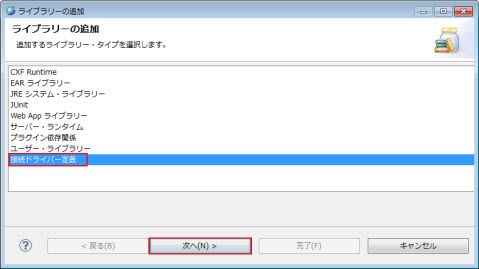
図10.1.2.5-1
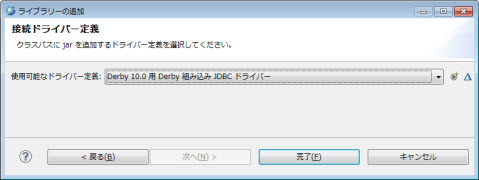
図10.1.2.5-2
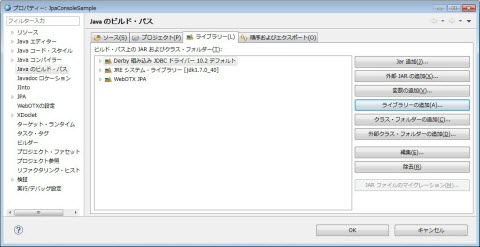
図10.1.2.5-3
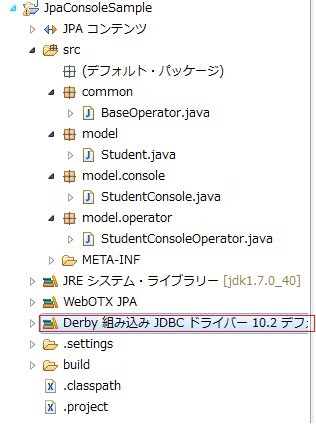
図10.1.2.5-4
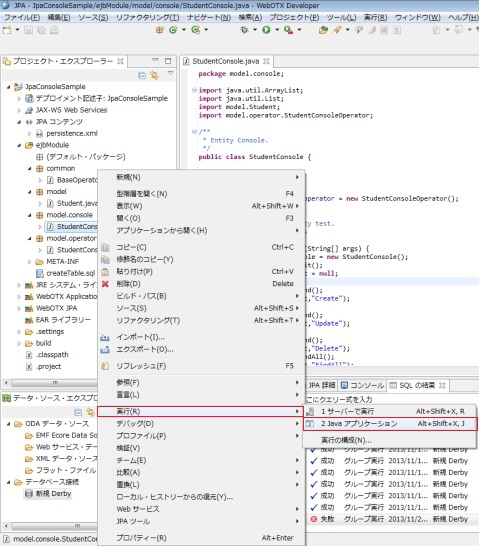
図10.1.2.6-1
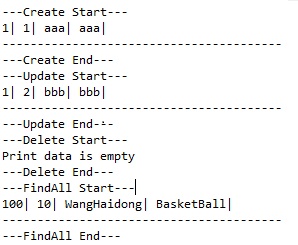
図10.1.2.6-2
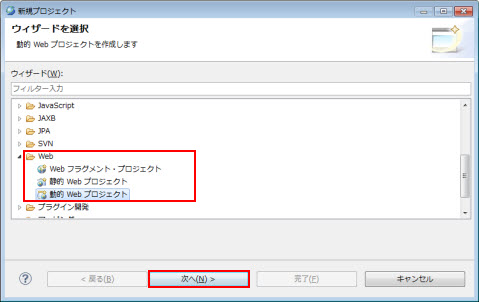
図10.1.3.1-1
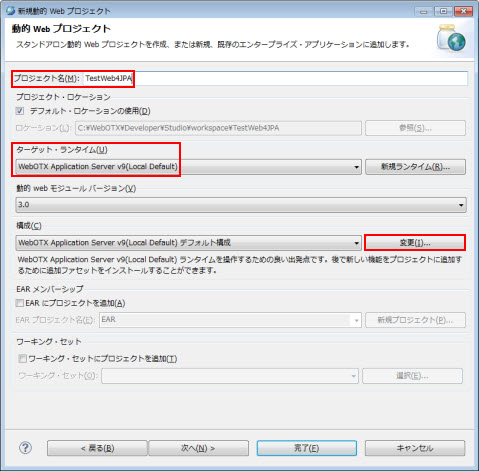
図10.1.3.1-2
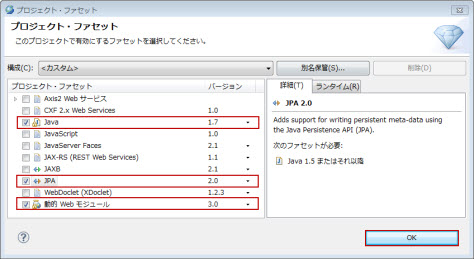
図10.1.3.1-3
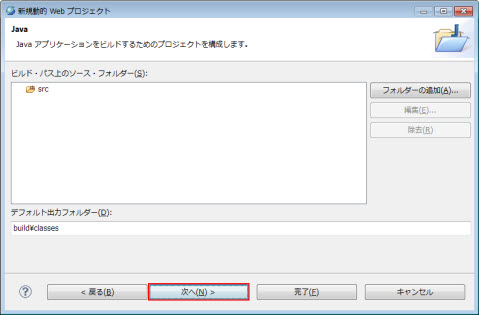
図10.1.3.1-4
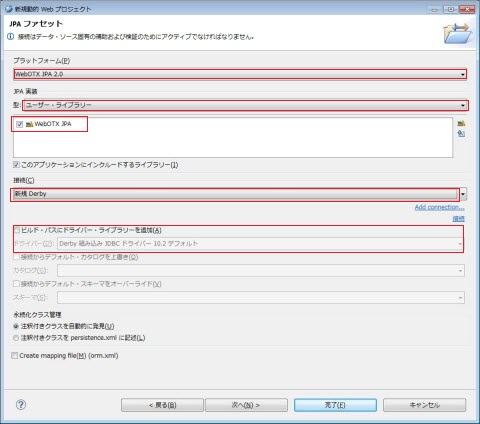
図10.1.3.1-5
| 属性 | 値 |
|---|---|
| プラットフォーム | WebOTX JPA 2.0 |
| JPA 実装 | WebOTX JPA を選択 |
| 接続 | 新規 Derby |
| ビルド・パスにドライバー・ライブラリーを追加 | 非選択 |
| 注釈つきクラスをpersistence.xml に記述 | 選択 |
| Create mapping file | 非選択 |
Memo
ユーザー・ライブラリーの何もリストされていない場合、
[10.2.1.1.JPAライブラリーのコンフィグレーション]を参照してWebOTX JPAライブラリーを追加してください。
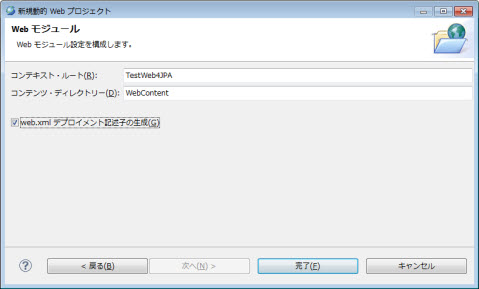
図10.1.3.1-6
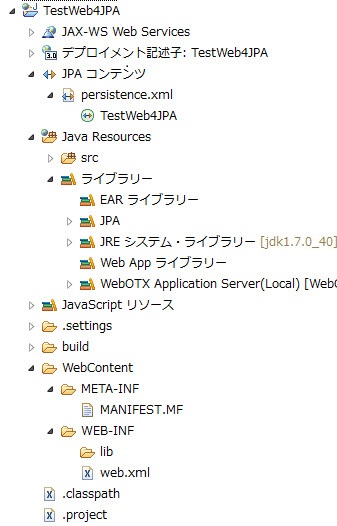
図10.1.3.1-7
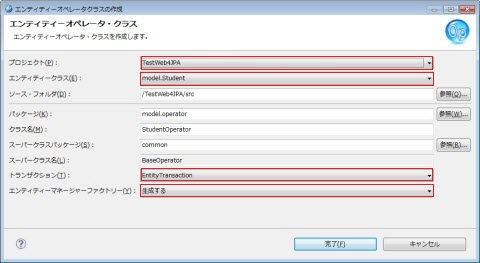
図10.1.3.3-1
図10.1.3.3-2
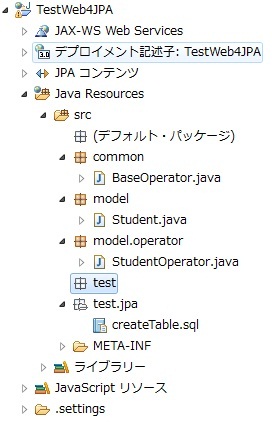
図10.1.3.3-3
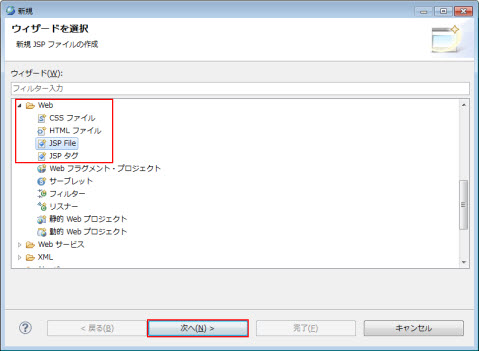
図10.1.3.4-1
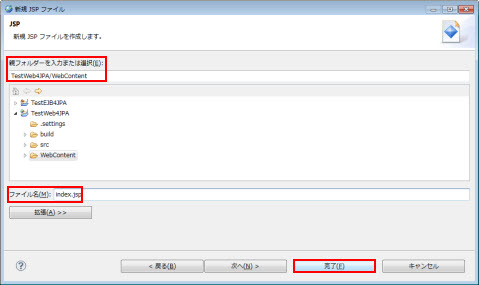
図10.1.3.4-2
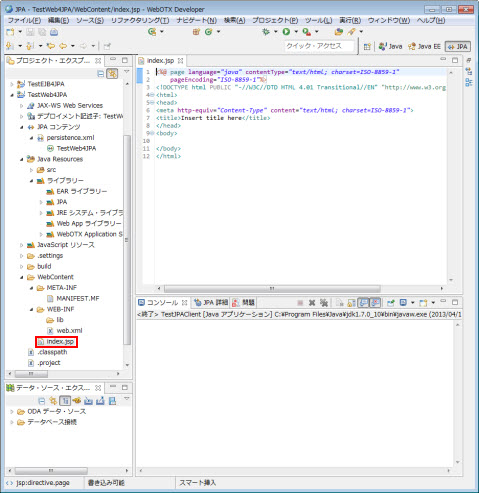
図10.1.3.4-3
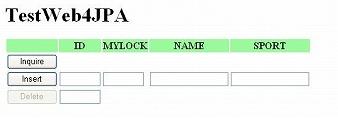
図10.1.3.4-4
| 処理 | javascript | ボタン |
|---|---|---|
| 一覧表示 | getDbInfo() | Inquire |
| データの挿入 | insertInfoToDb() | insert |
| データの削除 | deleteInfoFromoDb() | Delete |
| 初期化 | initialize() | - |
| 結果出力 | updatePage() | - |
<%@ page language="java" contentType="text/html; charset=ISO-8859-1"
    pageEncoding="ISO-8859-1"%>
<!DOCTYPE html PUBLIC "-//W3C//DTD HTML 4.01 Transitional//EN" "http://www.w3.org/TR/html4/loose.dtd">
<html>
<head>
<meta http-equiv="Content-Type" content="text/html; charset=ISO-8859-1">
<title>TestWeb4JPA</title>
<script language="javascript" type="text/javascript">

   var request = false;

   function initialize(){
      try {
        request = new XMLHttpRequest();
      } catch (trymicrosoft) {
        try {
          request= new ActiveXObject("Msxml2.XMLHTTP");
        } catch (othermicrosoft){
          try {
            request= new ActiveXObject("Microsoft.XMLHTTP");
          }catch (failed) {
            request=false;
        }
      }
    }
    if (!request) alert("Error initializing XMLHttpRequest!");
  }

  /* Insert Button */
  function insertInfoToDb() {
    var idForInert =document.getElementById("idForInert").value;
    var myLock =document.getElementById("myLock").value;
    var name =document.getElementById("name").value;
    var sport =document.getElementById("sport").value;
    if (isNaN(idForInert) || idForInert == null || idForInert=="") {
      alert("Id must is a number");
      return;
    }
    if (isNaN(myLock) || myLock == null || myLock =="") {
      alert("my Lock must is a number");
      return;
    }
    var commonad = "<request><command name=\"insert\">" + "<param id=\"" +
    idForInert + "\" myLock=\"" + myLock + "\" name=\"" +
    name + "\" sport=\"" + sport + "\" /></command></request>";
    var url = "TestServlet";
    request.open("POST",url, true);
    request.onreadystatechange =updatePage;
    request.send(commonad);
  }

  /* Inquire Button */
   function getDbInfo() {
    var myLock =document.getElementById("myLock").value;
    var name= document.getElementById("name").value;
    var sport= document.getElementById("sport").value;
    var commonad= "<request><command  name=\"inquire\">"+
                 "<parammy  Lock=\"" + myLock + "\"  name=\"" + name +
                 "\"  sport=\"" + sport + "\"/></command></request>";
    var url= "TestServlet";
    request.open("POST",url,true);
    request.onreadystatechange =updatePage;
    request.send(commonad);
  }

  /* Delete Button */
  function deleteInfoFromoDb() {
    var studentId =document.getElementById("studentId").value;
    if(isNaN(studentId)|| studentId == null || studentId==""){
      alert("IDmust is a number");
      return;
    }
    var commonad ="<request><command name=\"delete\">" +
                "<param studentId=\"" + studentId + "\"/></command></request>";
    var url = "TestServlet";
    request.open("POST",url, true);
    request.onreadystatechange =updatePage;
    request.send(commonad);
  }

  /* View Update */
  function updatePage() {
   if (request.readyState== 4) {
      if (request.status== 200) {
        var response =request.responseText;
        document.getElementById("resultFromDb").innerHTML= response.replace(/\n/g, "");
        document.getElementById("studentId").disabled=false;
        document.getElementById("deleteButton").disabled=false;
      }else {
        alert("status is " + request.status);
      }
    }
  }
</script>
</head>

<body onLoad="initialize();">
<h1>TestWeb4JPA</h1>
    <table>
      <tr>
        <th bgColor="palegreen"></th>
        <th bgColor="palegreen">ID</th>
        <th bgColor="palegreen">MYLOCK</th>
        <th bgColor="palegreen">NAME</th>
        <th bgColor="palegreen">SPORT</th>
      </tr>
      <tr>
        <td colspan="5">
          <input type="button" style="width: 80px" value="Inquire" onclick="getDbInfo();">
        </td>
      </tr>
      <tr>
         <td>
           <input type="button" style="width: 80px" value="Insert" onclick="insertInfoToDb();">
         </td>
         <td><input type="text" id="idForInert" size="5" maxlength="5"></td>
         <td><input type="text" id="myLock" size="5" maxlength="5"></td>
         <td><input type="text" id="name" size="15" maxlength="15"></td>
         <td><input type="text" id="sport" size="15" maxlength="15"></td>
      </tr>
      <tr>
        <td>
          <input type="button" id="deleteButton" style="width: 80px" value="Delete" onclick="deleteInfoFromoDb();" disabled="disabled">
        </td>
        <td  colspan="4"><input type="text" id="studentId" disabled="disabled" size="5" maxlength="5"></td>
      </tr>
    </table>
    <div id="resultFromDb"></div>
</body>
</html>
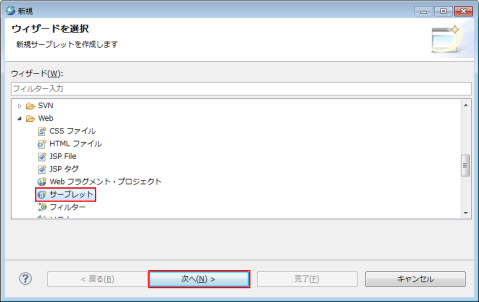
図10.1.3.5-1
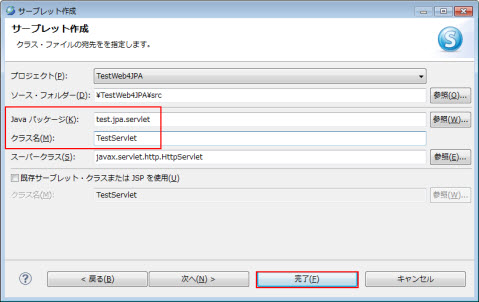
図10.1.3.5-2
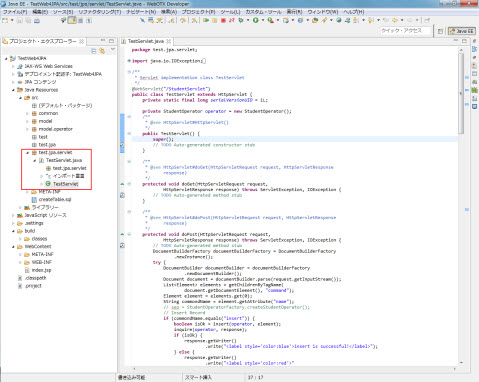
図10.1.3.5-3
void doPost(HttpServletRequest request, HttpServletResponse response)
に渡されます。doPost 内では、その要求を判別し、JSP 側のそれぞれのボタンに対応する、以下の処理へ振り分けます。
package test.jpa.servlet;

import java.io.IOException;
import java.util.ArrayList;
import java.util.List;

import javax.annotation.PostConstruct;
import javax.annotation.PreDestroy;
import javax.servlet.ServletException;
import javax.servlet.annotation.WebServlet;
import javax.servlet.http.HttpServlet;
import javax.servlet.http.HttpServletRequest;
import javax.servlet.http.HttpServletResponse;
import javax.xml.parsers.DocumentBuilder;
import javax.xml.parsers.DocumentBuilderFactory;

import model.Student;
import model.operator.StudentOperator;

import org.w3c.dom.Document;
import org.w3c.dom.Element;
import org.w3c.dom.Node;
import org.w3c.dom.NodeList;

/**
 * Servlet implementation class TestServlet
 */
@WebServlet("/StudentServlet")
public class TestServlet extends HttpServlet {
    private static final long serialVersionUID = 1L;

    private StudentOperator operator = new StudentOperator();
    /**
     * @see HttpServlet#HttpServlet()
     */
    public TestServlet() {
        super();
        // TODO Auto-generated constructor stub
    }

    /**
     * @see HttpServlet#doGet(HttpServletRequest request, HttpServletResponse
     *      response)
     */
    protected void doGet(HttpServletRequest request,
            HttpServletResponse response) throws ServletException, IOException {
        // TODO Auto-generated method stub
    }

    /**
     * @see HttpServlet#doPost(HttpServletRequest request, HttpServletResponse
     *      response)
     */
    protected void doPost(HttpServletRequest request,
            HttpServletResponse response) throws ServletException, IOException {
        // TODO Auto-generated method stub
        DocumentBuilderFactory documentBuilderFactory = DocumentBuilderFactory
                .newInstance();
        try {
            DocumentBuilder documentBuilder = documentBuilderFactory
                    .newDocumentBuilder();
            Document document = documentBuilder.parse(request.getInputStream());
            List<Element> elements = getChildrenByTagName(
                    document.getDocumentElement(), "command");
            Element element = elements.get(0);
            String commondName = element.getAttribute("name");
            // seo = StudentOperatorFactory.createStudentOperator();
            // Insert Record
            if (commondName.equals("insert")) {
                boolean isOk = insert(operator, element);
                inquire(operator, response);
                if (isOk) {
                    response.getWriter()
                            .write("<label style='color:blue'>insert is successful!</label>");
                } else {
                    response.getWriter()
                            .write("<label style='color:red'>"
                                    + "insert is failed! because this id has existed in the database</label>");
                }
            }
            // Select Record
            else if (commondName.equals("inquire")) {
                inquire(operator, response);
            }

            else if (commondName.equals("update")) {
                update(operator, element);
            }
            // Delete Record
            else {
                boolean isOk = delete(operator, element);
                inquire(operator, response);
                if (!isOk) {
                    response.getWriter()
                            .write("<label style='color:red'>"
                                    + "Delete is failed! because this id doesn't exist in the database</label>");
                } else {
                    response.getWriter()
                            .write("<label style='color:blue'>delete is successful!</label>");
                }
            }
        } catch (Exception e) {
        	e.printStackTrace();

        	response.getWriter().write("<label style='color:red'>" + e.toString() + "</label>");
        }
    }

    private List<Element> getChildrenByTagName(Element element, String tagName) {
        List<Element> result = new ArrayList<Element>();
        if (element == null) {
            return result;
        }
        NodeList childNodes = element.getChildNodes();
        int len = childNodes.getLength();
        for (int i = 0; i < len; i++) {
            Node childNode = childNodes.item(i);
            if (!(childNode instanceof Element)) {
                continue;
            }
            Element childElement = (Element) childNode;
            if (childElement.getTagName().equals(tagName)) {
                result.add(childElement);
            }
        }
        return result;
    }

    private void update(StudentOperator seo, Element element) {
        // TODO Auto-generated method stub
        List<Element> paramElementList = getChildrenByTagName(element, "param");
        Element param = paramElementList.get(0);
        String id = param.getAttribute("studentId");
        Student se = seo.findEntityById(Integer.parseInt(id));
        if (se != null) {
            String myLock = param.getAttribute("myLock");
            String name = param.getAttribute("name");
            String sport = param.getAttribute("sport");
            se.setMylock(Integer.parseInt(myLock));
            se.setName(name);
            se.setSport(sport);
        }

    }

    /* inquire テーブルの一覧取得 */
    private void inquire(StudentOperator seo, HttpServletResponse response)
            throws IOException {
        // call findEntity method of baseOperator
        List<Student> list = seo.findEntities();
        StringBuffer buffer = new StringBuffer();
        beginResult(buffer);
        for (Student se : list) {
            addRecorder(buffer, se);
        }
        endResult(buffer);
        response.getWriter().write(buffer.toString());
    }

    /* delete テーブルの要素削除 */
    private boolean delete(StudentOperator seo, Element element) throws Exception {
        List<Element> paramElementList = getChildrenByTagName(element, "param");
        Element param = paramElementList.get(0);
        String id = param.getAttribute("studentId");
        Student se = seo.findEntityById(Integer.parseInt(id));
        if (se != null) {
            seo.deleteEntity(se);
            return true;
        }
        return false;
    }

    /* insert テーブルへの要素挿入 */
    private boolean insert(StudentOperator seo, Element element)
            throws Exception {
        List<Element> paramElementList = getChildrenByTagName(element, "param");
        Element param = paramElementList.get(0);
        String id = param.getAttribute("id");
        Student se = seo.findEntityById(Integer.parseInt(id));
        if (se == null) {
            Student bean = new Student();
            String myLock = param.getAttribute("myLock");
            String name = param.getAttribute("name");
            String sport = param.getAttribute("sport");
            bean.setId(Integer.parseInt(id));
            bean.setMylock(Integer.parseInt(myLock));
            bean.setName(name);
            bean.setSport(sport);
            seo.createEntity(bean);
            return true;
        }
        return false;
    }

    /* 以下は、出力の整形(html の table 形式) */
    private void beginResult(StringBuffer buffer) {
        buffer.append("<br>").append("<label>results form database</label>");
        buffer.append("<table border='1'>").append("<tr bgcolor='gray'>");
        buffer.append("<td>ID</td>").append("<td>MYLOCK</td>");
        buffer.append("<td>NAME</td>").append("<td>SPORT</td>").append("</tr>");
    }

    private void addRecorder(StringBuffer buffer, Student student) {
        int id = student.getId();
        int myLock = student.getMylock();
        String name = student.getName();
        if (name.length() == 0) {
            name = " ";
        }
        String sport = student.getSport();
        if (sport.length() == 0) {
            sport = " ";
        }
        buffer.append("<tr>").append("<td>").append(String.valueOf(id))
                .append("</td>");
        buffer.append("<td>").append(String.valueOf(myLock)).append("</td>");
        buffer.append("<td>").append(name).append("</td>");
        buffer.append("<td>").append(sport).append("</td>").append("</tr>");
    }

    private void endResult(StringBuffer buffer) {
        buffer.append("</table>");
    }


	@PostConstruct
	public void init() {
		operator.init();
	}

	@PreDestroy
	public void end() {
		operator.end();
	}
}
<?xml version="1.0" encoding="UTF-8"?>
<persistence version="2.0" xmlns="http://java.sun.com/xml/ns/persistence" xmlns:xsi="http://www.w3.org/2001/XMLSchema-instance" xsi:schemaLocation="http://java.sun.com/xml/ns/persistence http://java.sun.com/xml/ns/persistence/persistence_2_0.xsd">
  <persistence-unit name="TestWeb4JPA" transaction-type="RESOURCE_LOCAL">
    <class>model.Student</class>
    <properties>
      <property name="javax.persistence.jdbc.url" value="jdbc:derby:C:\MyDB;create=true"/>
      <property name="javax.persistence.jdbc.driver" value="org.apache.derby.jdbc.EmbeddedDriver"/>
      <property name="javax.persistence.jdbc.user" value=""/>
      <property name="javax.persistence.jdbc.password" value=""/>
    </properties>
  </persistence-unit>
</persistence>
{WebOTXインストールディレクトリ}\domains\domain1\lib\ext
にコピー後、ドメインを再起動してください。
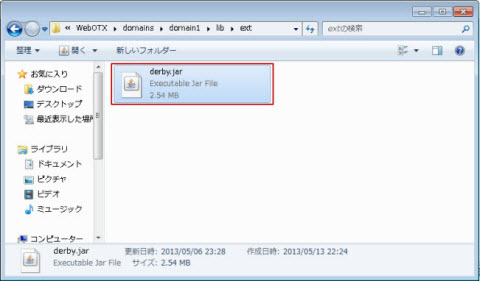
図10.1.3.7-2
Memo
ドメインの再起動については、 [ドメイン構築・基本設定ガイド
> 3. ドメイン
> 3.4. ドメインの起動・停止 > 3.4.3. 一般ドメインの起動/停止] をご覧ください。
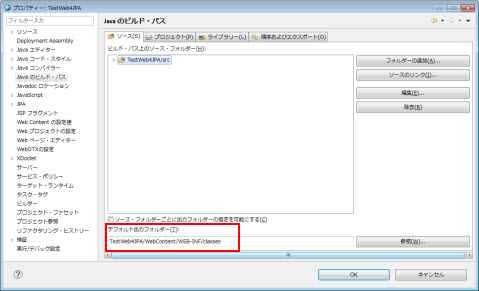
図10.1.3.7-3
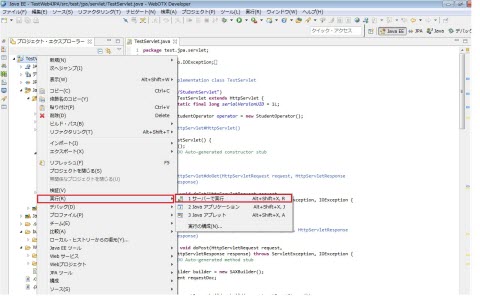
図10.1.3.8-1
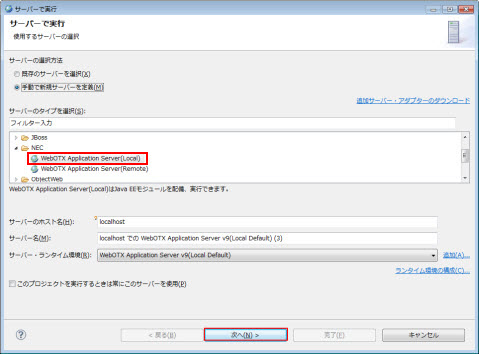
図10.1.3.8-2
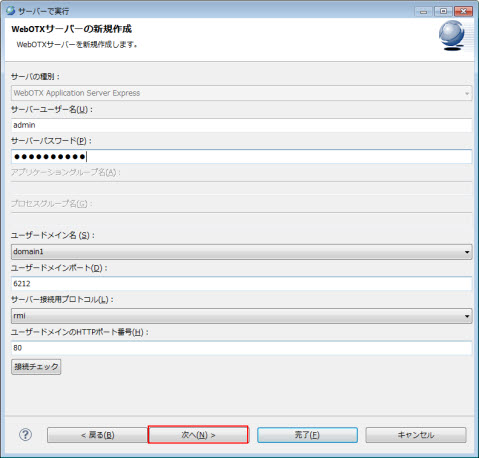
図10.1.3.8-3
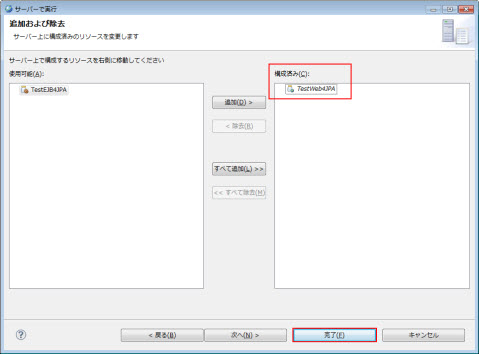
図10.1.3.8-4
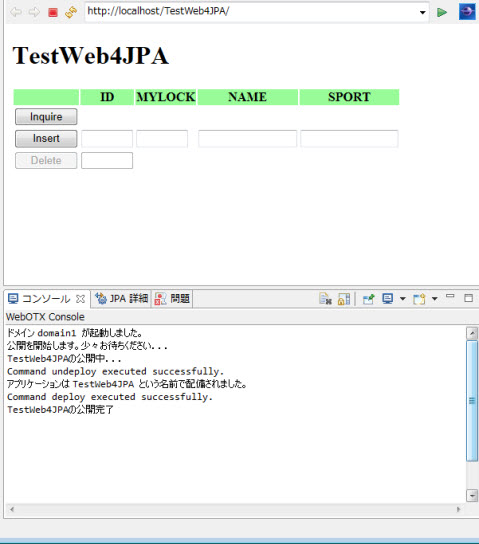
図10.1.3.8-5
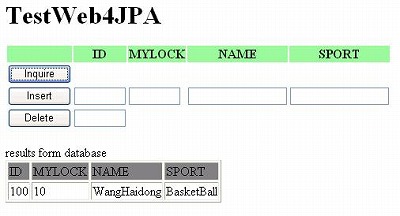
図10.1.3.8-6
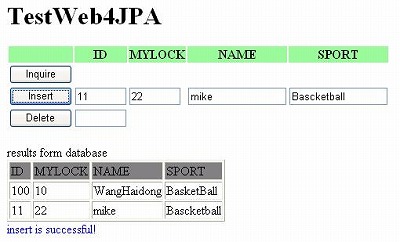
図10.1.3.8-7
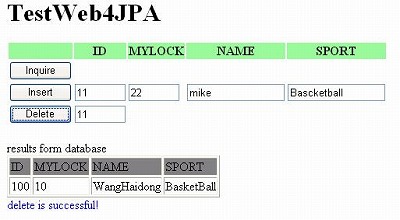
図10.1.3.8-8
図10.1.4.1-1
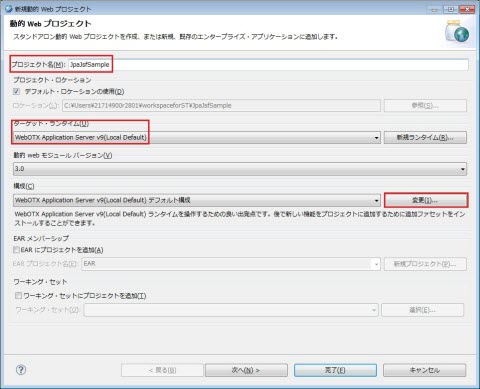
図10.1.4.1-2
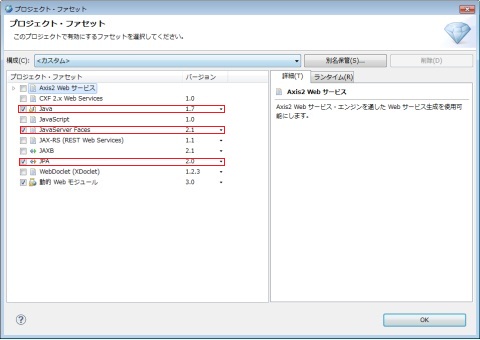
図10.1.4.1-3
図10.1.4.1-4
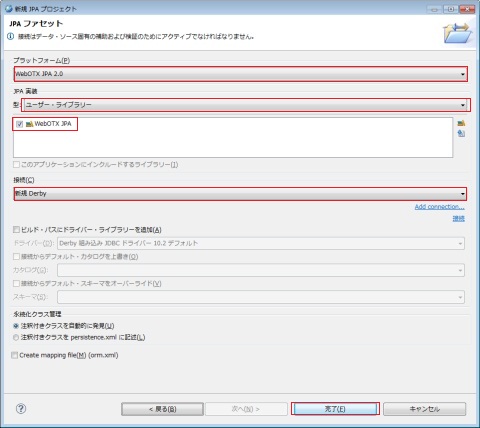
図10.1.4.1-5
| 属性 | 値 |
|---|---|
| プラットフォーム | WebOTX JPA 2.0 |
| JPA 実装 | WebOTX JPA を選択 |
| 接続 | 新規 Derby |
| ビルド・パスにドライバー・ライブラリーを追加 | 非選択 |
| 注釈つきクラスをpersistence.xml に記述 | 選択 |
| Create mapping file | 非選択 |
Memo
ユーザー・ライブラリーの何もリストされていない場合、
[10.2.1.1.JPAライブラリーのコンフィグレーション]を参照してWebOTX JPAライブラリーを追加してください。
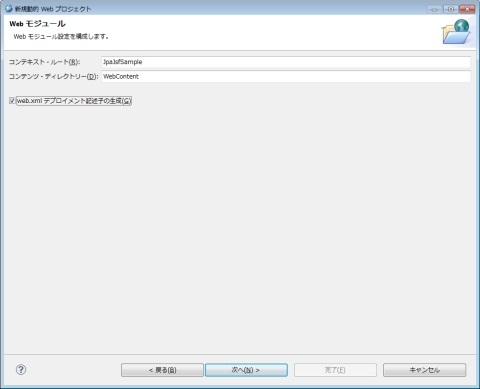
図10.1.4.1-6
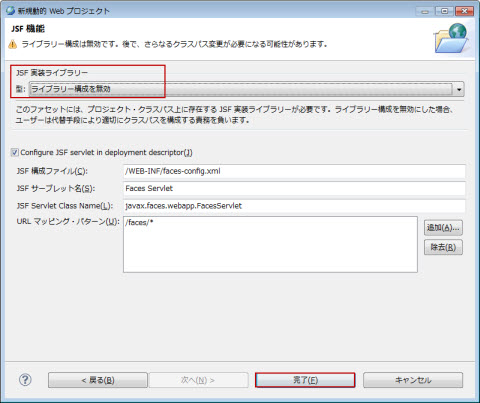
図10.1.4.1-7
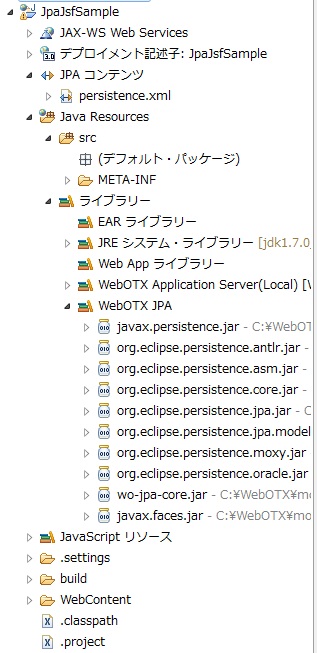
図10.1.4.1-8
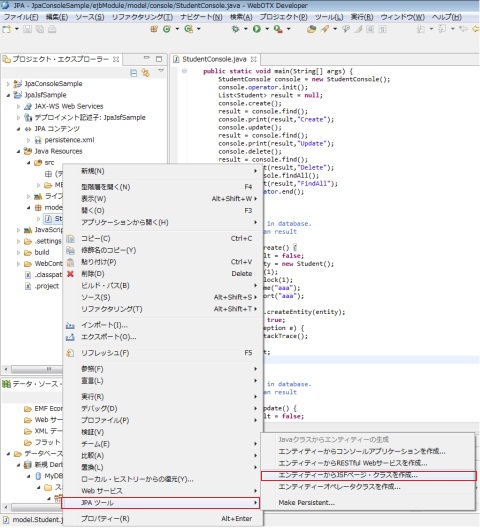
図10.1.4.3-1
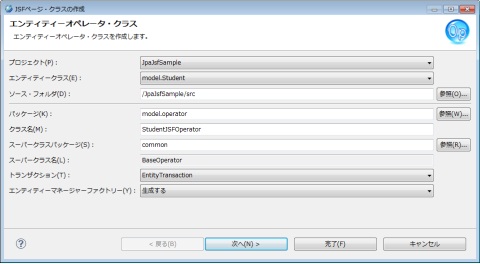
図10.1.4.3-2
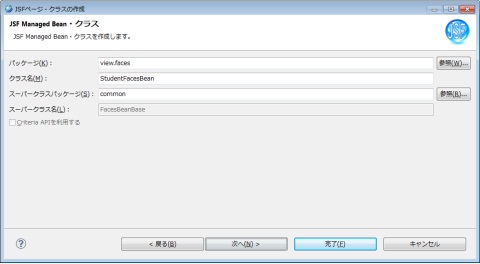
図10.1.4.3-3
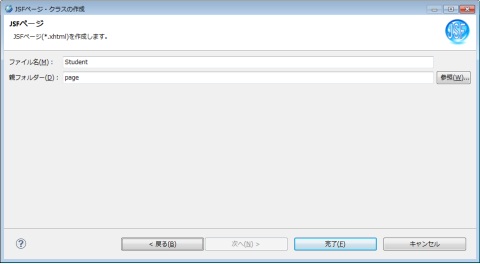
図10.1.4.3-4
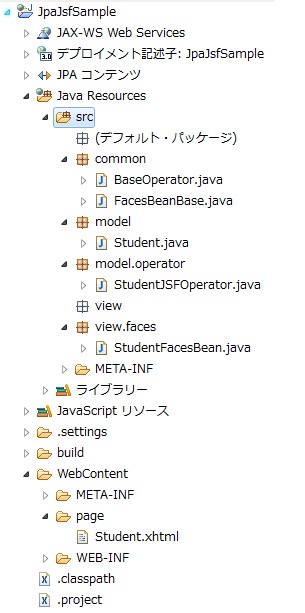
図10.1.4.3-5
<?xml version="1.0" encoding="UTF-8"?>
<persistence version="2.0" xmlns="http://java.sun.com/xml/ns/persistence" xmlns:xsi="http://www.w3.org/2001/XMLSchema-instance" xsi:schemaLocation="http://java.sun.com/xml/ns/persistence http://java.sun.com/xml/ns/persistence/persistence_2_0.xsd">
  <persistence-unit name="JpaJsfSample" transaction-type="RESOURCE_LOCAL">
    <class>model.Student</class>
    <properties>
      <property name="javax.persistence.jdbc.url" value="jdbc:derby:C:\MyDB;create=true"/>
      <property name="javax.persistence.jdbc.driver" value="org.apache.derby.jdbc.EmbeddedDriver"/>
      <property name="javax.persistence.jdbc.user" value=""/>
      <property name="javax.persistence.jdbc.password" value=""/>
    </properties>
  </persistence-unit>
</persistence>
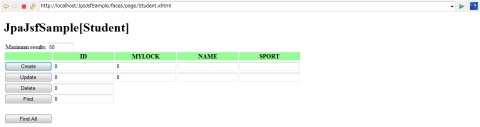
図10.1.4.5-1
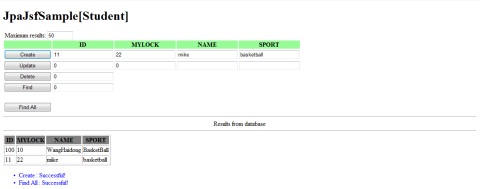
図10.1.4.5-2
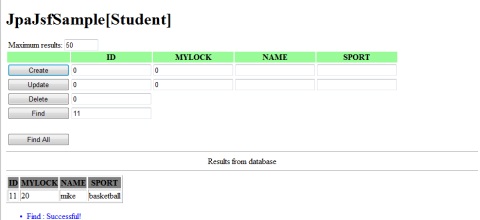
図10.1.4.5-3
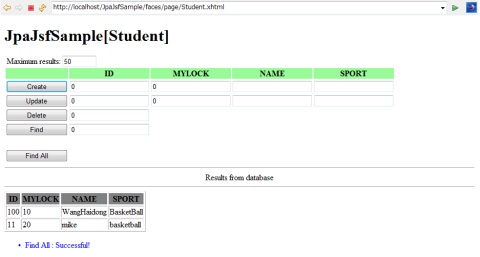
図10.1.4.5-4
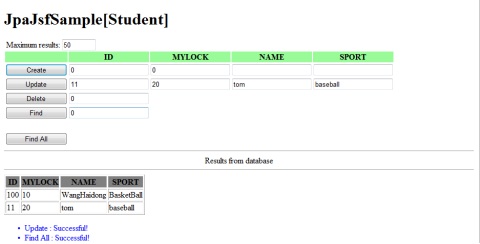
図10.1.4.5-5
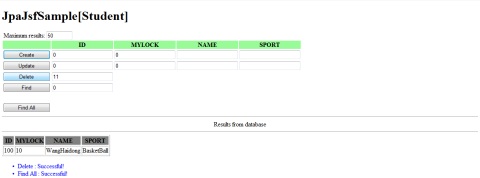
図10.1.4.5-6
図10.1.5.1-1
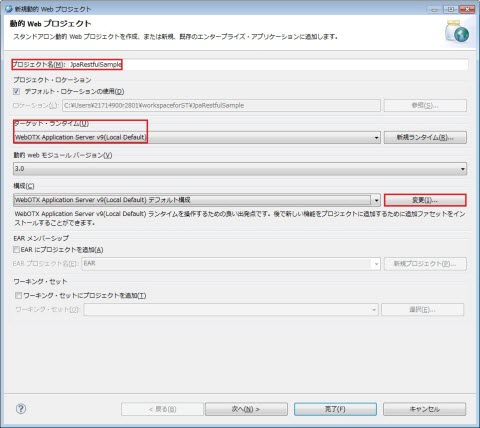
図10.1.5.1-2
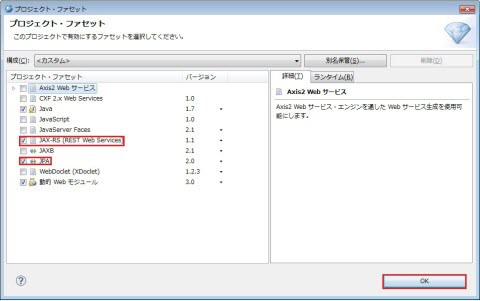
図10.1.5.1-3
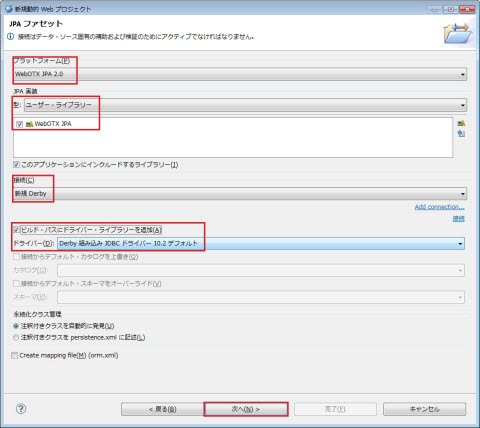
図10.1.5.1-4
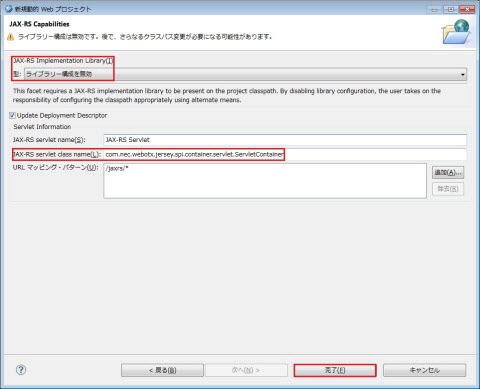
図10.1.5.1-5
| 属性 | 値 |
|---|---|
| JAX-RS Implementation Library | ライブラリー構成を無効 |
| JAX-RS servlet class name | com.nec.webotx.jersey.spi.container.servlet.ServletContainer |
| URL マッピング・パターン | /jaxrs/* |
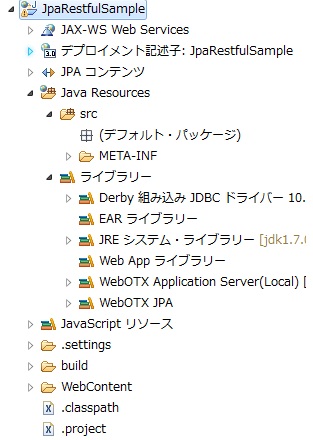
図10.1.5.1-6
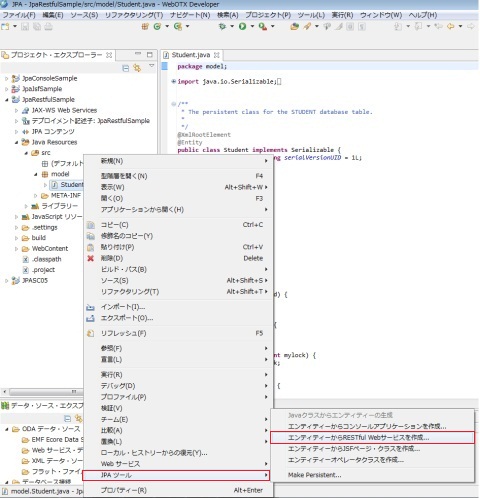
図10.1.5.3-1
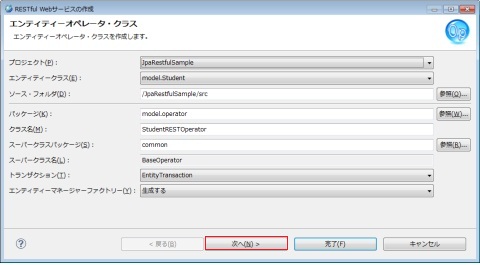
図10.1.5.3-2
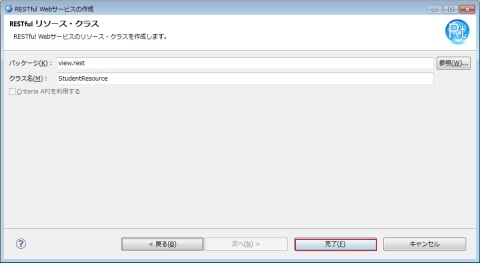
図10.1.5.3-3
図10.1.5.3-4
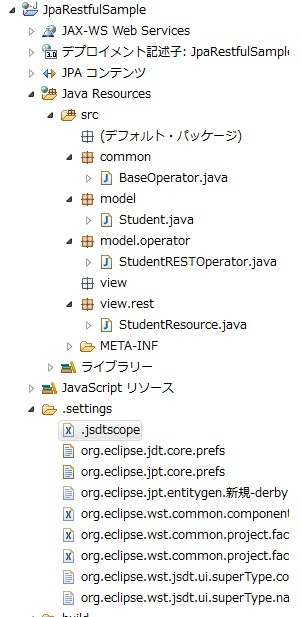
図10.1.5.3-5
<?xml version="1.0" encoding="UTF-8"?>
<persistence version="2.0" xmlns="http://java.sun.com/xml/ns/persistence" xmlns:xsi="http://www.w3.org/2001/XMLSchema-instance" xsi:schemaLocation="http://java.sun.com/xml/ns/persistence http://java.sun.com/xml/ns/persistence/persistence_2_0.xsd">
  <persistence-unit name="JpaRestfulSample" transaction-type="RESOURCE_LOCAL">
    <class>model.Student</class>
    <properties>
      <property name="javax.persistence.jdbc.url" value="jdbc:derby:C:\MyDB;create=true"/>
      <property name="javax.persistence.jdbc.driver" value="org.apache.derby.jdbc.EmbeddedDriver"/>
      <property name="javax.persistence.jdbc.user" value=""/>
      <property name="javax.persistence.jdbc.password" value=""/>
    </properties>
  </persistence-unit>
</persistence>
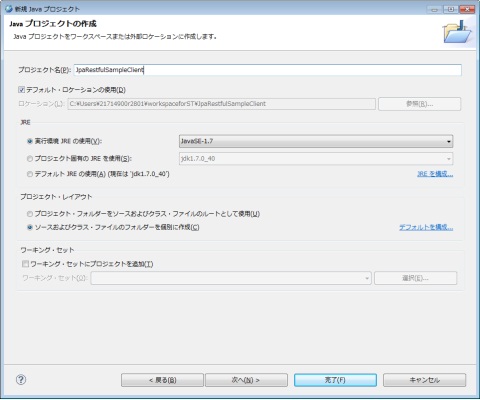
図10.1.5.5-1
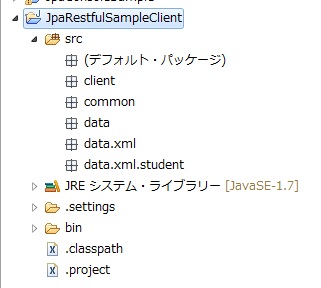
図10.1.5.5-2
package common;

import java.io.BufferedInputStream;
import java.io.IOException;
import java.io.InputStream;
import java.io.InputStreamReader;
import java.io.OutputStream;
import java.net.HttpURLConnection;
import java.net.URL;
import java.util.ArrayList;
import java.util.List;

public class RESTClient {

    protected static final String XML = "application/xml";
    protected static final String JSON = "application/json";

    protected static void create(final String httpUrlStr,
            final String contentType, final String dataPath) throws IOException {
        submit(httpUrlStr, "POST", contentType, dataPath);
    }

    protected static void update(final String httpUrlStr,
            final String contentType, final String dataPath) throws IOException {
        submit(httpUrlStr, "PUT", contentType, dataPath);
    }

    protected static void delete(final String httpUrlStr, final String param)
            throws IOException {
        HttpURLConnection httpUrlConnection = null;
        InputStream in = null;
        try {
            URL url = new URL(getFullHttpUrlStr(httpUrlStr,
                    new String[] { param }));
            httpUrlConnection = (HttpURLConnection) url.openConnection();
            httpUrlConnection.setRequestMethod("DELETE");
            httpUrlConnection.connect();
            in = httpUrlConnection.getInputStream();
        } finally {
            try {
                if (in != null) {
                    in.close();
                }
            } finally {
                if (httpUrlConnection != null) {
                    httpUrlConnection.disconnect();
                }
            }
        }
    }

    protected static String find(final String httpUrlStr,
            final String contentType, final String param) throws IOException {
        return getData(getFullHttpUrlStr(httpUrlStr, new String[] { param }),
                contentType);
    }

    protected static String criteriaFind(final String httpUrlStr,
            final String contentType, final String param) throws IOException {
        String criteriaUrl = null;
        if (httpUrlStr.endsWith("/") || httpUrlStr.endsWith("\\")) {
            criteriaUrl = httpUrlStr + "criteria/";
        } else {
            criteriaUrl = httpUrlStr + "/criteria/";
        }
        return getData(getFullHttpUrlStr(criteriaUrl, new String[] { param }),
                contentType);
    }

    protected static String findAll(final String httpUrlStr,
            final String contentType) throws IOException {
        return getData(httpUrlStr, contentType);
    }

    protected static String findRange(final String httpUrlStr,
            final String contentType, final String param1, final String param2)
            throws IOException {
        return getData(
                getFullHttpUrlStr(httpUrlStr, new String[] { param1, param2 }),
                contentType);
    }

    private static String getFullHttpUrlStr(final String httpUrlStr,
            final String[] params) {
        String result = httpUrlStr;
        if (params.length > 0) {
            if (result.endsWith("/") || result.endsWith("\\")) {
                result = result.substring(0, result.length() - 1);
            }
            for (String param : params) {
                result = result + "/";
                result = result + param;
            }
        }
        return result;
    }

    /**
     * submit.
     * @param httpUrlStr the HTTP URL string
     * @param method the HTTP
     *        method:"GET","POST","HEAD","OPTIONS","PUT","DELETE","TRACE"
     * @param contentType the Content-Type:"application/xml","application/json"
     * @param dataPath the data path
     * @throws IOException IO exception
     */
    private static void submit(final String httpUrlStr, final String method,
            final String contentType, final String dataPath) throws IOException {
        HttpURLConnection httpUrlConnection = null;
        OutputStream out = null;
        InputStream in = null;
        try {
            URL url = new URL(httpUrlStr);
            httpUrlConnection = (HttpURLConnection) url.openConnection();
            httpUrlConnection.setDoOutput(true);
            if (method != null && !method.trim().equals("")) {
                httpUrlConnection.setRequestMethod(method);
            }
            if (contentType != null && !contentType.trim().equals("")) {
                httpUrlConnection.addRequestProperty("Content-Type",
                        contentType);
            }
            httpUrlConnection.connect();
            out = httpUrlConnection.getOutputStream();
            out.write(readFile(dataPath));
            out.flush();
            in = httpUrlConnection.getInputStream();
        } finally {
            try {
                if (out != null) {
                    out.close();
                }
            } finally {
                try {
                    if (in != null) {
                        in.close();
                    }
                } finally {
                    if (httpUrlConnection != null) {
                        httpUrlConnection.disconnect();
                    }
                }
            }
        }
    }

    private static String getData(final String httpUrlStr,
            final String contentType) throws IOException {
        HttpURLConnection httpUrlConnection = null;
        InputStreamReader isr = null;
        try {
            URL url = new URL(httpUrlStr);
            httpUrlConnection = (HttpURLConnection) url.openConnection();
            httpUrlConnection.setDoInput(true);
            httpUrlConnection.setRequestMethod("GET");
            if (contentType != null && !contentType.trim().equals("")) {
                httpUrlConnection.addRequestProperty("Content-Type",
                        contentType);
            }
            httpUrlConnection.connect();
            isr = new InputStreamReader(httpUrlConnection.getInputStream());
            StringBuffer result = new StringBuffer();
            char[] buffer = new char[256];
            int length = isr.read(buffer);
            while (length > -1) {
                result.append(buffer, 0, length);
                length = isr.read(buffer);
            }
            return result.toString();
        } finally {
            try {
                if (isr != null) {
                    isr.close();
                }
            } finally {
                if (httpUrlConnection != null) {
                    httpUrlConnection.disconnect();
                }
            }
        }
    }

    private static byte[] readFile(final String dataPath) throws IOException {
        BufferedInputStream is = null;
        try {
            byte[] result = new byte[0];
            is = new BufferedInputStream(
                    RESTClient.class.getResourceAsStream(dataPath));
            byte[] buffer = new byte[1024];
            int num = is.read(buffer);
            while (num > -1) {
                int len = result.length;
                byte[] newResult = new byte[len + num];
                System.arraycopy(result, 0, newResult, 0, len);
                System.arraycopy(buffer, 0, newResult, len, num);
                result = newResult;
                num = is.read(buffer);
            }
            return result;
        } finally {
            if (is != null) {
                is.close();
            }
        }
    }

    protected static void deleteAllEntities(final String httpUrlStr,
            final String contentType, final String pkName) throws IOException {
        List<String> pkValues = getAllPKValues(httpUrlStr, contentType, pkName);
        for (String pkValue : pkValues) {
            delete(httpUrlStr, pkValue);
        }
        pkValues = getAllPKValues(httpUrlStr, contentType, pkName);
        if (pkValues.size() != 0) {
            throw new IOException();
        }
    }

    private static List<String> getAllPKValues(final String httpUrlStr,
            final String contentType, final String pkName) throws IOException {
        List<String> result = new ArrayList<String>();
        String xmlText = findAll(httpUrlStr, contentType);
        String startSign = "<" + pkName + ">";
        String endSign = "</" + pkName + ">";
        int fromIndex = 0;
        int startIndex = xmlText.indexOf(startSign, fromIndex);
        int endIndex = xmlText.indexOf(endSign, fromIndex);
        while (startIndex > -1) {
            result.add(xmlText.substring(startIndex + startSign.length(),
                    endIndex));
            fromIndex = endIndex + endSign.length();
            startIndex = xmlText.indexOf(startSign, fromIndex);
            endIndex = xmlText.indexOf(endSign, fromIndex);
        }
        return result;
    }

}
clientパッケージに、
JpaRestfulSampleClientというクラスを作成し、その内容は以下ようにします。
package client;

import common.RESTClient;

public class JpaRestfulSampleClient extends RESTClient {

    private static final String HTTP_URL = "http://localhost/JpaRestfulSample/jaxrs/student";
    private static final String DATA_ROOT = "/data/xml/student/";
    private static final String TEST_DATA1 = DATA_ROOT + "student1.xml";
    private static final String TEST_DATA2 = DATA_ROOT + "student2.xml";
    private static final String TEST_DATA3 = DATA_ROOT + "student3.xml";

    public static void main(String[] args) {
        String result = "succeed";
        try {
            create(HTTP_URL, XML, TEST_DATA1);
            create(HTTP_URL, XML, TEST_DATA3);

            String findResult = find(HTTP_URL, XML, "100");
            String findAllResult = findAll(HTTP_URL, XML);
            System.out.println("result(id=100):" + findResult);
            System.out.println("After Create(id=40,id=60), result(all):" + findAllResult);

            update(HTTP_URL, XML, TEST_DATA2);
            findAllResult = findAll(HTTP_URL, XML);
            System.out.println("After Update(id=40), result(all):" + findAllResult);

            String findRangeResult = findRange(HTTP_URL, XML, "0", "2");
            System.out.println("result(0~1):" + findRangeResult);

            delete(HTTP_URL, "40");
            delete(HTTP_URL, "60");
            findAllResult = findAll(HTTP_URL, XML);
            System.out.println("After Delete(id=40,id=60), result(all):" + findAllResult);
        } catch (Throwable e) {
            result = "failed";
        }
        System.out.println(result);
    }
}
data.xml.studentパッケージに、
student1.xmlというxmlファイルを作成し、その内容は以下ようにします。
<?xml version="1.0" encoding="UTF-8" standalone="yes" ?> <student> <id>40</id> <mylock>20</mylock> <name>Shirley</name> <sport>Dance</sport> </student>student2.xmlというxmlファイルを作成し、その内容は以下ようにします。
<?xml version="1.0" encoding="UTF-8" standalone="yes" ?> <student> <id>40</id> <mylock>20</mylock> <name>Valentine</name> <sport>CQB</sport> </student>student3.xmlというxmlファイルを作成し、その内容は以下ようにします。
<?xml version="1.0" encoding="UTF-8" standalone="yes" ?>
<student>
  <id>60</id>
  <mylock>30</mylock>
  <name>Akasha</name>
  <sport>Pain</sport>
</student>
作成完了のJpaRestfulSampleClientプロジェクトは以下のようです。
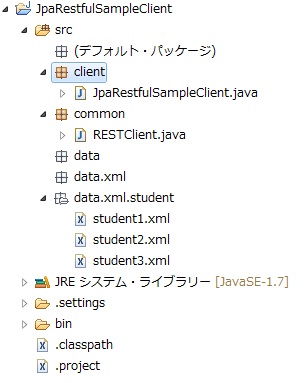
図10.1.5.5-3
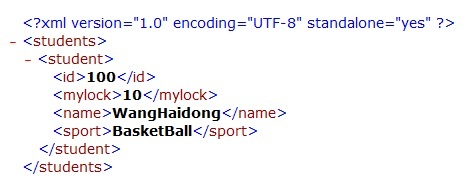
図10.1.5.6-1
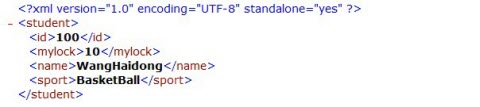
図10.1.5.6-2
result(id=100):<?xml version="1.0" encoding="UTF-8" standalone="yes"?><student><id>100</id><mylock>10</mylock><name>WangHaidong</name><sport>BasketBall</sport></student>
After Create(id=40,id=60), result(all):<?xml version="1.0" encoding="UTF-8" standalone="yes"?><students><student><id>100</id><mylock>10</mylock><name>WangHaidong</name><sport>BasketBall</sport></student><student><id>40</id><mylock>20</mylock><name>Shirley</name><sport>Dance</sport></student><student><id>60</id><mylock>30</mylock><name>Akasha</name><sport>Pain</sport></student></students>
After Update(id=40), result(all):<?xml version="1.0" encoding="UTF-8" standalone="yes"?><students><student><id>100</id><mylock>10</mylock><name>WangHaidong</name><sport>BasketBall</sport></student><student><id>40</id><mylock>30</mylock><name>Valentine</name><sport>CQB</sport></student><student><id>60</id><mylock>30</mylock><name>Akasha</name><sport>Pain</sport></student></students>
result(0~1):<?xml version="1.0" encoding="UTF-8" standalone="yes"?><students><student><id>100</id><mylock>10</mylock><name>WangHaidong</name><sport>BasketBall</sport></student><student><id>40</id><mylock>30</mylock><name>Valentine</name><sport>CQB</sport></student></students>
After Delete(id=40,id=60), result(all):<?xml version="1.0" encoding="UTF-8" standalone="yes"?><students><student><id>100</id><mylock>10</mylock><name>WangHaidong</name><sport>BasketBall</sport></students>
succeed