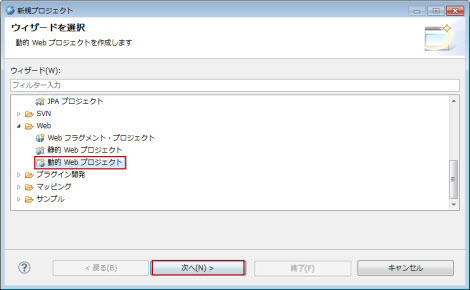
図1.2.15.1-1
図1.2.15.1-1
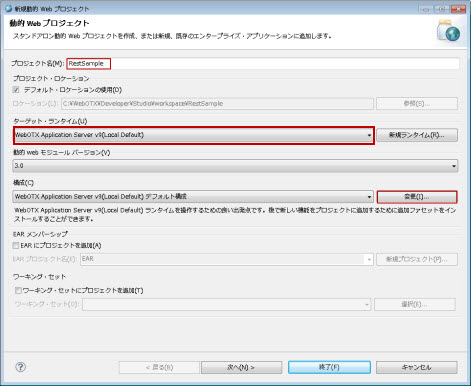
図1.2.15.1-2
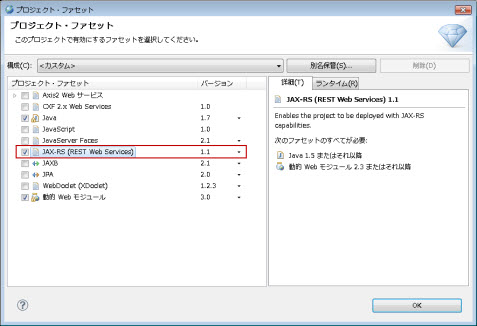
図1.2.15.1-3
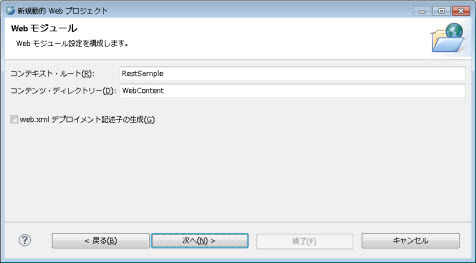
図1.2.15.1-4
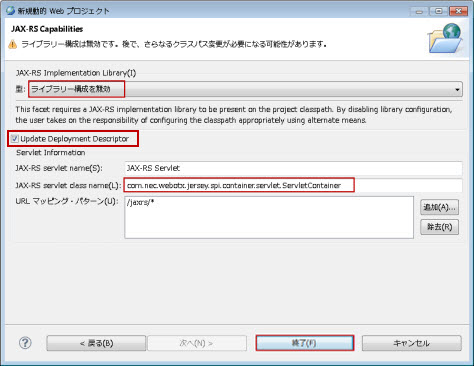
図1.2.15.1-5
|
項目 |
説明 |
|---|---|
|
JAX-RS servlet name |
必須。JAX-RSサーブレット名を設定します。 |
|
JAX-RS servlet class name |
必須。com.nec.webotx.jersey.spi.container.servlet.ServletContainerを設定します。 |
|
URL マッピング・パターン |
JAX-RSサーブレットにマッピングするURLパターンを設定します。通常は[/jaxrs/*]を設定します。 |
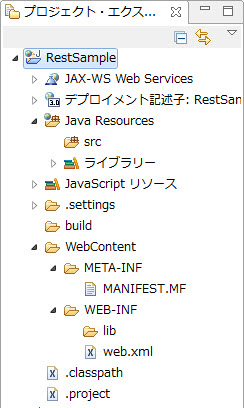
図1.2.15.1-6
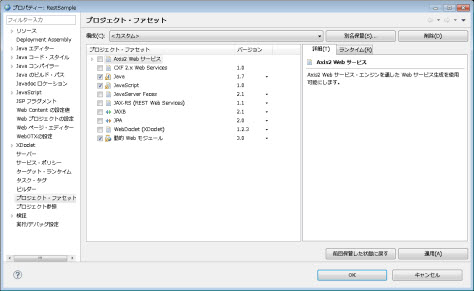
図1.2.15.1-7
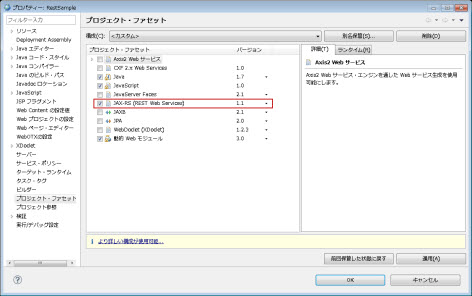
図1.2.15.1-8
図1.2.15.1-9
図1.2.15.1-10
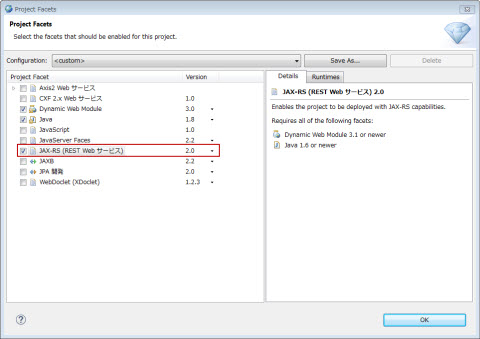
図1.2.15.1-11
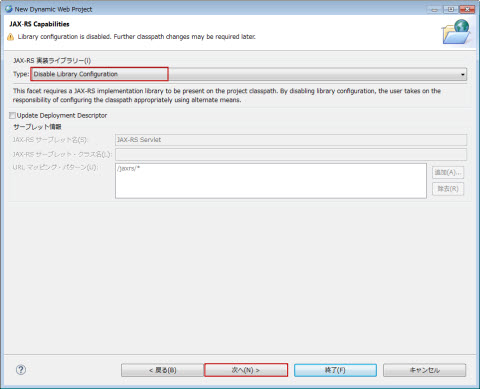
図1.2.15.1-12
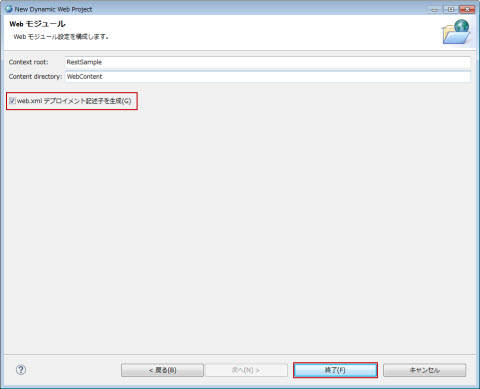
図1.2.15.1-13
図1.2.15.1-14
<?xml version="1.0" encoding="UTF-8"?>
<web-app xmlns:xsi="http://www.w3.org/2001/XMLSchema-instance" xmlns="http://java.sun.com/xml/ns/javaee" xsi:schemaLocation="http://java.sun.com/xml/ns/javaee http://java.sun.com/xml/ns/javaee/web-app_3_0.xsd" id="WebApp_ID" version="3.0">
  <display-name>RestSample</display-name>
  <welcome-file-list>
    <welcome-file>index.html</welcome-file>
    <welcome-file>index.htm</welcome-file>
    <welcome-file>index.jsp</welcome-file>
    <welcome-file>default.html</welcome-file>
    <welcome-file>default.htm</welcome-file>
    <welcome-file>default.jsp</welcome-file>
  </welcome-file-list>
  <servlet>
    <servlet-name>JAX-RS Servlet</servlet-name>
    <servlet-class>com.nec.webotx.jersey2.servlet.ServletContainer</servlet-class>
    <load-on-startup>1</load-on-startup>
  </servlet>
  <servlet-mapping>
    <servlet-name>JAX-RS Servlet</servlet-name>
    <url-pattern>/jaxrs/*</url-pattern>
  </servlet-mapping>
</web-app>
|
項目 |
説明 |
|---|---|
|
servlet-name |
必須。JAX-RSサーブレット名を設定します。 <servlet>下の<servlet-name>と<servlet-mapping>下の<servlet-name>に同じ値を設定してください。 |
|
servlet-class |
必須。com.nec.webotx.jersey2.servlet.ServletContainerを設定します。 |
|
load-on-startup |
JAX-RSサーブレットの初期化順序を設定します。通常は[1]を設定します。 |
|
url-pattern |
JAX-RSサーブレットにマッピングするURLパターンを設定します。通常は[/jaxrs/*]を設定します。 |
図1.2.15.1-15
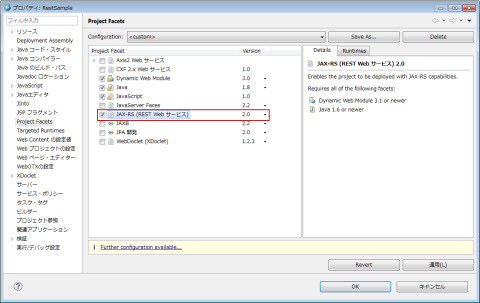
図1.2.15.1-16
  1 package com.nec.webotx.ws.rest.samples.helloworld.resources;
  2
  3 import javax.ws.rs.GET;
  4 import javax.ws.rs.Produces;
  5 import javax.ws.rs.Path;
  6
  7 // The Java class will be hosted at the URI path "/helloworld"
  8 @Path("/helloworld")
  9 public class HelloWorldResource {
 10
 11     // The Java method will process HTTP GET requests
 12     @GET
 13     // The Java method will produce content identified by the MIME Media
 14     // type "text/plain"
 15     @Produces("text/plain")
 16     public String getClichedMessage() {
 17         // Return some cliched textual content
 18         return "Hello World";
 19     }
 20 }
@Path("ResourceTest1")
public class Resource1{
    private String query1;
    public Resource1(@Encoded @DefaultValue("abc") @QueryParam("queryParam1") String query) {
    query1 = query;
}
@GET
@Path("/queryParam1Value")
    public String getQuery1Value() {
        return "query1=" + query1;
    }
}
この例では、クライアントからURL http://sample.com/example/ResourceTest1/queryParam1Value?queryParam1=queryValueでアクセスすると、queryValueを返却します。
| 項番 | インジェクション用アノテーション | オプションのアノテーション | |
|---|---|---|---|
| Encoded | DefaultValue | ||
| 1 | MatrixParam | ○ | ○ |
| 2 | QueryParam | ○ | ○ |
| 3 | PathParam | ○ | × |
| 4 | CookieParam | × | ○ |
| 5 | HeaderParam | × | ○ |
| 6 | FormParam | × | ○ |
| 7 | Context | × | × |
private @Encoded @DefaultValue("value1") @QueryParam("id") String id;
URLで“会社”をUTF-8でencodeしたパラメータの値“%E4%BC%9A%E7%A4%BE”でアクセスすると
(http://sample.com/example/ResourceTest3/queryParam1Value?id=%E4%BC%9A%E7%A4%BE)
リソースクラスで取得できるidの値は“%E4%BC%9A%E7%A4%BE”となり、encodeされた内容になります。
private String property1;
@DefaultValue("10") @QueryParam("paramProperty1")
public void setProperty1(String property1) {
  this.property1 = property1;
}
この例では、URLの“paramProperty1”QueryParamの値を自動的にproperty1にインジェクションします。
@Path("resource_method")
public class ResourceMethodResource {
	@GET
	public String resourceMethod() {
		return "this is a resource method.";
	}
}
ルートリソースクラスResourceMethodResourceのメソッドresourceMethod()はリソースメソッドです。
クライアントからURI「resource_method」にアクセスする時、JAX-RSエンジンはそのメソッドを呼び出します。
@Path("/resourceTest1")
public class Resource1 {
    public Resource1(){
    }
...
    @GET
    @Path("/testPathParam/{arg1}/{arg2}")
    public String listPathParam(@PathParam("arg1") String arg1,@PathParam("arg2") String arg2) {
        return "arg1="+arg1+" and arg2="+arg2;
    }
...
}
listPathParamメソッドはサブリソースメソッドです。
/resourceTest1/testPathParam/{arg1}/{arg2}のURIにリクエストすると、listPathParam()はそのリクエストを処理します。
@Path("/resourceTest1")
public class Resource1 {
    @Path("/testSubResourceLocator/{id}")
    public Resource1_1 getResource1_1(@PathParam("id") String id){
        return new Resource1_1(id);
    }
...
}
対応するサブリソースクラスの例を次に示します。
public class Resource1_1 {
    private String resourceID;
    public Resource1_1(String id){
        resourceID = id;
  }
    @GET
    public String getDetails(){
        return "This resource id is "+resourceID;
    }
}
この例では、ルートリソースクラスResource1はHTTPリクエストを直接処理しません。サブリソースロケータgetResource1_1が返すサブリソースクラスResource1_1がそのリクエストを処理します。
public class Resource1_1 {
    private String resourceID;
    public Resource1_1(String id){
        resourceID = id;
  }
    @GET
    public String getDetails(){
        return "This resource id is "+resourceID;
    }
}
サブリソースクラスのインスタンスは、JAX-RSエンジンによって生成されません。サブリソースクラスは、対応するサブリソースロケータでインスタンス化する必要があります。
import javax.ws.rs.GET;
import javax.ws.rs.Path;

@Path("optionsmethod")
public class OptionsMethodResource {
	@GET
	public String getHello() {
		return "hello";
	}
}
クライアントからHTTP OPTIONSリクエストメソッドでURI「optionsmethod」のリソースをリクエストする時、サーバから下記の内容が返信されます。
<?xml version="1.0" encoding="UTF-8"?>
<application xmlns="http://wadl.dev.java.net/2009/02">
    <doc xmlns:jersey="http://jersey.java.net/" jersey:generatedBy="Jersey: 1.11 12/09/2011 10:27 AM"/>
    <grammars/>
    <resources base="http://{server-name:port}/{context-root}/{url-pattern}/">
        <resource path="optionsmethod">
            <method id="getHello" name="GET">
                <response>
                    <representation mediaType="*/*"/>
                </response>
            </method>
        </resource>
    </resources>
</application>
      @GET
      Produces({"application/xml", "application/json"})
      public String doGetAsXmlOrJson() {
          ...
      }
品質係数の指定
      @GET
      @Produces({"application/xml; qs=0.9", "application/json"})
      public String doGetAsXmlOrJson() {
          ...
      }
//インタフェース
public interface A {
    @GET
    public String getValue(@QueryParam("query") String query);
}
//インタフェースを実装するルートリソースクラス
@Path("/root/")
public class Resource implements A {
    public String getValue(String query) {…}
}
URL http://sample.com/example/resource/root?query=10 に対するHTTP GETリクエストは、リソースメソッドgetValue()にディスパッチされます。リソースメソッドgetValue()はインタフェースのGETアノテーションを継承しているためです。
//親クラス
public class ParentClassA {
	@GET
	public String getValue(@QueryParam("query1") String query1){
		return "query1 = "+query1;
	}
}
//子クラス
@Path("/inheretance")
public class SubClass extends ParentClassA {
	public String getValue(String query){
		return query;
	}
}
URL http://sample.com/example/resource/inheretance?query1=10 にアクセスすると、queryの値は10を取得できます。
public interface InterfaceA {
	@GET
	public String getValue(@PathParam("path1") String path1);
}
public interface InterfaceB {
	@GET
	public String getValue(@QueryParam("query") String query);
}
@Path("/inheretance/{path1}")
public class SubClass implements InterfaceB, InterfaceA{
	public String getValue(String param){
		return param;
	}
}
URL http://sample.com/example/resource/inheretance/aaa?query=456 にアクセスすると、paramの値は456を取得できます。これは、InterfaceBが先にインタフェース実装されており、InterfaceBのアノテーションが優先利用されるためです。
以下のようにInterfaceAを先に記述した場合、
@Path("/inheretance/{path1}")
public class SubClass implements InterfaceA, InterfaceB{
	public String getValue(String param){
		return param;
	}
}
URL http://sample.com/example/resource/inheretance/aaa?query=456 にアクセスすると、paramの値はaaaを取得できます。
| 項番 | データ型 | アノテーション | |||||||
|---|---|---|---|---|---|---|---|---|---|
| PathParam | QueryParam | MatrixParam | CookieParam | HeaderParam | FormParam | Context | |||
| 1 | プリミティブ | int | ○※1 | ○ | ○ | ○ | ○ | ○ | × |
| 2 | short | ○※1 | ○ | ○ | ○ | ○ | ○ | × | |
| 3 | long | ○※1 | ○ | ○ | ○ | ○ | ○ | × | |
| 4 | float | ○※1 | ○ | ○ | ○ | ○ | ○ | × | |
| 5 | double | ○※1 | ○ | ○ | ○ | ○ | ○ | × | |
| 6 | char | × | × | × | × | × | × | × | |
| 7 | byte | ○※1 | ○ | ○ | ○ | ○ | ○ | × | |
| 8 | boolean | ○※1 | ○ | ○ | ○ | ○ | ○ | × | |
| 9 | String型の引数を一つ取るコンストラクタを持つ型 | ○※1 | ○ | ○ | ○ | ○ | ○ | × | |
| 10 | String型の引数を一つ取りその型のインスタンスを返すコンストラクタを持ち、かつstaticなvalueOfまたはfromStringメソッドを持つ型 ※2 | ○※1 | ○ | ○ | ○ | ○ | ○ | × | |
| 11 | List<T>(Tが上記項番9、10のデータ型) | ○※1 | ○ | ○ | × | ○ | ○ | × | |
| 12 | Set<T>(Tが上記項番9、10のデータ型) | ○※1 | ○ | ○ | × | ○ | ○ | × | |
| 13 | Sorted Set<T>(Tが上記項番9、10のデータ型) | ○※1 | ○ | ○ | × | ○ | ○ | × | |
| 14 | PathSegment | ○※1 | × | × | × | × | × | × | |
| 15 | コンテキスト型 | UriInfo | × | × | × | × | × | × | ○※1 |
| 16 | HttpHeaders | × | × | × | × | × | × | ○※1 | |
| 17 | Request | × | × | × | × | × | × | ○※1 | |
| 18 | SecurityContext | × | × | × | × | × | × | ○※1 | |
| 19 | Providers | × | × | × | × | × | × | ○※1 | |
| 20 | ServletConfig | × | × | × | × | × | × | ○※1 | |
| 21 | ServletContext | × | × | × | × | × | × | ○※1 | |
| 22 | HttpServletRequest | × | × | × | × | × | × | ○※1 | |
| 23 | HttpServletResponse | × | × | × | × | × | × | ○※1 | |
| ルートリソースクラスのコンス トラクターのパラメーター | ルート(サブ)リソースクラスのリソースメソッドのパラメータ | ルート(サブ)リソースクラスのサブリソースメソッドのパラメータ | ルート(サブ)リソースクラスのサブリソースロケータのパラメータ | ルートリソースクラスのフィールド | ルートリソースクラスのBeanプロパティ |
|---|---|---|---|---|---|
| ○ | ○ | ○ | ○ | ○ | ○ |
| ルートリソースクラスのコンス トラクターのパラメーター | ルート(サブ)リソースクラスのリソースメソッドのパラメータ | ルート(サブ)リソースクラスのサブリソースメソッドのパラメータ | ルート(サブ)リソースクラスのサブリソースロケータのパラメータ | ルートリソースクラスのフィールド | ルートリソースクラスのBeanプロパティ |
|---|---|---|---|---|---|
| ○ | ○ | ○ | ○ | ○ | ○ |
| ルートリソースクラスのコンス トラクターのパラメーター | ルート(サブ)リソースクラスのリソースメソッドのパラメータ | ルート(サブ)リソースクラスのサブリソースメソッドのパラメータ | ルート(サブ)リソースクラスのサブリソースロケータのパラメータ | ルートリソースクラスのフィールド | ルートリソースクラスのBeanプロパティ |
|---|---|---|---|---|---|
| ○ | ○ | ○ | ○ | ○ | ○ |
| ルートリソースクラスのコンストラクターのパラメーター | ルート(サブ)リソースクラスのリソースメソッドのパラメータ | ルート(サブ)リソースクラスのサブリソースメソッドのパラメータ | ルート(サブ)リソースクラスのサブリソースロケータのパラメータ | ルートリソースクラスのフィールド | ルートリソースクラスのBeanプロパティ |
|---|---|---|---|---|---|
| ○ | ○ | ○ | ○ | ○ | ○ |
| ルートリソースクラスのコンス トラクターのパラメーター | ルート(サブ)リソースクラスのリソースメソッドのパラメータ | ルート(サブ)リソースクラスのサブリソースメソッドのパラメータ | ルート(サブ)リソースクラスのサブリソースロケータのパラメータ | ルートリソースクラスのフィールド | ルートリソースクラスのBeanプロパティ |
|---|---|---|---|---|---|
| ○ | ○ | ○ | ○ | ○ | ○ |
@Path("/root")
public class Resource {
  private @Context UriInfo uriInfo;
  @GET
  public String getValue() {
    String value = this.uriInfo.getQueryParameters().getFirst("query");
    return value;
  }
}
URL http://sample.com/example/root?query=10 にアクセスすると、valueの値は10になります。
@Path("/root")
public class Resource {
  private @Context HttpHeaders httpHeaders;
  @GET
  public String getValue () {
    String value = this.httpHeaders.getRequestHeader("Accept").get(0);
    return value;
  }
}
HTTP Acceptヘッダに"application/xml"を指定し、
URL http://sample.com/example/root"に対するHTTP GETリクエストでアクセスすると、 valueの値はapplication/xmlになります。
@Path("/root")
public class Resource {
  private @Context Providers providers;
  @GET
  public String getValue() {
    //providersフィールドから例外マッピングプロバイダを取得します
    return this.providers.getExceptionMapper(RuntimeException.class);
  }
}
URL http://sample.com/example/root にアクセスすると、java.lang.RuntimeExceptionを処理できる例外マッピングプロバイダインスタンスが取得できます。
@Path("/root")
public class Resource {
private @Context SecurityContext securityContext;
  @GET
  public String getValue () {
    String value = "Authentication Scheme: "
        + this.securityContext.getAuthenticationScheme()
        + ", User Principal: " + this.securityContext.getUserPrincipal()
        + ", Is secure: " + this.securityContext.isSecure()
        + ", Is user in role: " + this.securityContext.isUserInRole("admin");
    return value;
  }
}
セキュリティ情報を含むweb.xmlの例を次に示します。
<?xml version="1.0" encoding="UTF-8"?>
<web-app ...>
  ...
  <security-constraint>
     <web-resource-collection>
       <web-resource-name>Test Resource</web-resource-name>
       <url-pattern>/*</url-pattern>
       <http-method>GET</http-method>
     </web-resource-collection>
     <auth-constraint>
       <role-name>admin</role-name>
     </auth-constraint>
  </security-constraint>
  <login-config>
     <auth-method>BASIC</auth-method>
     <realm-name>jaxrs_server</realm-name>
  </login-config>
  <security-role>
     <role-name>admin</role-name>
  </security-role>
</web-app>
URL http://sample.com/example/root にアクセスすると、web.xmlの設定と実際の認証情報に基づいてセキュリティ情報が取得できます。
WebOTXのJAX-RSではBASIC認証とDigest認証が使用できます。
@Path("/root")
public class Resource {
  private @Context HttpServletRequest httpRequest;
  @GET
  public String getValue() {
    return this.httpRequest.getParameter("TestParam");
  }
}
URL: http://sample.com/example/root?TestParam=TestValueでアクセスすると、
getValue()よりTestParamパラメータの値TestValueを取得できます。
@Path("/root")
public class Resource {
  private @Context HttpServletResponse httpResponse;
  @GET
  public void getValue() throws IOException {
    String entity = "Response mentioned using HttpServletResponse";
    httpResponse.setHeader("abc","xyz");
    httpResponse.getOutputStream().write(entity.getBytes());
    httpResponse.getOutputStream().flush();
    httpResponse.getOutputStream().close();
  }
}
URL:http://sample.com/example/root にHTTP GETリクエストでアクセスすると、httpResponseフィールドにHttpServletResponseがインジェクトされ、その後HTTP GETリクエストを処理するgetValue()メソッドが呼び出されます。
@Path("/root")
public class Resource {
  private @Context ServletConfig config;
  @GET
  public String getValue() {
    return this.config.getInitParameter("TestParam");
  }
}
追加の初期化パラメータ(init-param要素)を含むweb.xmlの例を次に示します。
<web-app ...>
<servlet>
<init-param>
      <param-name>TestParam</param-name>
      <param-value>TestValue</param-value>
</init-param>
……
</servlet>
</web-app>
URL:http://sample.com/example/root にHTTP GETリクエストでアクセスすると、初期化パラメータ"TestParam"の値"TestValue"を取得できます。
@Path("/root")
public class Resource {
  private @Context ServletContext context;
  @GET
  public String getValue() {
    return this.context.getInitParameter("TestParam");
  }
}
コンテキストスコープの初期化パラメータ(context-param要素)を含むweb.xmlを次に示します。
<?xml version="1.0" encoding="UTF-8"?>
<web-app ...>
  ...
  <context-param>
    <param-name>TestParam</param-name>
    <param-value>TestValue</param-value>
  </context-param>
</web-app>
URL:http://sample.com/example/root にHTTP GETリクエストでアクセスすると、コンテキストスコープの初期化パラメータ"TestParam"の値"TestValue"が取得できます。
| ルートリソースクラスのコンストラクターのパラメーター | ルート(サブ)リソースクラスのリソースメソッドのパラメータ | ルート(サブ)リソースクラスのサブリソースメソッドのパラメータ | ルート(サブ)リソースクラスのサブリソースロケータのパラメータ | ルートリソースクラスのフィールド | ルートリソースクラスのBeanプロパティ |
|---|---|---|---|---|---|
| ○ | ○ | ○ | ○ | ○ | ○ |
<html>
<head>
<meta http-equiv="content-type" content="text/xml;charset=utf-8">
<title> test RESTFulWebService @FromParam</title>
</head>
<body>
<form action="http://localhost:8080/WebProject1/myApplication1/testFormParam" method="post" >
<table>
<tr>
<td>FirstName:</td>
<td><input type="text" name="firstname"></td>
</tr>
<tr>
<td>Age:</td>
<td><input type="text" name="age"></td>
</tr>
</table>
<input type="submit" value="Submit" >
</form>
</body>
</html>
リソースクラス:
@Path("testFormParam")
public class FormResource {
@POST
@Consumes("application/x-www-form-urlencoded")
public String getFormString(@FormParam("firstname") String name, @FormParam("age") int age){
	return "firstname="+name+";age="+age;
	}
}
FirstName入力ボックスにname1を入力し、age入力ボックスに20を入力した場合、リソースクラスの@FormParamからname1と20を取得できます。
| パラメータ | DefaultValue使用の結果 | 備考(リクエストパスに指定パラメータの存在状況によって、DefaultValueの利用状況を説明します) |
|---|---|---|
| MatrixParam | 対応するParamがリクエストパスに存在しない場合、DefaultValue値が使用されます。(備考欄の②の場合、DefaultValueを使用しない) | ①リクエストパスに指定パラメータがない場合、DefaultValue値を利用する。例えば、リクエストパスに「;null」あるいは「; 指定パラメータ以外のパラメータ= XXX」を指定する。 ②リクエストパスに指定パラメータがある場合、DefaultValue値を利用しない。指定パラメータに値を与えない場合、値はnullになる。指定パラメータに値を与えた場合はその値を利用する。例えば、リクエストパスに「;指定パラメータ名」しか指定しない場合、値はnullになる。 |
| QueryParam | 同上 | 同上 |
| FormParam | 同上 | 同上 |
| CookieParam | 同上 | 同上 複数のパラメータ値を指定する場合、最後の値を利用する。 |
| HeaderParam | 対応するParamがリクエストに存在しない場合、DefaultValue値が使用されます。(備考欄の②の場合、DefaultValueを使用しない) | ①リクエストパスに指定パラメータがない場合、DefaultValue値を利用する。リクエストパスに一番目に指定するパラメータの値が指定しない場合(「指定パラメータ」のように指定する)、DefaultValue値を利用する。 ②一番目のパラメータは指定パラメータで、かつ有効な値を指定する場合、DefaultValue値を利用しない。 |
| PathParam | DefaultValueアノテーションを無視します。 | -- |
| Context | DefaultValueアノテーションを無視します。 | -- |
| BeanParam | DefaultValueアノテーションを無視します。 | -- |
public class MyBeanParam {
    @PathParam("p")
    private String pathParam;

    @MatrixParam("m")
    @Encoded
    @DefaultValue("default")
    private String matrixParam;

    @HeaderParam("header")
    private String headerParam;

    private String queryParam;

    public MyBeanParam(@QueryParam("q") String queryParam) {
        this.queryParam = queryParam;
    }

    public String getPathParam() {
        return pathParam;
    }
    ...
}
メソッドのパラメータとしてMyBeanParamのインジェクション:
@POST
public void post(@BeanParam MyBeanParam beanParam, String entity) {
    final String pathParam = beanParam.getPathParam();
    ...
}
上記の例では、シングルBeanとしてのMyBeanParamにインジェクション@PathParam、@QueryParam、@MatrixParamと@HeaderParamのアグリゲータを示しています。postリソースメソッドで@BeanParamより、Beanに注入されたパスパラメータ("p")の設定値が取得できます。| ルートリソースクラスの コンストラクターの パラメーター |
ルート(サブ)リソースクラスの リソースメソッドの パラメータ |
ルート(サブ)リソースクラスの サブリソースメソッドの パラメータ |
ルート(サブ)リソースクラスの サブリソースロケータの パラメータ |
ルートリソースクラスの フィールド |
ルートリソースクラスの Beanプロパティ |
|---|---|---|---|---|---|
| ○ | ○ | ○ | ○ | ○ | ○ |
@Path("EntityParameter")
public class EntityParameter {
	@POST
	@Path("getFileBody")
	public String getFileBody(File fileBody) throws IOException{
		BufferedReader br = new BufferedReader(new InputStreamReader(new FileInputStream(fileBody),"UTF-8"));
		String line=null;
		StringBuffer sb = new StringBuffer();
		while((line=br.readLine()) != null){
			sb.append(line);
		}
		return sb.toString();
	}
}
@Path("/inputStreamRes")
public class InputStreamResource {
	private Map<String, String> fileRecord = new HashMap<String, String>();
	public InputStreamResource() {
		fileRecord.put("id1", "ファイルパス");
	}
	@GET
	@Path("/{fileId}")
	public InputStream getInputStream(@PathParam("fileId") String fileId) {
		FileInputStream inStream = null;
		String filePath = fileRecord.get(fileId);
		if (filePath != null) {
			try {
				inStream = new FileInputStream(filePath);
			} catch (FileNotFoundException e) {
				e.printStackTrace();
			}
		}
		return inStream;
	}
}
パスパラメータ「fileId」により、対応するFileファイルのInputStreamを取得して返却します。
@Path("ResponseResource")
public class ResponseResource {
    @GET
    @Path("helloworld")
    public Response getHelloWorldByResponse() {
	    String entityBody = "HelloWorld";
	    return Response.ok(entityBody, MediaType.TEXT_HTML_TYPE).build();
    }
}
2.クライアント側からGETで「/ResponseResource/helloworld」をリクエストすると、
サブリソーメソッドgetHelloWorldByResponse()はレスポンス状態コード「200」、MIMEタイプ「text/html」、エンティティ「HelloWorld」のレスポンスメッセージを返信します。
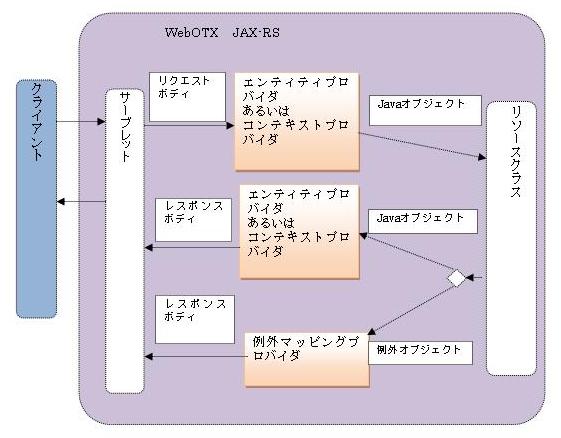
図1.2.15.12-1
| 項番 | Javaの型 | Charset(※1) | MIMEタイプ |
|---|---|---|---|
| 1 | byte[] | × | 任意(*/*) |
| 2 | java.lang.String | ○ | 任意(*/*) |
| 3 | java.io.InputStream | × | 任意(*/*) |
| 4 | java.io.Reader | ○ | 任意(*/*) |
| 5 | java.io.File(※2) | × | 任意(*/*) |
| 6 | javax.activation.DataSource | × | 任意(*/*) |
| 7 | javax.xml.transform.Source(※3) | × | text/xml、application/xml、application/*+xml |
| 8 | javax.xml.bind.JAXBElement | ○ | text/xml、application/xml、application/*+xml |
| 9 | MultivaluedMap<String,String> | ○ | application/x-www-form-urlencoded |
| 10 | StreamingOutput (※レスポンスのみ) | × | 任意(*/*) |
| 11 | java.awt.image.RenderedImage | × | image/*、application/octet-stream |
| 12 | org.w3c.dom.Document | × | pplication/xml、text/xml、*/* |
| 13 | com.nec.webotx.jersey.core.provider.EntityHolder<T> | △ | Tに指定した型と同じMIMEタイプになります。 |
| 14 | XmlRootElementアノテーションおよび/またはXmlTypeアノテーションでアノテートされたJAXBクラス | × | text/xml、application/xml、application/*+xml |
| 15 | com.nec.webotx.jersey.api.representation.Form | ○ | 任意(*/*) |
| 16 | javax.mail.internet.MimeMultipart | ○ | multipart/* |
| 17 | JSONフォーマットのデータ形式 | ○ | application/javascript、application/xml、text/xml |
| 18 | java.util.List<T>(※4) | ○ | text/xml、application/xml、application/*+xml |
| 19 | void(レスポンスのみ) | - | 任意(*/*) |
| 20 | javax.ws.rs.core.Response(※レスポンスのみ) | ○ | 任意(*/*) |
| 21 | javax.ws.rs.core.GenericEntity<T>(※5) | △ | Tに指定した型と同じMIMEタイプになります。 |
カスタムMessageBodyReaderエンティティプロバイダ
カスタムMessageBodyReaderエンティティプロバイダを作成するには、MessageBodyReaderインタフェースを実装し、アノテーション@Providerを付与します。| メソッド | 説明 |
|---|---|
| boolean isReadable(java.lang.Class<?>, java.lang.reflect.Type , java.lang.annotation.Annotation[] , MediaType) | MessageBodyReaderの実装クラスは特定のJavaタイプのインスタンスを作成できるかどうかを判断します。 true:作成できます。 false:作成できません。 |
| T readFrom(java.lang.Class<T>,java.lang.reflect.Type, java.lang.annotation.Annotation[],MediaType, MultivaluedMap<java.lang.String,java.lang.String>,java.io.InputStream) | InputStreamでTが指定するJavaタイプのインスタンスを作成して、返却します。isReadable()がtrueの場合のみ、そのメソッドをコールします。 |
  @Provider
 public class NamePasswordBeanReader implements MessageBodyReader<NamePasswordBean> {

	@Override
	public boolean isReadable(Class<?> arg0, Type arg1, Annotation[] arg2,MediaType arg3) {
		return arg0 == NamePasswordBean.class;
	}

	@Override
	public NamePasswordBean readFrom(Class<NamePasswordBean> arg0, Type arg1,Annotation[] arg2, MediaType arg3, MultivaluedMap<String, String> arg4, InputStream arg5) throws IOException, WebApplicationException {
		//NamePasswordBeanインスタンスを作成。
                ……
	}
}
プロバイダがリクエストから特定のMIMEタイプのエンティティのみ処理するには、クラスレベルで@Consumesアノテーションが必要になります。@Consumesアノテーションの値はプロバイダがサポートするMIMEタイプです。@Consumesアノテーションを設定しない場合、任意(*/*)のMIMEタイプになります。(1)MessageBodyReaderエンティティプロバイダのマッチルール
| クラス名/インタフェース | 説明 |
|---|---|
| public interface MessageBodyWriter<T> | - |
| メソッド | - |
| boolean isWriteable(java.lang.Class<?>,java.lang.reflect.Type, java.lang.annotation.Annotation[], MediaType) | MessageBodyWriterの実装クラスが特定のJavaタイプのインスタンスをHTTPレスポンスに変換できるかどうかを判断します。 true:変換できます。false:変換できません。 |
| long getSize(T,java.lang.Class<?>,java.lang.reflect.Type, java.lang.annotation.Annotation[], MediaType) | writeTo()メソッドをコールする前、TのインスタンスをHTTPレスポンスエンティティにシリアライズするバイトの長さが返却されます。 「-1」:全てのバイトの長さ |
| void writeTo(T,java.lang.Class<?>, java.lang.reflect.Type,java.lang.annotation.Annotation[], MediaType,MultivaluedMap<java.lang.String,java.lang.Object>, java.io.OutputStream) | エンティティにシリアライズします。isWriteable()がtrueの場合のみ、そのメソッドをコールします。 |
 @Provider
public class NamePasswordBeanWriter implements MessageBodyWriter<NamePasswordBean> {

	@Override
	public long getSize(NamePasswordBean arg0, Class<?> arg1, Type arg2,Annotation[] arg3, MediaType arg4) {
		return -1;
	}

	@Override
	public boolean isWriteable(Class<?> classType, Type arg1, Annotation[] arg2,MediaType arg3) {
		return classType == NamePasswordBean.class;
	}

	@Override
	public void writeTo(NamePasswordBean arg0, Class<?> arg1, Type arg2,Annotation[] arg3, MediaType arg4,MultivaluedMap<String, Object> arg5, OutputStream arg6) throws IOException, WebApplicationException {
		// NamePasswordBeanのインスタンスをシリアライズするロジック
     …………
	}
}
そのプロバイダは特定のタイプのレスポンスボディを返す時、クラスレベルで@Producesアノテーションが必要になります。レスポンスを返信する時、@Producesアノテーションの値はレスポンスのコンテントタイプ(content-type)とします。@Producesアノテーションを設定しない場合、「All media type(*/*)」はレスポンスのコンテントタイプ(content-type)とします。
(1)MessageBodyWriterエンティティプロバイダのマッチルール
JAXBアノテーション
ユーザ実装のJavaクラスにこのアノテーションを付与します。リソースメソッドの返却値あるいはエンティティパラメータは、このユーザ実装のJavaクラスを利用する場合、エンティティプロバイダを利用して、XMLデータ形式のリクエストボディからそのユーザ実装のJavaクラスのインスタンスに変換します。あるいは、そのユーザ実装のJavaクラスのインスタンスからXMLデータ形式のレスポンスボディに変換します。
   @XmlRootElement
   public class Planet {
       public int id;
       public String name;
       public double radius;
   }
PlanetクラスにはJAXBに定義するアノテーションが使用できます。
   @Path("planet")
   public class Resource {

       @GET
       @Produces(MediaType.APPLICATION_XML)
       public Planet getPlanet() {
           Planet p = new Planet();
           p.id = 1;
           p.name = "Earth";
          p.radius = 1.0;
          return p;
      }
 }
ResourceクラスにリソースメソッドgetPlanet()を定義する@Producesアノテーションを使用して「application/xml」を設定します。
  <?xml version="1.0" encoding="UTF-8" standalone="yes"?>
  <planet>
      <id>1</id>
      <name>Earth</name>
      <radius>1.0</radius>
   </planet>
「JAXBアノテーション」方式を利用し、ユーザ実装のJavaクラスにJAXBに定義するアノテーションを付与した場合、リソースメソッドの@Producesアノテーションを使用してMIMEタイプを「text/xml、application/xml 、application/*+xml」に設定する必要があります。JAXBElementクラス
JAXBアノテーションを使用せずJavaの型とXMLを対応するには、javax.xml.bind.JAXBElement<T>クラスを使用します。
   public class Planet {
       public int id;
       public String name;
       public double radius;
   }
(2)リソースクラスを定義します。
   @Path("planet")
   public class Resource {
       @GET
       @Produces(MediaType.APPLICATION_XML)
       public JAXBElement<Planet> getPlanet() {
           Planet p = new Planet();
           p.id = 1;
           p.name = "Earth";
          p.radius = 1.0;

          return new JAXBElement<Planet>(new QName(“myplanet”), Planet.class, p);
      }
   }
javax.xml.bind.JAXBElementを利用する場合、リソースメソッドgetPlanet()の返却値はJAXBElement<Planet>に変更してください。カスタムPlanetクラスのインスタンスを作成し、JAXBElementのコンストラクタのパラメータとして利用します。
  <?xml version="1.0" encoding="UTF-8" standalone="yes"?>
    <myplanet>
        <id>1</id>
        <name>Earth</name>
        <radius>1.0</radius>
    <myplanet>
リソースクラスにJAXBElement方式を使用する場合、@Producesアノテーションを使用してMIMEタイプを「text/xml、application/xml 、application/*+xml」に設定する必要があります。
Caution
任意のメンバ変数がシリアライズできない場合、エラーとなり次の例外が発生します。「JsonMappingException: No serializer found for class {サブリソースロケータの情報} and no properties discovered to create BeanSerializer」。その変数を無視するのであれば、アノテーション「@JsonIgnoreProperties(value = {"hibernateLazyInitializer", "変数名"})」を使用してください。
POJO
RESTful Webサービスを作成する際に、下記の設定が必要です。
     <init-param>
       <param-name>
            com.nec.webotx.jersey.api.json.POJOMappingFeature
       </param-name>
       <param-value>true</param-value>
   </init-param>
「POJOベース」のJSON表現を使用する場合、JSONWithPaddingクラスが使用できます。| クラス名 | 説明 |
|---|---|
| com.nec.webotx.jersey.api.json. JSONWithPadding implements com.nec.webotx.org.codehaus.jackson.map.JsonSerializableWithType | An entity supporting JSON with Padding (JSONP) |
| コンストラクタ | - |
| public JSONWithPadding(Object jsonSource) | Pad JSON using the default function name "callback".jsonSource: the JSON to pad. |
| public JSONWithPadding(Object jsonSource, String callbackName) | Pad JSON using a declared callback function name.jsonSource: the JSON to pad.callbackName: the callback function name. |
| public void serialize(JsonGenerator jgen, SerializerProvider provider) throws IOException, JsonProcessingException | JsonSerializableWithTypeインタフェースに定義するメソッド |
| public void serializeWithType(JsonGenerator jgen, SerializerProvider provider, TypeSerializer typeSer) throws IOException, JsonProcessingException | JsonSerializableWithTypeインタフェースに定義するメソッド |
   public class NonJAXBBean {
    public String name = "non-JAXB-bean";
    public String description = "I am not a JAXB bean, just an unannotated POJO";
    public int[] array = {1, 1, 2, 3, 5, 8, 13, 21};
   }
(2) リソースクラス「NonJAXBBeanResource」を定義します
	import com.nec.webotx.jersey.api.json.JSONWithPadding;
	import javax.ws.rs.GET;
	import javax.ws.rs.Path;
	import javax.ws.rs.Produces;
	import javax.ws.rs.core.MediaType;

	@Path("/nonJAXBResource")
	public class NonJAXBBeanResource {

	    @GET
	    @Produces({"application/javascript", MediaType.APPLICATION_JSON})
	    public JSONWithPadding getSimpleBeanJSONP() {
	        return new JSONWithPadding(new NonJAXBBean());
	    }
	}
リソースクラスNonJAXBBeanResourceのリソースメソッドgetSimpleBeanJSONP()はJSONWithPaddingインスタンスを返却します。
{"name":"non-JAXB-bean","description":"I am not a JAXB bean, just an unannotated POJO","array":[1,1,2,3,5,8,13,21]}
上記のリソースクラスNonJAXBBeanResourceのリソースメソッドgetSimpleBeanJSONP()には@Producesを指定します。指定するMIMEタイプはJSONに関連するMIMEタイプ(text/json、application/json)でなければなりません。JAXB
JAXBを使用してデータ形式を取得する場合、ユーザ実装のJavaクラスにJAXBを定義するアノテーションが必要になります。リソースクラスにそのクラスのインスタンスを返却します。また、@ProducesアノテーションはJSONに関連するMIMEタイプ(application/json)を指定します。
   @XmlRootElement
   public class MyJaxbBean {
     public String name;
     public int age;

     public MyJaxbBean() {} // JAXB needs this default constructor

     public MyJaxbBean(String name, int age) {
       this.name = name;
      this.age = age;
    }
 }
(2)リソースメソッドにそのクラスのインスタンスが返却されます。@Producesに「application/json」を設定します。
   @GET @Produces("application/json")
   public MyJaxbBean getMyBean() {
      return new MyJaxbBean("Agamemnon", 32);
   }
(3)クライアント側からそのリソースをリクエストする時、下記のJSONデータ形式でレスポンスを返信します。
{"name":"Agamemnon", "age":"32"}
リソースから返信するJSONデータ形式を変更するために、ContextResolver<T>インタフェースの実装が必要です。
   @Provider
   public class JAXBContextResolver implements ContextResolver<JAXBContext> {

       private JAXBContext context;
       private Class[] types = {MyJaxbBean.class};

       public JAXBContextResolver() throws Exception {
           this.context =
   	  new JSONJAXBContext(
  	    JSONConfiguration.natural().build(), types);
      }

      public JAXBContext getContext(Class<?> objectType) {
          for (Class type : types) {
              if (type == objectType) {
                  return context;
              }
          }
          return null;
      }
  }
ユーザ実装のJavaクラスであるMyJaxbBeanを解析する時、上記のJSONJAXBContextインスタンスを使用します。
	   @XmlRootElement
	   public class Address {
	       public String street;
	       public String town;

	       public Address(){}

	       public Address(String street, String town) {
	           this.street = street;
	          this.town = town;
	      }
	  }
Contactクラス詳細:
	   @XmlRootElement
	   public class Contact {
	       public int id;
	       public String name;
	       public List<Address> addresses;

	       public Contact() {};

	      public Contact(int id, String name, List<Address> addresses) {
	          this.name = name;
	          this.id = id;
	          this.addresses =
	  	        (addresses != null) ? new LinkedList<Address>(addresses) : null;
	      }
	 }
リソースクラス詳細:
   @Path("/JAXBJSONResource")
   public class JAXBJSONResource {
	 @GET
	 @Produces("application/json")
	 public Contact getContact() {
		 Address[] addresses = new Address[]{new Address("Long Street 1", "Short Village")};
		 Contact contact = new Contact(2, "BOb", Arrays.asList(addresses));

		 return contact;
 	 }
   }
コンテキストプロバイダ詳細:
   @Provider
   public class JAXBContextResolver implements ContextResolver<JAXBContext> {
	  private JAXBContext context;
	  private Class[] types = {Contact.class};

	  public JAXBContextResolver() throws Exception {
		  this.context = new JSONJAXBContext(JSONConfiguration.mapped().build() // ※(1)
				 types);
	  }

	  public JAXBContext getContext(Class<?> type) {
		  for(Class supportType: types) {
			  if (type == supportType) {
				 return context;
			  }
		}
		return null;
	}
  }
※(1):「JSONConfiguration.mapped().build()」は、Notaionによりパラメータが異なります。
Mapped Notation
Mapped notationを使用したい場合、JSONConfigurationクラスのmapped()メソッドを使用する必要があります。 詳細は上記の例のJAXBContextResolverの※(1)で「JSONConfiguration.mapped().build()」を使用して下さい。
{ "id":"2" ,"name":"Bob","addresses":{"street":"Long Street 1","town":"Short Village"}}
下記はMapped notation でJSONConfigurationに関連する設定オプションを説明します。
{"id":"2","name":"BOb","addresses":[{"street":"Long Street 1" ,"town":"Short Village"}]}
{"id":2 ,"name":"BOb","addresses":{"street":"Long Street 1","town":"Short Village"}}
また、nonStrings(String... nonStrings)メソッドに複数の文字列が使用できます。例:「JSONConfiguration.mapped().nonStrings("field1",”field2”).build()」。また、nonStrings(String... nonStrings)メソッドは繰り返し使用できます。例:「JSONConfiguration.mapped().nonStrings("field1").nonStrings("field2").build()」。
	 ...
	 @XmlAttribute
	 public int id;
	 ...
JSONデータ形式は下記の通り表現されます。
{"@id":"2" ...
上記の場合で出力内容に「@」記号を付けないためには、JSONConfiguration の設定オプションattributeAsElement(String... attributeAsElements)を使用します。
JAXBContextResolverの(1)で「JSONConfiguration.mapped().attributeAsElement("id").build()」に変更する必要があります。逆に出力内容に属性を表記する「@」記号を付与する場合、attributeAsElement(String... attributeAsElements)を使用しないでください。
{"contact":{"id":"2","name":"BOb","addresses":{"street":"Long Street 1" ,"town":"Short Village"}}}
(5)xml2JsonNs(Map<String, String> jsonXml2JsonNs)
	…
	@XmlElement(namespace="http://www.nec.cn.jersey")
	public List<Address> addresses;
	…
変数「addresses」は名前空間「http://www.nec.cn.jersey」を使用しています。クライアント側で変数「addresses」の値を正しく取得するためには、JSONにXML名前空間を付与します。JSONConfiguration の設定オプションxml2JsonNs(Map<String, String> jsonXml2JsonNs)を使用します。
	Map<String, String> ns2json = new HashMap<String, String>();
	ns2json.put("http://www.nec.cn.jersey", "addressesNS");
	this.context = new JSONJAXBContext(
	JSONConfiguration.mapped().xml2JsonNs(ns2json).build(), types);
JSONデータ形式を下記に示します。
{"id":"2","name":"BOb","addressesNS.addresses":{"street":"Long Street 1" ,"town":"Short Village"}}
上記のデータ形式では、デフォルトで「.」で名前空間セパレーターとして使用しています。他のセパレーターに変更する場合は、「nsSeparator(Character separator)」を使用して下さい。
JSONConfiguration.mapped().xml2JsonNs(ns2json).nsSeparator(':').build()
JSONデータ形式を下記に示します。
{"id":"2","name":"BOb","addressesNS:addresses":{"street":"Long Street 1","town":"Short Village"}}
Natural Notation
「Natural Notation」を使用する場合、「MappedNotation」のように設定オプションを配置する必要はありません。自動でJAXB beansの変数の型によって処理します。
{"id":2,"name":"BOb","addresses":[{"street":"Long Street 1","town":"Short Village"}]}
(1)rootUnwrapping(boolean rootUnwrapping)
{"contact":{"id":2,"name":"BOb","addresses":[{"street":"Long Street 1","town":"Short Village"}]}}
(2)usePrefixesAtNaturalAttributes()…… @XmlAttribute public int id; ……JSONデータ形式は下記に示します。
{"id":2,"name":"BOb","addresses":[{"street":"Long Street 1","town":"Short Village"}]}
[id]は記号「@」を付与しません。記号「@」で付与したい場合、usePrefixesAtNaturalAttributes()メソッドを利用します。JAXBContextResolverの(1)で「JSONConfiguration.natural().usePrefixesAtNaturalAttributes().build()」に変更します。
{"@id":2 ,"name":"BOb","addresses":[{"street":"Long Street 1","town":"Short Village"}]}
| Javaの型 | Mapped Notation | Natural Notation | 備考 |
|---|---|---|---|
| プリミティブとラッパクラス(int,short,long,float,double,byte,booleanを含む) | int "2",float "-1.0",Double "1.0",booleanValue:"false" | int 2,float -1.0,Double 1.0,booleanValue:false | Mapped Notationは引用符で処理します; Natural Notationは引用符なしで処理します |
| ArrayList | {"street":"Long Street 1","town":"Short Village"} | [{"street":"Long Street 1","town":"Short Village"}] | Natural Notationは”[ ]”の形式の配列で処理します |
| ArrayObject[]{101,true,'&'}); | [{"@type":"xs:int","$":"101"},{"@type":"xs:boolean","$":"true"},{"@type":"xs:unsignedShort","$":"38"}] | [{"type":"xs:int","$":"101"},{"type":"xs:boolean","$":"true"},{"type":"xs:unsignedShort","$":"38"}] | Natural Notationを利用してもNaturalフォーマットにならない |
| カスタムオブジェクト | {"contact":{"id":"3","doubleValue":"1.0"}} | {"contact":{"id":3,"doubleValue":1.0}} | Natural Notationはオブジェクト内的fieldに適用 |
| Mapmap.put("name", "id").map.put("id", 1); | {"map":{"entry":[{"key":{"@type":"xs:string","$":"id"},"value":{"@type":"xs:int","$":"1"}},{"key":{"@type":"xs:string","$":"name"},"value":{"@type":"xs:string","$":"id"}}]}} | {"map":{"entry":{"key":{"type":"xs:string","$":"id"},"value":{"type":"xs:int","$":"1"}},"entry":{"key":{"type":"xs:string","$":"name"},"value":{"type":"xs:string","$":"id"}}}} | Natural Notationを利用してもNaturalフォーマットになりません |
Jettison mapped Notation
JAXB beansに複数のXML名前空間がある場合、「Jettison mapped Notation」が使用できます。
{"contact":{"id":2,"name":"BOb","addresses":{"street":"Long Street 1","town":"Short Village"}}}
上記のデータ形式で「Jettison mapped Notation」を使用する場合、「number」と「boolean」は「string」に変換しません。また、List型に1つの要素だけ存在する時、JSONデータ形式に配列として表現しません。複数の要素がある時、「Jettison mapped Notation」は自動で配列として表現します。
	……
	@XmlElement(namespace="http://www.nec.cn.jersey")
	public int id;
	……
クライアント側で変数「id」の値にアクセスするには、JSONにXML名前空間の定義が必要です。JSONConfiguration の設定オプションxml2JsonNs(Map<String, String> jsonXml2JsonNs)が使用できます。
上記のJAXBContextResolverのコンストラクタに下記のように実装します。
	Map<String, String> ns2json = new HashMap<String, String>();
	ns2json.put("http://www.nec.cn.jersey", "idNS");
	this.context = new JSONJAXBContext(
	JSONConfiguration.mappedJettison().xml2JsonNs(ns2json).build(), types);
JSONデータ形式は下記に示します。
{"contact":{"idNS.id":2,"name":"BOb","addresses":{"street":"Long Street 1" ,"town":"Short Village"}}
Badgerfish Notation
「Badgerfish Notation」を使用するため、「JSONConfiguration.badgerFish().build()」を使用する必要があります。
{"contact":{"id":2,"name":"BOb","addresses":{"street":"Long Street 1","town":"Short Village"}}}
   public class Contact {

       public int id;
       public String name;

       public Contact(int id, String name) {
           this.name = name;
           this.id = id;

      }
  }
(2)リソースを定義します
	 @Path("/JSONObject")
	 public class MyJSONObjectResource {
		@GET
		@Produces("application/json")
		public JSONObject getContact() {

			Contact contact = new Contact(2, "BOb");
			JSONObject jsonOb = new JSONObject();
			try {
				jsonOb.put("id", contact.id).put("name", contact.name);
			} catch (JSONException e) {
				e.printStackTrace();
			}
			return jsonOb;
		}
   }
クライアント側からそのリソースにアクセスした時に返却されるJSONデータ形式を下記に示します。
{"id":2,"name":"BOb"}
| クラス名/インタフェース | 説明 |
|---|---|
| public interface ContextResolver<T> | インタフェース |
| メソッド | - |
| T getContext(java.lang.Class<?> type) | Get a context of type T that is applicable to the supplied type. |
    @Provider
   public class JAXBContextResolver implements ContextResolver<JAXBContext> {

       private JAXBContext context;
       private Class[] types = {MyJaxbBean.class};

       public JAXBContextResolver() throws Exception {
           this.context =
   	  new JSONJAXBContext(
  	    JSONConfiguration.natural().build(), types);
      }

      public JAXBContext getContext(Class<?> objectType) {
          for (Class type : types) {
              if (type == objectType) {
                  return context;
              }
          }
          return null;
      }
 }
上記の例に、ユーザ実装のJavaクラスであるMyJaxbBeanのJAXBContextプロバイダを定義します。getContext(Class<?> objectType)メソッドではクラスを判断してカスタムJAXBContext返却します。
     @Provider
     @Produces(“application/json”)
      public class JAXBContextResolver implements ContextResolver<JAXBContext> {
         ……
      }
「@Produces」を付与しない時、全てMIMEタイプをサポートすることを意味します。
import javax.ws.rs.client.Client;
import javax.ws.rs.client.ClientBuilder;
import javax.ws.rs.client.Entity;
import javax.ws.rs.client.WebTarget;
import javax.ws.rs.core.MediaType;
import javax.ws.rs.core.Response;

public class UserClient {

   private static String serverUri = "http://localhost:80/WSDemo/rest";

private static void addUser() {
     User user = new User("219","山口","25");
     Client client = ClientBuilder.newClient();
     WebTarget target = client.target(serverUri + "/users");
     Response response = target.request().buildPost(Entity.entity(user, MediaType.APPLICATION_XML)).invoke();
     response.close();
}
ClientConfigを利用して独自のフィルターやインターセプタなどProviderをクライアントオブジェクトに登録できます。
以下は、ユーザー独自のフィルターを登録します。ClientConfig clientConfig = new ClientConfig(); clientConfig.register(MyClientResponseFilter.class); clientConfig.register(new AnotherClientFilter()); Client client = ClientBuilder.newClient(clientConfig);クライアントのインスタンスが作成された後は、Webリソースを特定できます。target(uri)メソッドからWebTargetのオブジェクトが返却されます。WebTargetを利用してサーバーのサブリソースを特定できます。 サーバーのWebリソースはクエリパラメターを受け入れる場合は、queryParam()でWebTargetを特定します。
WebTarget webTarget = client.target("http://example.com/rest");
WebTarget resourceWebTarget = webTarget.path("resource");		// URI "http://example.com/rest/resource"
WebTarget helloworldWebTarget = resourceWebTarget.path("helloworld");	//"http://example.com/rest/resource/helloworld".
WebTarget helloworldWebTargetWithQueryParam = helloworldWebTarget.queryParam("greeting", "Hi World!");
次はHTTPリクエストを作成します。リクエストのメディアのタイプを指定したり、ヘッダを設定したりしたい場合は、以下のように行います。
Invocation.Builder invocationBuilder = helloworldWebTargetWithQueryParam.request(MediaType.TEXT_PLAIN_TYPE);
invocationBuilder.header("some-header", "true");
Invocation.Builder のメソッドを利用して、HTTPレスポンスオブジェクトを取得できます。Response response = invocationBuilder.get();postの場合
Response response = invocationBuilder.post(Entity.entity("A string entity to be POSTed", MediaType.TEXT_PLAIN));
その後は、レスポンスの結果を確認するにはSystem.out.println(response.getStatus()); System.out.println(response.readEntity(String.class));
フィルターはHttpヘッダなどリクエストとレスポンスのパラメータを変更したい場合に使用します。サーバー側のフィルターとクライアント側のフィルター、2種類に分かれています。
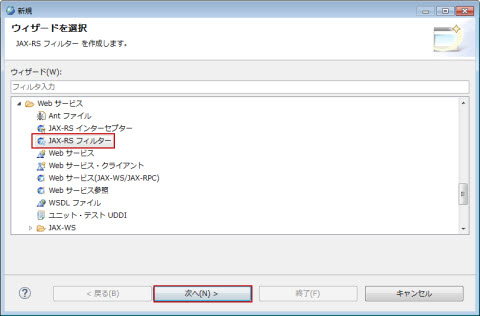
図1.2.15.14-1
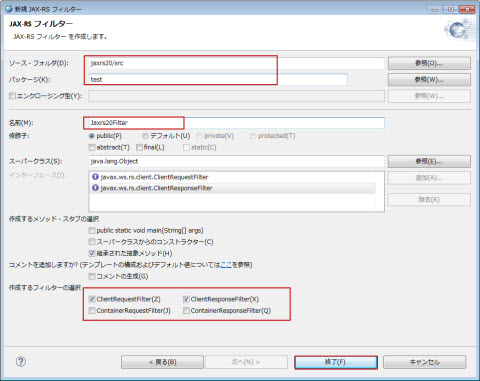
図1.2.15.14-2
Memo
フィルターは JAX-RS 2.0 規範に定義される機能であるため、フィルター作成で選択されるプロジェクトは JAX-RS 2.0 ファセットを持つ必要があります。
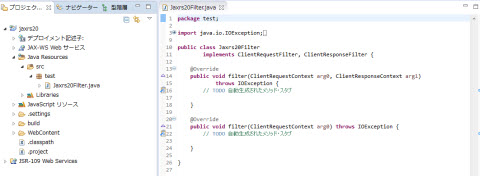
図1.2.15.14-3
import java.io.IOException;
import javax.ws.rs.container.ContainerRequestContext;
import javax.ws.rs.container.ContainerResponseContext;
import javax.ws.rs.container.ContainerResponseFilter;
import javax.ws.rs.core.Response;

public class PoweredByResponseFilter implements ContainerResponseFilter {

    @Override
    public void filter(ContainerRequestContext requestContext, ContainerResponseContext responseContext)
        throws IOException {
            responseContext.getHeaders().add("X-Powered-By", "Jersey :-)");
    }
}
import java.io.IOException;
import javax.ws.rs.container.ContainerRequestContext;
import javax.ws.rs.container.ContainerRequestFilter;
import javax.ws.rs.core.Response;
import javax.ws.rs.core.SecurityContext;

public class AuthorizationRequestFilter implements ContainerRequestFilter {

    @Override
    public void filter(ContainerRequestContext requestContext)
                    throws IOException {

        final SecurityContext securityContext =
                    requestContext.getSecurityContext();
        if (securityContext == null ||
                    !securityContext.isUserInRole("privileged")) {

                requestContext.abortWith(Response
                    .status(Response.Status.UNAUTHORIZED)
                    .entity("User cannot access the resource.")
                    .build());
        }
    }
}
public class CheckRequestFilter implements ClientRequestFilter {

    @Override
    public void filter(ClientRequestContext requestContext)
                        throws IOException {
        if (requestContext.getHeaders(
                        ).get("Client-Name") == null) {
            requestContext.abortWith(
                        Response.status(Response.Status.BAD_REQUEST)
                .entity("Client-Name header must be defined.")
                        .build());
         }
    }
}
public class ClientResponseLoggingFilter implements ClientResponseFilter {

	@Override
	public void filter(final ClientRequestContext reqCtx,
			final ClientResponseContext resCtx) throws IOException {
		System.out.println("status: " + resCtx.getStatus());
		System.out.println("media-type: " + resCtx.getMediaType().getType());
}
インターセプターは、入出力ストリームを通じてエンティティーの読み書き処理を行う時に使います。サーバー側とクライアント側は共通APIを利用します。
インターセプターは
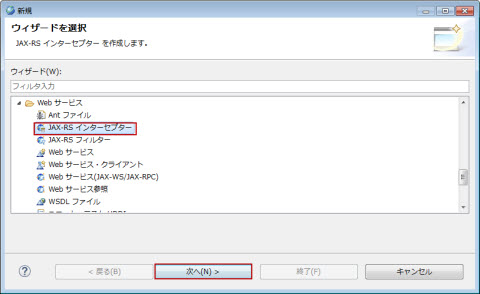
図1.2.15.15-1
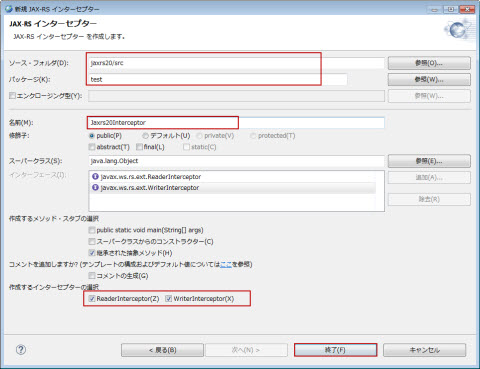
図1.2.15.15-2
Memo
インターセプターは JAX-RS 2.0 規範に定義される機能であるため、インターセプター作成で選択されるプロジェクトは JAX-RS 2.0 ファセットを持つ必要があります。
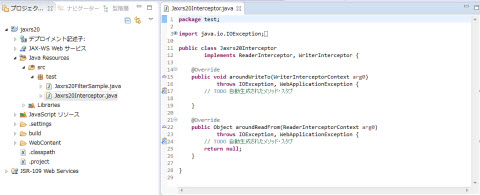
図1.2.15.15-3
public class GZIPReaderInterceptor implements ReaderInterceptor {

    @Override
    public Object aroundReadFrom(ReaderInterceptorContext context)
                    throws IOException, WebApplicationException {
        final InputStream originalInputStream = context.getInputStream();
        context.setInputStream(new GZIPInputStream(originalInputStream));
        return context.proceed();
    }
}
public class GZIPWriterInterceptor implements WriterInterceptor {

    @Override
    public void aroundWriteTo(WriterInterceptorContext context)
                    throws IOException, WebApplicationException {
        final OutputStream outputStream = context.getOutputStream();
        context.setOutputStream(new GZIPOutputStream(outputStream));
        context.proceed();
    }
}
import javax.ws.rs.GET;
import javax.ws.rs.Path;
import org.springframework.stereotype.Component;
@Component
@Path("/")
public class SomeResource {
    @Transactional
    @GET
    public void updateResource() {
        // ...
    }.
}
Spring機能を利用する場合は、SpringのjarをWARファイル中のWEB-INF/libに含めた上で、
<?xml version="1.0" encoding"UTF-8"?>
<nec-web-app>
        <context-root>sse-item-store-webapp</context-root>
	<class-loader delegate="false" extra-class-path="C:/WebOTX/modules/jaxrs20.jar;C:/WebOTX/lib/jaxrs20/jersey-spring3.jar">
		<property name="overrideablejavaxpackages" value="javax.ws.rs,javax.annotation,javax.validation" />
        </class-loader>
	......
</nec-web-app>
@Path("/resource")
public class AsyncResource {
    @GET
    public void asyncGet(@Suspended final AsyncResponse asyncResponse) {

        new Thread(new Runnable() {
            @Override
            public void run() {
                String result = veryExpensiveOperation();
                asyncResponse.resume(result);
            }

            private String veryExpensiveOperation() {
                // ... very expensive operation
            }
        }).start();
    }
}
非同期処理において、二つのリクエストの間に待ち時間があり、クライアント側でレスポンス待ちを行いたくない場合に、非同期タイムアウトを利用できます。デフォルトの場合、非同期タイムアウトは非同期レスポンス対象に定義・設定されていませんので、明示的に定義する必要があります。
@GET
public void asyncGetWithTimeout(@Suspended final AsyncResponse asyncResponse) {
    asyncResponse.setTimeoutHandler(new TimeoutHandler() {

        @Override
        public void handleTimeout(AsyncResponse asyncResponse) {
            asyncResponse.resume(Response.status(Response.Status.SERVICE_UNAVAILABLE)
                    .entity("Operation time out.").build());
        }
    });
    asyncResponse.setTimeout(20, TimeUnit.SECONDS);

    new Thread(new Runnable() {

        @Override
        public void run() {
            String result = veryExpensiveOperation();
            asyncResponse.resume(result);
        }

        private String veryExpensiveOperation() {
            // ... very expensive operation that typically finishes within 20 seconds
        }
    }).start();
}
final AsyncInvoker asyncInvoker = target().path("http://example.com/resource/")
        .request().async();
final Future<Response> responseFuture = asyncInvoker.get();
System.out.println("Request is being processed asynchronously.");
final Response response = responseFuture.get();
    // get() waits for the response to be ready
System.out.println("Response received.");
SslConfigurator sslConfig = SslConfigurator.newInstance()
        .trustStoreFile("./truststore_client")
        .trustStorePassword("secret-password-for-truststore")
        .keyStoreFile("./keystore_client")
        .keyPassword("secret-password-for-keystore");

SSLContext sslContext = sslConfig.createSSLContext();
Client client = ClientBuilder.newBuilder().sslContext(sslContext).build();
Response response = client.target("https://example.com/resource").request().get();
クライアントのHTTP認証には、HttpAuthenticationFeatureのインスタンスを利用できますが、HttpAuthenticationFeatureは二つの認証メソッド(basicとdigest)を提供して下記のモードで実行してください。
HttpAuthenticationFeature feature = HttpAuthenticationFeature.basic("user", "superSecretPassword");
下記はBASIC NON-PREEMPTIVE認証モードの例です。
HttpAuthenticationFeature feature = HttpAuthenticationFeature.basicBuilder()
    .nonPreemptive().credentials("user", "superSecretPassword").build();
       ClientBuilder.newClient(new ClientConfig()
             .register(JsonProcessingFeature.class)
             .property(JsonGenerator.PRETTY_PRINTING, true));
下記はJSON-Pを利用してJAX-RSのアプリケーションを作成する例です。
      public class MyApplication extends ResourceConfig {
          public MyApplication() {
              packages("com.nec.webotx.jersey.examples.jsonp.resource");
              register(LoggingFilter.class);
              property(JsonGenerator.PRETTY_PRINTING, true);
          }
      }
web.xmlの例です。
  <web-app version="2.5" xmlns="http://java.sun.com/xml/ns/javaee" xmlns:xsi="http://www.w3.org/2001/XMLSchema-instance" xsi:schemaLocation="http://java.sun.com/xml/ns/javaee http://java.sun.com/xml/ns/javaee/web-app_2_5.xsd">
   <servlet>
     <servlet-name>com.nec.webotx.jersey.examples.jsonp.MyApplication</servlet-name>
     <servlet-class>com.nec.webotx.jersey.servlet.ServletContainer</servlet-class>
     <init-param>
         <param-name>javax.ws.rs.Application</param-name>
         <param-value>com.nec.webotx.jersey.examples.jsonp.MyApplication</param-value>
     </init-param>
     <init-param>
         <param-name>javax.json.stream.JsonGenerator.prettyPrinting</param-name>
         <param-value>true</param-value>
     </init-param>
     <load-on-startup>1</load-on-startup>
   </servlet>
   <servlet-mapping>
     <servlet-name>com.nec.webotx.jersey.examples.jsonp.MyApplication</servlet-name>
     <url-pattern>/*</url-pattern>
   </servlet-mapping>
  </web-app>
JSON-P(JSR 353)はポータブルのAPIsを提供してJSONを解析、生成、伝送、クエリします。APIsについては、二つの種類のAPIを提供します。
| Class or Interface | 記述 |
|---|---|
| Json | Jsonの読み書き、生成及びファクトリーのオブジェクト |
| JsonGenerator | ストリームへJSONデータを書き込み |
| JsonReader | ストリームからJSONデータを読み出し |
| JsonObjectBuilder JsonArrayBuilder |
オブジェクトと配列のモジュールを生成 |
| JsonWriter | ストリームへメモリからオブジェクトのモジュールを書き込み |
| JsonValue JsonObject JsonArray JsonString JsonNumber |
JSONデータの値のタイプ |
      URL url = new URL("http://sample.com/example/?q=java&type=post");
      try (InputStream is = url.openStream();
          JsonReader rdr = Json.createReader(is)) {
          JsonObject obj = rdr.readObject();
          JsonArray results = obj.getJsonArray("data");
          for (JsonObject result : results.getValuesAs(JsonObject.class)) {
              System.out.print(result.getJsonObject("from").getString("name"));
              System.out.print(": ");
              System.out.println(result.getString("message", ""));
              System.out.println("-----------");
          }
結果のフォーマットは下記の通りです。
     	{
          "data" : [
              { "from" : { "name" : "xxx", ... }, "message" : "yyy", ... },
              { "from" : { "name" : "ppp", ... }, "message" : "qqq", ... },
              ...
          ],
          ...
      }
| Class or Interface | 記述 |
|---|---|
| Json | Jsonの読み書き、生成及びファクトリーのオブジェクト |
| JsonParser | イベントにベースして解析し、ストリームからJSONデータを読み出し |
| JsonGenerator | ストリームへJSONデータを書き込み |
      URL url = new URL("https://graph.facebook.com/search?q=java&type=post");
      try (InputStream is = url.openStream();
           JsonParser parser = Json.createParser(is)) {
           while (parser.hasNext()) {
             Event e = parser.next();
             if (e == Event.KEY_NAME) {
                   switch (parser.getString()) {
                      case "name":
                          parser.next();
                         System.out.print(parser.getString());
                         System.out.print(": ");
                         break;
                     case "message":
                         parser.next();
                          System.out.println(parser.getString());
                         System.out.println("---------");
                         break;
                  }
               }
           }
       }
出力結果はObject Model APIの使用例を参照してください。
     	...
      import com.nec.webotx.jersey.media.sse.EventOutput;
      import com.nec.webotx.jersey.media.sse.OutboundEvent;
      import com.nec.webotx.jersey.media.sse.SseFeature;
      ...
      @Path("events")
      public static class SseResource {
          @GET
          @Produces(SseFeature.SERVER_SENT_EVENTS)
          public EventOutput getServerSentEvents() {
              final EventOutput eventOutput = new EventOutput();
              new Thread(new Runnable() {
                  @Override
                  public void run() {
                      try {
                          for (int i = 0; i < 10; i++) {
                              // ... code that waits 1 second
                              final OutboundEvent.Builder eventBuilder
                              = new OutboundEvent.Builder();
                              eventBuilder.name("message-to-client");
                              eventBuilder.data(String.class,
                                  "Hello world " + i + "!");
                              final OutboundEvent event = eventBuilder.build();
                              eventOutput.write(event);
                          }
                      } catch (IOException e) {
                          throw new RuntimeException(
                              "Error when writing the event.", e);
                      } finally {
                          try {
                              eventOutput.close();
                          } catch (IOException ioClose) {
                              throw new RuntimeException(
                                  "Error when closing the event output.", ioClose);
                          }
                      }
                  }
              }).start();
              return eventOutput;
          }
      }
・クライアント側の実装例
      Client client = ClientBuilder.newBuilder()
        .register(SseFeature.class).build();
      WebTarget target = client.target("http://localhost:9998/events");

      EventInput eventInput = target.request().get(EventInput.class);
      while (!eventInput.isClosed()) {
          final InboundEvent inboundEvent = eventInput.read();
          if (inboundEvent == null) {
              // connection has been closed
              break;
          }
          System.out.println(inboundEvent.getName() + "; "
              + inboundEvent.readData(String.class));
      }
public class NotFoundException extends WebApplicationException {

   /**
     * Create a HTTP 404 (Not Found) exception.
     *
     * @param message the String that is the entity of the 404 response.
     */
    public NotFoundException(String message) {
        this(message, null);
    }

    /**
     * Create a HTTP 404 (Not Found) exception.
     *
     * @param message the String that is the entity of the 404 response.exception A URI-parameter-based exception for errors with QueryParam.Contain a response with a 404 (Client error) status code.
     *  ParamException.HeaderParamException	A parameter exception for errors with HeaderParam.Contain a response with a 400 (Client error) status code.
     *  ParamException.CookieParamException	A parameter exception for errors with CookieParam.Contain a response with a 400 (Client error) status code.
     *  ParamException.FormParamException	A parameter exception for errors with FormParam.Contain a response with a 400 (Client error) status code.
     * @param notFoundUri the URI that cannot be found.
     */
    public NotFoundException(String message, URI notFoundUri) {
        super(Responses.notFound().
                entity(message).type("text/plain").build());
        this.notFoundUri = notFoundUri;
    }
}
javax.ws.rs.WebApplicationExceptionのサブクラスは以下のとおりです。| 異常クラス | 説明 |
|---|---|
| ConflictException | Create a HTTP 409 (Conflict) exception. |
| NotFoundException | Create a HTTP 404 (Not Found) exception. |
| ParamException | An abstract extension of WebApplicationException for the class of parameter-based exceptions. |
| ParamException.PathParamException | A URI-parameter-based exception for errors with PathParam.Contain a response with a 404 (Client error) status code. |
| ParamException.MatrixParamException | A URI-parameter-based exception for errors with MatrixParam.Contain a response with a 404 (Client error) status code. |
| ParamException.QueryParamException | A URI-parameter-based exception for errors with QueryParam.Contain a response with a 404 (Client error) status code. |
| ParamException.HeaderParamException | A parameter exception for errors with HeaderParam.Contain a response with a 400 (Client error) status code. |
| ParamException.CookieParamException | A parameter exception for errors with CookieParam.Contain a response with a 400 (Client error) status code. |
| ParamException.FormParamException | A parameter exception for errors with FormParam.Contain a response with a 400 (Client error) status code. |
   @Provider
   public class EntityNotFoundMapper implements
           ExceptionMapper<EntityNotFoundException> {
       public Response toResponse(EntityNotFoundException ex) {
          return Response.status(404).
               entity(ex.getMessage()).
               type("text/plain").
              build();
       }
  }
発生例外クラスの型とマッチする例外クラスMapperを使用しますが、一つの例外クラスに対して複数の例外クラスMapperがマッチした場合、以下の選択ルールにより例外クラスMapperを使用します。
| ディレクトリ | 備考 | ||
|---|---|---|---|
| / | - | ||
| ┣ ┃ |
META-INF/ | - | |
| ┗ | MANIFEST.MF | - | |
| ┗ | WEB-INF/ | - | |
| ┣ | web.xml | 作成したweb.xmlです。 | |
| ┣ | classes/ | コンパイルしたJavaクラスを格納します。 | |
| ┗ | lib/ | コンパイルしたJavaクラスを含むJARファイルを格納します。 | |
| クラス名 | 説明 |
|---|---|
| public class Application | Defines the components of a JAX-RS application and supplies additional metadata. A JAX-RS application or implementation supplies a concrete subclass of this abstract class |
| フィールド | - |
| private static final Set<Object> emptyObjectSet | emptyObjectSet = Collections.emptySet() |
| private static final Set<Class<?>> emptyClassSet | emptyClassSet = Collections.emptySet() |
| メソッド | - |
| public Set<Class<?>> getClasses() | Get a set of root resource and provider classes. The default lifecycle for resource class instances is per-request. The default lifecycle for providers is singleton |
| public Set<Object> getSingletons() | Get a set of root resource and provider instances. Fields and properties of returned instances are injected with their declared dependencies Context by the runtime prior to use. |
      package com.nec.jersey.application;
      @ApplicationPath(“resources”)
      public class MyApplication extends Application {
        public Set<Class<?>> getClasses() {
            Set<Class<?>> s = new HashSet<Class<?>>();
            s.add(HelloWorldResource.class);
            return s;
        }
    }
その場合の@ApplicationPathに指定する値はweb.xmlの「url-pattern」の値と同じです。
    package com.nec.jersey.application;
    public class MyApplication extends PackagesResourceConfig {
        public MyApplication() {
            super("com.nec.jersey.resource;com.nec.jersey.providers");
        }
    }
また、MyApplicationのコンストラクタに「super("com.nec.jersey");」を使用できます。
パッケージ「com.nec.jersey」のサブパッケージ「com.nec.jersey.resource」と「com.nec.jersey.providers」にルートリソースクラスとプロバイダクラスをスキャンできます。
  <web-app>
       <servlet>
           <servlet-name>Jersey Web Application</servlet-name>
           <servlet-class>
             com.nec.webotx.jersey.spi.container.servlet.ServletContainer
           </servlet-class>
           <init-param>
               <param-name>
                 com.nec.webotx.jersey.config.property.packages
               </param-name>
               <param-value>com.nec.jersey.resource;com.nec.jersey.providers</param-value>
           </init-param>
           ...
      </servlet>
      ...
  </web-app>
上記の「param-name」は「com.nec.webotx.jersey.config.property.packages」を設定する必要があります。「param-value」にはルートリソースクラスとプロバイダクラスのパッケージ名を設定します。| 要素 | 説明 | 仕様章節 |
|---|---|---|
| application | the root element of a WADL description | 2.2 Application |
| doc | application」element can have one or more child doc elements that can be used to document that element. this element has two attributes: (1):xml:lang (2):title | 2.3 Documentation |
| grammars | The grammars element acts as a container for definitions of the format of data exchanged during execution of the protocol described by the WADL document | 2.4 Grammars |
| resources | The resources element acts as a container for the resources provided by the application. | 2.5 Resources |
| resource | A resource element describes a set of resources, each identified by a URI that follows a common pattern. | 2.6 Resource |
| resource_type | A resource_type element describes a set of methods that, together, define the behavior of a type of resource. | 2.7 Resource Type |
| method | A method element describes the input to and output from an HTTP protocol method that may be applied to a resource. | 2.8 Method |
| request | A request element describes the input to be included when applying an HTTP method to a resource. | 2.9 Request |
| response | A response element describes the output that results from performing an HTTP method on a resource. | 2.10 Response |
| representation | A representation element describes a representation of a resource's state. | 2.11 Representation |
| param | A param element describes a parameterized component of its parent element. | 2.12 Parameter |
  @Path("wadlResource")
  public class WADLResource {
	 @GET
	 public String executeGetRequest() {
		//do something
		return "success";
	 }
	 @POST
	 public String executePostRequest() {
		//do something
		return "success";
	 }
  }
web.xmlファイルの関連する設定を以下に示します。
  <web-app ……>
     ……
    <servlet>
  	   <servlet-name>wadlTest</servlet-name>
	   <servlet-class>
         com.nec.webotx.jersey.spi.container.servlet.ServletContainer
       </servlet-class>
  	    ……
    </servlet>
    <servlet-mapping>
  	   <servlet-name>wadlTest</servlet-name>
  	   <url-pattern>/jersey/*</url-pattern>
    </servlet-mapping>
    ……
  </web-app>
クライアント側でURL:「http://{server-name}:{port}/{context-root}/jersey/application.wadl」にアクセスすると、下記のWADLファイルを取得できます。
  <?xml version="1.0" encoding="UTF-8" standalone="yes"?>
   <application xmlns="http://wadl.dev.java.net/2009/02">
     <doc xmlns:jersey=http://jersey.java.net/ …… />
     <grammars/>
     <resources base="http://{server-name}:{port}/{context-root}/{url-pattern}/">
         <resource path="wadlResource">
             <method id="executeGetRequest" name="GET">
                <response>
                    <representation mediaType="*/*"/>
                </response>
             </method>
             <method id="executePostRequest" name="POST">
                 <response>
                     <representation mediaType="*/*"/>
                 </response>
             </method>
         </resource>
     </resources>
    </application>
WebOTX AS V9.4では、JAX-RS 1.1もしくはJAX-RS 2.0を利用できます。 デフォルトの環境ではJAX-RS 1.1が有効になっています。 JAX-RS 2.0に切り替える場合は、切り替え対象のドメインを停止し、管理ドメインにログインした後、 以下のコマンドを実行して下さい。
    otxadmin > login --user <管理ドメインのユーザ名> ---password <管理ドメインのパスワード> --port <管理ドメインのポート番号>
    otxadmin > install-optional-component --domain <ドメイン名> --apgroup <アプリケーショングループ名> --pgroup <プロセスグループ名> jaxrs20
JAX-RS 2.0から1.1へ切り替える場合は以下のコマンドで切り替えて下さい。
    otxadmin > login --user <管理ドメインのユーザ名> ---password <管理ドメインのパスワード> --port <管理ドメインのポート番号>
    otxadmin > uninstall-optional-component  --domain <ドメイン名> --apgroup <アプリケーショングループ名> --pgroup <プロセスグループ名> jaxrs20
JAX-RSの切り替えについてのより詳しい説明は[ ドメイン構築・基本設定ガイド > 3. ドメイン > 3.2. ドメインの作成・削除 > 3.2.1. ドメインの作成 > 3.2.1.7. オプショナルコンポーネントの有効化 ] を参照して下さい。