6. Details on network partition resolution resources
This chapter provides detailed information on network partition resolution resources.
This chapter covers:
6.1.1. Understanding the network partition resolution resources
6.2. Understanding network partition resolution by COM method
6.3. Understanding network partition resolution by DISK method
6.4. Understanding network partition resolution by PING method
6.5. Understanding network partition resolution by HTTP method
6.6. Understanding network partition resolution by majority method
6.7. Understanding network partition resolution by COM method and DISK method
6.8. Understanding network partition resolution by PING method and DISK method
6.10. Notes on network partition resolution resource settings
6.1. Network partitions
- 1
The action can be changed in the config mode Cluster WebUI by selecting Cluster Properties->NP Resolution tab->Tuning button->Network Partition Resolution Tuning Properties window->Action at NP Occurrence.
6.1.1. Understanding the network partition resolution resources
Servers in a cluster monitor other servers by using heartbeat resources. When all heartbeat resources are disconnected or other server is shut down by a server not in a cluster, the network partition is solved using network partition resolution resources. The following four types of network partition resolution resources are provided.
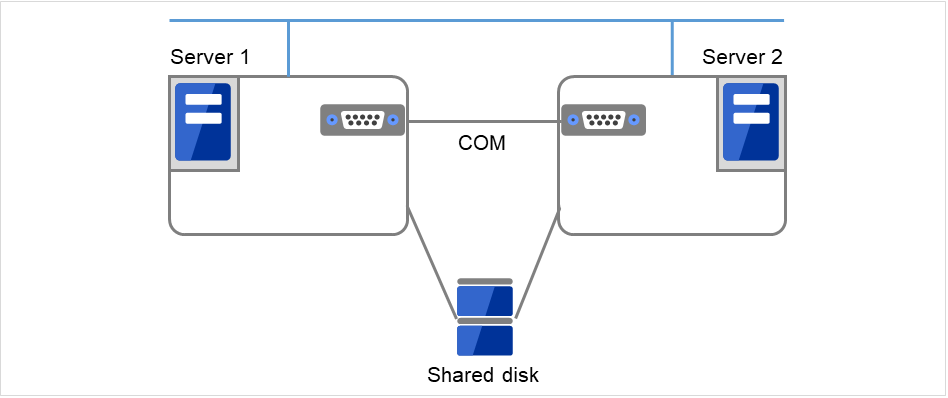
Fig. 6.1 Servers connected via LAN, a COM cable, and a shared disk
Network partition
resolution resources
|
Abbreviation |
Function Overview |
|---|---|---|
COM network partition resolution resource (COM method) |
comnp |
A network partition is solved by connecting two servers with COM cable. |
DISK network partition resolution resource (DISK method) |
Disk1np |
A network partition is solved by using a dedicated disk partition on the shared disk. |
PING network partition resolution resource (PING method) |
pingnp |
A network partition is solved by determining a server that can communicate using the ping command. |
HTTP network partition resolution resource (HTTP method) |
httpnp |
A network partition is solved by determining a server that can communicate, sending HTTP HEAD request to Web server. |
Majority network partition resolution resource (Majority method) |
majonp |
A network partition is solved by the number of servers that can make connection among three or more servers. |
A network partition resolution resource that can be selected is different depending on a server configuration in a cluster. Select one of the following network partition resolution methods:
Cluster server configuration |
Network partition resolution method
(Listed in the order of our recommendation)
|
|---|---|
Mirror disk resource exists |
Number of servers: 2
Number of servers: 3 or more servers
|
Mirror disk resource exists but disk resource does not exist |
Number of servers: 2
Number of servers: 3 or more servers
|
Neither disk resource nor mirror disk resource does not exist |
Number of servers: 2
Number of servers: 3 or more servers
|
For example, if both server1 and server2 use disk resource and mirror disk resource, the combination of DISK method and PING method, or a DISK method can be selected as a network partition resolution resource.
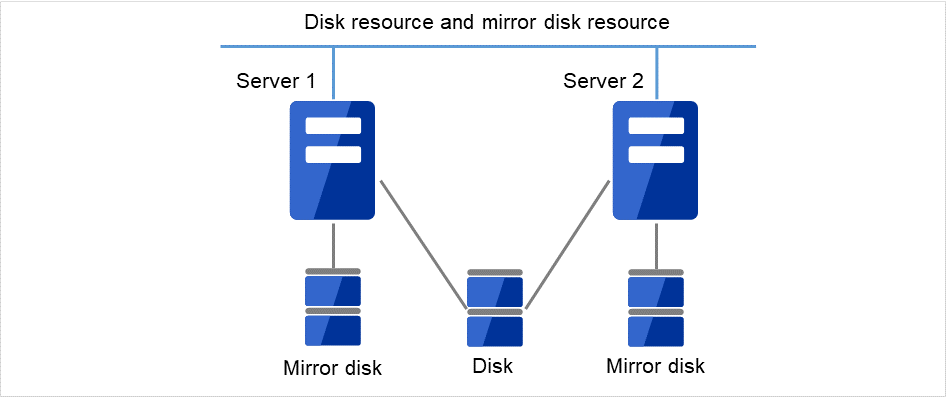
Fig. 6.2 Both servers using a disk resource and a mirror disk resource
When servers that can be started by disk resource and mirror disk resource differ, the network partition resolution resource needs to be set in each server. For example, if server1 and server2 use a shared disk, and server2 and server3 use a mirror disk, the combination of COM method and DISK method, PING method and DISK method, DISK method can be selected as network partition resolution resource for server1 and server2. PING method or COM method can be selected for server2 and server3.
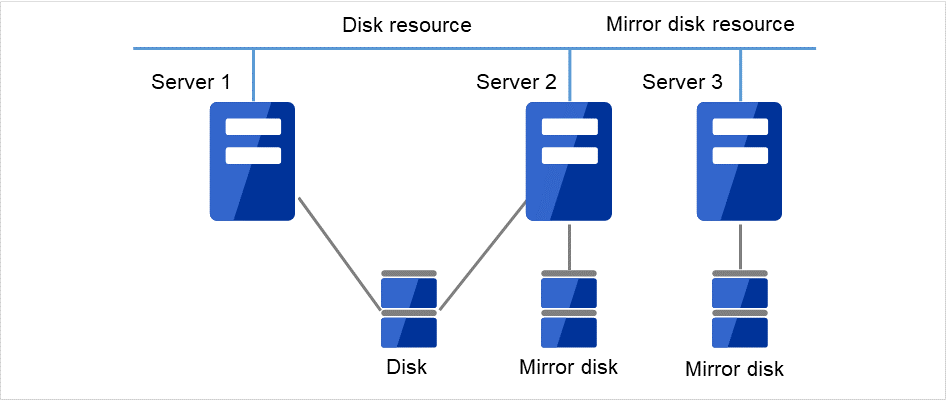
Fig. 6.3 A server enable to be activated by a disk resource and a server enabled to be activated by a mirror disk resource are different
A combination of two or more types of network partition resolution resources can be registered. When two or more types of resources are registered, they are used for solving an NP in the following order:
PING method and DISK method
COM method and DISK method
HTTP method
PING method
COM method
DISK method
Majority method
6.2. Understanding network partition resolution by COM method
6.2.1. Settings of the COM network partition resolution resources
To use COM network partition resolution resources, prepare a serial cross cable to connect two servers.
The COM network partition resolution resources shut down a server with less priority when a network partition is detected.
The COM network partition resolution resources executes the selected "action at NP occurrence" in the server with less priority when a network partition is detected.
Two servers are connected with a COM cable and two LANs.
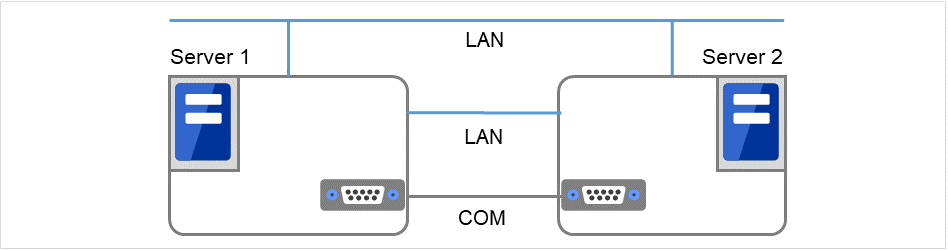
Fig. 6.4 COM network partition resolution resources (1)
If all the networks are disconnected, the COM network partition resolution resources cause one server to shut down. This prevents a split brain syndrome in the same group of both the active and standby servers.
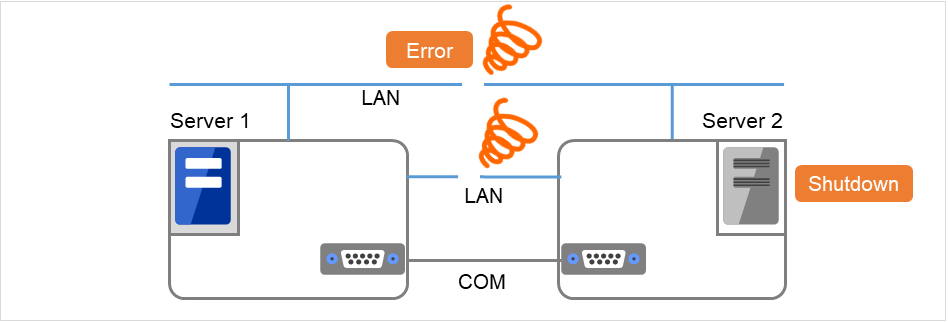
Fig. 6.5 COM network partition resolution resources (2)
For more information, refer to "NP Resolution tab" in "Cluster properties" in "2. Parameter details" in this guide.
6.2.2. COM network partition resolution resources
COM network partition resolution resource can be used between two servers. When mirror disk resources are used, be sure not to use COM network partition resolution resource.
The selected "action at NP occurrence" takes places in all servers if all heartbeats are disconnected while the COM channel is having an error (for example COM port or serial cross cable.)
If failures occur in all network channels between cluster servers and the COM channel simultaneously, both active and standby servers fail over. This can cause data corruption due to access to the same resource from multiple servers.
6.3. Understanding network partition resolution by DISK method
6.3.1. Settings of the DISK network partition resolution resources
The following settings are required to use DISK network partition resolution resource:
Allocate a dedicated disk partition for disk heartbeat resource on the shared disk. It is not necessary to format the partition.
Allocate driver letters for the disk partition on the shared disk. The drive letters must be the same for all the servers.
DISK network partition resolution resources cause the "action at NP occurrence" in servers that cannot communicate with the first priority server or the cluster service to stop when a network partition is detected.
Two servers, which share a disk, are connected by two LANs.
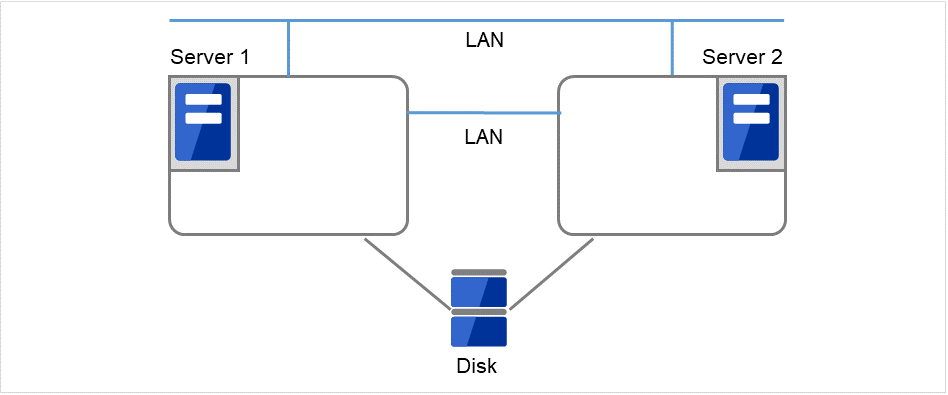
Fig. 6.6 DISK network partition resolution resources (1)
If all the networks are disconnected, the DISK network partition resolution resources cause one server to shut down. This prevents a split brain syndrome in the same group of both the active and standby servers.
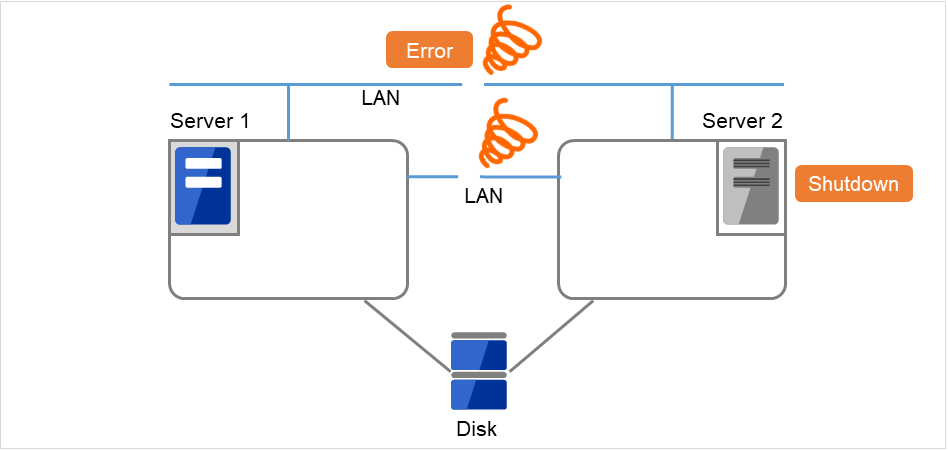
Fig. 6.7 DISK network partition resolution resources (2)
When a cluster is configured with two or more servers, DISK network partition resolution resources can be used as described below. DISK network partition resolution resources can be set to be used by servers that use the shared disk in a cluster.
For more information, refer to "NP Resolution tab" in "Cluster properties" in "2. Parameter details" in this guide.
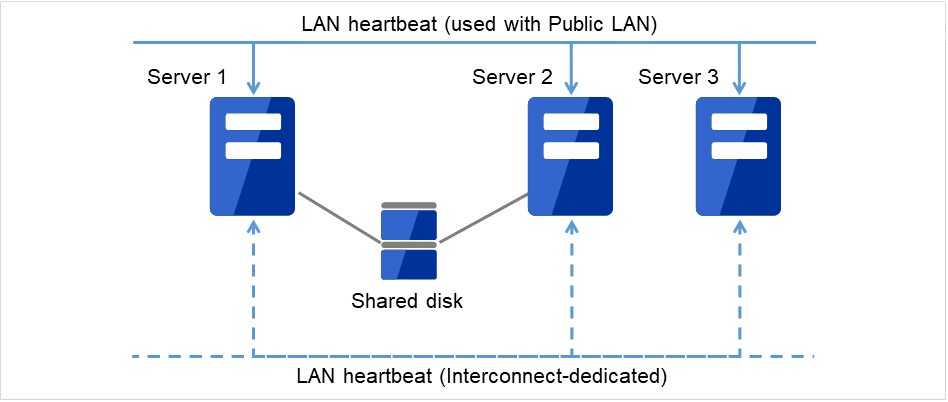
Fig. 6.8 A cluster configured with two or more servers
6.3.2. DISK network partition resolution resources
It is recommended to use DISK network partition resolution resources when a shared disk is used.
Configure DISK network partition resolution resources considering burden on the disk because they regularly perform read/write operations to the disk.
For disk heartbeat partitions to be used in DISK network partition resolution resources, use partitions that are configured to be managed in cluster in the HBA settings.
If a failure has occurred on all network channels while all disk heartbeat partitions can be accessed normally, a network partition is detected. Then failover takes place in the master server and a server that can communicate with the master server. The selected "action at NP occurrence" takes place in the rest of servers.
If the heartbeat is lost while some disk heartbeat partitions cannot be accessed normally, the network partitions cannot be solved and a failover cannot be performed. In this case, the selected "action at NP occurrence" is performed for those servers for which the disk heartbeat partition cannot be accessed normally.
When the I/O time to the shared disk takes longer than I/O Wait Time of DiskNP resource configured in cluster properties, a failover may not be performed due to timeout of solving a network partition.
Solving a network partition with this method takes longer compared to other methods because delay in disk I/O needs to be taken into account. The time required to solve a network partition takes twice as long as the longer time of the heartbeat timeout and Disk I/O Wait Time configured in cluster properties.
When DISK network partition resolution resources are used, all servers on which a cluster is started periodically access the dedicated disk partition on the shared disk. The servers on which the cluster is stopped or suspended do not access the dedicated partition.
6.4. Understanding network partition resolution by PING method
6.4.1. Settings of the PING network partition resolution resources
To use PING network partition resolution resources, a device that is always active to receive and respond to the ping command (hereafter described as ping device) is required.
When the heartbeat from another server is lost but the ping device is responding to the ping command, the remote server is down. Failover starts. If there is no response to the ping command, it is determined that the local server is isolated from the network due to "Status," and the selected "action at NP occurrence" takes place.
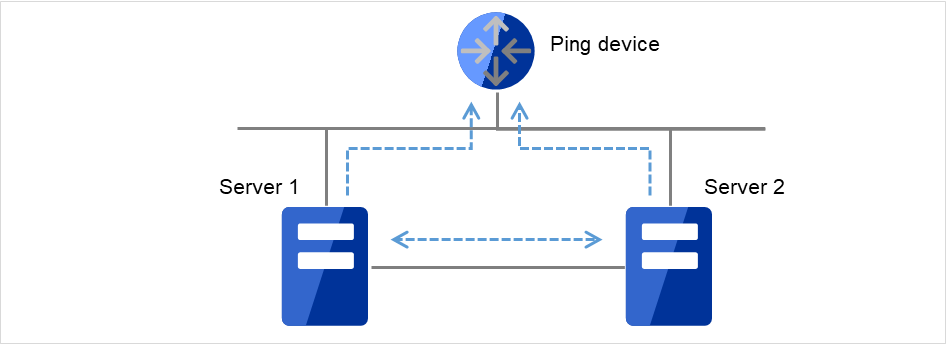
Fig. 6.9 PING network partition resolution resources (1)
When the heartbeat from the other server is found lost and the ping device does not respond to the ping command, the server is shut down. This prevents a split brain syndrome in the same group of both the active and standby servers.
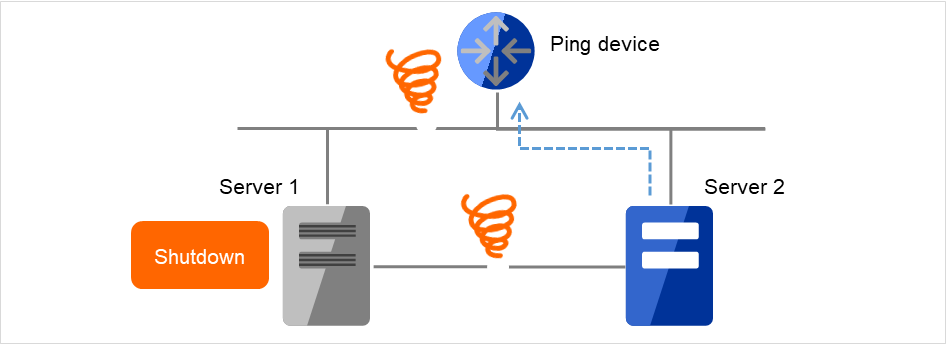
Fig. 6.10 PING network partition resolution resources (2)
For more information, refer to "NP Resolution tab" in "Cluster properties" in "2. Parameter details" in this guide.
6.4.2. Notes on PING network partition resolution resource
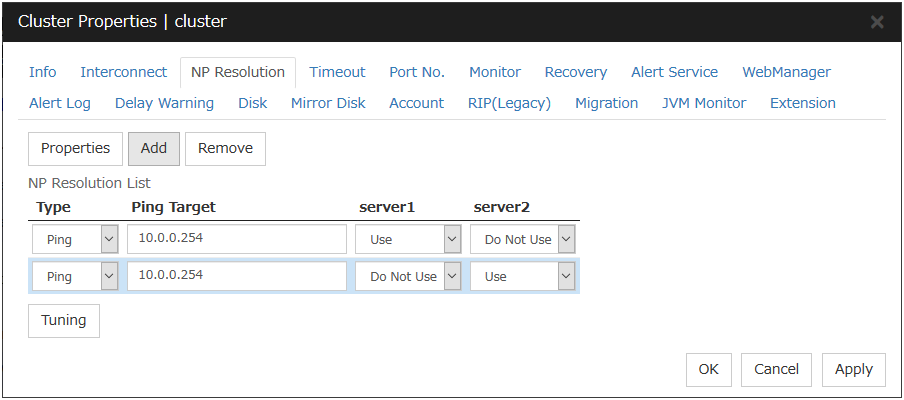
To use the ping network partition resolution resource, specify an address that allows transmission and reception via the interconnect LAN registered in the configuration data.
When the status where no response is returned to the ping command on all servers continues before the heartbeat is lost, which is caused by a failure in the ping device, if a network partition occurs under such situation, "action at NP occurrence" is not executed.
When shared disk is used, it is recommended to use not only PING Network Partition Resolution resource, but also DISK Network Partition Resolution resource at the same time.
6.5. Understanding network partition resolution by HTTP method
6.5.1. Settings of the HTTP network partition resolution resources
To use the HTTP network partition resolution resources, the following settings are required.
An all time running server with HTTP communication available (hereafter referred to as Web server) is needed.
When the heartbeat from another server is detected to be stopped, the HTTP network partition resolution resource operates in the following two ways: If there is a response from Web server, it determines it as a failure of another server and executes the failover. If there is no response from Web server, it determines that the network partition status isolated the local server from the network and executes the same operation as when the network partition occurs.
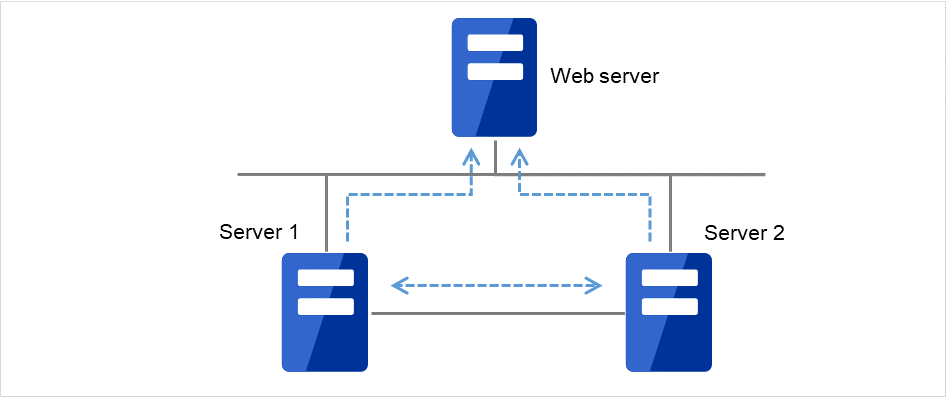
Fig. 6.11 HTTP network partition resolution resources (1)
When the heartbeat from the other server is found lost and there is no response from the Web server, the server is shut down. This prevents a split brain syndrome in the same group of both the active and standby servers.
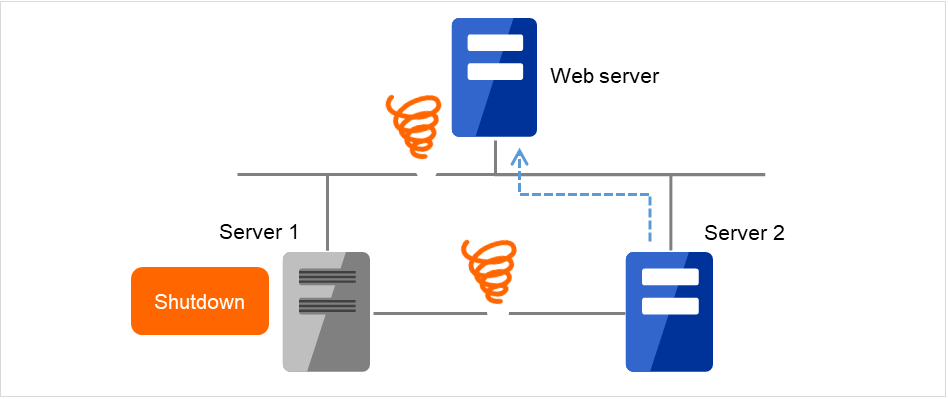
Fig. 6.12 HTTP network partition resolution resources (2)
For more information, refer to "NP Resolution tab" in "Cluster properties" in "2. Parameter details" in this guide.
6.5.2. Notes on HTTP network partition resolution resource
In the communication with Web server, NIC and a source address are selected according to the OS settings.
6.6. Understanding network partition resolution by majority method
6.6.1. Settings of the majority network partition resolution resources
This method prevents data corruption caused by "Split Brain Syndrome" by executes the selected "action at NP occurrence" in the server that can no longer communicate with the majority of the servers in the entire cluster because of network failure or stopping the cluster service.
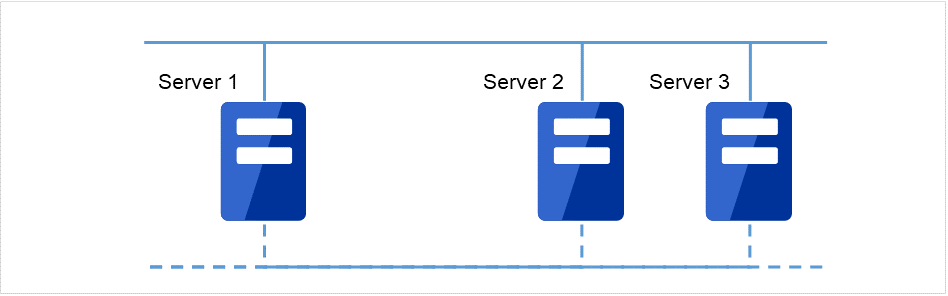
Fig. 6.13 Majority network partition resolution resources (1)
When the heartbeat from the other server is found lost and there is no response from the Web server, the server is shut down. This prevents a split brain syndrome in the same group of both the active and standby servers.
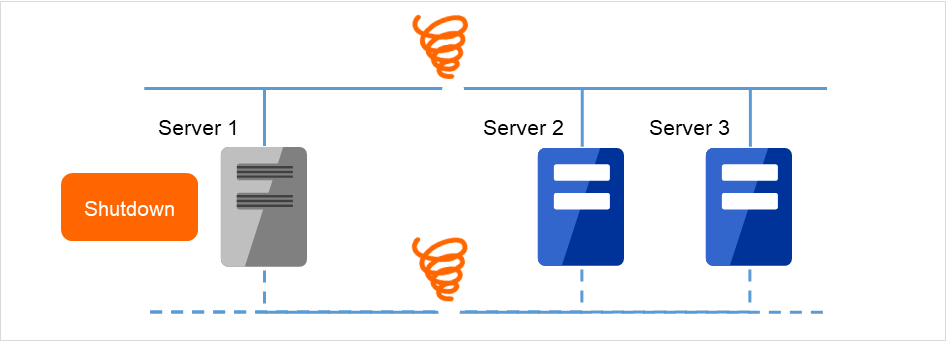
Fig. 6.14 Majority network partition resolution resources (2)
For more information, refer to "NP Resolution tab" in "Cluster properties" in "2. Parameter details" in this guide.
6.6.2. Majority network partition resolution resources
This method can be used in a cluster with three or more nodes.
If majority of the servers are down, the selected "action at NP occurrence" takes place in rest of the servers working properly. When communication with exactly half of the servers in the entire cluster is failing, the selected "action at NP occurrence" takes place in a server that cannot communicate with the top priority server.
If all servers are isolated form the network due to a hub error, the selected "action at NP occurrence" takes place in all servers.
6.7. Understanding network partition resolution by COM method and DISK method
A network partition is solved by combining COM network partition resolution resources and DISK network partition resolution resources.
When the COM channel (such as a COM port and serial cross cable) is working properly, this method works in the same way as the COM method. When an error occurs on the COM channel, this method switches to the shared disk method. This mechanism allows for higher availability than using only the COM method. The method also resolves achieves network partition faster than using the disk method alone.
6.8. Understanding network partition resolution by PING method and DISK method
A network partition is solved by combining PING network partition resolution resources and DISK network partition resolution resources.
When the communication with all servers and ping device is not working properly due to the failure of ping device 2, this method works in the same way as the DISK method. This mechanism allows for higher availability than using the PING method alone. The method also solves network partition faster than using only the disk method.
This method works as PING + DISK method when the server which uses PING network partition resolution resources and the server which uses DISK network partition resolution resources are identical. For example, in the clusters of hybrid disk configuration, when DISK network partition resolution resources used by a particular server group and PING network resolution resources used by the whole clusters are configured, these resources work independently. In such a case, to configure the resources to work in PING+DISK method, it is required to add PING network resolution resources to be used only by the same server group as DISK network partition resolution resources.
- 2
Status where no response is returned to the ping command on all servers before the heartbeat is lost.
6.9. Not resolving network partition
This method can be selected in a cluster that does not use a shared disk.
If a failure occurs on all network channels between servers in a cluster, all servers failover.
6.10. Notes on network partition resolution resource settings
In X2.1 or earlier, if any combination of network partition resolution resources other than those shown above is specified, network partitions are not resolved. In X3.0 or later, network partitions are resolved in the following order according to the specified resources, even for a combination of network partition resolution resources other than those shown above.
PING method and DISK method
COM method and DISK method
HTTP method (added in X4.1 version or later)
PING method (not applied if network partition resolution processing is performed in 1.)
COM method (not applied if network partition resolution processing is performed in 2.)
DISK method (not applied if network partition resolution processing is performed in 1 or 2.)
Majority method