EXPRESSCLUSTER X Getting Started Guide is intended for first-time users of the EXPRESSCLUSTER. The guide covers topics such as product overview of the EXPRESSCLUSTER, how the cluster system is installed, and the summary of other available guides. In addition, latest system requirements and restrictions are described.
This guide is intended for system engineers and administrators who want to build, operate, and maintain a cluster system. Instructions for designing, installing, and configuring a cluster system with EXPRESSCLUSTER are covered in this guide.
This guide is intended for system administrators. The guide covers topics such as how to operate EXPRESSCLUSTER, function of each module and troubleshooting. The guide is supplement to the Installation and Configuration Guide.
This guide is intended for administrators and for system administrators who want to operate and maintain EXPRESSCLUSTER-based cluster systems. The guide describes maintenance-related topics for EXPRESSCLUSTER.
This guide is intended for administrators and for system engineers who want to build EXPRESSCLUSTER-based cluster systems. The guide describes features to work with specific hardware, serving as a supplement to the Installation and Configuration Guide.
In this guide, Note, Important, See also are used as follows:
Note
Used when the information given is important, but not related to the data loss and damage to the system and machine.
Important
Used when the information given is necessary to avoid the data loss and damage to the system and machine.
See also
Used to describe the location of the information given at the reference destination.
The following conventions are used in this guide.
Convention
Usage
Example
Bold
Indicates graphical objects, such as fields, list boxes, menu selections, buttons, labels, icons, etc.
In User Name, type your name.
On the File menu, click Open Database.
Angled bracket within the command line
Indicates that the value specified inside of the angled bracket can be omitted.
clpstat -s[-h host_name]
#
Prompt to indicate that a Linux user has logged on as root user.
# clpcl -s -a
Monospace
Indicates path names, commands, system output (message, prompt, etc.), directory, file names, functions and parameters.
/Linux/6.0/en/server/
bold
Indicates the value that a user actually enters from a command line.
Enter the following:
# clpcl -s -a
italic
Indicates that users should replace italicized part with values that they are actually working with.
clpstat-s[-hhost_name]
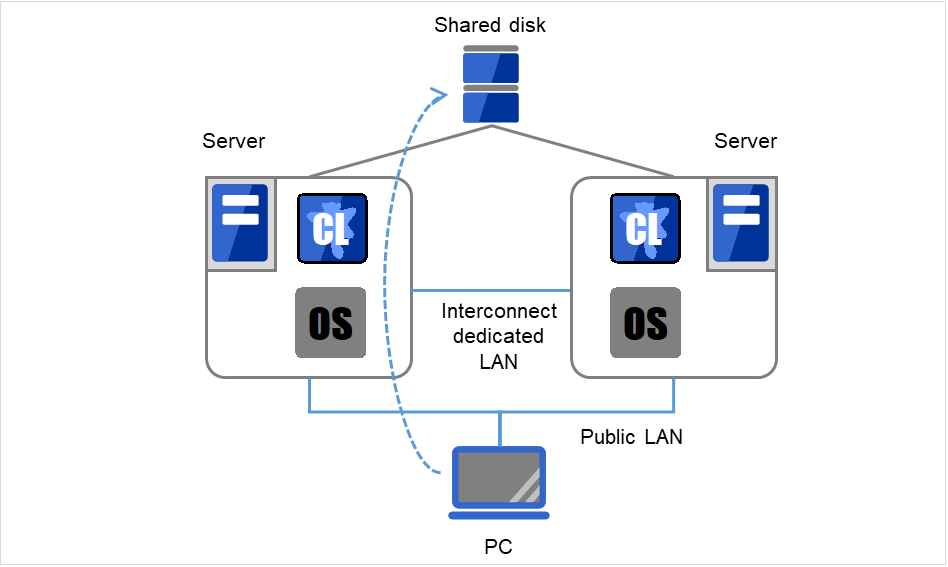
In the figures of this guide, this icon represents EXPRESSCLUSTER.
This document uses KB, MB, GB, and TB as units of data size.
Each unit represents 1,024 times the size of the next smaller unit (e.g., 1 KB = 1,024 bytes; 1 MB = 1,024 KB; 1 GB = 1,024 MB).
A key to success in today's computerized world is to provide services without them stopping. A single machine down due to a failure or overload can stop entire services you provide with customers. This will not only result in enormous damage but also in loss of credibility you once enjoyed.
A cluster system is a solution to tackle such a disaster. Introducing a cluster system allows you to minimize the period during which operation of your system stops (down time) or to avoid system-down by load distribution.
As the word "cluster" represents, a cluster system is a system aiming to increase reliability and performance by clustering a group (or groups) of multiple computers. There are various types of cluster systems, which can be classified into the following three listed below. EXPRESSCLUSTER is categorized as a high availability cluster.
High Availability (HA) Cluster
In this cluster configuration, one server operates as an active server. When the active server fails, a standby server takes over the operation. This cluster configuration aims for high-availability and allows data to be inherited as well. The high availability cluster is available in the shared disk type, data mirror type or remote cluster type.
Load Distribution Cluster
This is a cluster configuration where requests from clients are allocated to load-distribution hosts according to appropriate load distribution rules. This cluster configuration aims for high scalability. Generally, data cannot be taken over. The load distribution cluster is available in a load balance type or parallel database type.
High Performance Computing (HPC) Cluster
This is a cluster configuration where CPUs of all nodes are used to perform a single operation. This cluster configuration aims for high performance but does not provide general versatility.
Grid computing, which is one of the types of high performance computing that clusters a wider range of nodes and computing clusters, is a hot topic these days.
To enhance the availability of a system, it is generally considered that having redundancy for components of the system and eliminating a single point of failure is important. "Single point of failure" is a weakness of having a single computer component (hardware component) in the system. If the component fails, it will cause interruption of services. The high availability (HA) cluster is a cluster system that minimizes the time during which the system is stopped and increases operational availability by establishing redundancy with multiple servers.
The HA cluster is called for in mission-critical systems where downtime is fatal. The HA cluster can be divided into two types: shared disk type and data mirror type. The explanation for each type is provided below.
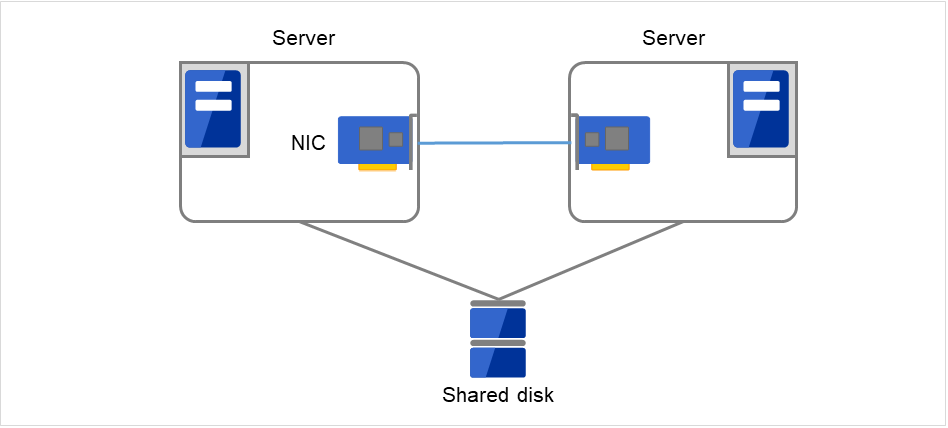
Data must be inherited from one server to another in cluster systems. A cluster topology where data is stored in a shared disk with two or more servers using the data is called shared disk type.
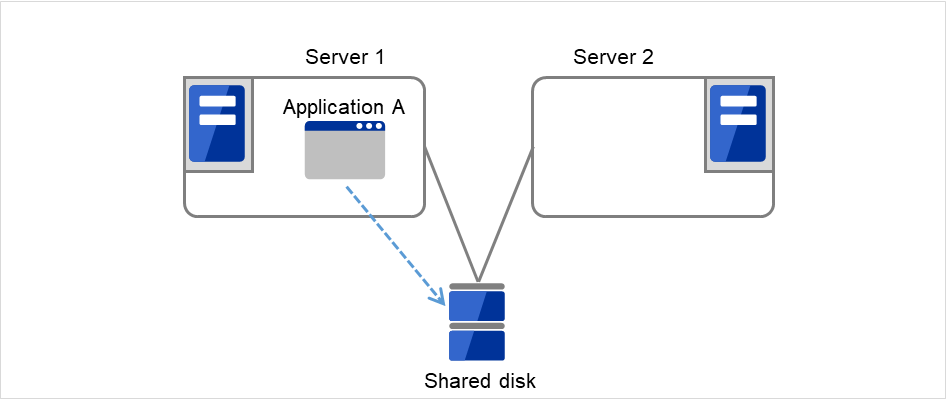
Fig. 2.1 HA cluster configuration (Shared disk type)
Expensive since a shared disk is necessary.
Ideal for the system that handles large data.
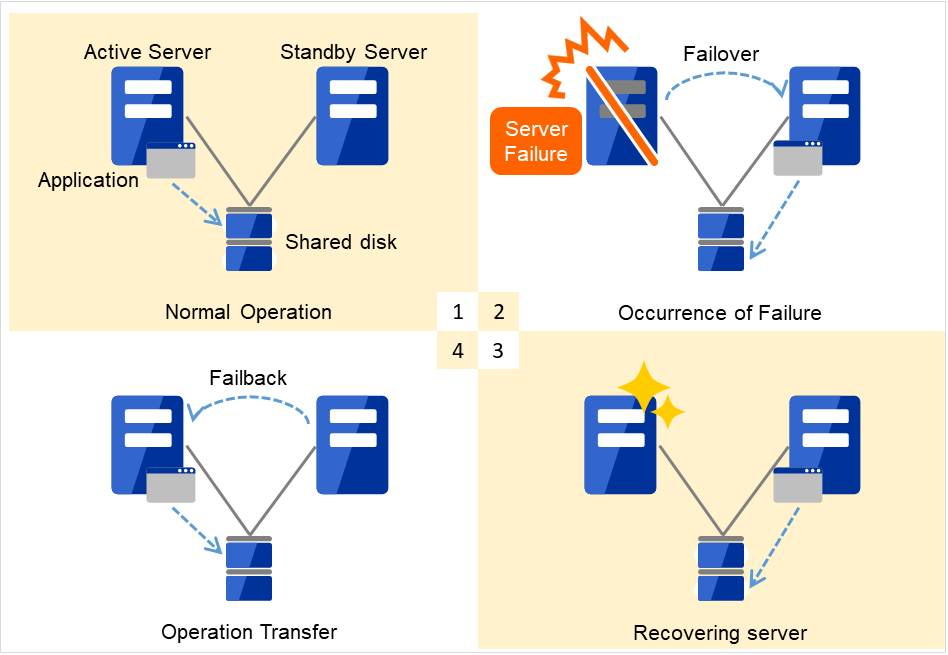
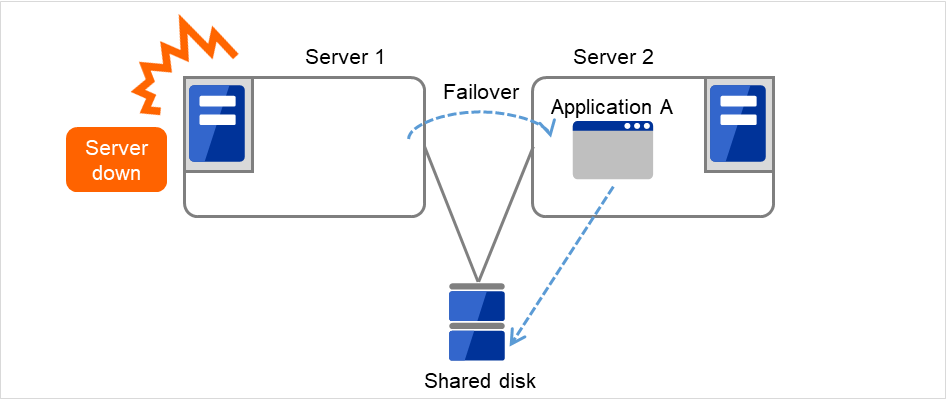
If a failure occurs on a server where applications are running (active server), the cluster system detects the failure and applications are automatically started in a standby server to take over operations. This mechanism is called failover. Operations to be inherited in the cluster system consist of resources including disk, IP address and application.
In a non-clustered system, a client needs to access a different IP address if an application is restarted on a server other than the server where the application was originally running. In contrast, many cluster systems allocate a virtual IP address on an operational basis. A server where the operation is running, be it an active or a standby server, remains transparent to a client. The operation is continued as if it has been running on the same server.
File system consistency must be checked to inherit data. A check command (for example, fsck in Linux) is generally run to check file system consistency. However, the larger the file system is, the more time spent for checking. While checking is in process, operations are stopped. For this problem, journaling file system is introduced to reduce the time required for failover.
Logic of the data to be inherited must be checked for applications. For example, roll-back or roll-forward is necessary for databases. With these actions, a client can continue operation only by re-executing the SQL statement that has not been committed yet.
A server with the failure can return to the cluster system as a standby server if it is physically separated from the system, fixed, and then succeeds to connect the system. Such returning is acceptable in production environments where continuity of operations is important.
Fig. 2.2 From occurrence of a failure to recovery
Normal operation
Occurrence of failure
Recovering server
Operation transfer
When the specification of the failover destination server does not meet the system requirements or overload occurs due to multi-directional standby, operations on the original server are preferred. In such a case, a failback takes place to resume operations on the original server.
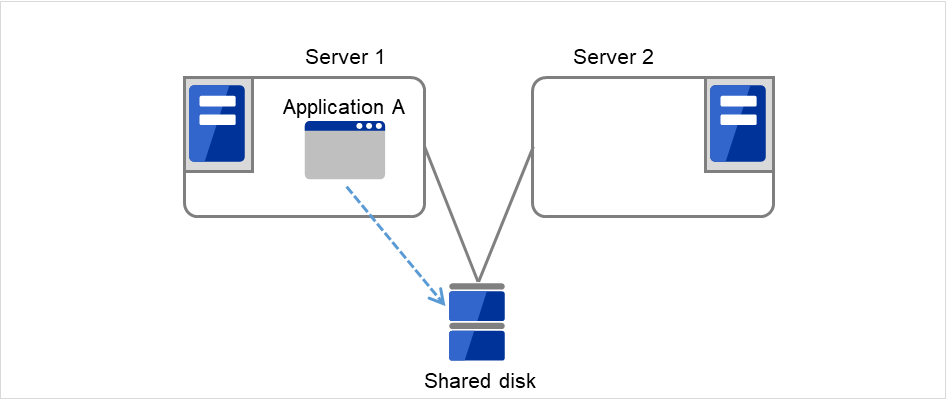
Fig. 2.3 HA cluster topology (Uni-directional standby)
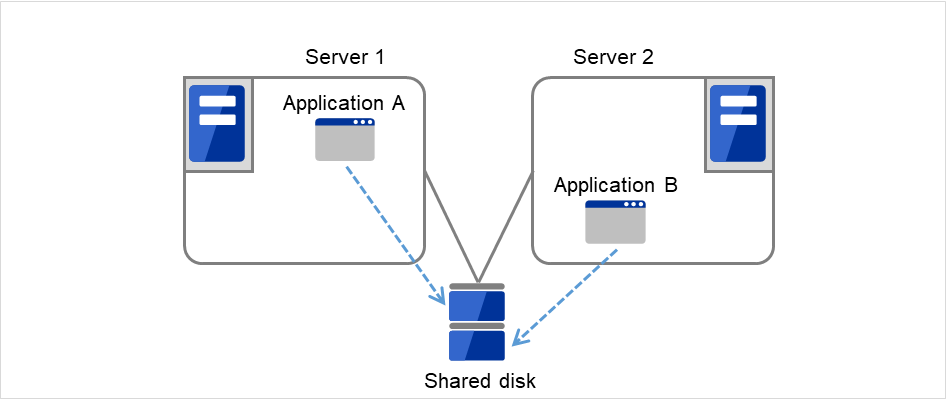
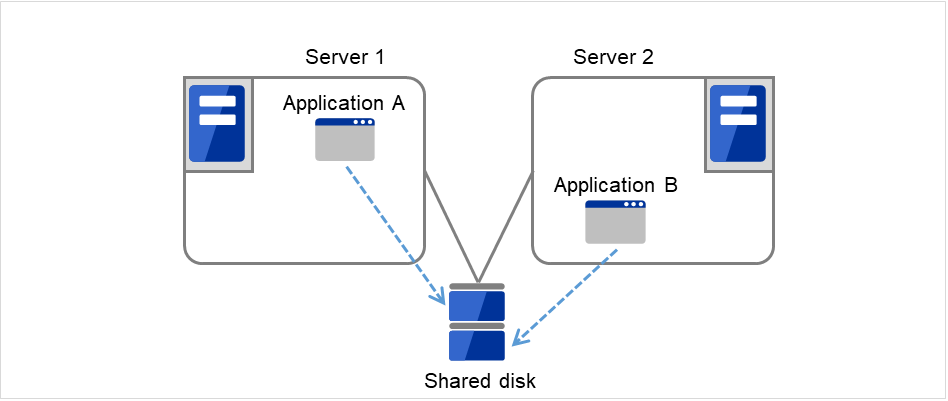
A mode where there are two or more operations with each server in the cluster serving as both active and standby server, as shown in Fig. 2.4 HA cluster topology (Multi-directional standby), is referred to as multi-directional standby.
Server 1 is the active server for Application A and also the standby server for Application B.
Server 2 is the active server for Application B and also the standby server for Application A.
Fig. 2.4 HA cluster topology (Multi-directional standby)
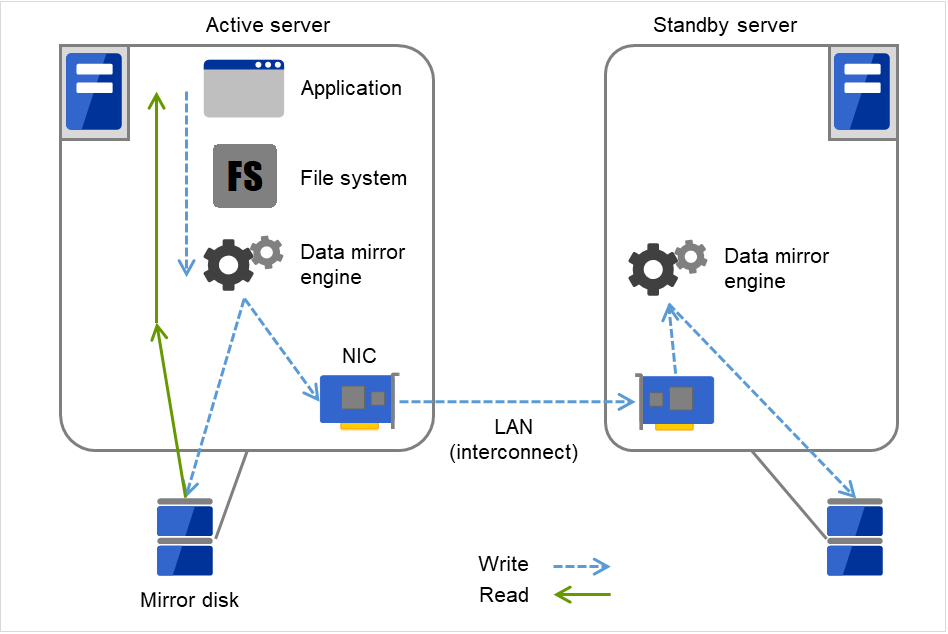
The shared disk type cluster system is good for large-scale systems. However, creating a system with this type can be costly because shared disks are generally expensive. The data mirror type cluster system provides the same functions as the shared disk type with smaller cost through mirroring of server disks.
Fig. 2.5 HA cluster configuration (Data mirror type)
Cheap since a shared disk is unnecessary.
Ideal for the system with less data volume because of mirroring.
The data mirror type is not recommended for large-scale systems that handle a large volume of data since data needs to be mirrored between servers.
When a write request is made by an application, the data mirror engine not only writes data in the local disk but sends the write request to the standby server via the interconnect. Interconnect is a network connecting servers. It is used to monitor whether or not the server is activated in the cluster system. In addition to this purpose, interconnect is sometimes used to transfer data in the data mirror type cluster system. The data mirror engine on the standby server achieves data synchronization between standby and active servers by writing the data into the local disk of the standby server.
For read requests from an application, data is simply read from the disk on the active server.
Snapshot backup is applied usage of data mirroring. Because the data mirror type cluster system has shared data in two locations, you can keep the disk of the standby server as snapshot backup without spending time for backup by simply separating the server from the cluster.
Failover mechanism and its problems
There are various cluster systems such as failover clusters, load distribution clusters, and high performance computing (HPC) clusters. The failover cluster is one of the high availability (HA) cluster systems that aim to increase operational availability through establishing server redundancy and passing operations being executed to another server when a failure occurs.
Cluster software executes failover (for example, passing operations) when a failure that can impact continued operation is detected. The following section gives you a quick view of how the cluster software detects a failure.
Heartbeat and detection of server failures
Failures that must be detected in a cluster system are failures that can cause all servers in the cluster to stop. Server failures include hardware failures such as power supply and memory failures, and OS panic. To detect such failures, heartbeat is employed to monitor whether or not the server is active.
Some cluster software programs use heartbeat not only for checking whether or not the target is active through ping response, but for sending status information on the local server. Such cluster software programs begin failover if no heartbeat response is received in heartbeat transmission, determining no response as server failure. However, grace time should be given before determining failure, since a highly loaded server can cause delay of response. Allowing grace period results in a time lag between the moment when a failure occurred and the moment when the failure is detected by the cluster software.
Detection of resource failures
Factors causing stop of operations are not limited to stop of all servers in the cluster. Failure in disks used by applications, NIC failure, and failure in applications themselves are also factors that can cause the stop of operations. These resource failures need to be detected as well to execute failover for improved availability.
Accessing a target resource is a way employed to detect resource failures if the target is a physical device. For monitoring applications, trying to service ports within the range not impacting operation is a way of detecting an error in addition to monitoring whether or not application processes are activated.
In a failover cluster system of the shared disk type, multiple servers physically share the disk device. Typically, a file system enjoys I/O performance greater than the physical disk I/O performance by keeping data caches in a server.
What if a file system is accessed by multiple servers simultaneously?
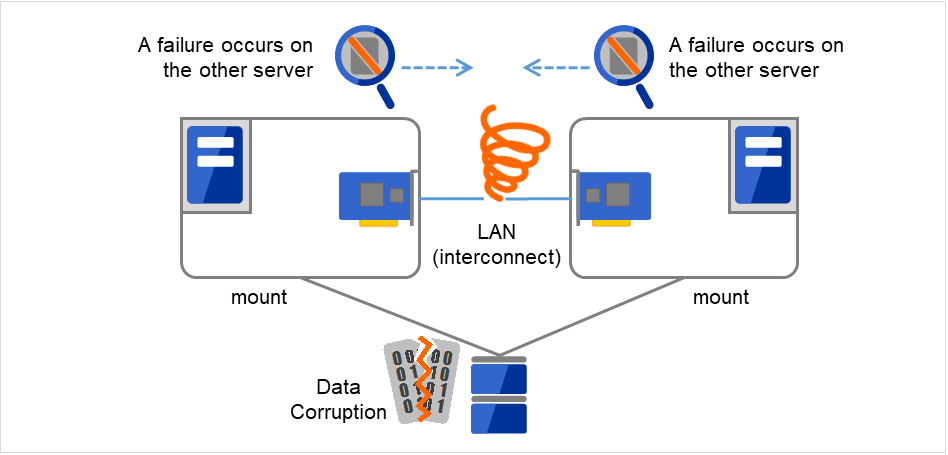
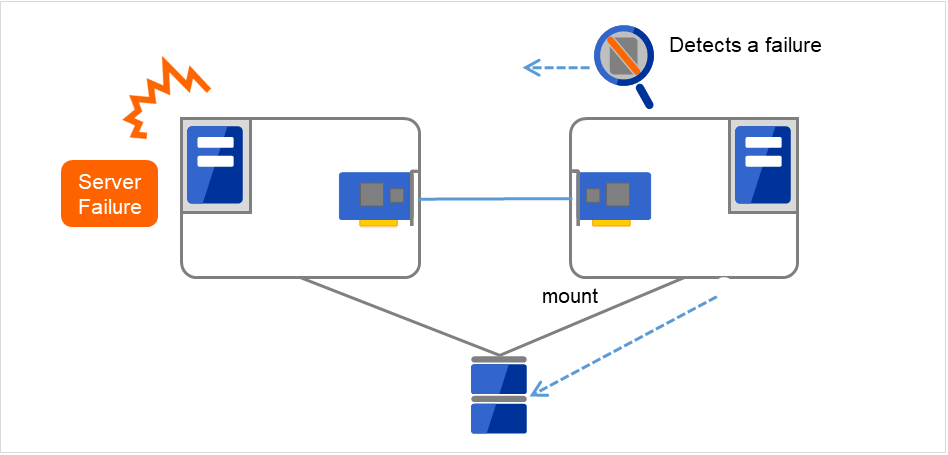
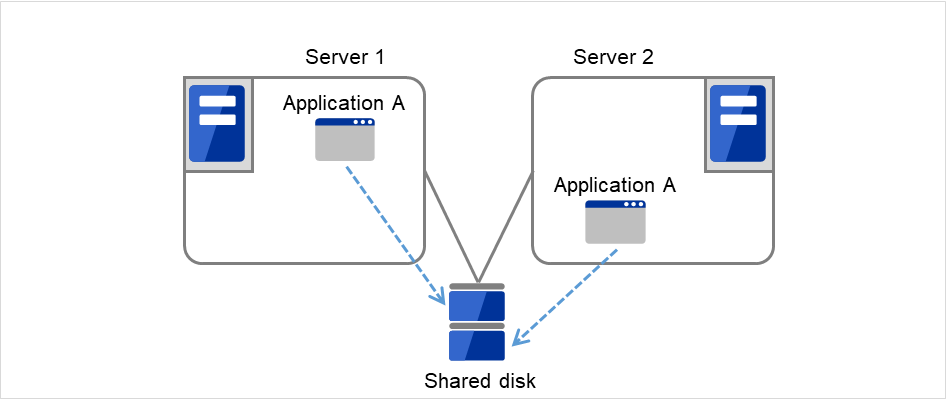
Because a general file system assumes no server other than the local updates data on the disk, inconsistency between caches and the data on the disk arises. Ultimately the data will be corrupted. The failover cluster system locks the disk device to prevent multiple servers from mounting a file system, simultaneously caused by a network partition.
Fig. 2.7 Cluster configuration with a shared disk
When all interconnects between servers are disconnected, failover takes place because the servers assume other server(s) are down. To monitor whether the server is activated, a heartbeat communication is used. As a result, multiple servers mount a file system simultaneously causing data corruption. This explains the importance of appropriate failover behavior in a cluster system at the time of failure occurrence.
The problem explained in the section above is referred to as "network partition" or "split-brain syndrome." The failover cluster system is equipped with various mechanisms to ensure shared disk lock at the time when all interconnects are disconnected.
As mentioned earlier, resources to be managed by a cluster include disks, IP addresses, and applications. The functions used in the failover cluster system to inherit these resources are described below.
Data to be passed from a server to another in a cluster system is stored in a partition on the shared disk. This means data is re-mounting the file system of files that the application uses on a healthy server. What the cluster software should do is simply mount the file system because the shared disk is physically connected to a server that inherits data.
"Figure 2.9 Taking over data" may look simple, but consider the following issues in designing and creating a cluster system.
One issue to consider is recovery time for a file system. A file system to be inherited may have been used by another server or being updated just before the failure occurred and requires a file system consistency check. When the file system is large, the time spent for checking consistency will be enormous. It may take a few hours to complete the check and the time is wholly added to the time for failover (time to take over operation), and this will reduce system availability.
Another issue you should consider is writing assurance. When an application writes important data into a file, it tries to ensure the data to be written into a disk by using a function such as synchronized writing. The data that the application assumes to have been written is expected to be inherited after failover. For example, a mail server reports the completion of mail receiving to other mail servers or clients after it has securely written mails it received in a spool. This will allow the spooled mail to be distributed again after the server is restarted. Likewise, a cluster system should ensure mails written into spool by a server to become readable by another server.
The last to come in inheritance of operation by cluster software is inheritance of applications. Unlike fault tolerant computers (FTC), no process status such as contents of memory is inherited in typical failover cluster systems. The applications running on a failed server are inherited by rerunning them on a healthy server.
For example, when instances of a database management system (DBMS) are inherited, the database is automatically recovered (roll-forward/roll-back) by startup of the instances. The time needed for this database recovery is typically a few minutes though it can be controlled by configuring the interval of DBMS checkpoint to a certain extent.
Many applications can restart operations by re-execution. Some applications, however, require going through procedures for recovery if a failure occurs. For these applications, cluster software allows to start up scripts instead of applications so that recovery process can be written. In a script, the recovery process, including cleanup of files half updated, is written as necessary according to factors for executing the script and information on the execution server.
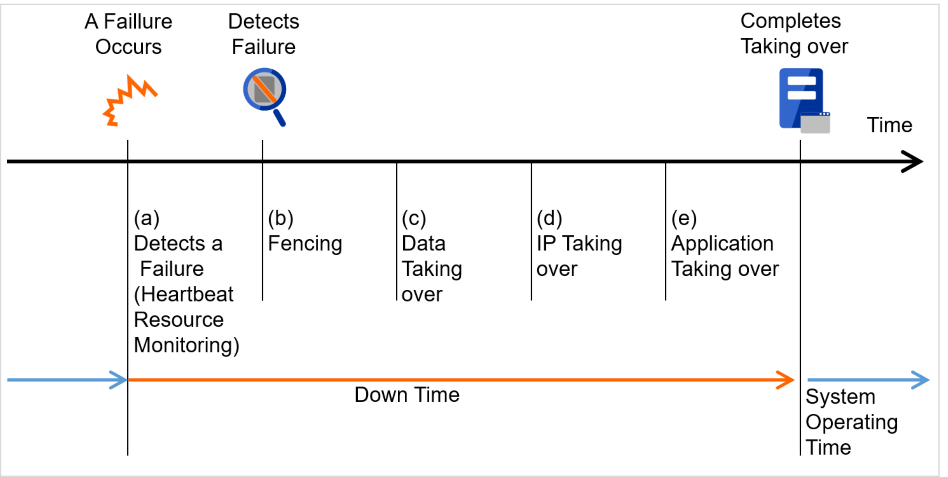
Cluster software is required to complete each task quickly and reliably (see "Figure 2.10 Failover time chart"). Cluster software achieves high availability with due consideration on what has been described so far.
Having a clear picture of the availability level required or aimed is important in building a high availability system. This means when you design a system, you need to study cost effectiveness of countermeasures, such as establishing a redundant configuration to continue operations and recovering operations within a short period of time, against various failures that can disturb system operations.
Single point of failure (SPOF), as described previously, is a component where failure can lead to stop of the system. In a cluster system, you can eliminate the system's SPOF by establishing server redundancy. However, components shared among servers, such as shared disk may become a SPOF. The key in designing a high availability system is to duplicate or eliminate this shared component.
A cluster system can improve availability but failover will take a few minutes for switching systems. That means time for failover is a factor that reduces availability. Solutions for the following three, which are likely to become SPOF, will be discussed hereafter although technical issues that improve availability of a single server such as ECC memory and redundant power supply are important.
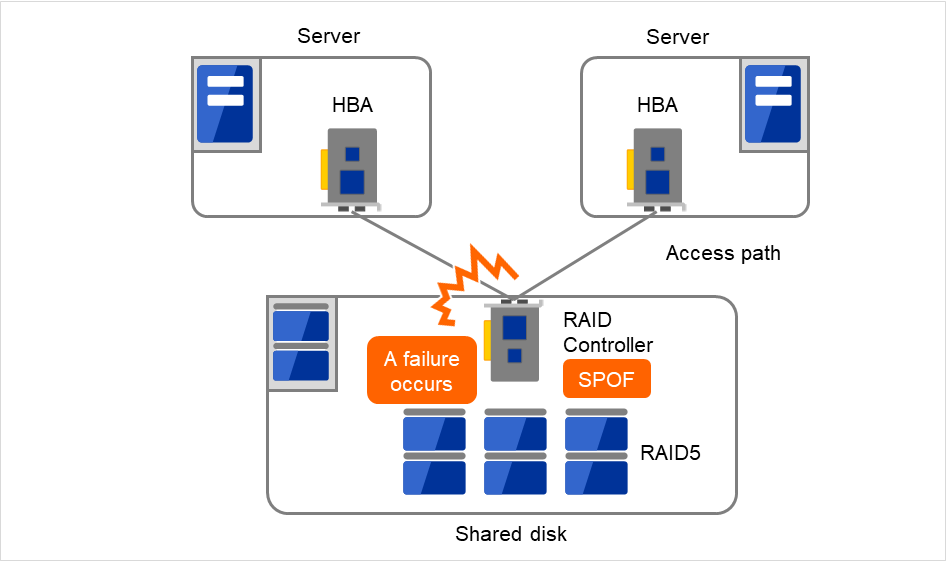
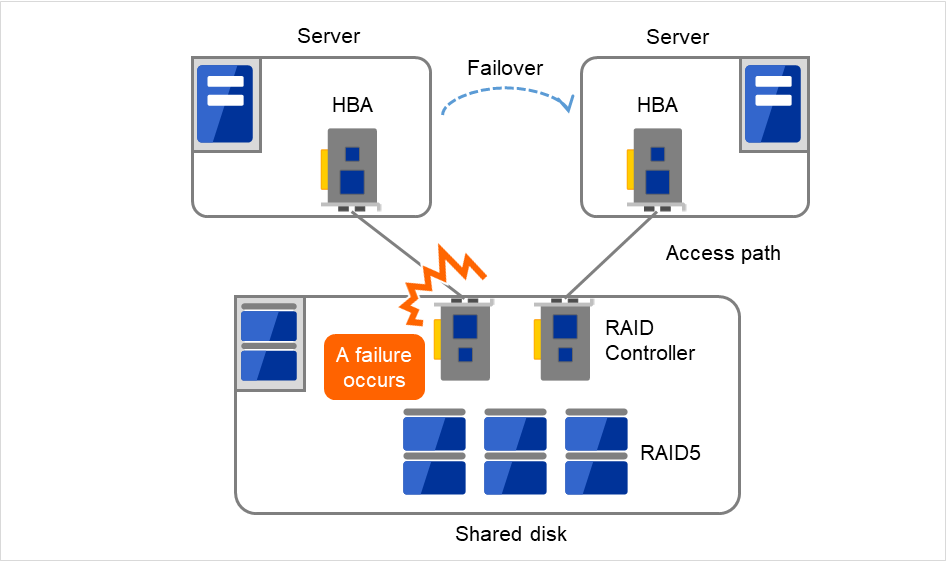
Typically a shared disk uses a disk array for RAID. Because of this, the bare drive of the disk does not become SPOF. The problem is the RAID controller is incorporated. Shared disks commonly used in many cluster systems allow controller redundancy.
In general, access paths to the shared disk must be duplicated to benefit from redundant RAID controller. There are still things to be done to use redundant access paths in Linux (described later in this chapter). If the shared disk has configuration to access the same logical disk unit (LUN) from duplicated multiple controllers simultaneously, and each controller is connected to one server, you can achieve high availability by failover between nodes when an error occurs in one of the controllers.
Fig. 2.11 Example of a RAID controller and access paths both being SPOF
Fig. 2.12 Example of RAID controllers and access paths both being redundant
With a failover cluster system of data mirror type, where no shared disk is used, you can create an ideal system having no SPOF because all data is mirrored to the disk in the other server. However you should consider the following issues:
Disk I/O performance in mirroring data over the network (especially writing performance)
System performance during mirror resynchronization in recovery from server failure (mirror copy is done in the background)
Time for mirror resynchronization (clustering cannot be done until mirror resynchronization is completed)
In a system with frequent data viewing and a relatively small volume of data, choosing the data mirror type for clustering is a key to increase availability.
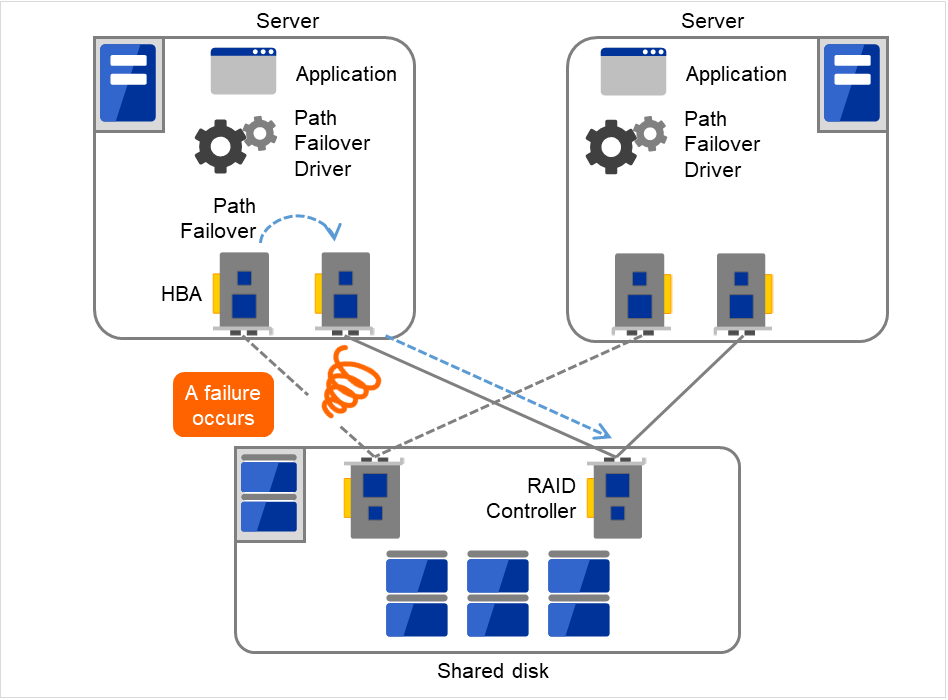
In a typical configuration of the shared disk type cluster system, the access path to the shared disk is shared among servers in the cluster. To take SCSI as an example, two servers and a shared disk are connected to a single SCSI bus. A failure in the access path to the shared disk can stop the entire system.
What you can do for this is to have a redundant configuration by providing multiple access paths to the shared disk and make them look as one path for applications. The device driver allowing such is called a path failover driver. Path failover drivers are often developed and released by shared disk vendors. Path failover drivers in Linux are still under development. For the time being, as discussed earlier, offering access paths to the shared disk by connecting a server on an array controller on the shared disk basis is the way to ensure availability in Linux cluster systems.
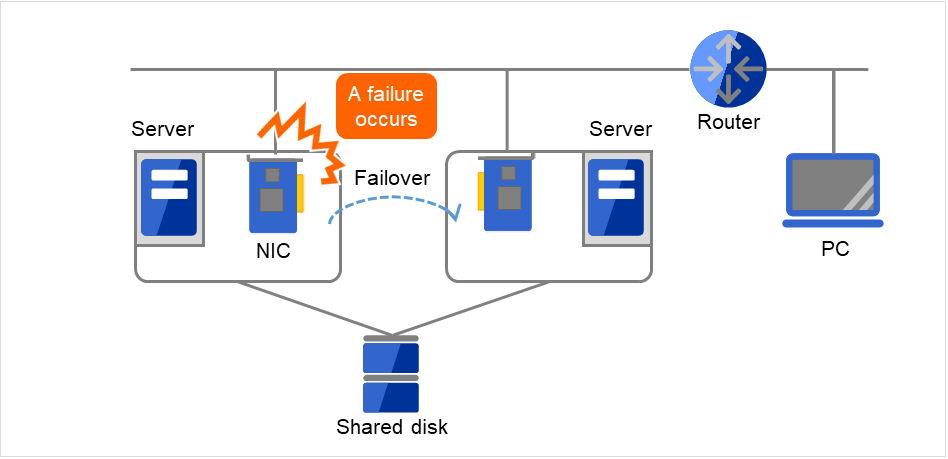
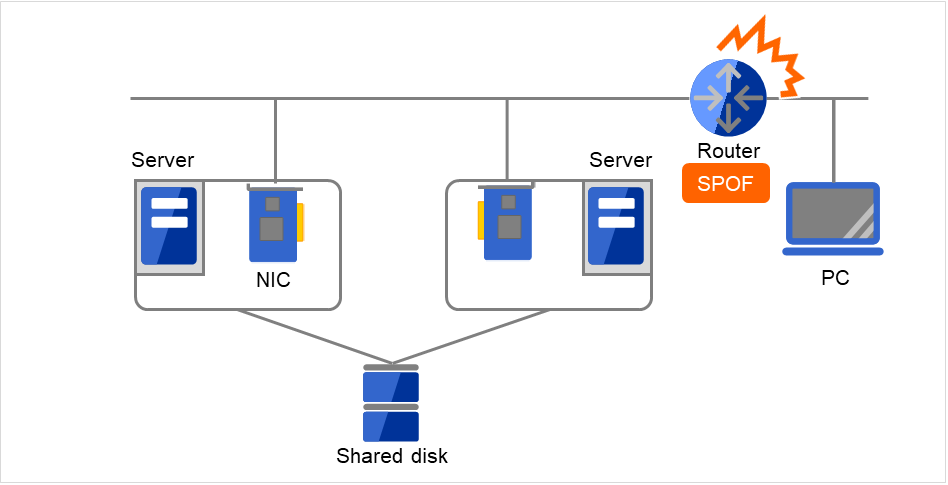
In any systems that run services on a network, a LAN failure is a major factor that disturbs operations of the system. If appropriate settings are made, availability of cluster system can be increased through failover between nodes at NIC failures. However, a failure in a network device that resides outside the cluster system disturbs operation of the system.
In the case of this above figure, if the router has a failure, the access from the PC to the service on the server cannot be maintained (Router becomes a SPOF).
LAN redundancy is a solution to tackle device failure outside the cluster system and to improve availability. You can apply ways used for a single server to increase LAN availability. For example, choose a primitive way to have a spare network device with its power off, and manually replace a failed device with this spare device. Choose to have a multiplex network path through a redundant configuration of high-performance network devices, and switch paths automatically. Another option is to use a driver that supports NIC redundant configuration such as Intel's ANS driver.
Load balancing appliances and firewall appliances are also network devices that are likely to become SPOF. Typically they allow failover configurations through standard or optional software. Having redundant configuration for these devices should be regarded as requisite since they play important roles in the entire system.
Given many of factors causing system troubles are said to be the product of incorrect settings or poor maintenance, evaluation before actual operation is important to realize a high availability system and its stabilized operation. Exercising the following for actual operation of the system is a key in improving availability:
Clarify and list failures, study actions to be taken against them, and verify effectiveness of the actions by creating dummy failures.
Conduct an evaluation according to the cluster life cycle and verify performance (such as at degenerated mode)
Arrange a guide for system operation and troubleshooting based on the evaluation mentioned above.
Having a simple design for a cluster system contributes to simplifying verification and improvement of system availability.
Despite the above efforts, failures still occur. If you use the system for long time, you cannot escape from failures: hardware suffers from aging deterioration and software produces failures and errors through memory leaks or operation beyond the originally intended capacity. Improving availability of hardware and software is important yet monitoring for failure and troubleshooting problems is more important. For example, in a cluster system, you can continue running the system by spending a few minutes for switching even if a server fails. However, if you leave the failed server as it is, the system no longer has redundancy and the cluster system becomes meaningless should the next failure occur.
If a failure occurs, the system administrator must immediately take actions such as removing a newly emerged SPOF to prevent another failure. Functions for remote maintenance and reporting failures are very important in supporting services for system administration. Linux is known for providing good remote maintenance functions. Mechanism for reporting failures are coming in place. To achieve high availability with a cluster system, you should:
Remove or have complete control on single point of failure.
Have a simple design that has tolerance and resistance for failures, and be equipped with a guide for operation and troubleshooting.
Detect a failure quickly and take appropriate action against it.
EXPRESSCLUSTER is software that enhances availability and expandability of systems by a redundant (clustered) system configuration. The application services running on the active server are automatically inherited to a standby server when an error occurs in the active server.
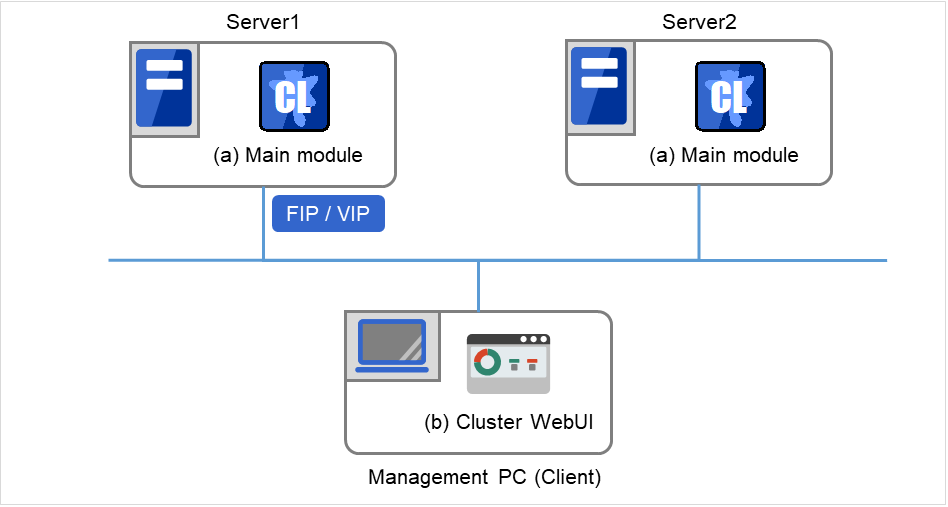
A core component of EXPRESSCLUSTER. This includes all high availability functions of the server. The server functions of the Cluster WebUI, are also included.
Cluster WebUI
This is a tool to create the configuration data of EXPRESSCLUSTER and to manage EXPRESSCLUSTER operations. Uses a Web browser as a user interface. The Cluster WebUI is installed in EXPRESSCLUSTER Server, but it is distinguished from the EXPRESSCLUSTER Server because the Cluster WebUI is operated from the Web browser on the management PC.
The software configuration of EXPRESSCLUSTER should look similar to the figure below. Install the EXPRESSCLUSTER Server (software) on a server that constitutes a cluster. Because the main functions of Cluster WebUI are included in EXPRESSCLUSTER Server, it is not necessary to separately install them. The Cluster WebUI can be used through the web browser on the management PC or on each server in the cluster.
3.3.1. How an error is detected in EXPRESSCLUSTER
There are three kinds of monitoring in EXPRESSCLUSTER: (1) server monitoring, (2) application monitoring, and (3) internal monitoring. These monitoring functions let you detect an error quickly and reliably. The details of the monitoring functions are described below.
Server monitoring is the most basic function of the failover-type cluster system. It monitors if a server that constitutes a cluster is properly working.
EXPRESSCLUSTER regularly checks whether other servers are properly working in the cluster system. This way of verification is called "heartbeat communication." The heartbeat communication uses the following communication paths:
Primary Interconnect
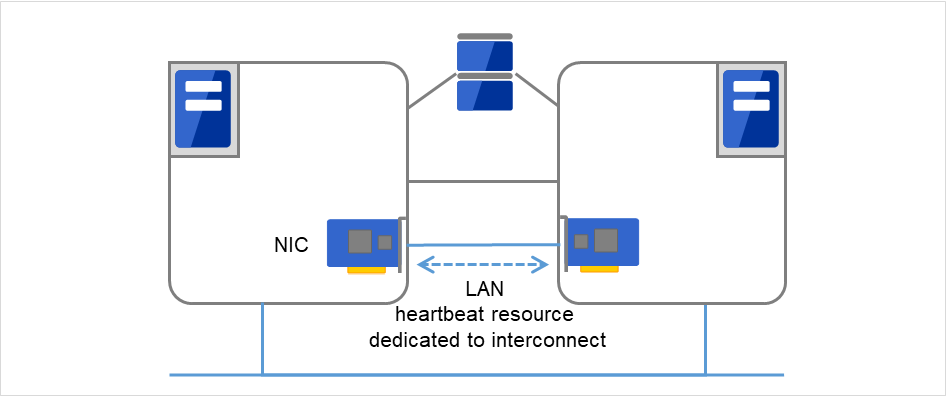
Uses an Ethernet NIC in communication path dedicated to the failover-type cluster system. This is used to exchange information between the servers as well as to perform heartbeat communication.
Fig. 3.2 LAN heartbeat/Kernel mode LAN heartbeat (Primary interconnect)
Secondary Interconnect
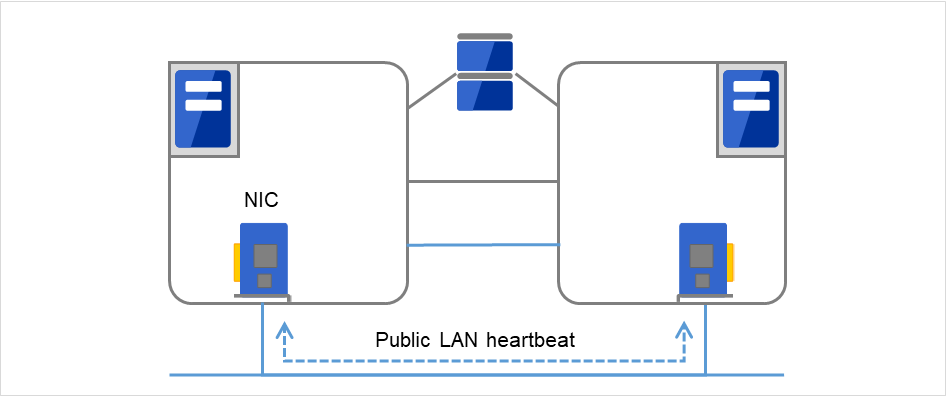
Uses a communication path used for communication with client machine as an alternative interconnect. Any Ethernet NIC can be used as long as TCP/IP can be used. This is also used to exchange information between the servers and to perform heartbeat communication.
Fig. 3.3 LAN heartbeat/Kernel mode LAN heartbeat (Secondary interconnect)
Shared disk
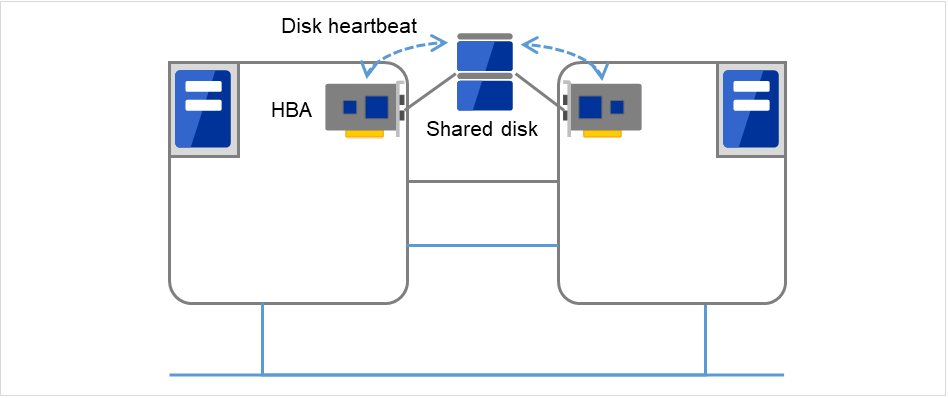
Creates an EXPRESSCLUSTER-dedicated partition (EXPRESSCLUSTER partition) on the disk that is connected to all servers that constitute the failover-type cluster system, and performs heartbeat communication on the EXPRESSCLUSTER partition.
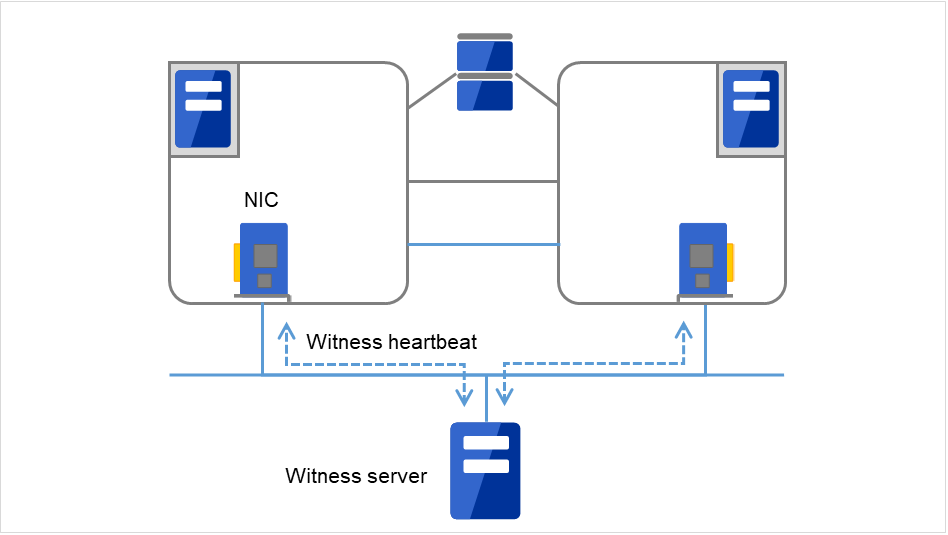
This is used by the external Witness server running the Witness server service to check if other servers constructing the failover-type cluster exist through communication with them.
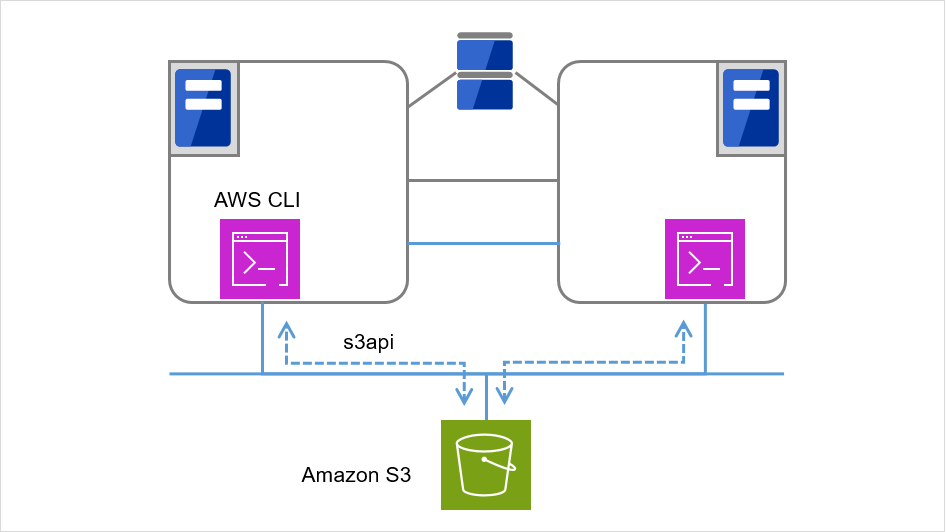
Confirms the servers' availability by connecting to the object storage service from each of the servers that constitute a failover cluster, and by checking the last update date and time of the object corresponding to each of the servers.
Having these communication paths dramatically improves the reliability of the communication between the servers, and prevents the occurrence of network partition.
Note
Network partition refers to a condition when a network gets split by having a problem in all communication paths of the servers in a cluster. In a cluster system that is not capable of handling a network partition, a problem occurred in a communication path and a server cannot be distinguished. As a result, multiple servers may access the same resource and cause the data in a cluster system to be corrupted.
Application monitoring is a function that monitors applications and factors that cause a situation where an application cannot run.
Activation status of application monitoring
An error can be detected by starting up an application from an EXEC resource in EXPRESSCLUSTER and regularly checking whether a process is active or not by using the pid monitor resource. It is effective when the factor for application to stop is due to error termination of an application.
Note
An error in resident process cannot be detected in an application started up by EXPRESSCLUSTER.
When the monitoring target application starts and stops a resident process, an internal application error (such as application stalling, result error) cannot be detected.
Resource monitoring
An error can be detected by monitoring the cluster resources (such as disk partition and IP address) and public LAN using the monitor resources of the EXPRESSCLUSTER. It is effective when the factor for application to stop is due to an error of a resource which is necessary for an application to operate.
Internal monitoring refers to an inter-monitoring of modules within EXPRESSCLUSTER. It monitors whether each monitoring function of EXPRESSCLUSTER is properly working. Activation status of EXPRESSCLUSTER process monitoring is performed within EXPRESSCLUSTER.
There are monitorable and non-monitorable errors in EXPRESSCLUSTER. It is important to know what can or cannot be monitored when building and operating a cluster system.
3.3.6. Detectable and non-detectable errors by server monitoring
Monitoring condition: A heartbeat from a server with an error is stopped
Example of errors that can be monitored:
Hardware failure (of which OS cannot continue operating)
System panic
Example of error that cannot be monitored:
Partial failure on OS (for example, only a mouse or keyboard does not function)
3.3.7. Detectable and non-detectable errors by application monitoring
Monitoring conditions: Termination of applications with errors, continuous resource errors, and disconnection of a path to the network devices.
Example of errors that can be monitored:
Abnormal termination of an application
Failure to access the shared disk (such as HBA [1] failure)
Public LAN NIC problem
Example of errors that cannot be monitored:
Application stalling and resulting in error.
EXPRESSCLUSTER cannot monitor application stalling and error results. However, it is possible to perform failover by creating a program that monitors applications and terminates itself when an error is detected, starting the program using the EXEC resource, and monitoring application using the PID monitor resource.
Upon detecting that a heartbeat from a server is interrupted, EXPRESSCLUSTER determines whether the cause of this interruption is an error in a server or a network partition. If it is judged as a server failure, failover (activate resources and start applications on a healthy server) is performed. If it is judged as a network partition, protecting data is given priority over operations and a processing such as emergency shutdown is performed.
The following is the network partition resolution method:
ping method
http method
See also
For the details on the network partition resolution method, see "Details on network partition resolution resources" of the Reference Guide.
When a server failure is detected, a healthy server can send a stop request to the failed server. Making the failed server stop eliminates the possibility of simultaneously starting business applications on two or more servers. The forced stop is made before a failover is started.
Upon detecting that a heartbeat from a server is interrupted, EXPRESSCLUSTER determines whether the cause of this interruption is an error in a server or a network partition before starting a failover. Then a failover is performed by activating various resources and starting up applications on a properly working server.
The group of resources which fail over at the same time is called a "failover group." From a user's point of view, a failover group appears as a virtual computer.
Note
In a cluster system, a failover is performed by restarting the application from a properly working node. Therefore, what is saved in an application memory cannot be failed over.
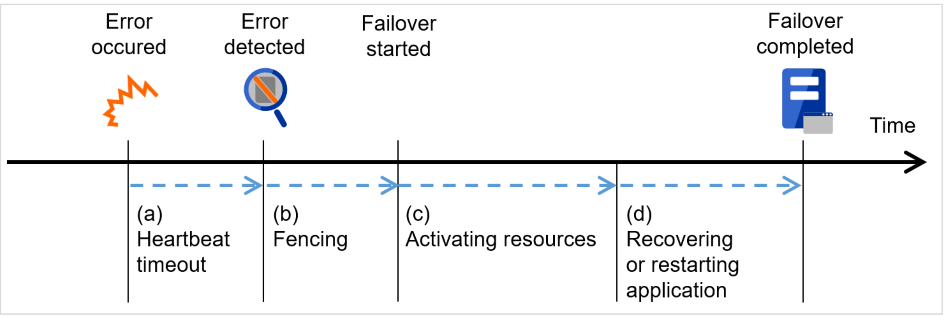
The time for a standby server to detect an error after that error occurred on the active server.
The setting values of the cluster properties should be adjusted depending on the application load. (The default value is 90 seconds.)
Fencing
The time for network partition resolution and forced stopping.
For network partition resolution, EXPRESSCLUSTER checks whether stop of heartbeat (heartbeat timeout) detected from the other server is due to a network partition or an error in the other server.
Confirmation completes immediately.
For forced stopping, a stop request is sent to the server that is recognized to be the failure source.
How long it will take varies depending on the cluster's operating environment such as a physical one, a virtual one, or the cloud.
Activating various resources
The time to activate the resources necessary for operating an application.
The file system recovery, transfer of data in disks, and transfer of IP addresses are performed.
The resources can be activated in a few seconds in ordinary settings, but the required time changes depending on the type and the number of resources registered to the failover group. For more information, refer to the "Installation and Configuration Guide".
Start script execution time
The data recovery time for a roll-back or roll-forward of the database and the startup time of the application to be used in operation.
The time for roll-back or roll-forward can be predicted by adjusting the check point interval. For more information, refer to the document that comes with each software product.
EXPRESSCLUSTER can fail over the following resources:
Switchable partition
Resources such as disk resource, mirror disk resource and hybrid disk resource.
A disk partition to store the data that the application takes over.
Floating IP Address
By connecting an application using the floating IP address, a client does not have to be conscious about switching the servers due to failover processing.
It is achieved by dynamic IP address allocation to the public LAN adapter and sending ARP packet. Connection by floating IP address is possible from most of the network devices.
Script (EXEC resource)
In EXPRESSCLUSTER, applications are started up from the scripts.
The file failed over on the shared disk may not be complete as data even if it is properly working as a file system. Write the recovery processing specific to an application at the time of failover in addition to the startup of an application in the scripts.
Note
In a cluster system, failover is performed by restarting the application from a properly working node. Therefore, what is saved in an application memory cannot be failed over.
3.5.2. System configuration of the failover-type cluster
In a failover-type cluster, a disk array device is shared between the servers in a cluster. When an error occurs on a server, the standby server takes over the applications using the data on the shared disk.
Fig. 3.8 System configuration of failover-type cluster
A failover-type cluster can be divided into the following categories depending on the cluster topologies:
Uni-Directional Standby Cluster System
In the uni-directional standby cluster system, the active server runs applications while the other server, the standby server, does not. This is the simplest cluster topology and you can build a high-availability system without performance degradation after failing over.
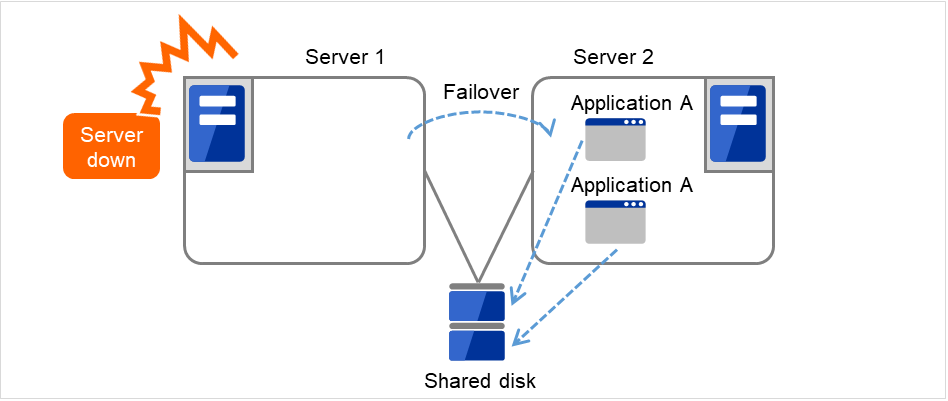
Multi-directional standby cluster system with the same application
In the same application multi-directional standby cluster system, the same applications are activated on multiple servers. These servers also operate as standby servers. The applications must support multi-directional standby operation. When the application data can be split into multiple data, depending on the data to be accessed, you can build a load distribution system per data partitioning basis by changing the client's connecting server.
Fig. 3.11 Multi-directional standby cluster system with the same application (1)
Fig. 3.12 Multi-directional standby cluster system with the same application (2)
Multi-directional standby cluster system with different applications
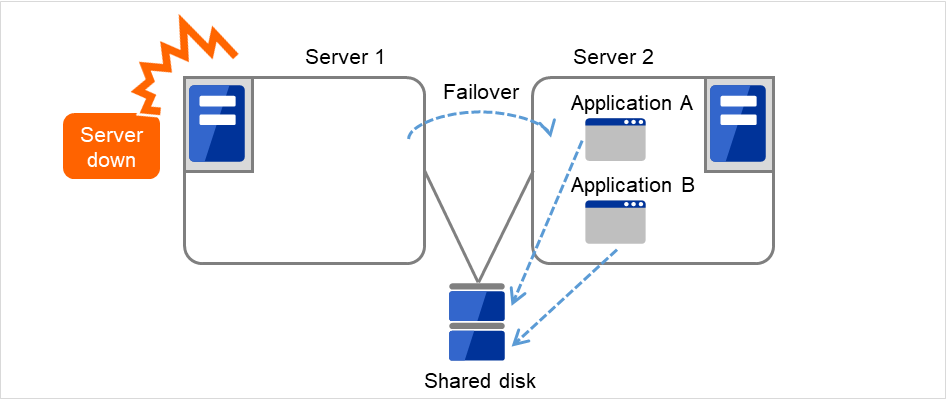
In the different application multi-directional standby cluster system, different applications are activated on multiple servers and these servers also operate as standby servers. The applications do not have to support multi-directional standby operation. A load distribution system can be built per application unit basis.
Application A and Application B are different applications.
Fig. 3.13 Multi-directional standby cluster system with different applications (1)
Fig. 3.14 Multi-directional standby cluster system with different applications (2)
Node to Node Configuration
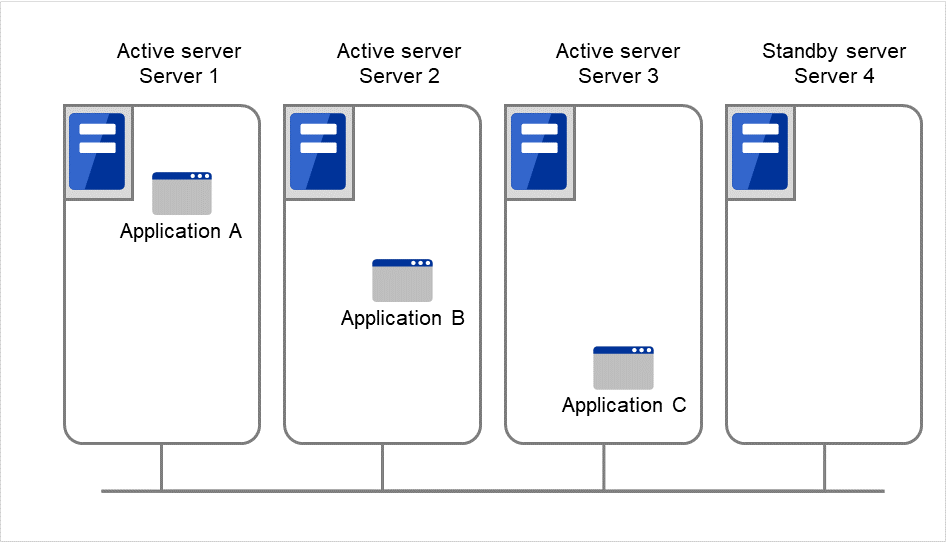
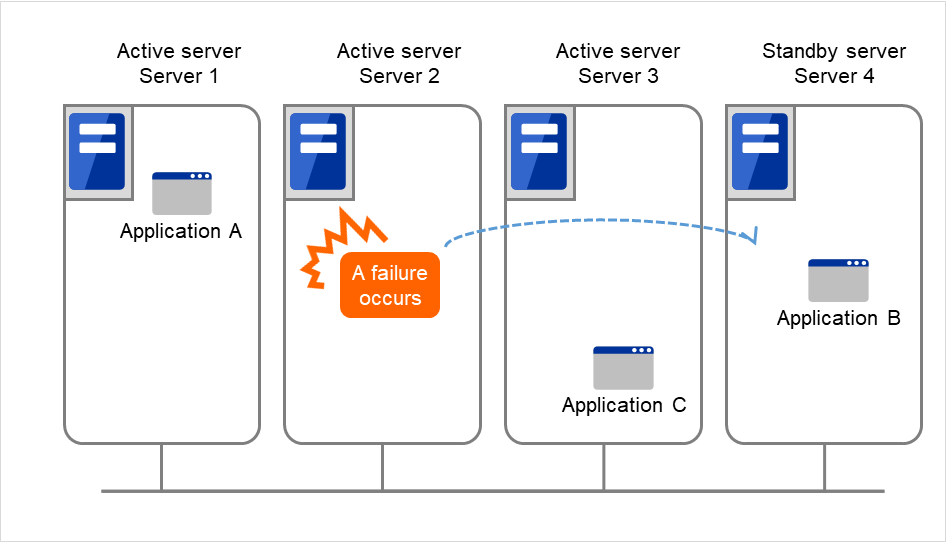
The configuration can be expanded with more nodes by applying the configurations introduced thus far. In a node to node configuration described below, three different applications are run on three servers and one standby server takes over the application if any problem occurs. In a uni-directional standby cluster system, one of the two servers functions as a standby server. However, in a node to node configuration, only one of the four server functions as a standby server and performance deterioration is not anticipated if an error occurs only on one server.
3.5.3. Hardware configuration of the shared disk type cluster
The hardware configuration of the shared disk in EXPRESSCLUSTER is described below. In general, the following is used for communication between the servers in a cluster system:
Two NIC cards (one for external communication, one for EXPRESSCLUSTER)
Specific space of a shared disk
SCSI or FibreChannel can be used for communication interface to a shared disk; however, recently FibreChannel is more commonly used.
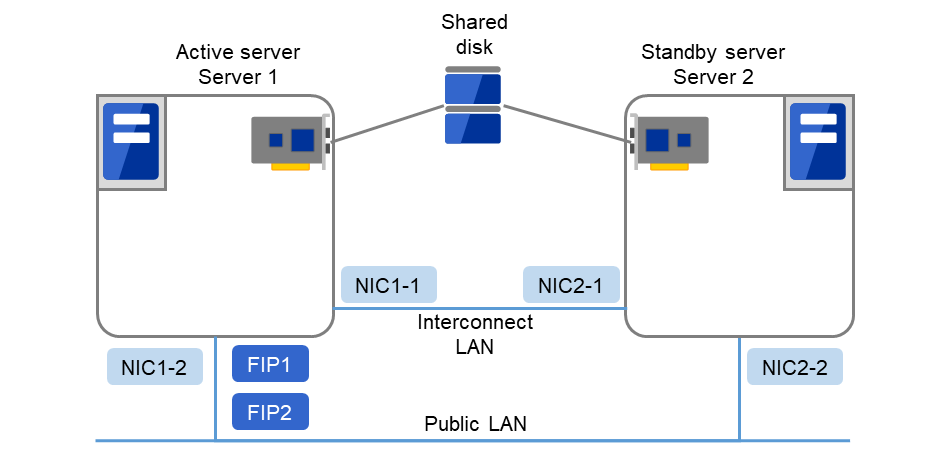
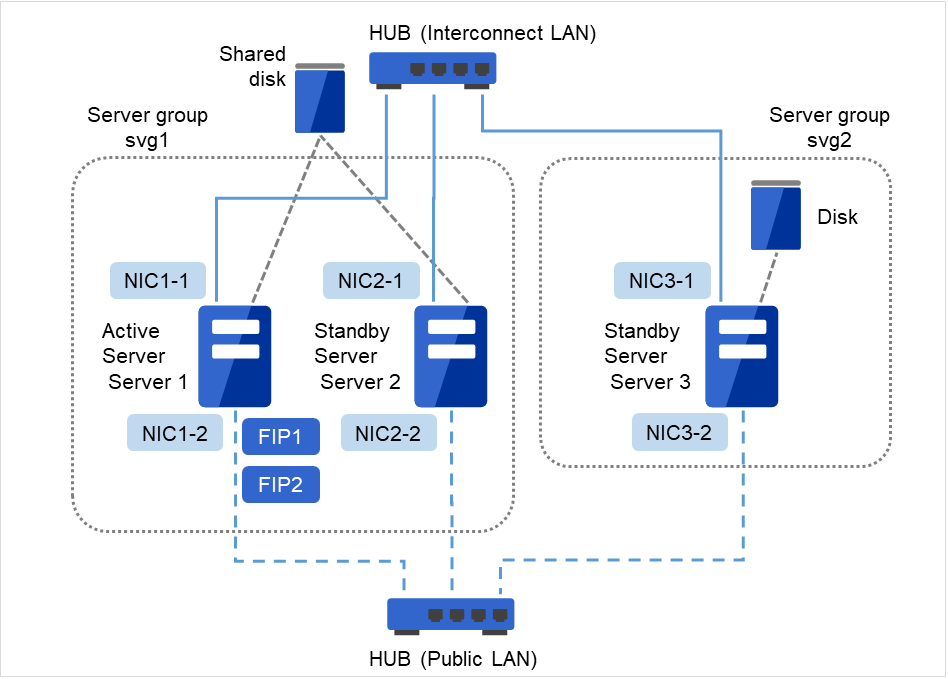
Fig. 3.17 Example of cluster configuration (Shared disk type)
FIP1
10.0.0.11 (Access destination from the Cluster WebUI client)
FIP2
10.0.0.12 (Access destination from the operation client)
NIC1-1
192.168.0.1
NIC1-2
10.0.0.1
NIC2-1
192.168.0.2
NIC2-2
10.0.0.2
Shared disk
Device name
/dev/disk/by-id/scsi-222850001557d9443-part1
Mount point
/mnt/sd1
File system
ext4
3.5.4. Hardware configuration of the mirror disk type cluster
The hardware configuration of the mirror disk in EXPRESSCLUSTER is described below.
Unlike the shared disk type, a network to copy the mirror disk data is necessary. In general, a network is used with NIC for internal communication in EXPRESSCLUSTER.
Mirror disks need to be separated from the operating system; however, they do not depend on a connection interface (IDE or SCSI.)
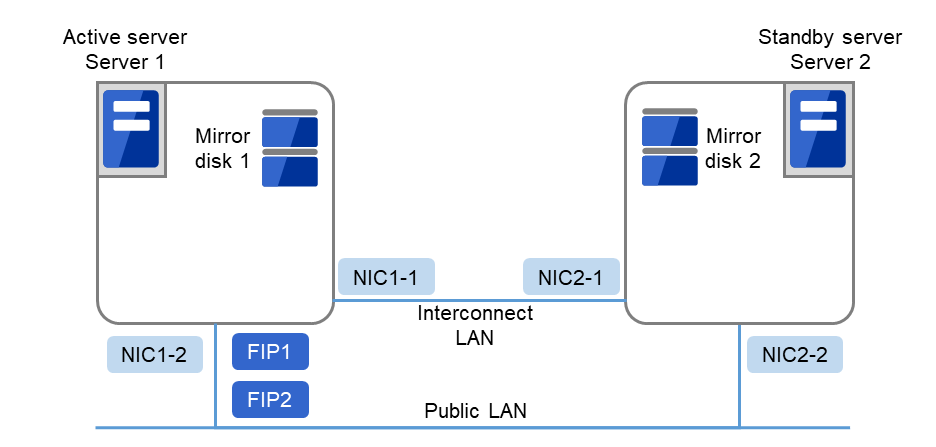
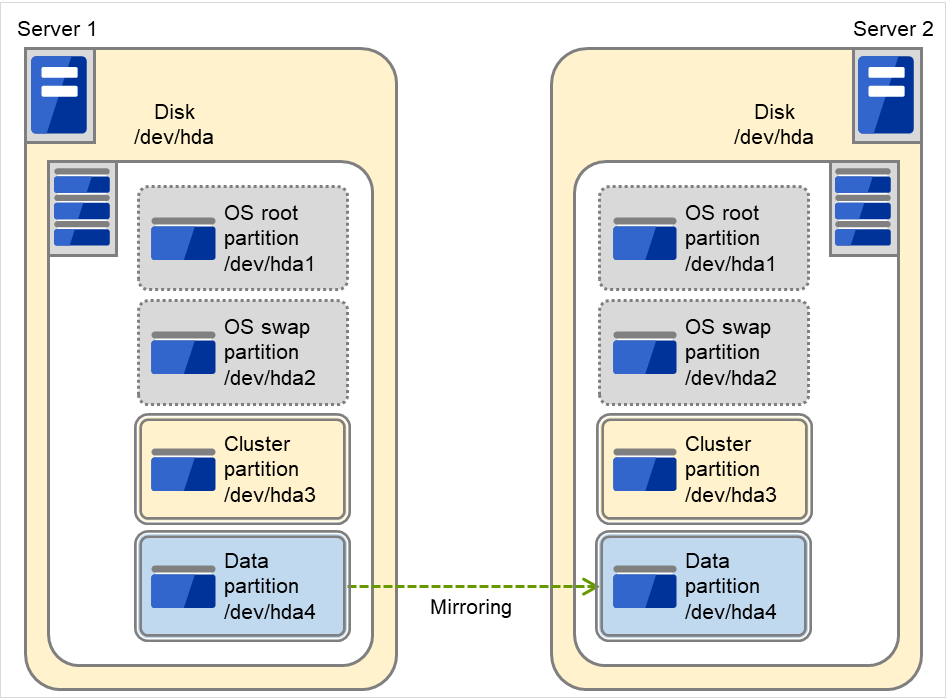
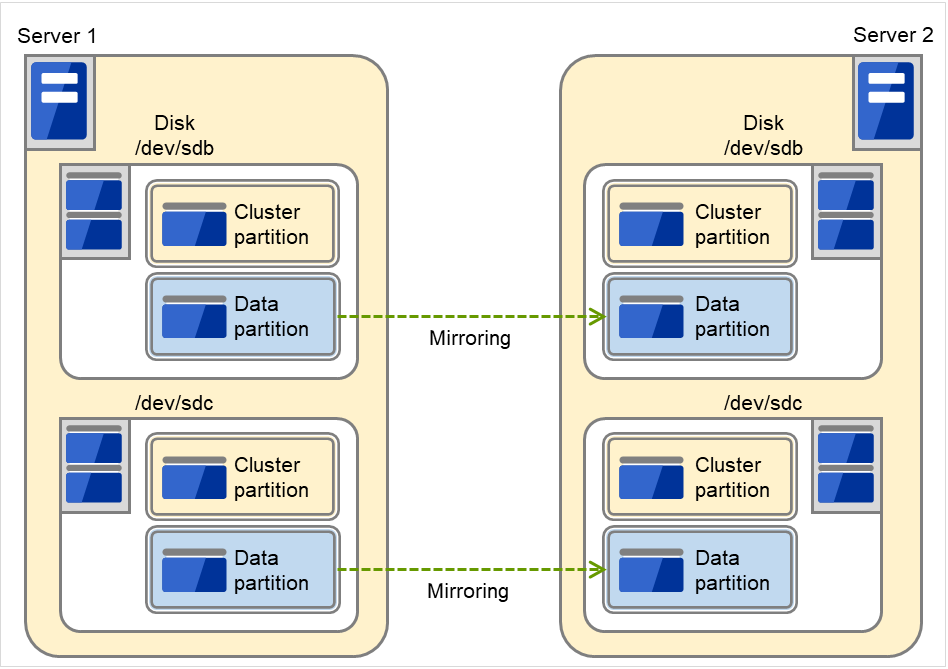
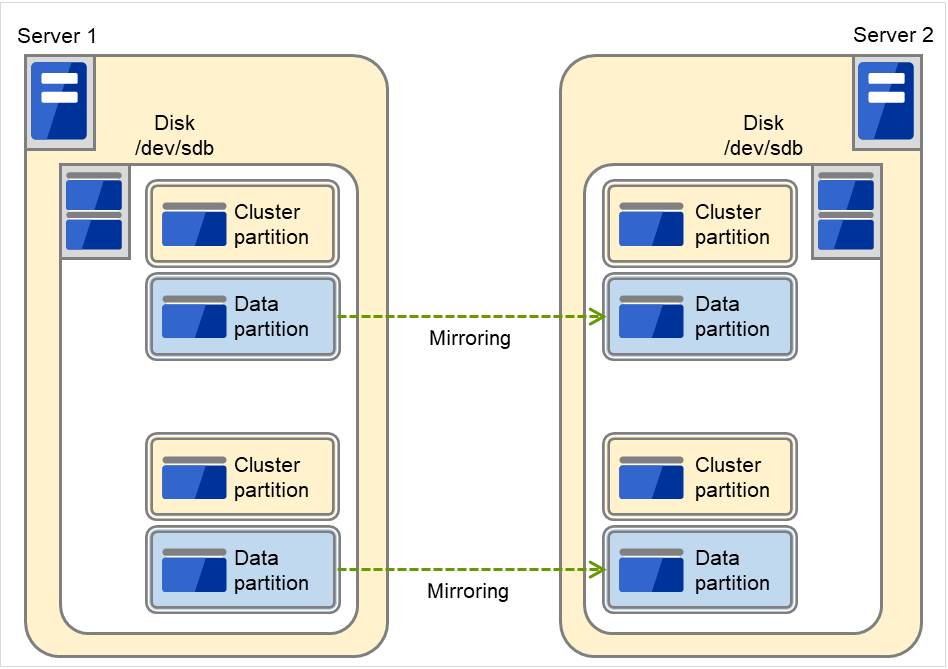
Sample cluster environment with mirror disks used (When cluster partitions and data partitions are allocated to OS-installed disks)
In the following configuration, free partitions of the OS-installed disks are used as cluster partitions and data partitions.
Fig. 3.18 Example of cluster configuration (1) (Mirror disk type)
FIP1
10.0.0.11 (Access destination from the Cluster WebUI client)
FIP2
10.0.0.12 (Access destination from the operation client)
NIC1-1
192.168.0.1
NIC1-2
10.0.0.1
NIC2-1
192.168.0.2
NIC2-2
10.0.0.2
/boot device for OS
/dev/sda1
Swap device for OS
/dev/sda2
/(root) device for OS
/dev/sda3
Mirror disk 1 Device for cluster partitions
/dev/disk/by-id/scsi-222850001557d9443-part1
Mirror disk 1 Device for data partitions
/dev/disk/by-id/scsi-222850001557d9443-part2
Mirror disk 2 Device for cluster partitions
/dev/disk/by-id/scsi-2222400015526436d-part1
Mirror disk 2 Device for data partitions
/dev/disk/by-id/scsi-2222400015526436d-part2
Mount point
/mnt/md1
File system
ext4
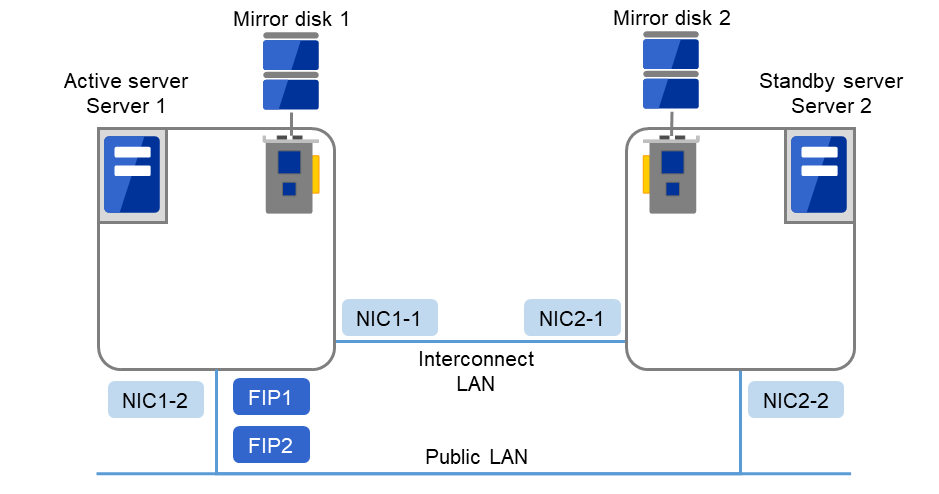
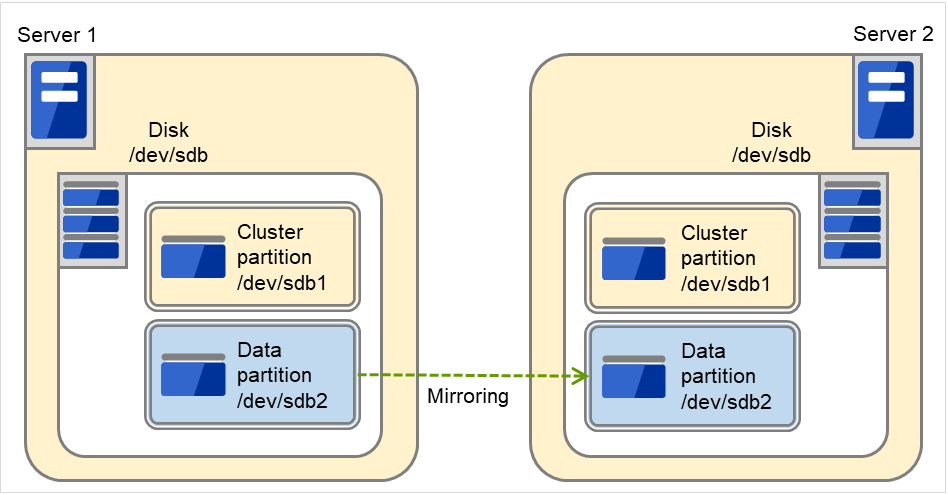
Sample cluster environment with mirror disks used (When disks are prepared for cluster partitions and data partitions)
In the following configuration, disks are prepared to be used for cluster partitions and data partitions, and connected to the servers.
Fig. 3.19 Example of cluster configuration (2) (Mirror disk type)
FIP1
10.0.0.11 (Access destination from the Cluster WebUI client)
FIP2
10.0.0.12 (Access destination from the operation client)
NIC1-1
192.168.0.1
NIC1-2
10.0.0.1
NIC2-1
192.168.0.2
NIC2-2
10.0.0.2
/boot device for OS
/dev/sda1
Swap device for OS
/dev/sda2
/(root) device for OS
/dev/sda3
Mirror disk 1 Device for cluster partitions
/dev/disk/by-id/scsi-222850001557d9443-part1
Mirror disk 1 Device for data partitions
/dev/disk/by-id/scsi-222850001557d9443-part2
Mirror disk 2 Device for cluster partitions
/dev/disk/by-id/scsi-2222400015526436d-part1
Mirror disk 2 Device for data partitions
/dev/disk/by-id/scsi-2222400015526436d-part2
Mount point
/mnt/md1
File system
ext4
3.5.5. Hardware configuration of the hybrid disk type cluster
The hardware configuration of the hybrid disk in EXPRESSCLUSTER is described below.
Unlike the shared disk type, a network to copy the data is necessary. In general, NIC for internal communication in EXPRESSCLUSTER is used to meet this purpose.
Disks do not depend on a connection interface (IDE or SCSI).
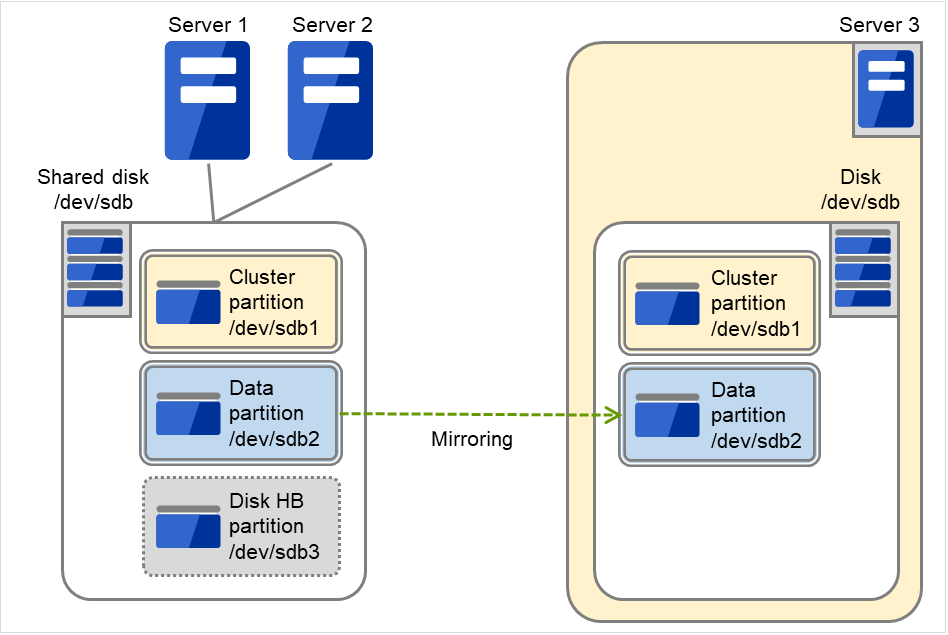
Sample cluster environment with the hybrid disk used (When a shared disk is used by two servers and the data is mirrored to the normal disk of the third server)
Fig. 3.20 Example of cluster configuration (Hybrid disk type)
FIP1
10.0.0.11 (Access destination from the Cluster WebUI client)
FIP2
10.0.0.12 (Access destination from the operation client)
In EXPRESSCLUSTER, a group used for monitoring the target is called "resources." There are four types of resources and are managed separately. Having resources allows distinguishing what is monitoring and what is being monitored more clearly. It also makes building a cluster and handling an error easy. The resources can be divided into heartbeat resources, network partition resolution resources, group resources, and monitor resources.
Heartbeat resources are used for verifying whether the other server is working properly between servers. The following heartbeat resources are currently supported:
LAN heartbeat resource
Uses Ethernet for communication.
Kernel mode LAN heartbeat resource
Uses Ethernet for communication.
Disk heartbeat resource
Uses a specific partition (cluster partition for disk heartbeat) on the shared disk for communication. It can be used only on a shared disk configuration.
Witness heartbeat resource
Uses the external server running the Witness server service to show the status (of communication with each server) obtained from the external server.
Object storage heartbeat resource
Uses the object storage service for communication.
A group resource constitutes a unit when a failover occurs. The following group resources are currently supported:
Floating IP resource (fip)
Provides a virtual IP address. A client can access virtual IP address the same way as the regular IP address.
EXEC resource (exec)
Provides a mechanism for starting and stopping the applications such as DB and httpd.
Disk resource (disk)
Provides a specified partition on the shared disk. It can be used only on a shared disk configuration.
Mirror disk resource (md)
Provides a specified partition on the mirror disk. It can be used only on a mirror disk configuration.
Hybrid disk resource (hd)
Provides a specified partition on a shared disk or a disk. It can be used only for hybrid configuration.
Volume manager resource (volmgr)
Handles multiple storage devices and disks as a single logical disk.
Virtual IP resource (vip)
Provides a virtual IP address. This can be accessed from a client in the same way as a general IP address. This can be used in the remote cluster configuration among different network addresses.
Dynamic DNS resource (ddns)
Registers the virtual host name and the IP address of the active server to the dynamic DNS server.
LB probe port resource (lbpp)
Provides a system for opening a specific port on a node on which the operation is performed.
AWS elastic ip resource (awseip)
Provides a system for giving an elastic IP (referred to as EIP) when EXPRESSCLUSTER is used on AWS.
AWS virtual ip resource (awsvip)
Provides a system for giving a virtual IP (referred to as VIP) when EXPRESSCLUSTER is used on AWS.
AWS secondary ip resource (awssip)
Provides a system for giving a secondary IP when EXPRESSCLUSTER is used on AWS.
AWS DNS resource (awsdns)
Registers the virtual host name and the IP address of the active server to Amazon Route 53 when EXPRESSCLUSTER is used on AWS.
Azure DNS resource (azuredns)
Registers the virtual host name and the IP address of the active server to Azure DNS when EXPRESSCLUSTER is used on Microsoft Azure.
Google Cloud DNS resource (gcdns)
Registers the virtual host name and the IP address of the active server to Cloud DNS when EXPRESSCLUSTER is used on Google Cloud.
Oracle Cloud secondary ip resource (ocsip)
Provides a system for giving a secondary IP when EXPRESSCLUSTER is used on Oracle Cloud.
Oracle Cloud DNS resource (ocdns)
Registers the virtual host name and the IP address of the active server to Oracle Cloud DNS when EXPRESSCLUSTER is used on Oracle Cloud Infrastructure.
Required specifications for EXPRESSCLUSTER Server are the following:
Ethernet port 2 or more ports
Shared disk
Mirror disk or empty partition for mirror
DVD-ROM drive (required when the installation DVD-ROM is used)
4.2. System requirements for EXPRESSCLUSTER Server
4.2.1. Supported distributions and kernel versions
Note
The EXPRESSCLUSTER X installation media may not include an rpm package that supports newer kernel versions. Read this section, check the kernel version used in your operating environment, and then apply an update that matches the versions listed in "EXPRESSCLUSTER Version".
The environment where EXPRESSCLUSTER Server can operate depends on kernel module versions because there are kernel modules unique to EXPRESSCLUSTER.
There are the following driver modules unique to EXPRESSCLUSTER.
Driver module unique to EXPRESSCLUSTER
Description
Kernel mode LAN heartbeat driver
Used with kernel mode LAN heartbeat resources.
Keepalive driver
Used if keepalive is selected as the monitoring method for user-mode monitor resources.
Used if keepalive is selected as the monitoring method for shutdown monitoring.
Mirror driver
Used with mirror disk resources.
Kernel versions which has been verified are listed below.
About newest information, see the web site as follows:
EXPRESSCLUSTER website
->System Requirements
->EXPRESSCLUSTER X for Linux
Note
The OS image (including the kernel) provided for cloud environments has been frequently updated/upgraded.
The use of the JVM monitor requires a Java runtime environment. Also, monitoring a domain mode of JBoss Enterprise Application Platform requires Java(TM) SE Development Kit.
x86_64
Java(TM) Runtime Environment
Version 8.0 Update 11 (1.8.0_11) or later
Java(TM) SE Development Kit
Version 8.0 Update 11 (1.8.0_11) or later
Java(TM) Runtime Environment
Version 9.0 (9.0.1) or later
Java(TM) SE Development Kit
Version 9.0 (9.0.1) or later
Java(TM) SE Development Kit
Version 11.0 (11.0.5) or later
Java(TM) SE Development Kit
Version 17.0 (17.0.2) or later
Java(TM) SE Development Kit
Version 21.0 (21.0.3) or later
Open JDK
Version 8.0 (1.8.0) or later
Version 9.0 (9.0.1) or later
ARM64
Java(TM) SE Development Kit
Version 21.0 (21.0.3) or later
4.2.4. Operation environment for Object storage heartbeat resource
Using an object storage heartbeat resource requires the following software according to the platform:
Amazon S3
Software
Version
Remarks
AWS CLI
2.0.0 or later
4.2.5. Operation environment for AWS Elastic IP resource, AWS Elastic IP monitor resource, AWS AZ monitor resource
The use of the AWS elastic ip resource, AWS elastic IP monitor resource, AWS AZ monitor resource requires the following software.
Software
Version
Remarks
AWS CLI
2.0.0 or later
4.2.6. Operation environment for AWS Virtual IP resource, AWS Virtual IP monitor resource
The use of the AWS virtual ip resource, AWS virtual IP monitor resource requires the following software.
Software
Version
Remarks
AWS CLI
2.0.0 or later
4.2.7. Operation environment for AWS secondary ip resource, AWS secondary IP monitor resource
The use of the AWS secondary ip resource, AWS secondary IP monitor resource requires the following software.
Software
Version
Remarks
AWS CLI
2.0.0 or later
4.2.8. Operation environment for AWS DNS resource, AWS DNS monitor resource
The use of the AWS DNS resource, AWS DNS monitor resource requires the following software.
Software
Version
Remarks
AWS CLI
2.0.0 or later
4.2.9. Operation environment for AWS forced stop resource
The use of the AWS forced stop resource requires the following software.
Software
Version
Remarks
AWS CLI
2.0.0 or later
4.2.10. Operation environment for Azure DNS resource, Azure DNS monitor resource
The use of the Azure DNS resource, Azure DNS monitor resource requires the following software.
Software
Version
Remarks
Azure CLI
2.0 or later
Use the 64-bit version.
4.2.11. Operation environment for Azure forced stop resource
The use of the Azure forced stop resource requires the following software.
Software
Version
Remarks
Azure CLI
2.0 or later
Use the 64-bit version.
4.2.12. Operation environments for Google Cloud DNS resource, Google Cloud DNS monitor resource
The use of the Google Cloud DNS resource, Azure Google Cloud monitor resource requires the following software.
Software
Version
Remarks
gcloud CLI
295.0.0 or later
4.2.13. Operation environments for Oracle Cloud secondary ip resource, Oracle Cloud secondary IP monitor resource
The use of the Oracle Cloud secondary ip resource, Oracle Cloud monitor secondary IP resource requires the following software.
Software
Version
Remarks
OCI CLI
3.55.0~
4.2.14. Operation environments for Oracle Cloud DNS resource, Oracle Cloud DNS monitor resource
The use of the Oracle Cloud DNS resource, Oracle Cloud DNS monitor resource requires the following software.
Software
Version
Remarks
OCI CLI
3.27.1 or later
4.2.15. Operation environment for OCI forced stop resource
The use of the OCI forced stop resource requires the following software.
Software
Version
Remarks
OCI CLI
3.5.3 or later
4.2.16. Operation environment for enabling encryption
For EXPRESSCLUSTER components, enabling communication encryption requires the following software:
Software
Version
Remarks
OpenSSL
1.1.1 (1.1.1a or later)
3.0 (3.0.0 or later)
3.1 (3.1.0 or later)
3.2 (3.2.0 or later)
3.3 (3.3.0 or later)
3.4 (3.4.0 or later)
3.5 (3.5.0 or later)
3.6 (3.6.0 or later)
4.0 (4.0.0 or later)
The following components support communication encryption using the above software:
Refer to the website, http://www.nec.com/global/prod/expresscluster/, for the latest information. Currently the following operating systems and browsers are supported:
Browser
Language
Firefox
English/Japanese
Google Chrome
English/Japanese
Microsoft Edge (Chromium)
English/Japanese
Note
When using an IP address to connect to Cluster WebUI, the IP address must be registered to Site of Local Intranet in advance.
Note
No mobile devices, such as tablets and smartphones, are supported.
Note
When upgrading EXPRESSCLUSTER, it is recommended to upgrade your browser as well. If the browser version is outdated, the Cluster WebUI screen may not display correctly.
5.1. Correspondence list of EXPRESSCLUSTER and a manual
Description in this manual assumes the following version of EXPRESSCLUSTER. Make sure to note and check how EXPRESSCLUSTER versions and the editions of the manuals are corresponding.
The following features and improvements have been released.
No.
Internal Version
Contents
1
6.0.0-1
Enabled the configuration of servers that can start up resources.
2
6.0.0-1
Added a RESTful API feature for executing mirror backup and restoration (clpbackup.sh, clprestore.sh).
3
6.0.0-1
Changed the time unit displayed in delay warning messages from tick count to milliseconds.
4
6.0.0-1
Added the following to the information collected by the function for obtaining a log file for investigation: the execution results of external commands used for controlling various resources.
5
6.0.0-1
Added a feature to move all groups between server groups in Integrated Cluster WebUI.
6
6.0.0-1
Added the ability to move all groups between server groups with the clpgrp command.
7
6.0.0-1
Removed several features as part of the major version upgrade. For details, see the list of removed features.
8
6.0.0-1
Added a feature to disable the behavior on NP occurrence.
9
6.0.0-1
Added a feature to disable the forced-stop action.
10
6.0.0-1
Added a heartbeat feature based on object storage (Amazon S3).
11
6.0.0-1
Changed the system to allow setting environment variables used by cluster functions on a per-server basis.
12
6.0.0-1
Added a command, clpswctrl.sh, to cancel the wait processing for the service startup delay time.
13
6.0.0-1
Modified Cluster WebUI to display group resources in order of dependency.
14
6.0.0-1
Changed the ARP packet type sent on resource activation from ARP Reply to ARP Request for the following resources:
- Floating IP resources
- Virtual IP resources
- ARP monitor resources
15
6.0.0-1
Reviewed the permissions of the installation files: Removed read, write, and execute permissions from Group and Other.
16
6.0.0-1
Added Oracle Cloud Secondary IP resources and Oracle Cloud Secondary IP monitor resources.
17
6.0.0-1
Shortened the processing time for an emergency shutdown.
18
6.0.0-1
Added mirror recovery performance information to the log collection items.
19
6.0.0-1
Added a command, clpsvportchk.sh, to check whether communication ports can be connected.
20
6.0.0-1
Added a RESTful API feature for generating/clearing a dummy server failure.
21
6.0.0-1
Added the EXPRESSCLUSTER Data Bridge service.
22
6.0.0-1
Added a Cluster WebUI privilege that allows or disallows changing cluster configuration.
23
6.0.0-1
Enabled the clpcfconv.sh command for converting cluster configuration data files to support upgrading to EXPRESSCLUSTER X 6.0.
24
6.0.0-1
Added a feature in Integrated Cluster WebUI to change the folder status display method.
25
6.0.0-1
Added to Integrated Cluster WebUI a message and a status icon for clusters with authentication errors.
26
6.0.0-1
Modified Integrated Cluster WebUI to display folders in the cluster list in order of folder name.
27
6.0.0-1
Modified the config mode of Cluster WebUI to display the group resource tree in order of dependency.
28
6.0.0-1
Modified the config mode of Cluster WebUI to allow changing [Periodic-check timeout] and [Periodic-check interval] for forced-stop resources.
29
6.0.0-1
Added a feature to download Cluster WebUI operation logs in CSV format.
30
6.0.0-1
Added a feature to display Cluster WebUI alert log messages on a per-server basis.
31
6.0.0-1
Added a feature to download Cluster WebUI alert logs (normal view / per-server view) in CSV format.
32
6.0.0-1
Modified the alert settings of Cluster WebUI to allow batch configuration of destinations for multiple messages.
33
6.0.0-1
Enabled JVM monitor resources to monitor JBoss Enterprise Application Platform's domain mode for Java 17 and later.
34
6.0.0-1
Enabled JVM monitor resources to support password authentication for Apache Tomcat.
35
6.0.0-1
Improved the alert logs/syslog for the following monitor resources by adding the monitor name, enabling identification of the monitor that reported an abnormal condition:
- FTP monitor resources
- MAP4 monitor resources
- NFS monitor resources
- POP3 monitor resources
- Tuxedo monitor resources
36
6.0.0-1
Enabled JVM monitor resources to support JBoss Enterprise Application Platform 8.1.
37
6.0.0-1
Enabled JVM monitor resources to support Apache Tomcat 11.0.
38
6.0.0-1
Enabled WebLogic monitor resources to support Oracle WebLogic Server 14c (14.1.2).
39
6.0.0-1
Enabled JVM monitor resources to support Oracle WebLogic Server 14c (14.1.2).
40
6.0.0-1
Enabled WebOTX monitor resources to support WebOTX V12.1.
41
6.0.0-1
Enabled JVM monitor resources to support WebOTX V12.1.
42
6.0.0-1
Enabled Samba monitor resource to support Samba 4.21.
43
6.0.0-1
Enabled PostgreSQL monitor resource to support PostgreSQL 18.0.
44
6.0.0-1
Enabled MySQL monitor resource to support MySQL 8.4.6.
45
6.0.0-1
Enabled MySQL monitor resource to support MariaDB 12.0.2.
46
6.0.0-1
Supported Red Hat Enterprise Linux 10.0 (x86_64 architecture).
47
6.0.0-1
Supported Red Hat Enterprise Linux 10.0 (ARM64 architecture).
48
6.0.0-1
Supported Oracle Linux 10.0.
49
6.0.0-1
Supported AlmaLinux OS 10.0.
50
6.0.0-1
Supported SUSE Linux Enterprise Server 15 SP7.
51
6.0.0-1
Supported SUSE Linux Enterprise Server 16.
52
6.0.0-1
Supported Ubuntu Server 24.04.3 LTS.
53
6.0.0-1
Added support for OpenSSL 3.6 to the following features:
- Cluster WebUI
- Witness heartbeat resources
- HTTP network partition resolution resources
- HTTP monitor resources
- FTP monitor resources
- POP3 monitor resources
- Mail reporting
54
6.0.0-1
Added support for re-registering fixed-term licenses deleted while in use.
55
6.0.1-1
Changed the maximum value of the periodic check interval for the forced stop resource to 86,400 seconds.
56
6.0.1-1
Added support for OpenSSL 4.0 to the following features:
- Cluster WebUI
- Witness heartbeat resources
- HTTP network partition resolution resources
- HTTP monitor resources
- FTP monitor resources
- POP3 monitor resources
- Mail reporting
57
6.0.1-1
Enabled Oracle monitor resource to support Oracle AI Database 26ai.
58
6.0.1-1
Enabled SQL Server monitor resource to support SQL Server 2025.
59
6.0.1-1
Supported Red Hat Enterprise Linux 10.2 (x86_64 architecture).
60
6.0.1-1
Supported Red Hat Enterprise Linux 10.2 (ARM64 architecture).
61
6.0.1-1
Supported AlmaLinux OS 10.2.
62
6.0.1-1
Supported Red Hat Enterprise Linux 9.8 (x86_64 architecture).
63
6.0.1-1
Supported Red Hat Enterprise Linux 9.8 (ARM64 architecture).
64
6.0.1-1
Supported AlmaLinux OS 9.8.
65
6.0.1-1
Supported Oracle Linux 10.2.
66
6.0.1-1
Supported Oracle Linux 9.8.
67
6.0.1-1
Supported MIRACLE LINUX 9.8.
68
6.0.1-1
Enabled MySQL monitor resource to support MySQL 9.7.1.
69
6.0.1-1
Enabled PostgreSQL monitor resource to support PostgreSQL 17.10.
70
6.0.1-1
Enabled PostgreSQL monitor resource to support PostgreSQL 18.4.
Modification has been performed on the following minor versions.
No.
Version in which the problem has been solved
/ Version in which the problem occurred
Phenomenon
Level
Occurrence condition/
Occurrence frequency
1
6.0.0-1
/ 1.0.0-1 to 5.3.1-1
Group resources may not start as intended.
M
This may occur when a failover is triggered by a group resource startup failure during a manual group start or an automatic failback.
2
6.0.0-1
/ 1.0.0-1 to 5.3.1-1
Kernel mode LAN heartbeat resource outputs no delay warning.
S
This always occurs.
3
6.0.0-1
/ 5.3.0-1 to 5.3.1-1
In verification mode, generating a dummy server failure leads to an activation failure in a floating/virtual IP resource due to an IP address conflict.
S
This occurs with a floating/virtual IP resource configured.
4
6.0.0-1
/ 5.0.0-1 to 5.3.1-1
For hybrid/mirror disk resources, their activation and deactivation timeout values are not changed.
S
This occurs when the parameters of hybrid/mirror disk resources are modified with the clpcfadm.py command.
5
6.0.0-1
/ 1.0.0-1 to 5.3.1-1
In [Cluster Properties] -> [Timeout] -> [Server Sync Wait Time], changing the value and applying it does not trigger a restart of the Node Manager service.
S
This occurs when, in [Cluster Properties] -> [Timeout] -> [Server Sync Wait Time], the value is changed and it is applied.
6
6.0.0-1
/ 1.0.0-1 to 5.3.1-1
A deleted CPU license may be restored unexpectedly.
S
This occurs in the following case: A CPU license is deleted on one server. Then, still existing on another server, the CPU license is registered and deleted on the other server.
7
6.0.0-1
/ 3.0.0-1 to 5.3.1-1
Syslog messages may have incorrect event classification.
S
This occurs on extremely rare occasions depending on the timing.
8
6.0.0-1
/ 5.0.0-1 to 5.3.1-1
AWS secondary IP monitor resources may fail to perform recovery actions.
S
This occurs in the following case: No secondary IP address exists in the OS, and [Action when AWS CLI command failed to receive response] is set to [Disable recovery action].
9
6.0.0-1
/ 5.2.0-1 to 5.3.1-1
For Oracle Cloud DNS resources, a region change may lead to a failure in deleting the DNS record for the previous region.
S
This occurs when the zone OCID on the standby server is changed.
10
6.0.0-1
/ 5.1.0-1 to 5.3.1-1
By using the clpcfadm.py command to apply configuration data including a resource comment, a suspension is requested.
S
This always occurs.
11
6.0.0-1
/ 5.2.0-1 to 5.3.1-1
With multiple AWS Elastic IP resources configured, AWS Elastic IP monitor resources may become abnormal.
M
This occurs in the following case: Multiple AWS Elastic IP resources are configured, and two or more of the AWS Elastic IP resources are started up on a single server.
12
6.0.0-1
/ 5.3.0-1 to 5.3.1-1
Certain group resources may fail to start, or the Cluster WebUI may not operate normally after applying the update.
L
This occurs when any of the following group resources exist and [Dependency] is set to [Follow the default dependency] during the update.
- AWS DNS resource
- Azure DNS resource
- Google Cloud DNS resource
- Oracle Cloud DNS resource
13
6.0.0-1
/ 5.3.0-1 to 5.3.1-1
In Integrated Cluster WebUI, clicking the browser's refresh button or pressing the F5 key, without specifying any URL, results in a connection to Cluster WebUI.
S
This always occurs.
14
6.0.0-1
/ 4.3.0-1 to 5.3.1-1
Cloud environments allow ManagementIP resources to be registered.
S
This always occurs.
15
6.0.0-1
/ 4.2.0-1 to 5.3.1-1
The EXPRESSCLUSTER Information Base service may terminate abnormally.
S
This occurs on extremely rare occasions when the EXPRESSCLUSTER Information Base service stops.
16
6.0.0-1
/ 1.0.0-1 to 5.3.1-1
A disk resource may fail to be deactivated.
L
This occurs on rare occasions during the deactivation that involves a timeout and a subsequent retry in the unmounting process.
17
6.0.1-1
/ 5.1.0-1 to 6.0.0-1
Azure VM backup processing may fail.
M
This occurs when a periodic forced stop check is performed during Azure VM backup processing.
18
6.0.1-1
/ 1.0.0-1 to 6.0.0-1
[Action When the Cluster Service Process Is Failure] may occur when the cluster service is stopped.
M
This occurs on extremely rare occasions when stopping the cluster service, depending on the timing.
19
6.0.1-1
/ 4.2.0-1 to 6.0.0-1
Group resource status display may be incorrect.
S
This occurs during deactivation of group resources.
20
6.0.1-1
/ 5.0.0-1 to 6.0.0-1
Forced stop resource status display may be incorrect.
S
This occurs when the cluster is resumed.
21
6.0.1-1
/ 5.3.0-1 to 6.0.0-1
The EXPRESSCLUSTER Node Manager service may fail to start.
M
This occurs on extremely rare occasions when the cluster is started.
Linux md stripe set, volume set, mirroring, and stripe set with parity cannot be used for either mirror disk resource cluster partitions or data partitions.
Linux LVM volumes can be used for both cluster partitions and data partitions.
For SuSE, however, LVM and MultiPath volumes cannot be used for data partitions. (This is because for SuSE, ReadOnly or ReadWrite control over these volumes cannot be performed by EXPRESSCLUSTER.)
Mirror disk resource cannot be made as a target of a Linux md stripe set, volume set, mirroring, and stripe set with parity.
Mirror partitions (data partition and cluster partition) to use a mirror disk resource.
There are two ways to allocate mirror partitions:
Allocate a mirror partition (data partition and cluster partition) on the disk where the operating system (such as root partition and swap partition) resides.
Reserve (or add) a disk (or LUN) not used by the operating system and allocate a mirror partition on the disk.
Consider the following when allocating mirror partitions:
When maintainability and performance are important:
- It is recommended to have a mirror disk that is not used by the OS.
When LUN cannot be added due to hardware RAID specification or when changing LUN configuration is difficult in hardware RAID pre-install model:
- Allocate a mirror partition on the same disk where the operating system resides.
When multiple mirror disk resources are used, it is recommended to prepare (adding) a disk per mirror disk resource. Allocating multiple mirror disk resources on the same disk may result in degraded performance and it may take a while to complete mirror recovery due to disk access performance on Linux operating system.
Disks used for mirroring must be the same in all servers.
Disk interface
Mirror disks on both servers and disks where mirror partition is allocated should be of the same disk interface
Example
Combination
server1
server2
OK
SCSI
SCSI
OK
IDE
IDE
NG
IDE
SCSI
Disk type
Mirror disks on both servers and disks where mirror partition is allocated should be of the same disk type
Example
Combination
server1
server2
OK
HDD
HDD
OK
SSD
SSD
NG
HDD
SSD
Sector size
Mirror disks on both servers and disks where mirror partition is allocated should be of the same sector size
Example
Combination
server1
server2
OK
512 B
512 B
OK
4 KB
4 KB
NG
512 B
4 KB
Notes when the geometries of the disks used as mirror disks differ between the servers.
The partition size allocated by the fdisk command is aligned by the number of blocks (units) per cylinder. Allocate a data partition considering the relationship between data partition size and direction for initial mirror configuration to be as indicated below:
Source server <= Destination server
"Source server" refers to the server where the failover group that a mirror disk resource belongs has a higher priority in failover policy. "Destination server" refers to the server where the failover group that a mirror disk resource belongs has a lower priority in failover policy.
Make sure that the data partition sizes do not cross over 32 GB, 64 GB, 96 GB, and so on (multiples of 32 GB) on the source server and the destination server. For sizes that cross over multiples of 32 GB, initial mirror construction may fail. Be careful, therefore, to secure data partitions of similar sizes.
Example
Combination
Data partition size
Description
On server 1
On server 2
OK
30 GB
31 GB
OK because both are in the range of 0 to 32 GB.
OK
50 GB
60 GB
OK because both are in the range of 32 GB to 64 GB.
Disks to be used as a hybrid disk resource do not support a Linux md stripe set, volume set, mirroring, and stripe set with parity.
Linux LVM volumes can be used for both cluster partitions and data partitions.
For SuSE, however, LVM and MultiPath volumes cannot be used for data partitions. (This is because for SuSE, ReadOnly or ReadWrite control over these volumes cannot be performed by EXPRESSCLUSTER.)
Hybrid disk resource cannot be made as a target of a Linux md stripe set, volume set, mirroring, and stripe set with parity.
Hybrid partitions (data partition and cluster partition) are required to use a hybrid disk resource.
When a disk for hybrid disk is allocated in the shared disk, a partition for disk heartbeat resource between servers sharing the shared disk device is required.
The following are the two ways to allocate partitions when a disk for hybrid disk is allocated from a disk which is not a shared disk:
Allocate hybrid partitions (data partition and cluster partition) on the disk where the operating system (such as root partition and swap partition) resides.
Reserve (or add) a disk (or LUN) not used by the operating system and allocate a hybrid partition on the disk.
Consider the following when allocating hybrid partitions:
When maintainability and performance are important:
- It is recommended to have a hybrid disk that is not used by the OS.
When LUN cannot be added due to hardware RAID specification or when changing LUN configuration is difficult in hardware RAID pre-install model:
- Allocate a hybrid partition on the same disk where the operating system resides.
Device for which hybrid disk resource is allocated
Type of required partition
Shared disk device
Non-shared disk device
Data partition
Required
Required
Cluster partition
Required
Required
Partition for disk heart beat
Required
Not Required
Allocation on the same disk (LUN) as where the OS is
-
Possible
When multiple hybrid disk resources are used, it is recommended to prepare (add) a LUN per hybrid disk resource. Allocating multiple hybrid disk resources on the same disk may result in degraded in performance and it may take a while to complete mirror recovery due to disk access performance on Linux operating system.
Notes when the geometries of the disks used as hybrid disks differ between the servers.
Allocate a data partition considering the relationship between data partition size and direction for initial mirror configuration to be as indicated below:
Source server <= Destination server
"Source server" refers to the server with a higher priority in failover policy in the failover group where the hybrid disk resource belongs. "Destination server" refers to the server with a lower priority in failover policy in the failover group where the hybrid disk resource belongs has.
Make sure that the data partition sizes do not cross over 32 GB, 64 GB, 96 GB, and so on (multiples of 32 GB) on the source server and the destination server. For sizes that cross over multiples of 32 GB, initial mirror construction may fail. Be careful, therefore, to secure data partitions of similar sizes.
Example
Combination
Data partition size
Description
On server 1
On server 2
OK
30 GB
31 GB
OK because both are in the range of 0 to 32 GB.
OK
50 GB
60 GB
OK because both are in the range of 32 GB to 64 GB.
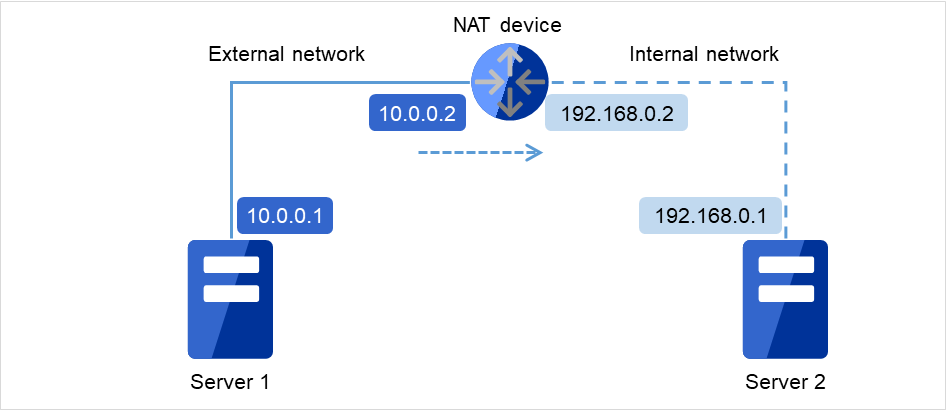
The cluster configuration cannot be configured or operated in an environment, such as NAT, where an IP address of a local server is different from that of a remote server.
Example of network configuration
The following figure shows two servers connected to different networks with a NAT device set between them.
For example, assume that the NAT device is set as "the packet from the external network to 10.0.0.2 is forwarded to the internal network."
However, to build a cluster with Server 1 and Server 2 in this environment, IP addresses for different networks must be specified in each server.
In the environment with each server set in different subnets like this, a cluster cannot be properly configured or operated.
Fig. 6.1 Example of the environment where a cluster cannot be configured
Cluster settings for Server 1
Local server: 10.0.0.1
Remote server: 10.0.0.2
Cluster settings for Server 2
Local server: 192.168.0.1
Remote server: 10.0.0.1
6.1.7. Execute Script before Final Action setting for monitor resource recovery action
EXPRESSCLUSTER version 3.1.0-1 and later supports the execution of a script before reactivation and before failover.
The same script is executed in either case. Therefore, if Execute Script before Final Action is set with a version earlier than 3.1.0-1, editing of the script file may be required.
For the additional script configuration needed to execute the script before reactivation and before failover, the script file must be edited to assign processing to each recovery action.
Some NIC boards and drivers do not support required ioctl( ).
The propriety of a NIC Link Up/Down monitor resource of operation can be checked by the ethtool command which each distributor offers.
* The following shows an example output of ethtool version 6.11.
# ethtool ens256
Settings for ens256:
        Supported ports: [ TP ]
        Supported link modes:   1000baseT/Full
                                10000baseT/Full
        Supported pause frame use: No
        Supports auto-negotiation: No
        Supported FEC modes: Not reported
        Advertised link modes:  Not reported
        Advertised pause frame use: No
        Advertised auto-negotiation: No
        Advertised FEC modes: Not reported
        Speed: 10000Mb/s
        Duplex: Full
        Auto-negotiation: off
        Port: Twisted Pair
        PHYAD: 0
        Transceiver: internal
        MDI-X: Unknown
        Supports Wake-on: uag
        Wake-on: d
        Link detected: yes
When the LAN cable link status ("Link detected: yes") is not displayed as the result of the ethtool command:
It is highly likely that NIC Link Up/Down monitor resource of EXPRESSCLUSTER is not operable. Use IP monitor resource instead.
When the LAN cable link status ("Link detected: yes") is displayed as the result of the ethtool command:
In most cases NIC Link Up/Down monitor resource of EXPRESSCLUSTER can be operated, but sometimes it cannot be operated.
Particularly in the following hardware, NIC Link Up/Down monitor resource of EXPRESSCLUSTER may not be operated. Use IP monitor resource instead.
When hardware is installed between the actual LAN connector and NIC chip such as a blade server
When the monitored NIC is in a bonding environment, check whether the MII Polling Interval is set to 0 or higher.
To check if NIC Link Up/Down monitor resource can be used by using EXPRESSCLUSTER on an actual machine, follow the steps below to check the operation.
Register NIC Link Up/Down monitor resource with the configuration information.
Select No Operation for the configuration of recovery operation of NIC Link Up/Down monitor resource upon failure detection.
Start the cluster.
Check the status of NIC Link Up/Down monitor resource.
If the status of NIC Link Up/Down monitor resource is abnormal while LAN cable link status is normal, NIC Link Up/Down monitor resource cannot be operated.
If NIC Link Up/Down monitor resource status becomes abnormal when LAN cable link status is made abnormal status (link down status), NIC Link Up/Down monitor resource can be operated.
If the status remains to be normal, NIC Link Up/Down monitor resource cannot be operated.
6.1.9. Write function of the Mirror disk resource and Hybrid disk resource
There are 2 types of disk mirroring of mirror disk resources and hybrid disk resources: synchronous mirroring and asynchronous mirroring.
In synchronous mirroring, data is written in the disks of both servers for every request to write data in the data partition to be mirrored and its completion is waited. Data is written in each of the servers along with this, but it is written in disks of other servers via network, so writing performance declines more significantly compared to a normal local disk that is not to be mirrored. In case of the remote cluster configuration, since the network communication speed is slow and delay is long, the writing performance declines drastically.
In asynchronous mirroring, data is written to the local server immediately. However, when writing data to other server, it is saved to the local queue first and then written in the background. In case of asynchronous mirror, the data to be updated is saved in the queue for every writing request as well, so the writing performance declines more significantly, compared to the normal local disk that is not to be mirrored and the shared disk. For this reason, it is recommended to use the shared disk for the system (such as the database system with lots of update systems) that is required high throughput for writing data in disks.
In case of asynchronous mirroring, the writing sequence will be guaranteed, but the data that has been updated to the latest may be lost, if an active server shuts down. For this reason, if it is required to inherit the data immediately before an error occurs for sure, use synchronous mirroring or the shared disk.
In mirror disk or hybrid disk with asynchronous mode, data that cannot afford to be written in memory queue is recorded temporarily in a folder specified to save history files. When the limit of the file is not specified, history files are written in the specified folder without limitation. In this case, the line speed is too low, compared to the disk update amount of application, writing data to other server cannot catch up with update of data on the disk, and history files will overflow from the disk.
For this reason, it is required to reserve a communication line with enough speed in the remote cluster configuration as well, in accordance with the disk update amount of application.
It is also required to prepare against an overflow of history files from the directory due to a long delay in communication or a continuous update of data on the disk. The preparation can be achieved by maintaining enough free space and limiting the history file size for the history file directory, or by specifying a different directory on a non-system disk.
6.1.11. Not outputting syslog to the Mirror disk resource or the Hybrid disk resource
Do not set directories or subdirectories which mounted the mirror disk resource or the hybrid disk resource as syslog output destination directories.
When the mirror disk connection is disconnected, the I/O to the mirror partition may stop until the disconnection is detected. The system may become abnormal because of the syslog output stoppage at this time.
When outputting syslog to the mirror disk resource or the hybrid disk resource is necessary, consider the followings.
Use bonding as a way of path redundancy of the mirror disk connection.
Adjust the user-mode monitoring timeout value or the mirror related timeout values.
6.1.12. Notes when terminating the Mirror disk resource or the Hybrid disk resource
In case that processes which access to the directories, subdirectories and files which mounted the mirror disk resource or the hybrid disk resource exist, terminate the accesses to each disk resource by using ending script or other methods at deactivation of each disk resource like when shutdown or failover.
Depending on the settings of each disk resource, action at abnormity detection when unmounting (forcibly terminate processes while each disk resource is being accessed) may occur, or recovery action at deactivation failure caused by unmount failure (OS shutdown or other actions) may be executed.
In case that a massive amount of accesses to directories, subdirectories or files which mounted the mirror disk resource or hybrid disk resource are executed, it may take much time before the cache of the file systems is written out to the disks when unmounting at disk resource deactivation.
At times like this, set the timeout interval of unmount longer enough so that the writing to the disks will successfully complete.
6.1.13. Data consistency among multiple asynchronous mirror disks
In mirror disk or hybrid disk with asynchronous mode, writing data to the data partition of the active server is performed in the same order as the data partition of the standby server.
This writing order is guaranteed except during the initial mirror disk configuration or recovery (copy) period after suspending mirroring the disks. The data consistency among the files on the standby data partition is guaranteed.
However, the writing order is not guaranteed among multiple mirror disk resources and hybrid disk resources. For example, if a file gets older than the other and files that cannot maintain the data consistency are distributed to multiple asynchronous mirror disks, an application may not run properly when it fails over due to server failure.
For this reason, be sure to place these files on the same asynchronous mirror disk or hybrid disk.
6.1.14. Mirror data reference at the synchronization destination if mirror synchronization is interrupted
If mirror synchronization is interrupted for a mirror disk or a hybrid disk in the mirror synchronization state, using the mirror disks or the clpmdctrl / clphdctrl command (with the --break / -b / --nosync option specified), the file system and application data may be abnormal if the mirror disk on the server on the mirror synchronization destination (copy destination) is made accessible by performing forced activation (removing the access restriction) or forced mirror recovery.
This occurs because if mirror synchronization is interrupted on the server on the mirror synchronization source (server on which the resources are activated) leading to an inconsistent state in which there are portions that can be synchronized with the synchronization destination and portions that cannot be synchronized such as; for example, when an application is writing to a mirror disk area, part of the data and so on will be retained in the cache and so on (memory) of the OS, but not yet actually written to the mirror disk, or may be in the process of being written.
If you want to perform access in a state in which consistency with the mirror disk on the mirror synchronization destination (standby server) is ensured, secure a rest point on the mirror synchronization source (active server on which the resources are activated) first and then interrupt mirror synchronization. Alternatively, secure a rest point by deactivating. (With an application end, access to the mirror area ends, and by unmounting the mirror disk, the cache and so on of the OS are all written to the mirror disk.)
Similarly, if mirror recovery is interrupted for a mirror disk or a hybrid disk that is in the middle of mirror recovery (mirror resynchronization), the file system and application data may be abnormal if the mirror disk on the mirror synchronization destination is accessed by performing forced activation (removing the access restriction) or forced mirror recovery.
This also occurs because mirror recovery is interrupted in an inconsistent state in which there are portions that can be synchronized but also portions that cannot.
6.1.15. O_DIRECT for mirror or hybrid disk resources
Do not use the O_DIRECT flag of the open() system call for the mirror partition device (/dev/NMPx) of a mirror or hybrid disk resource.
Examples include the Oracle parameter filesystemio_options = setall.
Do not specify the O_DIRECT mode of the disk monitor resource for the mirror partition device (/dev/NMPx) of a mirror or hybrid disk resource.
6.1.16. Initial mirror construction time for mirror or hybrid disk resources
The time that takes to construct the initial mirror is different between ext3/ext4/xfs and other file systems.
Up to 25 Java VMs can be monitored concurrently. The Java VMs that can be monitored concurrently are those which are uniquely identified by the Cluster WebUI (with Identifier in the Monitor (special) tab).
Connections between Java VMs and Java Resource Agent do not support SSL.
It may not be possible to detect thread deadlocks. This is a known problem in Java VM. For details, refer to "Bug ID: 6380127" in the Oracle Bug Database.
The JVM monitor resources can monitor only the Java VMs on the server on which the JVM monitor resources are running.
The JVM monitor resources can monitor only one JBoss server instance per server.
The Java installation path setting made by the Cluster WebUI (with Java Installation Path in the JVM monitor tab in Cluster Properties) is shared by the servers in the cluster. The version and update of Java VM used for JVM monitoring must be the same on every server in the cluster.
The management port number setting made by the Cluster WebUI (with Management Port in the Connection Setting dialog box opened from the JVM monitor tab in Cluster Properties) is shared by all the servers in the cluster.
Application monitoring is disabled when an application to be monitored on the IA32 version is running on an x86_64 version OS.
If a large value such as 3,000 or more is specified as the maximum Java heap size by the Cluster WebUI (by using Maximum Java Heap Size on the JVM monitor tab in Cluster Properties), The JVM monitor resources will fail to start up. The maximum heap size differs depending on the environment, so be sure to specify a value based on the capacity of the mounted system memory.
Example: When adding one SCSI disk to each of both servers and making a pair of mirrored disks:
In the figure below, a SCSI disk is added to each of two servers.
The inside of the disk is divided into the cluster partition and the data partition. This set of partitions, called a mirror partition device, is a unit for the failover of the mirror disk resource.
Fig. 6.2 Configuration of disks and partitions (with SCSI disks added)
Example: When using free space of IDE disks of both servers, where the OS is stored, and making a pair of mirrored disks:
The following figure illustrates using the free space of each built-in disk as a mirror partition device (cluster partition and data partition):
Fig. 6.3 Configuration of disks and partitions (with free space of existing disks used)
Mirror partition device refers to cluster partition and data partition.
Allocate cluster partition and data partition on each server as a pair.
It is possible to allocate a mirror partition (cluster partition and data partition) on the disk where the operating system resides (such as root partition and swap partition.).
When maintainability and performance are important:
It is recommended to have a mirror disk that is not used by the operating system (such as root partition and swap partition.)
When LUN cannot be added due to hardware RAID specification: or
When changing LUN configuration is difficult in hardware RAID pre-install model:
It is possible to allocate a mirror partition (cluster partition and data partition) on the disk where the operating system resides (such as root partition and swap partition.)
Disk configurations
Multiple disks can be used as mirror disks on a single server. Or, you can allocate multiple mirror partitions on a single disk.
Example: When adding two SCSI disks to each of both servers and making two pairs of mirrored disks:
Fig. 6.4 Each of multiple disks used as a mirror partition
Allocate two partitions, cluster partition and data partition, as a pair on each disk.
Use of the data partition as the first disk and the cluster partition as the second disk is not permitted.
Example: When adding one SCSI disk to each of both servers and making two mirror partitions:
The figure below illustrates the case where two mirror partitions are allocated in a disk.
Fig. 6.5 Multiple areas of each disk used as mirror partitions
A disk does not support a Linux md stripe set, volume set, mirroring, and stripe set with parity.
Disks that are shared or not shared (server with built-in disk, external disk chassis not shared by servers etc.) can be used.
Example) When two servers use a shared disk and the third server uses a built-in disk in the server:
In the figure below, the built-in disk of Server 3 is used as a mirror partition device.
Fig. 6.6 Configuration of disks and partitions (with a shared disk and a built-in disk used)
Mirror partition device is a device EXPRESSCLUSTER mirroring driver provides in the upper.
Allocate cluster partition and data partition on each server as a pair.
When a disk that is not shared (e.g. server with a built-in disk, external disk chassis that is not shared among servers) is used, it is possible to allocate mirror partitions (cluster partition and data partition) on the disk where the operating system resides (such as root partition and swap partition.).
When maintainability and performance are important:
It is recommended to have a mirror disk that is not used by the operating system (such as root partition and swap partition.)
When LUN cannot be added due to hardware RAID specification: or
When changing LUN configuration is difficult in hardware RAID pre-install model:
It is possible to allocate mirror partitions (cluster partition and data partition) on the disk where the operating system resides (such as root partition and swap partition.)
When a hybrid disk is allocated in a shared disk device, allocate a partition for the disk heart beat resource between servers sharing the shared disk device.
A disk does not support a Linux md stripe set, volume set, mirroring, and stripe set with parity.
For a cloud environment, allow access to ports numbered as below, not only in a firewall configuration at the instance side but also in a security configuration at the cloud infrastructure side.
6.3.2. Changing the range of automatic allocation for the communication port numbers
The range of automatic allocation for the communication port numbers managed by the OS might overlap the communication port numbers used by EXPRESSCLUSTER.
Change the OS settings to avoid duplication when the range of automatic allocation for the communication numbers managed by OS and the communication numbers used by EXPRESSCLUSTER are duplicated.
Examples of checking and displaying OS setting conditions.
The range of automatic allocation for the communication port numbers depends on the distribution.
This is the condition to be assigned for the range from 1024 to 65000 when the application requests automatic allocation for the communication port numbers to the OS.
This is the condition to be assigned for the range from 32768 to 61000 when the application requests automatic allocation for the communication port numbers to the OS.
Examples of OS settings change
Add the line below to /etc/sysctl.conf. (When changing to the range from 30000 to 65000)
net.ipv4.ip_local_port_range=3000065000
This setting takes effect after the OS is restarted.
After changing /etc/sysctl.conf, you can reflect the change instantly by executing the command below.
If a lot of servers and resources are used for EXPRESSCLUSTER, the number of temporary ports used for internal communications by EXPRESSCLUSTER may be insufficient and the servers may not work properly as the cluster server.
Adjust the range of port number and the time before a temporary port is released as needed.
Because of the ifconfig command specification, when the NIC device name is shortened, the length of the NIC device name which EXPRESSCLUSTER can handle depends on it.
When you continue using the data on the shared disk at times such as server reinstallation, do not allocate a partition or create a file system.
The data on the shared disk gets deleted if you allocate a partition or create a file system.
EXPRESSCLUSTER controls the file systems on the shared disk. Do not include the file systems on the shared disk to /etc/fstab in operating system.
(If the entry to is required /etc/fstab, please use the noauto option is not used ignore option.)
Provide a disk heartbeat partition with 10 MB (10*1024*1024 bytes) or more of space. The disk heartbeat partition does not require any file system to be created.
Set a management partition for mirror disk resource (cluster partition) and a partition for mirror disk resource (data partition).
EXPRESSCLUSTER controls the file systems on mirror disks. Do not set the file systems on the mirror disks to /etc/fstab in operating system.
(Do not enter a mirror partition device, mirror mount point, cluster partition, or data partition in /etc/fstab of the operating system.)
(Do not enter /etc/fstab even with the ignore option specified.
If you enter /etc/fstab with the ignore option specified, the entry will be ignored when mount is executed, but an error may subsequently occur when fsck is executed.)
(Entering /etc/fstab with the noauto option specified is not recommended, either, because it may lead to an inadvertent manual mount or result in some application being mounted.)
Provide the cluster partition with 1024 MB or more of space. (Do not mind that specifying just 1024 MB actually provides more than the size due to a difference in the disk geometry.) Do not create any file system in the cluster partition.
Configure the management partition (cluster partition) for hybrid disk resource and the partition used for hybrid disk resource (data partition).
When a hybrid disk is allocated in the shared disk device, allocate the partition for the disk heart beat resource between servers sharing the shared disk device.
EXPRESSCLUSTER controls the file systems on the hybrid disk. Do not include the file systems on the hybrid disk to /etc/fstab in operating system.
(Do not enter a mirror partition device, mirror mount point, cluster partition, or data partition in /etc/fstab of the operating system.)
(Do not enter /etc/fstab even with the ignore option specified.
If you enter /etc/fstab with the ignore option specified, the entry will be ignored when mount is executed, but an error may subsequently occur when fsck is executed.)
(Entering /etc/fstab with the noauto option specified is not recommended, either, because it may lead to an inadvertent manual mount or result in some application being mounted.)
Provide the cluster partition with 1024 MB or more of space. (Do not mind that specifying just 1024 MB actually provides more than the size due to a difference in the disk geometry.) Do not create any file system in the cluster partition.
When creating an ext3/ext4 file system for the data partition of a mirror/hybrid disk resource by manually executing the mkfs command, avoid setting the block size at 1024.
The value, 1024, of the block size is not supported by mirror or hybrid disk resources. To explicitly use the block size, specify 2048 or 4096.
It is necessary to configure the time from power-on of each node in the cluster to the server operating system startup to be longer than the following:
The time from power-on of the shared disks to the point they become available.
OpenIPMI do not come with EXPRESSCLUSTER. You need to download and install the rpm packages for OpenIPMI.
Check whether or not your server (hardware) supports OpenIPMI in advance.
Note that even if the machine complies with ipmi standard as hardware, OpenIPMI may not run if you actually try to run them.
If you are using a software program for server monitoring provided by a server vendor, do not choose ipmi as a monitoring method for user-mode monitor resource and shutdown stall monitor. Because these software programs for server monitoring and OpenIPMI both use BMC on the server, a conflict occurs preventing successful monitoring.
When executing the final action by the ipmitool command, the ipmi driver needs to be loaded. It is recommended to load the ipmi driver automatically at OS startup.
The designated function of the generation of the syslog does not work by a log collection function in SUSE LINUX. The reason is because the suffixes of the syslog are different.
Please change setting of rotate of the syslog as follows to use the appointment of the generation of the syslog of the log collection function.
Please comment out "compress" and "date ext" of the /etc/logrotate.d/syslog file.
When the total log size exceeds 2 GB on each server, log collection may fail.
The following functions use nsupdate and nslookup.
Dynamic DNS resource of group resource (ddns)
Dynamic DNS monitor resource of monitor resource (ddnsw)
EXPRESSCLUSTER does not include nsupdate and nslookup. Therefore, install the rpm files of nsupdate and nslookup, in addition to the EXPRESSCLUSTER installation.
NEC does not support the items below regarding nsupdate and nslookup. Use nsupdate and nslookup at your own risk.
Inquiries about nsupdate and nslookup
Guaranteed operations of nsupdate and nslookup
Malfunction of nsupdate or nslookup or failure caused by such a malfunction
Inquiries about support of nsupdate and nslookup on each server
If a banner message to be registered to the FTP server or a message to be displayed at connection is long or consists of multiple lines, a monitor error may occur. When monitoring by the FTP monitor resource, do not register a banner message or connection message.
The mail reporting function takes advantage of the [mail] command that the OS provides. Because the [mail] command is not installed in the minimum configuration, please execute one of the following.
Select the [SMTP] by the Mail Method on the Alert Service tab of Cluster Properties.
To execute EXPRESSCLUSTER-related commands, execute them as the root user.
Only a WebSphere monitor resource is supported in Application Server Agent. This is because other Application Server isn't supporting Ubuntu.
The mail reporting function takes advantage of the [mail] command that the OS provides. Because the [mail] command is not installed in the minimum configuration, please execute one of the following.
Select the [SMTP] by the Mail Method on the Alert Service tab of Cluster Properties.
Installing mailutils.
Information acquisition by SNMP cannot be used.
6.3.19. Time synchronization in the AWS environment
The following AWS-related features run the AWS CLI:
AWS Elastic IP resource
AWS Virtual IP resource
AWS Secondary IP resource
AWS DNS resource
AWS Elastic IP monitor resource
AWS Virtual IP monitor resource
AWS Secondary IP monitor resource
AWS AZ monitor resource
AWS DNS monitor resource
AWS Forced stop resource
Amazon S3-based object storage heartbeat resource
Feature to send the monitoring process time data of monitor resources to Amazon CloudWatch
Feature to send alert service messages to Amazon SNS
If the date and time of an instance is not correctly set, executing the AWS CLI may fail due to the specification of AWS.
This section describes the settings of IAM (Identity & Access Management) in AWS environment.
Some of EXPRESSCLUSTER's functions internally run AWS CLI for their processes. To run AWS CLI successfully, you need to set up IAM in advance.
You can give access permissions to AWS CLI by using IAM role or IAM user. IAM role method offers a high-level of security because you do not have to store AWS access key ID and AWS secret access key in an instance. Therefore, it is recommended to use IAM role basically.
The procedure of setting IAM is shown below.
First, create IAM policy by referring to "Creating IAM policy" explained below.
Next, set up the instance.
To use IAM role, refer to "Setting up an instance by using IAM role" described later.
To use IAM user, refer to "Setting up an instance by using IAM user" described later.
Creating IAM policy
Create a policy that describes access permissions for the actions to the services such as EC2 and S3 of AWS. The actions required for AWS-related resources and monitor resources to execute AWS CLI are as follows:
The necessary policies are subject to change.
AWS virtual ip resource / AWS virtual ip monitor resource
Action
Description
ec2:DescribeNetworkInterfaces
ec2:DescribeVpcs
ec2:DescribeRouteTables
This is required for obtaining information of VPC, route table and network interfaces.
ec2:ReplaceRoute
This is required for updating the route table.
AWS elastic ip resource /AWS elastic ip monitor resource
Action
Description
ec2:DescribeNetworkInterfaces
ec2:DescribeAddresses
This is required for obtaining information of EIP and network interfaces.
ec2:AssociateAddress
This is required for associating EIP with ENI.
ec2:DisassociateAddress
This is required for disassociating EIP from ENI.
AWS secondary ip resource / AWS secondary ip monitor resource
Action
Description
ec2:DescribeNetworkInterfaces
ec2:DescribeSubnets
This is required for obtaining information on network interfaces and subnets.
ec2:AssignPrivateIpAddresses
This is required for assigning secondary IP addresses.
ec2:UnassignPrivateIpAddresses
This is required for deassigning secondary IP addresses.
AWS AZ monitor resource
Action
Description
ec2:DescribeAvailabilityZones
This is required for obtaining information of the availability zone.
AWS DNS resource / AWS DNS monitor resource
Action
Description
route53:ChangeResourceRecordSets
This is required for a resource record set is added or deleted or when the resource record set configuration is updated.
route53:GetChange
This is required for a resource record set is added or when the resource record set configuration is updated.
route53:ListResourceRecordSets
This is required for obtaining information of a resource record set.
AWS forced stop resource
Action
Description
ec2:DescribeInstances
This is required for obtaining information on instances.
ec2:StopInstances
This is required for stopping instances.
ec2:RebootInstances
This is required for restarting instances.
ec2:DescribeInstanceAttribute
This is required for obtaining instance attributes.
Amazon S3-based object storage heartbeat resource
Action
Description
s3:ListBucket
This is required for obtaining the last update date and time of an object.
s3:PutObject
This is required for updating an object.
s3:DeleteObject
This is required for deleting an object.
Feature to send the monitoring process time data of monitor resources to Amazon CloudWatch
Action
Description
cloudwatch:PutMetricData
This is required for sending custom metrics.
Feature to send alert service messages to Amazon SNS
Action
Description
sns:Publish
This is required for sending messages.
In the following example, a custom policy allows actions used by all the AWS-related features:
(If EXPRESSCLUSTER has been installed before installing the AWS CLI, be sure to restart the OS before using EXPRESSCLUSTER.)
Execute the command from the shell as shown below
$ sudo aws configure
Input the information required to execute AWS CLI in response to the prompt. Do not input AWS access key ID and AWS secret access key.
AWS Access Key ID [None]: (Just press Enter key)
AWS Secret Access Key [None]: (Just press Enter key)
Default region name [None]: <default region name>
Default output format [None]: text
For "Default output format", other format than "text" may be specified.
If you input wrong information, delete the entire /root/.aws directory and execute the step described above.
Setting up an instance by using IAM user
In this method, you can execute AWS CLI after creating the IAM user and storing its access key ID and secret access key in the instance. You do not have to assign the IAM role to the instance when creating the instance.
(If EXPRESSCLUSTER has been installed before installing the AWS CLI, be sure to restart the OS before using EXPRESSCLUSTER.)
Execute the command from the shell as shown below
$ sudo aws configure
Input the information required to execute AWS CLI in response to the prompt. Obtain AWS access key ID and AWS secret access key from IAM user detail screen to input.
AWS Access Key ID [None]: <AWS access key>
AWS Secret Access Key [None]: <AWS secret access key>
Default region name [None]: <default region name >
Default output format [None]: text
For "Default output format", other format than "text" may be specified.
If you input wrong information, delete the entire /root/.aws directory and execute the step described above.
In order to support SMB protocol version 2.0 or later, NTLM authentication, and SMB signature, Samba monitor resources use a shared library 'libsmbclient.so.0' for the internal version 4.1.0-1 or later. Confirm that it is installed since libsmbclient.so.0 is included in libsmbclient package.
If the version of libsmbclient is 3 or earlier, you can specify only either 139 or 445 for Port. Specify the port number included in smb ports of smb.conf.
The version of SMB protocol supported by Samba monitor resource depends on the installed libsmbclient. You can confirm whether to receive supports from libsmbclient by testing a connection to shared area of the monitoring target by using the smbclient command which each distributer provides.
6.3.26. About HTTP network partition resolution resources and Witness heartbeat resources
For HTTP network partition resolution resources and Witness heartbeat resources, using SSL requires OpenSSL.
To set libraries to be used, go to Cluster Properties -> the Encryption tab -> SSL Library and Crypto Library.
This section describes policy setting in the OCI environment.
Some of EXPRESSCLUSTER's functions internally run the OCI CLI for their processes. To run the OCI CLI successfully, the policy setting is required in advance.
Policy setting
For EXPRESSCLUSTER's OCI-related functions to run the OCI CLI, the following policies are required:
These policies are subject to change in the future.
For Oracle Cloud Secondary IP resources and Oracle Cloud Secondary IP monitor resources
Policy syntax
Description
Allow <subject> to manage vnics in <location>
Required for assigning or unassigning secondary IP addresses.
Allow <subject> to read private-ips in <location>
Required for obtaining information on secondary IP addresses.
For Oracle Cloud DNS resources and Oracle Cloud DNS monitor resources
Policy syntax
Description
Allow <subject> to use dns in <location>
Required to create, update, or delete an A record of Oracle Cloud DNS, or to retrieve information on it.
For OCI forced-stop resource
Policy syntax
Description
Allow <subject> to use instance-family in <location>
Required to stop or restart an instance, or to retrieve information on it.
Into each of <subject> and <location>, enter a value suitable for the environment.
For Node.js, the installation path of the executable file must be included in the PATH environment variable.
6.4. Notes when creating EXPRESSCLUSTER configuration data
Notes when creating a cluster configuration data and before configuring a cluster system is described in this section.
6.4.1. Directories and files in the location pointed to by the EXPRESSCLUSTER installation path
The directories and files in the location pointed to by the EXPRESSCLUSTER installation path must not be handled (edited, created, added, or deleted) by using any application or tool other than EXPRESSCLUSTER.
Any effect on the operation of a directory or file caused by using an application or tool other than EXPRESSCLUSTER will be outside the scope of NEC technical support.
The following operations cannot be executed in an environment in which more than 511 environment variables are set. When using the following function or resource, set the number of environment variables less than 512.
Group start/stop operation
Start/Stop script executed by EXEC resource when activating/deactivating
Script executed by Custom monitor Resource when monitoring
Script before final action after the group resource or the monitor resource error is detected
Script to be executed before and after activating or deactivating a group resource
The script for forced stop
Note
Set the total number of environment variables available system-wide to 511 or fewer. This total includes:
- Environment variables set by EXPRESSCLUSTER (about 30)
- Environment variables that can be defined by the user in [Server Properties] - [Environment variables] (up to 256)
When EXPRESSCLUSTER performs "Server Reset", "Server Panic," or "Server power off", servers are not shut down normally. Therefore, the following may occur.
Damage to a mounted file system
Loss of unsaved data
Suspension of OS dump collection
"Server reset" or "Server panic" occurs in the following settings:
Action at an error occurred when activating/inactivating group resources
Sysrq Panic
Keepalive Reset
Keepalive Panic
BMC Reset
BMC Power Off
BMC Power Cycle
BMC NMI
Final action at detection of an error in monitor resource
Sysrq Panic
Keepalive Reset
Keepalive Panic
BMC Reset
BMC Power Off
BMC Power Cycle
BMC NMI
Action at detection of user mode monitor timeout
Monitoring method softdog
Monitoring method ipmi
Monitoring method keepalive
Note
"Server panic" can be set only when the monitoring method is "keepalive."
Shutdown stall mentoring
Monitoring method softdog
Monitoring method ipmi
Monitoring method keepalive
Note
"Server panic" can be set only when the monitoring method is "keepalive."
Operation of Forced Stop
BMC reset
BMC power off
BMC cycle
BMC NMI
VMware vSphere power off
6.4.5. Final action for group resource deactivation error
If you select No Operation as the final action when a deactivation error is detected, the group does not stop but remains in the deactivation error status. Make sure not to set No Operation in the production environment.
The following are the currently supported file systems:
ext3
ext4
xfs
none(no file system)
6.4.8. Time to start a single serve when many Mirror disks are defined.
If many mirror disk resources are defined and a short time is set to Time to wait for the other servers to start up, it may take time to start a mirror agent and mirror disk resources and monitor resources related to mirror disks may not start properly when a single server is started.
If such an event occurs when starting a single server, change the value set to the time to wait for synchronization to a large value (by selecting Cluster Properties - Timeout tab - Server Sync Wait Time).
For disk device names (e.g., disk, mirror disk, and hybrid disk resources), it is recommended to use persistent device name (e.g., /dev/disk/by-id/[device name], /dev/disk/by-partuuid/[device name]).
If non-persistent device names (e.g., /dev/sdX or /dev/nvmeX) are specified, an unintended device may be mounted when device file names are reassigned during OS startup, which could result in data corruption.
If the delay warning rate is set to 0 or 100, the following can be achieved:
When 0 is set to the delay monitoring rate
An alert for the delay warning is issued at every monitoring.
By using this feature, you can calculate the polling time for the monitor resource at the time the server is heavily loaded, which will allow you to determine the time for monitoring time-out of a monitor resource.
When 100 is set to the delay monitoring rate
The delay warning will not be issued.
Be sure not to set a low value, such as 0%, except for a test operation.
6.4.11. Disk monitor resource (monitoring method TUR)
You cannot use the TUR methods on a disk or disk interface (HBA) that does not support the Test Unit Ready (TUR) and SG_IO commands of SCSI. Even if your hardware supports these commands, consult the driver specifications because the driver may not support them.
S-ATA disk interface may be recognized as IDE disk interface (hd) or SCSI disk interface (sd) by OS depending on disk controller type and distribution. When it is recognized as IDE interface, all TUR methods cannot be used. If it is recognized as SCSI disk interface, TUR (legacy) can be used. Note that TUR (generic) cannot be used.
TUR methods burdens OS and disk load less compared to Read methods.
In some cases, TUR methods may not be able to detect errors in I/O to the actual media.
6.4.12. Configuring LAN heartbeat resources or kernel mode LAN heartbeat resources
For an interconnect with the highest priority, configure LAN heartbeat resources or kernel mode LAN heartbeat resources which can be exchanged between all servers.
Configuring at least two kernel mode LAN heartbeat resources is recommended unless it is difficult to add a network to an environment such as the cloud or a remote cluster.
It is recommended to register both an interconnect-dedicated LAN and a public LAN as LAN heartbeat resources.
It is recommended to use kernel mode LAN heartbeat resource for distribution kernel of which kernel mode LAN heartbeat can be used.
6.4.13. Double-byte character set that can be used in script comments
Scripts edited in Linux environment are dealt as EUC code, and scripts edited in Windows environment are dealt as Shift-JIS code. In case that other character codes are used, character corruption may occur depending on environment.
6.4.14. The character code and line feed code in a script
If you use the clpcfctrl command to apply the settings of a script created by some means other than Cluster WebUI, make sure beforehand that the character code and line feed code in the script are the same as those in the configuration data file (clp.conf). If the character code or the line feed code is different between the script and clp.conf, the script may not work properly.
The System Resource Agent detects by using thresholds and monitoring duration time as parameters.
The System Resource Agent collects the data (number of opened files, number of user processes, number of threads, used size of memory, CPU usage rate, and used size of virtual memory) on individual system resources continuously, and detects errors when data keeps exceeding a threshold for a certain time (specified as the duration time).
Error notification to external link monitor resources can be done in any of three ways: using the clprexec command, or linkage with the server management infrastructure.
To use the clprexec command, use the relevant file stored on the EXPRESSCLUSTER X Media. Use this method according to the OS and architecture of the notification-source server. The notification-source server must be able to communicate with the notification-destination server.
When the monitoring target is the WebLogic Server, the maximum values of the following JVM monitor resource settings may be limited due to the system environment (including the amount of installed memory):
The number under Monitor the requests in Work Manager
Average under Monitor the requests in Work Manager
The number of Waiting Requests under Monitor the requests in Thread Pool
Average of Waiting Requests under Monitor the requests in Thread Pool
The number of Executing Requests under Monitor the requests in Thread Pool
Average of Executing Requests under Monitor the requests in Thread Pool
When the monitoring-target is a 64-bit JRockit JVM, the following parameters cannot be monitored because the maximum amount of memory acquired from the JRockit JVM is a negative value that disables the calculation of the memory usage rate:
Total Usage under Monitor Heap Memory Rate
Nursery Space under Monitor Heap Memory Rate
Old Space under Monitor Heap Memory Rate
Total Usage under Monitor Non-Heap Memory Rate
Class Memory under Monitor Non-Heap Memory Rate
To use the JVM monitor resources, install the Java runtime environment (JRE) described in "Operation environment for JVM monitor" in "4.Installation requirements for EXPRESSCLUSTER" You can use either the same JRE as that used by the monitoring target (WebLogic Server or WebOTX) or a different JRE.
The monitor resource name must not include a blank.
6.4.18. EXPRESSCLUSTER startup when using volume manager resources
When EXPRESSCLUSTER starts up, the system startup may take some time because of the deactivation processing performed by the vgchange command if the volume manager is lvm or the deport processing if it is vxvm. If this presents a problem, edit the startup or stop script of the EXPRESSCLUSTER main body as shown below.
For a systemd environment, edit /opt/nec/clusterpro/etc/systemd/clusterpro.sh as shown below.
#!/bin/sh## Startup script for the EXPRESSCLUSTER daemon#:
:
# See how we were called.case"$1"instart):
:
# export all volmgr resource# clp_logwrite "$1" "clpvolmgrc start." init_main# ./clpvolmgrc -d > /dev/null 2>&1# retvolmgrc=$?# clp_logwrite "$1" "clpvolmgrc end.("$retvolmgrc")" init_main
AWS virtual IP resources cannot be used if access via a VPC peering connection is necessary. This is because it is assumed that an IP address to be used as a VIP is out of the VPC range and such an IP address is considered invalid in a VPC peering connection. If access via a VPC peering connection is necessary, use the AWS DNS resource that use Amazon Route 53.
An AWS virtual IP resource starts up normally, even if the route table to be used by instances does not include any route to an IP address to be used by the AWS virtual IP resource. This operation is as required. When activated, an AWS virtual IP resource updates the content of a route table that includes a specified IP address entry. Finding no route table, the resource considers the situation as nothing to be updated and therefore as normal. Which route table should have a specified entry, depending on the system configuration, is not the resource's criterion for judging the normality.
In the AWS environment, floating IP resources, floating IP monitor resources, virtual IP resources, and virtual IP monitor resources cannot be used.
In the Resource Record Set Name field, enter a name without an escape code. If it is included in the Resource Record Set Name, a monitor error occurs.
Associated with a single account, an AWS DNS resource cannot be used for different accounts, AWS access key IDs, or AWS secret access keys. If you want such usage, consider using a script (EXEC resource) to execute the AWS CLI.
Check if the host command is available. With the command unavailable, the name-resolution-based monitoring is skipped, then left in a warning state.
Immediately after the AWS DNS resource is activated, monitoring by the AWS DNS monitor resource may fail due to the following events. If monitoring failed, set Wait Time to Start Monitoring of the AWS DNS monitor resource longer than the time to reflect the changed DNS setting of Amazon Route 53 (https://aws.amazon.com/route53/faqs/).
When the AWS DNS resource is activated, a resource record set is added or updated.
If the AWS DNS monitor resource starts monitoring before the changed DNS setting of Amazon Route 53 is applied, name resolution cannot be done and monitoring fails.
The AWS DNS monitor resource will continue to fail monitoring while a DNS resolver cache is enabled.
The changed DNS setting of Amazon Route 53 is applied.
Name resolution succeeds after the TTL valid period of the AWS DNS resource elapses. Then, the AWS DNS monitor resource succeeds monitoring.
In the Microsoft Azure environment, floating IP resources, floating IP monitor resources, virtual IP resources, and virtual IP monitor resources cannot be used.
In the Google Cloud environment, floating IP resources, floating IP monitor resources, virtual IP resources, and virtual IP monitor resources cannot be used.
When using multiple Google Cloud DNS resources in the cluster, you need to configure them to prevent their simultaneous activation/deactivation for their dependence or a wait for a group start/stop. Their simultaneous activation/deactivation may cause an error.
6.4.28. Setting up Oracle Cloud Secondary IP resources
IPv6 is not supported.
In the Oracle Cloud environment, floating IP resources, floating IP monitor resources, virtual IP resources, and virtual IP monitor resources cannot be used.
No Oracle Cloud secondary IP resources can be used in a configuration with a different subnet.
There is a limit on the number of secondary IP addresses that the Oracle Cloud secondary IP resource can assign per VNIC.
In the Oracle Cloud environment, floating IP resources, floating IP monitor resources, virtual IP resources, and virtual IP monitor resources cannot be used.
6.4.30. Configuration file for running OCI-related features
The OCI CLI run from OCI-related features uses the configuration file stored in the following directory:
/root/.oci
To use a configuration file in a directory other than the above, you must specify the environment variables.
The following are the names of the environment variables to specify such a configuration file:
OCI_CLI_CONFIG_FILE
With these environment variable names, specify the path to a configuration file and that to an authentication data file respectively.
For more information on environment variables for the OCI CLI, see OCI documents.
6.4.31. Resource types listed in the wizard window for adding resources
By default, the wizard window for adding group and monitor resources lists resource types based on the environment where EXPRESSCLUSTER is installed. In other words, some of the resource types may be hidden.
To display hidden resource types, click the Show All Types button.
6.4.32. Coexistence of a mirror disk resource with a hybrid disk resource
A mirror disk resource and a hybrid disk resource cannot coexist in the same failover group.
Notes on situations you may encounter after start operating EXPRESSCLUSTER are described in this section.
6.5.1. Error message in the load of the mirror driver in an environment such as udev
In the load of the mirror driver in an environment such as udev, logs like the following may be recorded into the message file:
kernel: [I] <type: liscal><event: 141> NMP1 device does not exist. (liscal_make_request)
kernel: [I] <type: liscal><event: 141> - This message can be recorded on udev environment when liscal is initializing NMPx.
kernel: [I] <type: liscal><event: 141> - Ignore this and following messages 'Buffer I/O error on device NMPx' on udev environment.

kernel: Buffer I/O error on device NMP1, logical block 0
kernel: <liscal liscal_make_request> NMP1 device does not exist.
kernel: Buffer I/O error on device NMP1, logical block 112
This phenomenon is not abnormal.
6.5.2. Buffer I/O error log for the mirror partition device
If the mirror partition device is accessed when a mirror disk resource or hybrid disk resource is inactive, log messages such as the ones shown below are recorded in the messages file.
kernel: [W] <type: liscal><event: 144> NMPx I/O port has been closed, mount(0), io(0). (PID=xxxxx)
kernel: [I] <type: liscal><event: 144> - This message can be recorded on hotplug service starting when NMPx is not active.
kernel: [I] <type: liscal><event: 144> - This message can be recorded by fsck command when NMPx becomes active.
kernel: [I] <type: liscal><event: 144> - Ignore this and following messages 'Buffer I/O error on device NMPx' on such environment.

:

kernel: Buffer I/O error on device /dev/NMPx, logical block xxxx
kernel: [W] <type: liscal><event: 144> NMPx I/O port has been closed, mount(0), io(0). (PID=xxxx)

:

kernel: [W] <type: liscal><event: 144> NMPx I/O port has been closed, mount(0), io(0). (PID=xxxx)
kernel: <liscal liscal_make_request> NMPx I/O port is close, mount(0), io(0).
kernel: Buffer I/O error on device /dev/NMPx, logical block xxxx
(Where x and xxxx each represent a given number.)
The possible causes of this phenomenon are described below.
(In the case of a hybrid disk resource, the term "mirror disk resource" should be replaced with "hybrid disk resource" hereinafter.)
When the udev environment is responsible
In this case, when the mirror driver is loaded, the message "kernel: Buffer I/O error on device /dev/NMPx, logical block xxxx" is recorded together with the message "kernel: [I] <type: liscal><event: 141>".
These messages do not indicate any error and have no impact on the operation of EXPRESSCLUSTER.
When an information collection command (sosreport, sysreport, blkid, etc.) of the operating system has been executed
In this case, these messages do not indicate any error and have no impact on the operation of EXPRESSCLUSTER.
When an information collection command provided by the operating system is executed, the devices recognized by the operating system are accessed. When this occurs, the inactive mirror disk is also accessed, resulting in the above messages being recorded.
There is no way of suppressing these messages by using the settings of EXPRESSCLUSTER or other means.
When the unmount of the mirror disk has timed out
In this case, these messages are recorded together with the message that indicates that the unmount of the mirror disk resource has timed out.
EXPRESSCLUSTER performs the "recovery operation for the detected deactivation error" of the mirror disk resource. It is also possible that there is inconsistency in the file system.
When the mirror partition device may be left mounted while the mirror disk is inactive
In this case, the above messages are recorded after the following actions are taken.
After the mirror disk resource is activated, the user or an application (for example, NFS) specifies an additional mount in the mirror partition device (/dev/NMPx) or the mount point of the mirror disk resource.
Then, the mirror disk resource is deactivated without unmounting the mount point added in (1).
While the operation of EXPRESSCLUSTER is not affected, it is possible that there is inconsistency in the file system.
When multiple mirror disk resources are configured
With some distributions, when two or more mirror disk resources are configured, the above messages may be output due to the behavior of fsck if the resources are active.
In case that a massive amount of write over the disk capability to the mirror disk resource or the hybrid disk resource are executed, even though the mirror connection is alive, the control from write may not return or memory allocation failure may occur.
In case that a massive amount of I/O requests over transaction performance exist, and then the file system ensure a massive amount of cache and the cache or the memory for the user space (HIGHMEM zone) are insufficient, the memory for the kernel space (NORMAL zone) may be used.
Change the settings so that the parameter will be changed at OS startup by using sysctl or other commands.
/proc/sys/vm/lowmem_reserve_ratio
In case that a massive amount of accesses to the mirror disk resource or the hybrid disk resource are executed, it may take much time before the cache of the file systems is written out to the disks when unmounting at disk resource deactivation.
If, at this moment, the unmounting times out before the writing from the file system to the disks is completed, I/O error messages or unmount failure messages like those shown below may be recorded.
In this case, change the unmount timeout length for the disk resource in question to an adequate value such that the writing to the disk will be normally completed.
Example 1:
expresscls: [I] <type: rc><event: 40> Stopping mdx resource has started.
kernel: [I] <type: liscal><event: 193> NMPx close I/O port OK.
kernel: [I] <type: liscal><event: 195> NMPx close mount port OK.
kernel: [I] <type: liscal><event: 144> NMPx I/O port has been closed, mount(0), io(0).
kernel: [I] <type: liscal><event: 144> - This message can be recorded on hotplug service starting when NMPx is not active.
kernel: [I] <type: liscal><event: 144> - This message can be recorded by fsck command when NMPx becomes active.
kernel: [I] <type: liscal><event: 144> - Ignore this and following messages 'Buffer I/O error on device NMPx' on such environment.
kernel: Buffer I/O error on device NMPx, logical block xxxx
kernel: [I] <type: liscal><event: 144> NMPx I/O port has been closed, mount(0), io(0).
kernel: Buffer I/O error on device NMPx, logical block xxxx

:
Example 2:
expresscls: [I] <type: rc><event: 40> Stopping mdx resource has started.
kernel: [I] <type: liscal><event: 148> NMPx holder 1. (before umount)
expresscls: [E] <type: md><event: 46> umount timeout. Make sure that the length of Unmount Timeout is appropriate. (Device:mdx)

:

expresscls: [E] <type: md><event: 4> Failed to deactivate mirror disk. Umount operation failed.(Device:mdx)
kernel: [I] <type: liscal><event: 148> NMPx holder 1. (after umount)
expresscls: [E] <type: rc><event: 42> Stopping mdx resource has failed.(83 : System command timeout (umount, timeout=xxx))

:
6.5.4. When multiple mounts are specified for a resource like a mirror disk resource
If, after activation of a mirror disk resource or hybrid disk resource, you have created an additional mount point in a different location by using the mount command for the mirror partition device (/dev/NMPx) or the mount point (or a part of the file hierarchy for the mount point), you must unmount that additional mount point before the disk resource is deactivated.
If the deactivation is performed without the additional mount point being unmounted, the file system data remaining in memory may not be completely written out to the disks. As a result, the I/O to the disks is closed and the deactivation is completed although the data on the disks are incomplete.
Because the file system will still try to continue writing to the disks even after the deactivation is completed, I/O error messages like those shown below may be recorded.
After this, an attempt to stop the mirror agent, such as when stopping the server, will fail, since the mirror driver cannot be terminated. This may cause the server to restart.
Example:
expresscls: [I] <type: rc><event: 40> Stopping mdx resource has started.
kernel: [I] <type: liscal><event: 148> NMP1 holder 1. (before umount)
kernel: [I] <type: liscal><event: 148> NMP1 holder 1. (after umount)
kernel: [I] <type: liscal><event: 193> NMPx close I/O port OK.
kernel: [I] <type: liscal><event: 195> NMPx close mount port OK.
expresscls: [I] <type: rc><event: 41> Stopping mdx resource has completed.
kernel: [I] <type: liscal><event: 144> NMPx I/O port has been closed, mount(0), io(0).
kernel: [I] <type: liscal><event: 144> - This message can be recorded on hotplug service starting when NMPx is not active.
kernel: [I] <type: liscal><event: 144> - This message can be recorded by fsck command when NMPx becomes active.
kernel: [I] <type: liscal><event: 144> - Ignore this and following messages 'Buffer I/O error on device NMPx' on such environment.
kernel: Buffer I/O error on device NMPx, logical block xxxxx
kernel: lost page write due to I/O error on NMPx
kernel: [I] <type: liscal><event: 144> NMPx I/O port has been closed, mount(0), io(0).
kernel: Buffer I/O error on device NMPx, logical block xxxxx
kernel: lost page write due to I/O error on NMPx

:
6.5.5. Messages written to syslog when multiple mirror disk resources or hybrid disk resources are used
When more than two mirror disk resources or hybrid disk resources are configured on a cluster, the following messages may be written to the OS message files when the resources are activated.
This phenomenon may occur due to the behavior of the fsck command of some distributions (fsck accesses an unintended block device).
kernel: [I] <type: liscal><event: 144> NMPx I/O port has been closed, mount(0), io(0).
kernel: [I] <type: liscal><event: 144> - This message can be recorded by fsck command when NMPx becomes active.
kernel: [I] <type: liscal><event: 144> - This message can be recorded on hotplug service starting when NMPx is not active.
kernel: [I] <type: liscal><event: 144> - Ignore this and following messages 'Buffer I/O error on device NMPx' on such environment.
kernel: Buffer I/O error on device /dev/NMPx, logical block xxxx
kernel: <liscal liscal_make_request> NMPx I/O port is close, mount(0), io(0).
kernel: Buffer I/O error on device /dev/NMPx , logical block xxxx
This is not a problem for EXPRESSCLUSTER. If this causes any problem such as heavy use of message files, change the following settings of mirror disk resources or hybrid disk resources.
Select "Not Execute" on "fsck action before mount"
Select "Execute" on "fsck Action When Mount Failed"
When loading a mirror driver, messages like the following may be displayed at the console and/or syslog. However, this is not an error.
kernel: liscal: no version for "xxxxx" found: kernel tainted.
kernel: liscal: module license 'unspecified' taints kernel.
(Any character strings are set to xxxxx .)
And also, when loading the clpka or clpkhb driver, messages like the following may be displayed on the console and/or syslog. However, this is not an error.
kernel: clpkhb: no version for "xxxxx" found: kernel tainted.
kernel: clpkhb: module license 'unspecified' taints kernel.
kernel: clpka: no version for "xxxxx" found: kernel tainted.
kernel: clpka: module license 'unspecified' taints kernel.
(Any character strings are input into xxxxx .)
6.5.7. Messages displayed for the first I/O to mirror disk resources or hybrid disk resources
When reading/writing data from/to a mirror disk resource or hybrid disk resource for the first time after the resource was mounted, a message like the following may be displayed at the console and/or syslog. However, this is not an error.
kernel: JBD: barrier-based sync failed on NMPx - disabling barriers
When you want to prevent this log from being recorded, rename /dev/ipmikcs.
6.5.10. Limitations during the recovery operation
Do not operate the following by using the Cluster WebUI or running commands when a group resource (such as disk resources, Exec resources) is set as a recovery target in the settings of error detection for the monitor resource, and recovery is in progress (reactivation -> failover -> final action) after detection of an error.
Stop/suspend the cluster
Start/stop/move a group
If you perform the above-mentioned operations while recovery caused by detection of an error by a monitor resource is in progress, other group resources of the group with an error may not stop.
However, the above-mentioned operations can be performed when the final action is completed.
6.5.11. Executable format file and script file not described in manuals
Executable format files and script files which are not described in "EXPRESSCLUSTER command reference" in the "Reference Guide" exist under the installation directory. Do not run these files on any system other than EXPRESSCLUSTER. The consequences of running these files will not be supported.
When fsck is specified to execute at activation of disk resources, mirror disk resources, or hybrid disk resources, fsck is executed when an ext3/ext4 file system is mounted. Executing fsck may take times depending on the size, usage or status of the file system, resulting that an fsck timeout occurs and mounting the file system fails.
This is because fsck is executed in either of the following ways.
Only performing simplified journal check.
Executing fsck does not take times.
Checking consistency of the entire file system.
When the data saved by OS has not been checked for 180 days or more or the data will
be checked after it is mounted around 30 times.
In this case, executing fsck takes times depending the size or usage of the file system.
Specify a time in safe for the fsck timeout of disk resources so that no timeout occurs.
When fsck is specified not to execute at activation of disk resources, mirror disk resources, or hybrid disk resources, the warning described below may be displayed on the console and/or syslog when an ext3/ext4 file system is mounted more than the mount execution count set to OS that it is recommended to execute fsck.
EXT4-fs warning: xxxxx, running e2fsck is recommended.

Note: There are multiple patterns displayed in xxxxx .
It is recommended to execute fsck when this waning is displayed.
Follow the steps below to manually execute fsck.
Be sure to execute the following steps on the server where the disk resource in question has been activated.
Deactivate a group to which the disk resource in question belongs by using a command such as clpgrp.
Confirm that no disks have been mounted by using a command such as mount and df.
Change the state of the disk from Read Only to Read Write by executing one of the following commands depending on the disk resource type.
Example for disk resources: A device name is /dev/disk/by-id/scsi-222850001557d9443-part2.
Example for mirror disk resources: A resource name is md1.
# clpmdctrl --active -nomount md1
<md1@server1>: active successfully
Example for hybrid disk resources: A resource name is hd1.
# clphdctrl --active -nomount hd1
<hd1@server1>: active successfully
Execute fsck.
(If you specify the device name for fsck execution in the case of a mirror disk resource or hybrid disk resource, specify the mirror partition device name (/dev/NMPx) corresponding to the resource.)
Change the state of the disk from Read Write to Read Only by executing one of the following commands depending on the disk resource type.
Example for disk resources: A device name is /dev/disk/by-id/scsi-222850001557d9443-part2.
Activate a group to which the disk resource in question belongs by using a command such as clpgrp.
If you need to specify that the warning message is not output without executing fsck, for ext3/ext4, change the maximum mount count by using tune2fs. Be sure to execute this command on the server where the disk resource in question has been activated.
Execute one of the following commands..
Example for disk resources: A device name is /dev/disk/by-id/scsi-222850001557d9443-part2.
# tune2fs -c -1 /dev/disk/by-id/scsi-222850001557d9443-part2
tune2fs 1.47.1 (20-May-2024)
Setting maximal mount count to -1
Example for mirror disk resources: A mirror partition device name is /dev/NMP1.
# tune2fs -c -1 /dev/NMP1
tune2fs 1.47.1 (20-May-2024)
Setting maximal mount count to -1
Example for hybrid disk resources: A mirror partition device name is /dev/NMP1.
# tune2fs -c -1 /dev/NMP1
tune2fs 1.47.1 (20-May-2024)
Setting maximal mount count to -1
Confirm that the maximum mount count has been changed.
Example: A device name is /dev/disk/by-id/scsi-222850001557d9443-part2.
# tune2fs -l /dev/disk/by-id/scsi-222850001557d9443-part2
tune2fs 1.47.1 (20-May-2024)
Filesystem volume name: <none>
    :
Maximum mount count: -1
    :
When an xfs-based disk resource/mirror disk resource/hybrid disk resource is activated, the console may display a warning message of xfs. In this case, executing xfs_repair is recommended to restore the file system.
To run xfs_repair, follow these steps:
Make sure that the resource is not activated. If the resource is activated, deactivate it with Cluster WebUI.
Make the device writable.
Example of a disk resource whose device name is /dev/disk/by-id/scsi-222850001557d9443-part2:
When collecting logs, the message described below is displayed at the console, but this is not an error. Logs are collected successfully.
hd#: bad special flag: 0x03
ip_tables: (C) 2000-2002 Netfilter core team
("hd#" is replaced with the device name of IDE.)
kernel: Warning: /proc/ide/hd?/settings interface is obsolete, and will be removed soon!
6.5.15. Failover and activation during mirror recovery
When mirror recovery is in progress for a mirror disk resource or hybrid disk resource, a mirror disk resource or hybrid disk resource placed in the deactivated state cannot be activated.
During mirror recovery, a failover group including the disk resource in question cannot be moved.
If a failover occurs during mirror recovery, the copy destination server does not have the latest status, so a failover to the copy destination server or copy destination server group will fail.
Even if an attempt to fail over a hybrid disk resource to a server in the same server group is made by actions for when a monitor resource detects an error, it will fail, too, since the current server is not changed.
Note that, depending on the timing, when mirror recovery is completed during a failover, move, or activation, the operation may be successful.
At the first mirror startup after configuration information registration and also at the first mirror startup after a mirror disk is replaced after a failure, the initial mirror configuration is performed.
In the initial mirror configuration, disk copying (full mirror recovery) is performed from the active server to the mirror disk on the standby server immediately after mirror activation.
Until this initial mirror configuration (full mirror recovery) is completed and the mirror enters the normal synchronization state, do not perform either failover to the standby server or group movement to the standby server.
If a failover or group movement is performed during this disk copying, the standby server may be activated while the mirror disk of the standby server is still incomplete, causing the data that has not yet been copied to the standby server to be lost and thus causing mismatches to occur in the file system.
6.5.16. Cluster shutdown and reboot (mirror disk resource and hybrid disk resource)
When using a mirror disk resource or a hybrid disk resource, do not execute cluster shutdown or cluster shutdown reboot from the clpstdn command or the Cluster WebUI while a group is being activated.
A group cannot be deactivated while a group is being activated. Therefore, OS may be shut down in the state that mirror disk resource or hybrid disk resources is not deactivated successfully and a mirror break may occur.
6.5.17. Shutdown and reboot of individual server (mirror disk resource and hybrid disk resource)
When using a mirror disk and a hybrid disk resource, do not shut down the server or run the shutdown reboot command from the clpdown command or the Cluster WebUI while activating the group.
A group cannot be deactivated while a group is being activated. Therefore, OS may be shut down and a mirror break may occur in the state that mirror disk resources and hybrid disk resources are not deactivated successfully.
EXPRESSCLUSTER services might take a while to start up, depending on the wait processing at startup.
clusterpro_evt
Servers other than the master server wait up to two minutes for configuration data to be downloaded from the master server. Downloading usually finishes within several seconds if the master server is already operating. The master server does not have this wait process.
clusterpro_nm
There is no wait process. This process usually finishes within several seconds.
clusterpro_trn
There is no wait process. This process usually finishes within several seconds.
clusterpro_ib
There is no wait process. This process usually finishes within several seconds.
clusterpro_api
There is no wait process. This process usually finishes within several seconds.
clusterpro_md
This service starts up only when the mirror or hybrid disk resources exist. The system waits up to one minute for the mirror agent to normally start up. This process usually finishes within several seconds.
clusterpro
Although there is no wait process, EXPRESSCLUSTER might take several tens of seconds to start up. This process usually finishes within several seconds.
clusterpro_webmgr
There is no wait process. This process usually finishes within several seconds.
clusterpro_alertsync
There is no wait process. This process usually finishes within several seconds.
In addition, the system waits for cluster activation synchronization after the EXPRESSCLUSTER daemon is started. By default, this wait time is five minutes.
The following cases, old EXEC resource scripts are not deleted automatically.
When the EXEC resource is deleted or renamed
When a group that belongs to the EXEC resource is deleted or renamed
Old EXEC resource scripts can be deleted when unnecessary.
6.5.21. Monitor resources that monitoring timing is "Active"
When monitor resources that monitoring timing is "Active" have suspended and resumed, the following restriction apply:
In case stopping target resource after suspending monitor resource, monitor resource becomes suspended. As a result, monitoring restart cannot be executed.
In case stopping or starting target resource after suspending monitor resource, monitoring by monitor resource starts when target resource starts.
If the Cluster WebUI is operated in the state that it cannot communicate with the connection destination, it may take a while until the control returns.
When going through the proxy server, make the settings for the proxy server be able to relay the port number of the Cluster WebUI.
When going through the reverse proxy server, the Cluster WebUI will not operate properly.
When updating EXPRESSCLUSTER, close all running browsers. Clear the browser cache and restart the browser.
Cluster configuration data created using a later version of this product cannot be used with this product.
When closing the Web browser, the dialog box to confirm to save may be displayed.
When you continue to edit, click the Stay on this pagebutton.
Reloading the Web browser (by selecting Refresh button from the menu or tool bar), the dialog box to confirm to save may be displayed.
When you continue to edit, click the Stay on this pagebutton.
For notes and restrictions of Cluster WebUI other than the above, see the online manual.
6.5.23. Changing the partition size of mirror disks and hybrid disk resources
If you are changing the kdump settings and "applying" them while the cluster is running, you may see the following error message output.
In this case, stop the cluster once (stop the mirror agent as well as the cluster when using a mirror disk resource or hybrid disk resource), and then retry the kernel dump configuration.
* The following {driver_name} indicates clpka, clpkhb, or liscal.
No module {driver_name} found for kernel {kernel_version}, aborting
6.5.25. Notes on floating IP and virtual IP resources
Do not execute a network restart on a server on which floating IP resources or virtual IP resources are active. If the network is restarted, any IP addresses that have been added as floating IP resources or virtual IP resources are deleted.
6.5.26. System monitor resources,Process resource monitor resource
To change a setting, the cluster must be suspended.
System monitor resources do not support a delay warning for monitor resources.
If the date and time of the OS is changed during operation, the timing of analysis processing being performed at 10-minute intervals will change only once immediately after the date and time is changed. This will cause the following to occur; suspend and resume the cluster as necessary.
An error is not detected even when the time to be detected as abnormal elapses.
An error is detected before the time to be detected as abnormal elapses.
Up to 64 disks can be monitored at the same time by the disk resource monitor function of system monitor resource.
The HTTP monitor resource uses any of the following OpenSSL shared library symbolic links:
libssl.so
libssl.so.1.1 (OpenSSL 1.1.1 shared library)
libssl.so.10 (OpenSSL 1.0 shared library)
libssl.so.6 (OpenSSL 0.9 shared library)
The above symbolic links may not exist depending on the OS distribution or version, or the package installation status.
If the above symbolic links cannot be found, the following error occurs in the HTTP monitor resource.
Detected an error in monitoring<Module Resource Name>. (1 :Can not found library. (libpath=libssl.so, errno=2))
For this reason, if the above error occurred, be sure to check whether the above symbolic links exit in /usr/lib or /usr/lib64.
If the above symbolic links do not exit, create the symbolic link libssl.so, as in the command example below.
Command example:
cd/usr/lib64# Move to /usr/lib64.ln-slibssl.so.1.0.1elibssl.so# Create a symbolic link.
6.5.29. Restoration from an AMI in an AWS environment
If the ENI ID of a primary network interface is set to the ENI ID of the AWS virtual ip resource and AWS elastic ip resource and AWS secondary ip resource, the AWS virtual ip resource and AWS elastic ip resource and AWS secondary ip resource setting is required to change when restoring data from an AMI.
If the ENI ID of a secondary network interface is set to the ENI ID of the AWS virtual ip resource and AWS elastic ip resource and AWS secondary ip resource, it is unnecessary to set the AWS virtual ip resource and AWS elastic ip resource and AWS secondary ip resource again because the same ENI ID is inherited by a detach/attach processing when restoring data from an AMI.
6.6. Notes when changing the EXPRESSCLUSTER configuration
The section describes what happens when the configuration is changed after starting to use EXPRESSCLUSTER in the cluster configuration.
When the exclusive attribute of the exclusive rule is changed, the change is applied by suspending and resuming the cluster.
When a group is added to the exclusion rule whose exclusive attribute is set to Absolute, multiple groups of Absolute exclusive start on the same server depending on the group startup status before suspending the cluster.
Exclusive control will be performed at the next group startup.
When the dependency between resources has been changed, the change is applied by suspending and resuming the cluster.
If a change in the dependency between resources that requires the resources to be stopped during application is made, the startup status of the resources after the resume may not reflect the changed dependency.
Dependency control will be performed at the next group startup.
When a disk resource is deleted, the corresponding device is sometimes set to Read Only.
Change the status of the device to Read Write by using the clproset command.
6.6.4. Setting cluster statistics information of external link monitor resources
Once the settings of cluster statistics information of monitor resource has been changed, the settings of cluster statistics information are not applied to external link monitor resources even if you execute the suspend and resume. Reboot the OS to apply the settings to the external link monitor resources.
The following describes the functions changed for each of the versions.
Internal Version 4.0.0-1
Management tool
The default management tool has been changed to Cluster WebUI. If you want to use the conventional WebManager as the management tool, specify "http://management IP address of management group or actual IP address:port number of the server in which EXPRESSCLUSTER Server is installed/main.htm" in the address bar of a web browser.
Mirror/hybrid disk resource
Considering that the minimum size of a cluster partition has been increased to 1 GB, prepare a sufficient size of it for upgrading EXPRESSCLUSTER.
Internal Version 4.1.0-1
Configuration tool
The default configuration tool has been changed to Cluster WebUI, which allows you to manage and configure clusters with Cluster WebUI.
Cluster statistical information collection function
By default, the cluster statistical information collection function saves statistics information files under the installation path. To avoid saving the files for such reasons as insufficient disk capacity, disable the cluster statistical information collection function. For more information on settings for this function, see "Parameter details" in the "Reference Guide".
Mirror/hybrid disk resource in the asynchronous mode
In the asynchronous mode, the mirror break status is not set even if the queue for the data to be sent has become full. The overflown ones are temporarily written as a history file. Due to this functional enhancement, it is necessary to enter the setting values below:
History file storage directory
History file size limit
* Shortly after the update, these setting values are in blank. In this case, the history file storage directory is treated as a directory which has installed EXPRESSCLUSTER, and no limit is imposed on the history file size.
For more information on the setting values, see "Understanding mirror disk connect monitor resources" of "Group resource details" in the "Reference Guide".
System monitor resource
The System Resource Agent process settings part of the system monitor resource has been separated to become a new monitor resource. Therefore, the conventional monitor settings of the System Resource Agent process settings are no longer valid. To continue the conventional monitoring, configure it by registering a new process resource monitor resource after upgrading EXPRESSCLUSTER. For more information on monitor settings for process resource monitor resources, see "Understanding process resource monitor resources" in "Monitor resource details" in the "Reference Guide".
Internal Version 4.2.0-1
AWS AZ monitor resource
The way of evaluating the AZ status grasped through the AWS CLI has been changed: available as normal, information or impaired as warning, and unavailable as warning. (Previously, any AZ status other than available was evaluated as abnormal.)
Internal Version 4.3.0-1
WebLogic monitor resource
REST API has been added as a new monitoring method. From this version, REST API is the default value for the monitoring method. At the version upgrade, reconfigure the monitoring method.
The default value of the password has been changed. If you use weblogic that is the previous default value, reset the password default value.
Internal Version 5.0.0-1
Forced stop function and scripts
These have been redesigned as individual forced stop resources adapted to environment types.
Since the forced stop function and scripts configured before the upgrade are no longer effective, set them up again as forced stop resources.
Internal Version 5.1.0-1
AWS Virtual IP resources
Some of the parameters have been changed due to a discontinuation of using Python.
Internal Version 5.2.0-1
Supported browsers for Cluster WebUI
If you use an internal version since 5.2.0-1, Cluster WebUI does not support Internet Explorer. For information on supported browsers, refer to "4.3.1.Supported browsers" .
Internal Version 5.3.0-1
System monitor resource/Process resource monitor resources/System Resource Statistics/Smart failover
The compression method has been changed from zip to tar.gz, for outputting a file.
Delete unnecessary zip files left after the upgrade, from the following directories:
<EXPRESSCLUSTER_install_path>/ha/sra/data
<EXPRESSCLUSTER_install_path>/perf/system
Internal Version 6.0.0-1
History Recording Area Size in Asynchronous Mode
This item has been removed from Cluster WebUI. Any setting value other than the default (100 MB) will be retained after the version upgrade.
The following describes the functions removed for each of the versions.
Important
Upgrading EXPRESSCLUSTER from its old version requires manually updating the cluster configuration data for functions with corresponding actions described in the table below.
Open Cluster Properties -> Interconnect tab, then remove each heartbeat interface whose type is unknown.
Virtual machine groups
Virtual machine resources
Virtual machine monitor resources
You cannot move configuration data (for a host cluster) which involves virtual machine groups.
BMC linkage
Delete relevant external link monitor resources.
Controlling CPU frequency command
(clpcpufreq command)
-
Estimating the amount of resource usage command
(clpprer command)
-
Controlling chassis identify lamp command
(clpledctrl command)
-
Processing inter-cluster linkage command
(clptrnreq command)
-
Changing BMC information command
(clpbmccnf command)
-
Disk I/O Lockout
-
Disk Heart Beat RawDevice
-
IBM POWER does not support the following functions:
kernel mode LAN heartbeat resources
User mode monitor resources - Monitor by: keepalive
Keepalive Reset
Keepalive Panic
It does not apply to IBM POWER and IBM POWER LE
NAS resources
If NAS resources are individually set in group resources' dependency, remove the dependency settings first.
For the group resources, open Resource Properties -> the Dependency tab, select the NAS resources, and then click the deleted button to exclude them from the dependency.
A server that is part of a cluster in a cluster system. In networking terminology, it refers to devices, including computers and routers, that can transmit, receive, or process signals.
 In the figures of this guide, this icon represents EXPRESSCLUSTER.