This manual is intended for administrators, who want to build a cluster system, system engineers who want to provide user support, and maintenance personnel.
This manual introduces software whose operation in an EXPRESSCLUSTER environment has been checked.
The software and setup examples introduced here are for reference only. They are not meant to guarantee the operation of each software product.
The bundled scripts are for achieving failover.
Since these scripts are not designed to monitor all the SAP processes, check and (if necessary for their usage environments and their monitoring targets) customize their contents.
1.2. EXPRESSCLUSTER X for Linux SAP NetWeaver Documentation Set
This guide is intended for system engineers and administrators who want to build, operate, and maintain a cluster system. Instructions for designing, installing, and configuring a cluster system with EXPRESSCLUSTER are covered in this guide.
This guide is intended for system administrators. The guide covers topics such as how to operate EXPRESSCLUSTER, function of each module and troubleshooting. The guide is supplement to the Installation and Configuration Guide.
This guide is intended for administrators and for system administrators who want to build, operate, and maintain EXPRESSCLUSTER-based cluster systems. The guide describes maintenance-related topics for EXPRESSCLUSTER.
This guide is intended for administrators and for system engineers who want to build EXPRESSCLUSTER-based cluster systems. The guide describes features to work with specific hardware, serving as a supplement to the Installation and Configuration Guide.
2.1. Examplary settings of the environment for SAP NW
Terminology used in this chapter.
SID
SAP System ID
INO
Instance Number
The additional terminology used in a configuration consisting of one NFS server and a cluster configuration consisting of two NFS servers is described in the following sections:
Since SAP NW can run on several database technologies, e.g. SAP HANA, SAP MaxDB, IBM DB2, Oracle, Microsoft SQLSERVER, this guide assumes there is already a high available database setup in place. If you need help how create an HA setup for your database scenario please follow related EXPRESSCLUSTER documents on https://www.nec.com/en/global/prod/expresscluster/.
Throughout this document the HA database setup will be referred to as "database".
The following shows an example of NFS server shares and according mount points for each node needed.
Mount Type
Node#1 / Node#2
NFS Server
fstab(NFS)
/usr/sap/trans
/sapmnt/<SID>
/opt/nfsroot/saptrans
/opt/nfsroot/sapmnt/<SID>
EXPRESSCLUSTER
/usr/sap/<SID>/ASCS<INO>
/opt/nfsroot/sapascs
Before installing SAP NW, it is necessary to create a symbolic link from /usr/sap/<SID>/SYS of Node#1 and Node#2 to mount point /sapmnt/<SID>. For how to create a symbolic link, refer to the SAP NW document.
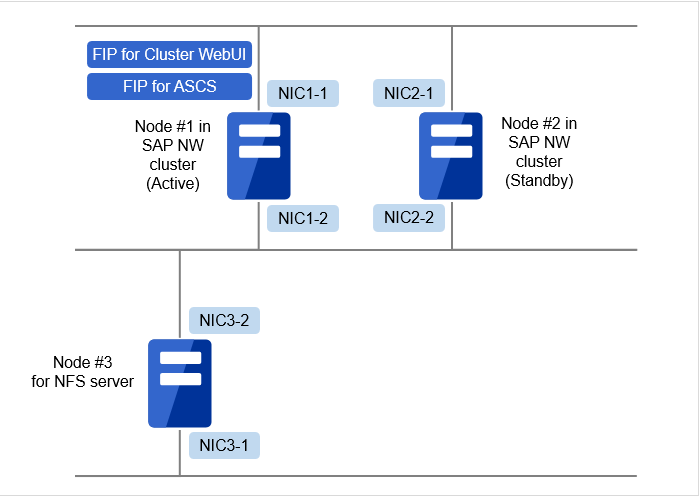
The following table shows the static IP and floating IP setting example for a SAP NW cluster consisting of an active node (Node#1) and standby node (Node#2).
Node#1
Node#2
Host Name
sap1
sap2
Static IP(eth0)
172.16.30.135/24
172.16.30.136/24
Static IP(eth1)
10.0.0.1/24
10.0.0.2/24
Floating IP(eth0)
managesv:172.16.30.137/24
ascssv:172.16.30.138/24
erssv:172.16.30.139/24 (required only when ENSA2 is used)
2.1.3.2. Static IP and floating IP for an NFS server
The following table shows the static IP setting example for a configuration consisting of one NFS server (Node#3). In this configuration, no floating IP is required.
Node#3
Host Name
nassv
Static IP(eth0)
172.16.30.140/24
Static IP(eth1)
10.0.0.3/24
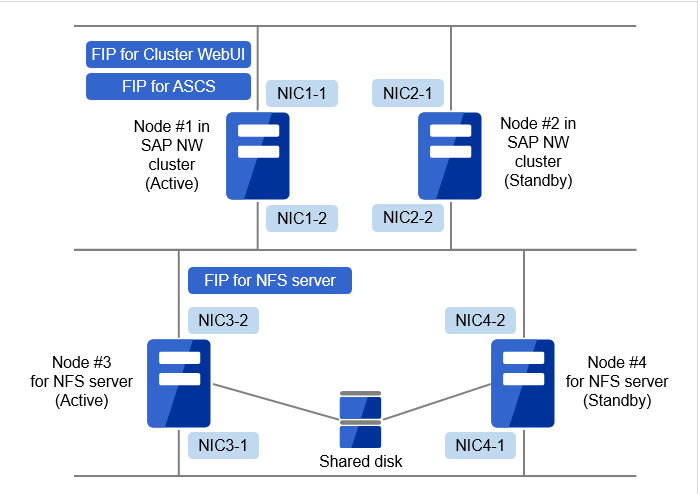
The following table shows the static IP and floating IP setting example for a unidirectional standby cluster configuration consisting of two nodes (Node#3 and Node#4) as an NFS server.
# vi /etc/hosts
10.0.0.3  nassv
172.16.30.135 sap1
172.16.30.136 sap2
172.16.30.137 managesv
172.16.30.138 ascssv
172.16.30.139 erssv # required only when ENSA2 is used
The additional terminology used in a configuration consisting of one NFS server and a cluster configuration consisting of two NFS servers is described in the following section:
10th monitor resource(For ERS2 service with ENSA used, NOT required with ENSA2 used)
Parameter name
Value of the setting
Type
custom monitor
Monitor resource name
genw-ERS2-service
Interval
15 sec
Timeout
60 sec
Retry Count
1 time
Wait Time to Start Monitoring
30 sec
Monitor Timing
Active
exec-ERS2-SAP-service_NEC_21
Script created with this product
genw.sh
Monitor Type
Synchronous
Log Output Path
/opt/nec/clusterpro/log/genw-ERS2-service.log
Rotate Log
ON
Rotation Size
1000000 byte
Normal Return Value
0
Recovery Action
Custom settings
Recovery Target
exec-ERS2-SAP-service_NEC_21
Recovery Script Execution Count
0 time
Maximum Reactivation Count
3 time
Maximum Failover Count
0 time
Final Action
No operation
11th monitor resource(for PAS instance)
Parameter name
Value of the setting
Type
custom monitor
Monitor resource name
genw-PAS-instance
Interval
30 sec
Timeout
120 sec
Retry Count
2 time
Wait Time to Start Monitoring
30 sec
Monitor Timing
Active
exec-PAS-SAP-instance_NEC_30
Script created with this product
genw.sh
Monitor Type
Synchronous
Log Output Path
/opt/nec/clusterpro/log/genw-PAS-instance.log
Rotate Log
ON
Rotation Size
1000000 byte
Normal Return Value
0
Recovery Action
Custom settings
Recovery Target
exec-PAS-SAP-instance_NEC_30
Recovery Script Execution Count
0 time
Maximum Reactivation Count
3 time
Maximum Failover Count
0 time
Final Action
No operation
12th monitor resource(for PAS service)
Parameter name
Value of the setting
Type
custom monitor
Monitor resource name
genw-PAS-service
Interval
15 sec
Timeout
60 sec
Retry Count
1 time
Wait Time to Start Monitoring
30 sec
Monitor Timing
Active
exec-PAS-SAP-service_NEC_30
Script created with this product
genw.sh
Monitor Type
Synchronous
Log Output Path
/opt/nec/clusterpro/log/genw-PAS-service.log
Rotate Log
ON
Rotation Size
1000000 byte
Normal Return Value
0
Recovery Action
Custom settings
Recovery Target
exec-PAS-SAP-service_NEC_30
Recovery Script Execution Count
0 time
Maximum Reactivation Count
3 time
Maximum Failover Count
0 time
Final Action
No operation
13th monitor resource(for AAS instance)
Parameter name
Value of the setting
Type
custom monitor
Monitor resource name
genw-AAS-instance
Interval
30 sec
Timeout
120 sec
Retry Count
2 time
Wait Time to Start Monitoring
30 sec
Monitor Timing
Active
exec-AAS-SAP-instance_NEC_40
Script created with this product
genw.sh
Monitor Type
Synchronous
Log Output Path
/opt/nec/clusterpro/log/genw-AAS-instance.log
Rotate Log
ON
Rotation Size
1000000 byte
Normal Return Value
0
Recovery Action
Custom settings
Recovery Target
exec-AAS-SAP-instance_NEC_40
Recovery Script Execution Count
0 time
Maximum Reactivation Count
3 time
Maximum Failover Count
0 time
Final Action
No operation
14th monitor resource(for AAS service)
Parameter name
Value of the setting
Type
custom monitor
Monitor resource name
genw-AAS-service
Interval
15 sec
Timeout
60sec
Retry Count
1 time
Wait Time to Start Monitoring
30 sec
Monitor Timing
Active
exec-AAS-SAP-service_NEC_40
Script created with this product
genw.sh
Monitor Type
Synchronous
Log Output Path
/opt/nec/clusterpro/log/genw-AAS-service.log
Rotate Log
ON
Rotation Size
1000000 byte
Normal Return Value
0
Recovery Action
Custom settings
Recovery Target
exec-AAS-SAP-service_NEC_40
Recovery Script Execution Count
0 time
Maximum Reactivation Count
3 time
Maximum Failover Count
0 time
Final Action
No operation
15th monitor resource(for hostexec1)
Parameter name
Value of the setting
Type
custom monitor
Monitor resource name
genw-hostexec1
Interval
30 sec
Timeout
120 sec
Retry Count
1 time
Wait Time to Start Monitoring
30 sec
Monitor Timing
Active
exec-hostexec1
Script created with this product
genw.sh
Monitor Type
Synchronous
Log Output Path
/opt/nec/clusterpro/log/genw-hostexec1.log
Rotate Log
ON
Rotation Size
1000000 byte
Normal Return Value
0
Recovery Action
Custom settings
Recovery Target
exec-hostexec1
Recovery Script Execution Count
0 time
Maximum Reactivation Count
3 time
Maximum Failover Count
0 time
Final Action
No operation
16th monitor resource(for hostexec2)
Parameter name
Value of the setting
Type
custom monitor
Monitor resource name
genw-hostexec2
Interval
30 sec
Timeout
120 sec
Retry Count
1 time
Wait Time to Start Monitoring
30 sec
Monitor Timing
Active
exec-hostexec2
Script created with this product
genw.sh
Monitor Type
Synchronous
Log Output Path
/opt/nec/clusterpro/log/genw-hostexec2.log
Rotate Log
ON
Rotation Size
1000000 byte
Normal Return Value
0
Recovery Action
Custom settings
Recovery Target
exec-hostexec2
Recovery Script Execution Count
0 time
Maximum Reactivation Count
3 time
Maximum Failover Count
0 time
Final Action
No operation
17th monitor resource
Parameter name
Value of the setting
Type
disk monitor
Monitor resource name
diskw-NFS
Interval
15 sec
Timeout
30 sec
Retry Count
0 time
Wait Time to Start Monitoring
0 sec
Monitor Timing
Always
Method
READ(O_DIRECT)
Monitor Target
/sapmnt/<SID>/.nfscheck
Recovery Action
Final action only
Final Action
No operation
18th monitor resource(Required only with ENSA2 used)
Parameter name
Value of the setting
Type
custom monitor
Monitor resource name
genw-check-ENSA2
Interval
30 sec
Timeout
30 sec
Retry Count
0 time
Wait Time to Start Monitoring
5 sec
Monitor Timing
Active
exec-ascs-SAP-instance_NEC_10
Script created with this product
genw.sh
Monitor Type
Synchronous
Log Output Path
/opt/nec/clusterpro/log/genw-check-ENSA2.log
Rotate Log
ON
Rotation Size
1000000 byte
Normal Return Value
0
Recovery Action
Custom settings
Recovery Target
ERS-Group
Recovery Script Execution Count
0 time
Maximum Reactivation Count
0 time
Maximum Failover Count
1 time(node count - 1)
Final Action
Stop Group
Note
The /sapmnt/<SID>/.nfscheck file to be set to Monitor Target of the disk monitor resource must be created in advance.
2.2.2. Sample configuration of EXPRESSCLUSTER in an NFS cluster
The following table outlines the EXPRESSCLUSTER settings for creating a NFS server cluster environment. The following settings are not necessary when using one node as an NFS server.
2.2.2.1. Configuration example for failover groups
Cluster configuration
Parameter name
Value of the setting
Cluster name
Cluster-nfs
The number of servers
2
The number of failover groups
1
The number of monitor resources
1
Heartbeat
Lankhb
2
Lanhb
2
Node#3
(Server of master)
Server name
nas1
IP address of interconnect
(Kernel Mode, Priority 1)
10.0.0.4
IP address of interconnect
(Kernel Mode, Priority 2)
172.16.30.140
IP address of interconnect
(User Mode, Priority 3)
10.0.0.4
IP address of interconnect
(User Mode, Priority 4)
172.16.30.140
Node#4
Server name
nas2
IP address of interconnect
(Kernel mode, priority 1)
10.0.0.5
IP address of interconnect
(Kernel mode, priority 2)
172.16.30.141
IP address of interconnect
(User mode, priority 3)
10.0.0.5
IP address of interconnect
(User mode, priority 4)
172.16.30.141
1st group(for NFS server)
Parameter name
Value of the setting
Type
failover
Group name
NFS-Group
Startup Server
Failover is possible on all servers
Startup Attribute
Auto Startup
Failover Attribute
Auto Failover
Use the startup server settings
Failback Attribute
Manual Failback
Failover Exclusive Attribute
Off
The number of group resources
3
1st group resource
Depth 0
Type
floating ip resource
Group resource name
fip-nfs
Dependent Resources
Follow the default dependency
IP Address
10.0.0.3
2nd group resource
Depth 1
Type
disk resource
Group resource name
disk-nfs
Dependent Resources
Follow the default dependency
Recovery Operation at Activation Failure Detection
Retry Count 0
Failover Threshold 1
No operation (not activate next resource)
Recovery Operation at Deactivation Failure Detection
Retry Count at Deactivation Failure 0
Stop the cluster service and shutdown OS
Disk Type
disk
File System
ext4
Device Name
/dev/sda2
Mount Point
/opt/nfsroot
3rd group resource
Depth 2
Type
EXEC resource
Group resource name
exec-nfs
Dependent Resources
disk-nfs
Recovery Operation at Activation Failure Detection
Retry Count 0
Failover Threshold 1
No operation (not activate next resource)
Recovery Operation at Deactivation Failure Detection
Retry Count at Deactivation Failure 0
Stop the cluster service and shutdown OS
Details
Script created with this product
Start script: start.sh
Stop script: stop.sh
2.2.2.2. Example of the configuration of the monitor resources
Set the following bundled scripts in a media as EXEC resources.
Bundled scripts are listed below.
Folder name
File name
Use
SAP-ASCS-instance
ascs_post_handler.sh
For exclusive control of ASCS/ERS instance
ascs_start.sh
For starting ASCS instance
ascs_stop.sh
For stopping ASCS instance
SAP-ERS-instance
ers_start.sh
For exclusive control of ASCS/ERS instance
ers_stop.sh
For starting ERS instance
exclusive_control.sh
For stopping ERS instance
check_ensa2.sh
For ASCS/ERS exclusion control with ENSA2 used.
SAP-HostExec
hostexec_start.sh
For starting SapHostExec
hostexec_stop.sh
For stopping SapHostExec
SAP-Instance
instance_start.sh
For starting instance
instance_stop.sh
For stopping instance
SAP-service
service_start.sh
For starting service
service_stop.sh
For stopping service
Modify SAP user (SAPUSER), SAP System ID (SID) and Instance Number (INO) written in the bundled sample scripts according to the values setting of your installation of SAP NW.
During SAP NW installation instance profiles are automatically created for each instance in the global directory /sapmnt/<SID>/profile on both nodes.
The default naming convention is <SID>_<instance name>_<Host Name>.
An example of profile path of each instance is listed below.
For some sample scripts, the usage changes depending on whether ENSA or ENSA2 is used. For these sample scripts, refer to either of the following sections depending on the selected configuration.
Modify "TIMEOUT" of service_stop.sh to the time in seconds until ASCS instance stops.
"TIMEOUT" is the time period used for each waiting process in the sample script (e.g. waiting process for sapcontrol command in the sample script).
Therefore, if more than 1 waiting processes exist in the sample script, the maximum time period for the waiting process is calculated as the timeout value multiplied by the number of waiting processes.
Additionally, please consider the Start Script-Timeout and Stop Script-Timeout of EXEC resource.
Example in this manual
300
The stop script confirms whether the instance has stopped or not every "DELAY" seconds of service_stop.sh until the elapsed time reaches "TIMEOUT".
Example in this manual
10
Note
To estimate the necessary time to stop the group resource of ASCS instance, stop the group resource with "DELAY=1", and then check alerts using the Cluster WebUI.
Failover group name: PAS-Group
EXEC resource name: exec-PAS-SAP-instance_NEC_30
Copy the contents of "instance_start.sh" and "instance_stop.sh" to start.sh and stop.sh respectively.
Modify <instance name> to the "file name of SAP profile" of PAS.
Example in this manual
NEC_D30_sap1
EXEC resource name: exec-PAS-SAP-service_NEC_30
Copy the contents of "service_start.sh" and "service_stop.sh" to start.sh and stop.sh respectively.
Modify <instance name> to the "file name of SAP profile" of PAS.
Modify "TIMEOUT" of service_stop.sh to the time in seconds until PAS instance stops.
"TIMEOUT" is the time period used for each waiting process in the sample script (e.g. waiting process for sapcontrol command in the sample script).
Therefore, if more than 1 waiting processes exist in the sample script, the maximum time period for the waiting process is calculated as the timeout value multiplied by the number of waiting processes.
Additionally, please consider the Start Script-Timeout and Stop Script-Timeout of EXEC resource.
Example in this manual
300
The stop script confirms whether the instance has stopped or not every "DELAY" seconds of service_stop.sh until the elapsed time reaches "TIMEOUT".
Example in this manual
10
Note
To estimate the necessary time to stop the group resource of PAS instance, stop the group resource with "DELAY=1", and then check alerts using the Cluster WebUI.
Failover group name: AAS-Group
EXEC resource name: exec-AAS-SAP-instance_NEC_40
Copy the contents of "instance_start.sh" and "instance_stop.sh" to start.sh and stop.sh respectively.
Modify <instance name> to the "file name of SAP profile" of AAS.
Example in this manual
NEC_D40_sap2
EXEC resource name: exec-AAS-SAP-service_NEC_40
Copy the contents of "service_start.sh" and "service_stop.sh" to start.sh and stop.sh respectively.
Modify <instance name> to the "file name of SAP profile" of AAS.
Modify "TIMEOUT" of service_stop.sh to the time in seconds until AAS instance stops.
"TIMEOUT" is the time period used for each waiting process in the sample script (e.g. waiting process for sapcontrol command in the sample script).
Therefore, if more than 1 waiting processes exist in the sample script, the maximum time period for the waiting process is calculated as the timeout value multiplied by the number of waiting processes.
Additionally, please consider the Start Script-Timeout and Stop Script-Timeout of EXEC resource.
Example in this manual
300
The stop script confirms whether the instance has stopped or not every "DELAY" seconds of service_stop.sh until the elapsed time reaches "TIMEOUT".
Example in this manual
10
Note
To estimate the necessary time to stop the group resource of AAS instance, stop the group resource with "DELAY=1", and then check alerts using the Cluster WebUI.
Failover group name: hostexec1-Group
EXEC resource name: exec-hostexec1
Copy the contents of "hostexec_start.sh" and "hostexec_stop.sh" to start.sh and stop.sh respectively.
Use the default path of SAP NW for SAPHOSTEXEC and PROFILE.
Note
In SAP NW 7.5 or later environment, activation of the exec-hostexec1 may be failed. In that case, add " -restart" to the end of the line "${SAPHOSTEXEC} pf=${PROFILE}" in the start.sh.
Failover group name: hostexec2-Group
EXEC resource name: exec-hostexec2
Setting like the above exec-hostexec1.
Note
In SAP NW 7.5 or later environment, activation of the exec-hostexec2 may be failed. In that case, add " -restart" to the end of the line "${SAPHOSTEXEC} pf=${PROFILE}" in the start.sh.
2.3.1.1.1. Usage of sample script (only for ENSA configuration)
Failover group name: ASCS-Group
EXEC resource name: exec-ascs-SAP-instance_NEC_10
Copy the files of SAP-ASCS-instance directory to any directory.
Example in this manual
/root/sample/scripts/SAP-ASCS-instance
Assign the execute permission to ascs_post_handler.sh, ascs_start.sh and ascs_stop.sh.
If any failover group of the ERS instance is not working, the failover group of ERS instance is started automatically when administrator starts or moves ASCS instance manually. For disabling auto startup of the failover group of the ERS instance change the value of "ENABLED" of ascs_start.sh to "0", and start or move ASCS instance by manual.
Failover group name: ERS1-Group
EXEC resource name: exec-ERS1-SAP-instance_NEC_20
Copy the files of SAP- ERS-instance directory to any directory.
Example in this manual
/root/sample/scripts/SAP-ERS-instance
Assign the execute permission to ers_start.sh, ers_stop.sh and exclusive_control.sh.
Modify <ERS_instance_name> of ers_start.sh and ers_stop.sh to the "file name of SAP profile" of ERS.
Example in this manual
NEC_ERS20_sap1
Modify <directory_path_of_exclusive_control.sh> of ers_start.sh and ers_stop.sh to the absolute path of the directory where exclusive_control.sh is placed.
Copy the contents of "service_start.sh" and "service_stop.sh" to start.sh and stop.sh respectively. Modify <instance name> to the "file name of SAP profile" of ERS1.
Modify "TIMEOUT" of service_stop.sh to the time in seconds until ERS1 instance stops.
Example in this manual
300
The stop script confirms whether the instance has stopped or not every "DELAY" seconds of service_stop.sh until the elapsed time reaches "TIMEOUT".
Example in this manual
10
Note
To estimate the necessary time to stop the group resource of ERS1 instance, stop the group resource with "DELAY=1", and then check alerts using the Cluster WebUI.
Failover group name: ERS2-Group
EXEC resource name: exec-ERS2-SAP-instance_NEC_21
Copy the files of SAP- ERS-instance directory to any directory.
Example in this manual
/root/sample/scripts/SAP-ERS-instance
Assign the execute permission to ers_start.sh, ers_stop.sh and exclusive_control.sh.
Modify <ERS_instance_name> of ers_start.sh and ers_stop.sh to the "file name of SAP profile" of ERS.
Example in this manual
NEC_ERS21_sap2
Modify <directory_path_of_exclusive_control.sh> of ers_start.sh and ers_stop.sh to the absolute path of the directory where exclusive_control.sh is placed.
Copy the contents of "service_start.sh" and "service_stop.sh" to start.sh and stop.sh respectively. Modify <instance name> to the "file name of SAP profile" of ERS2.
Modify "TIMEOUT" of service_stop.sh to the time in seconds until ERS2 instance stops.
Example in this manual
300
The stop script confirms whether the instance has stopped or not every "DELAY" seconds of service_stop.sh until the elapsed time reaches "TIMEOUT".
Example in this manual
10
Note
To estimate the necessary time to stop the group resource of ERS2 instance, stop the group resource with "DELAY=1", and then check alerts using the Cluster WebUI.
2.3.1.1.2. Usage of sample script (only for ENSA2 configuration)
Failover group name: ASCS-Group
EXEC resource name: exec-ascs-SAP-instance_NEC_10
Locate the files under SAP-ASCS-instance directory on a voluntary directory.
Example in this manual
/root/sample/scripts/SAP-ASCS-instance
Give execution permission to ascs_start.sh and ascs_stop.sh.
Copy the contents of check_ensa2.sh on start.sh and rename the <ASCS_GROUP> of check_ensa2.sh as ASCS failover group and <ERS_GROUP> as ERS failover group.
Example in this manual
ASCS-GroupERS-Group
EXEC resource name: exec-ERS-SAP-instance_NEC_20
Locate the files under the SAP-ERS-instance directory on a voluntary directory.
Example in this manual
/root/sample/scripts/SAP-ERS-instance
Give execution permission to ers_start.sh, ers_stop.sh.
Rename the < ERS_instance_name > of ers_start.sh and ers_stop.sh as "File name of SAP profile" of ERS.
Example in this manual
NEC_ERS20_erssv
EXEC resource name: exec-ERS-SAP-service_NEC_20
Copy the contents of service_start.sh on start.sh and service_stop.sh on stop.sh. Then rename the <instance_name> as "File name of SAP profile" of ERS.
Set the required value (in second) for "TIMEOUT" in service_stop.sh to stop the group resources for ERS2 instance.
"TIMEOUT" is the time period used for each waiting process in the sample script (e.g. waiting process for sapcontrol command in the sample script).
Therefore, if more than 1 waiting processes exist in the sample script, the maximum time period for the waiting process is calculated as the timeout value multiplied by the number of waiting processes.
Additionally, please consider the Start Script-Timeout and Stop Script-Timeout of EXEC resource.
Example in this manual
300
"DELAY" in service_stop.sh is to check if it stops every time period set until it reaches "TIMEOUT".
Example in this manual
10
Note
In order to confirm the time period required to start/stop the group resource for ERS instance, perform the start/stop of the group resource with setting 1 for DELAY and check the alerts on Cluster WebUI.
Use the following bundled sample scripts as custom monitor resources.
File name
Use
as_instance_genw.sh
For monitoring the PAS/AAS instance
ascs_enq_genw.sh
For monitoring ASCS enqueue server
ascs_msg_genw.sh
For monitoring ASCS message server
check_ensa2.sh
For ASCS/ERS exclusion control when ENSA2 is used
check_monitor_status.sh
Sample script to check whether access to files in /sapmnt/<SID> is available before each custom monitor starts monitoring
ers_instance_genw.sh
For monitoring the ERS instance
ers_mon_preaction.sh
Bundled script of recovery action for ERS instance monitoring
ers_mon_preaction_wrapper.sh
Bundled script of recovery action for ERS instance monitoring
service_genw.sh
For monitoring instance service
hostexec_genw.sh
For monitoring Saphostexec
In the same way as in 2.3.1.EXEC resources,modify SAPUSER, SID (SAP System ID) and INO (Instance Number) used in the bundled sample scripts according to the values used during the installation of SAP NW.
Copy the contents of "hostexec_genw.sh" to genw.sh and modify the following part.
For SAPHOSTEXEC, use the default path of SAP NW.
Custom monitor name: genw-check-ENSA2
Copy the contents of check_ensa2.sh on genw.sh and rename the <ASCS_GROUP> of check_ensa2.sh as ASCS failover group and <ERS_GROUP> as ERS failover group.
Example in this manual
ASCS-GroupERS-Group
2.3.2.2. Usage of the recovery scripts (only for ENSA configuration)
It order to use ENSA, it is necessary for the ENSA configuration to configure the following recovery script.
Custom monitor name: genw-ERS1-instance
Copy ers_mon_preaction.sh and ers_mon_preaction_wrapper.sh in any directory.
Example in this manual
/root/sample/genw
Assign the execute permission to ers_mon_preaction.sh and ers_mon_preaction_wrapper.sh.
Modify <directory_path_of_ers_mon_preaction.sh> of ers_mon_preaction_wrapper.sh to the absolute path of the directory where ers_mon_preaction.sh is placed.
Modify <directory_path_of_ers_mon_preaction.sh> of ers_mon_preaction_wrapper.sh to the absolute path of the directory where ers_mon_preaction.sh is placed.
Select the Properties of custom monitor resource and select the Recovery Action tab.
Click Script Settings to display the Edit Script dialog box.
Click User Application in the Edit Script dialog box.
Enter the absolute path of ers_mon_preaction_wrapper.sh in File.
 In the figures of this guide, this icon represents EXPRESSCLUSTER.