This guide is intended for administrators who want to build a cluster system, system engineers who want to provide user support, and maintenance personnel.
This guide introduces software whose operation in an EXPRESSCLUSTER environment has been verified.
The software and setup examples introduced here are for reference only. They are not meant to guarantee the operation of each software product.
The bundled scripts are for achieving failover.
Since these scripts are not designed to monitor all the SAP processes, check and (if necessary for their usage environments and their monitoring targets) customize their contents.
This guide is intended for system engineers and administrators who want to build, operate, and maintain a cluster system. Instructions for designing, installing, and configuring a cluster system with EXPRESSCLUSTER are covered in this guide.
This guide is intended for system administrators. The guide covers topics such as how to operate EXPRESSCLUSTER, function of each module and troubleshooting. The guide is supplement to the Installation and Configuration Guide.
This guide is intended for administrators and for system administrators who want to build, operate, and maintain EXPRESSCLUSTER-based cluster systems. The guide describes maintenance-related topics for EXPRESSCLUSTER.
This guide is intended for administrators and for system engineers who want to build EXPRESSCLUSTER-based cluster systems. The guide describes features to work with specific hardware, serving as a supplement to the Installation and Configuration Guide.
A cluster with the following configuration can be built by combining SAP NW and EXPRESSCLUSTER.
2.1.1.1. SAP NW cluster configuration using EXPRESSCLUSTER
Configure the following component in EXPRESSCLUSTER as independent active-standby failover group to perform failover from the active node to the standby node if a failure occurs in order to improve the availability of the SAP NW environment:
With ENSA2 used, Enqueue Replication Server Instance (hereinafter ERS) is also set as an Active-Standby failover group.
ABAP SAP Central Services Instance (hereafter ASCS)
(With ENSA2 used) ERS
Configure the following components as failover groups for a single server configuration in which failover groups operate on each node.
(With ENSA used) ERS
Primary Application Server Instance (hereafter PAS)
Additional Application Server Instance (hereafter AAS)
saphostexec
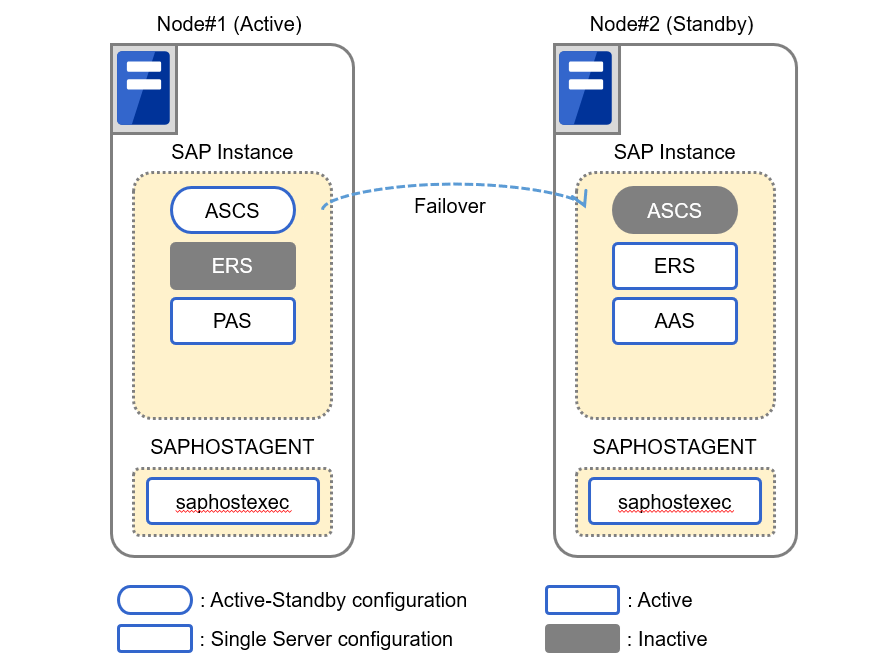
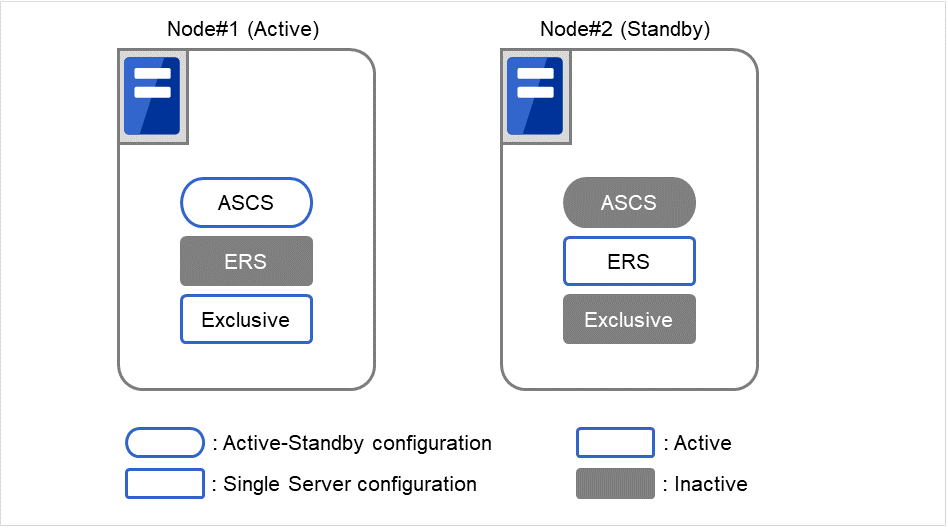
The diagram below shows the configuration with ENSA used.
Fig. 2.1 SAP ABAP Platform Clustered System(for ENSA configuration)
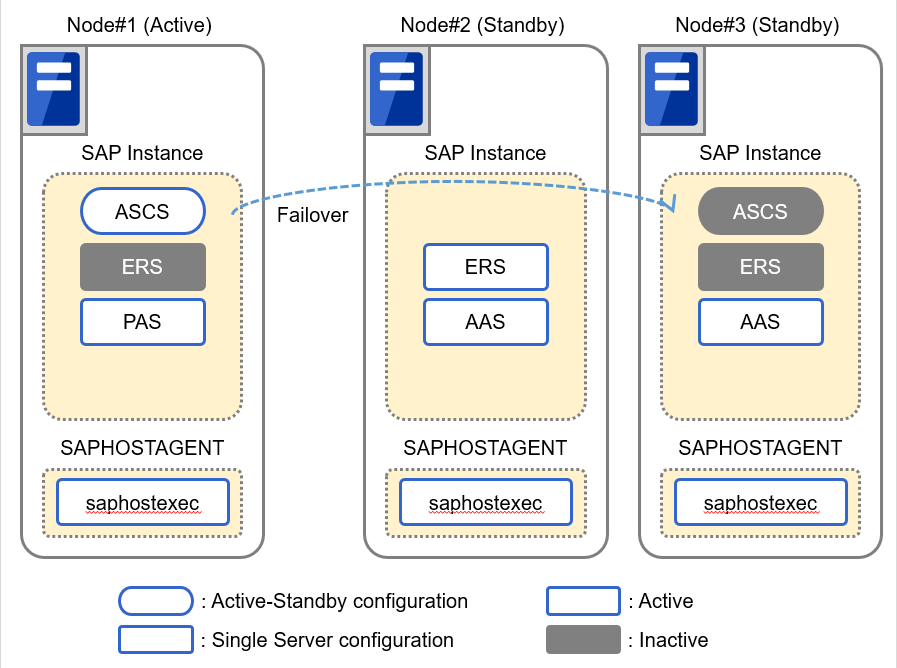
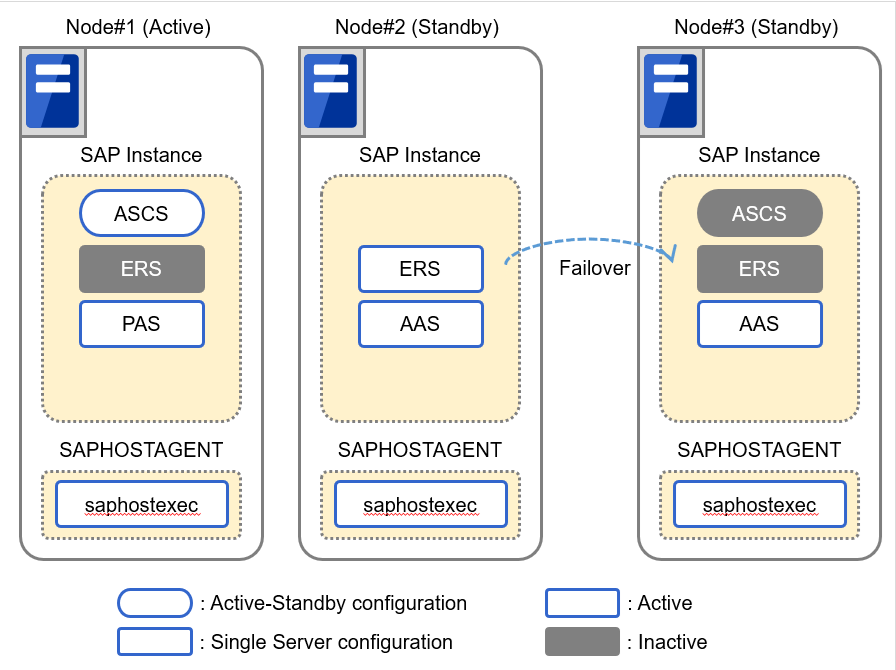
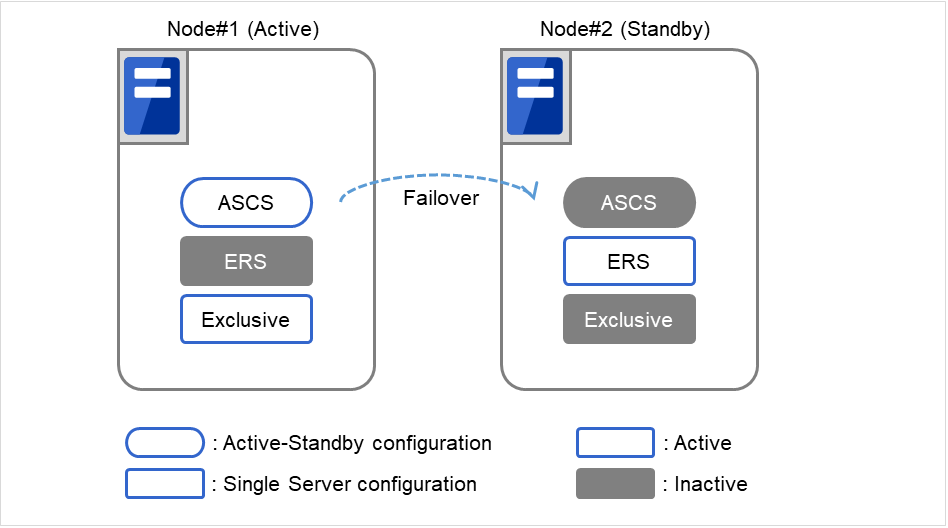
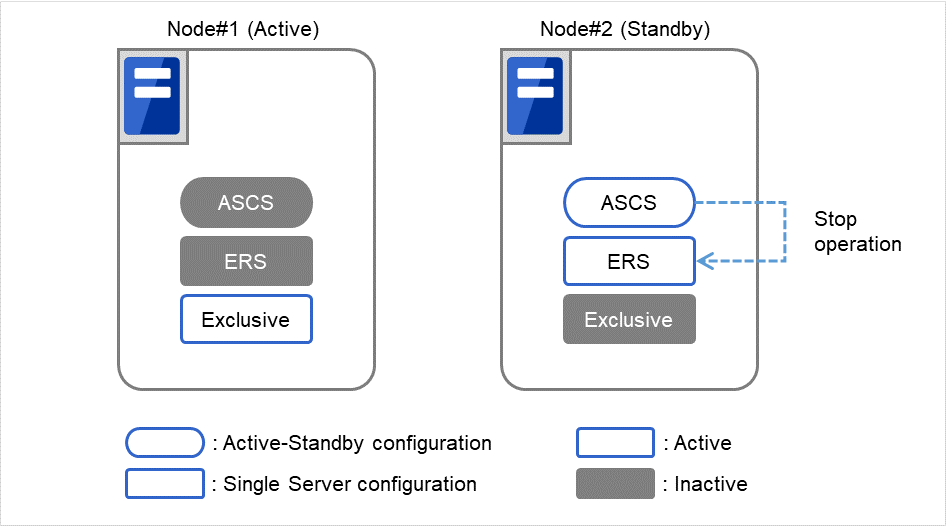
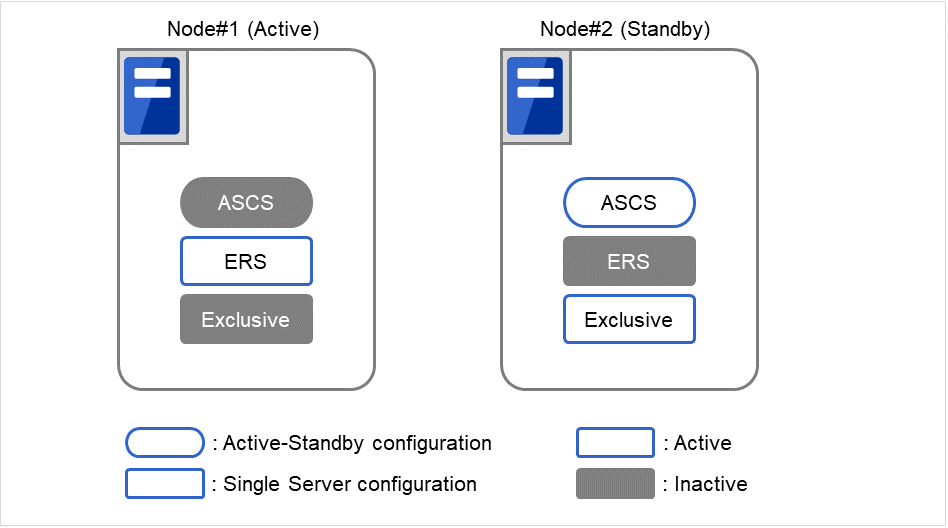
The diagram below shows the configuration with ENSA2 used.
Fig. 2.2 SAP ABAP Platform Clustered System(for ENSA2 configuration)(1)
Fig. 2.3 SAP ABAP Platform Clustered System(for ENSA2 configuration)(2)
In addition to the monitoring functions provided by EXPRESSCLUSTER the SAP NW cluster system uses a monitoring package that supports the SAP system and an SAP NW-specific monitoring to monitor the SAP NW components for response errors and hang-ups.
2.1.1.4. Instance number configuration of the SAP NW components
It is necessary to assign an instance number to each SAP NW component.
The SAP NW instance number must be unique across the cluster nodes.
If an instance number is duplicated inside a node or between nodes, reinstall a SAP NW component and reassign an instance number in either of the nodes.
2.1.1.5. Integration between SAP NW and EXPRESSCLUSTER
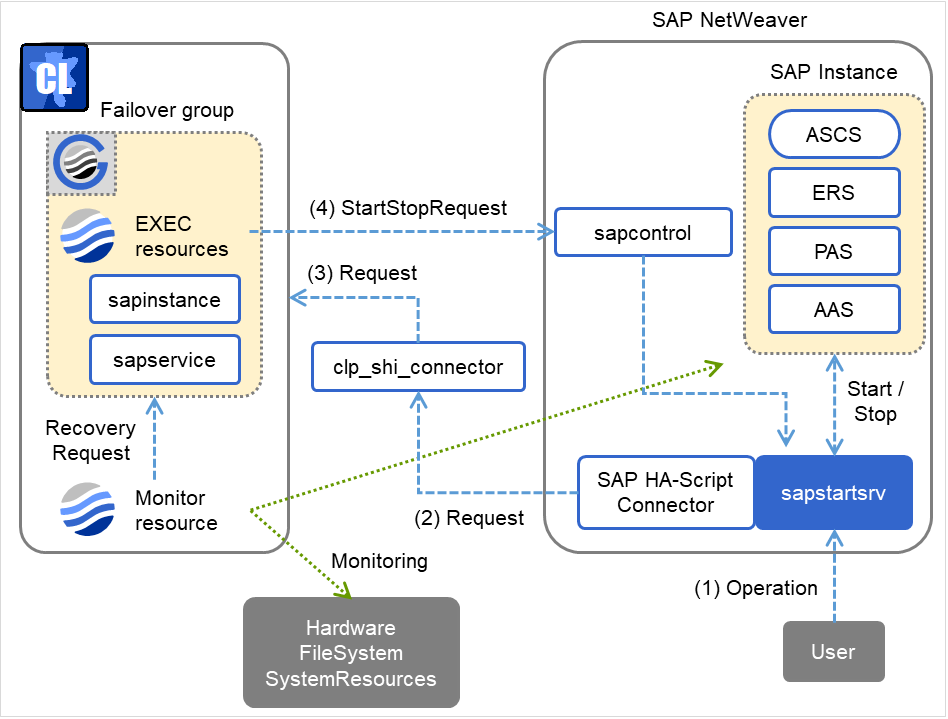
User requests to SAP NW are sent to EXPRESSCLUSTER via the Connector for SAP (clp_shi_connector). The EXPRESSCLUSTER cluster is operated by SAP NW.
2.1.1.6. Illustration of exclusive control of ASCS/ERS instance by EXPRESSCLUSTER
EXPRESSCLUSTER handles the exclusive control of the ASCS/ERS instances that is required for SAP NW as follows.
Exclusive in the figure below indicates a failover group for exclusive control.
Start both ASCS and ERS instances on different nodes. Start ERS instance on only one node. If ENSA is used, start the failover group for exclusive control on all nodes except the node which ERS instance starts.
EXPRESSCLUSTER handles failover process of the ASCS instance as follows.
If ENSA is used, fail over the ASCS instance to the node where the ERS instance was started before. If ENSA2 is used, fail over the ASCS instance to the node determined by the startup priority set in the failover group for ASCS.
If ENSA is used, ERS instance stops based on the SAP NW specifications automatically by ASCS instance, after the failover of it is executed. If ENSA2 is used and the ERS instance has already been started on the failover target node of ASCS instance, the custom monitor resource of EXPRESSCLUSTER will execute the failover of ERS instance to another node.
The above mechanism of exclusive control of both ASCS/ERS instances by EXPRESSCLUSTER works similarly in the case of more than 3 nodes.
2.1.1.7. Note on manual operation of the ERS instance
The ERS instance is used for the replication of the lock table from the ASCS instance. To ensure its redundancy the ERS instance must work on the node where the ASCS instance is not running. The ERS instance should not even manually be launched on the node where the ASCS instance is running. Additionally the ERS instance should not be launched on more than two nodes at same time.
The failover group of the ERS instance is not restarted automatically, when the node where the ERS instance was working recovers from a failure. After validating the health of the node a manual restart of the ERS instance failover group is required.
Since SAP NW can run on several database technologies, e.g. SAP HANA, SAP MaxDB, IBM DB2, Oracle, Microsoft SQLSERVER, this guide assumes there is already a high available database setup in place. If you need help how create an HA setup for your database scenario please follow related EXPRESSCLUSTER documents on https://www.nec.com/en/global/prod/expresscluster/.
Throughout this document the HA database setup will be referred to as "database".
Modification has been performed on the following minor versions.
EXPRESSCLUSTER Internal Version 3.3.x
Version in which the problem has been solved
/ Version in which the problem occurred
Phenomenon
Level
Occurrence condition/
Occurrence frequency
3.3.5-1
/ 3.3.2-1 to 3.3.4-2
A failover group for the ERS instance of SAP NetWeaver may not link with a failover group for exclusive control in the same node.
* To deal with this problem, it is required to replace the script manually. The sample script can be obtained from the support portal (content ID: 9510100151).
M
Rarely occurs when starting up a failover group for ASCS instances.
EXPRESSCLUSTER Internal Version 4.0.xor later
Version in which the problem has been solved
/ Version in which the problem occurred
Phenomenon
Level
Occurrence condition/
Occurrence frequency
4.1.0-1
/ 3.3.0-1, 4.0.0-1
At the time of failure detection of a custom monitor resource using the sample script for SAP NW, start processing of SAP instance service is performed during stop processing of SAP instance service.
S
Occurs when it takes time to stop the SAP instance service.
4.1.0-1
/ 3.3.0-1, 4.0.0-1
If any languages other than English is selected in the language settings of EXPRESSCLUSTER, SAP Connector for SAP NetWeaver does not operate normally.
S
If any languages other than English is selected, this problem inevitably occurs.
4.3.0-1
/ 4.1.0-1 to 4.2.2-1
Regarding SAP Connector for SAP NetWeaver, an unnecessary error message is outputted to syslog.
S
This problem occurs with the following conditions: The SMM_PATH parameter is set in clp_shi_connector.conf, and the SAP instance is started/stopped.
3.1. Configuration Consisting of a SAP NW Cluster and NFS Server
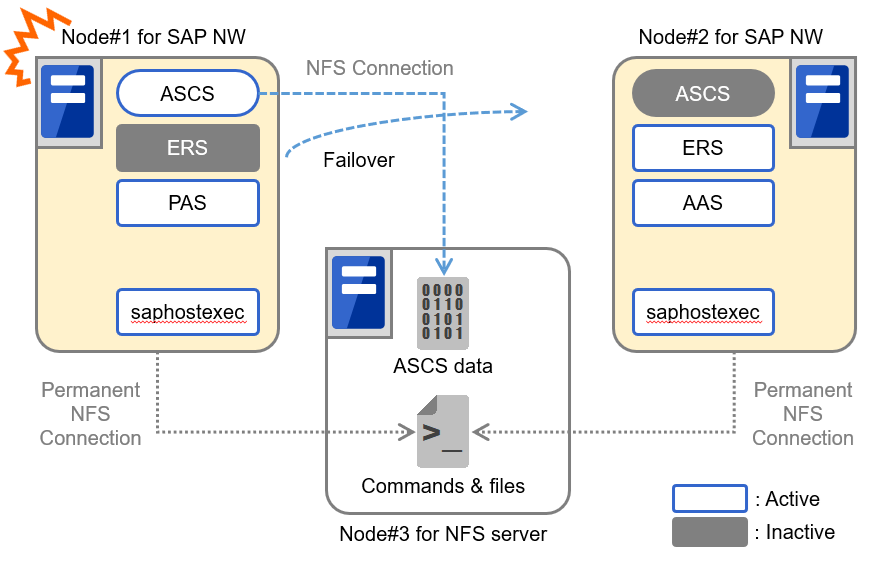
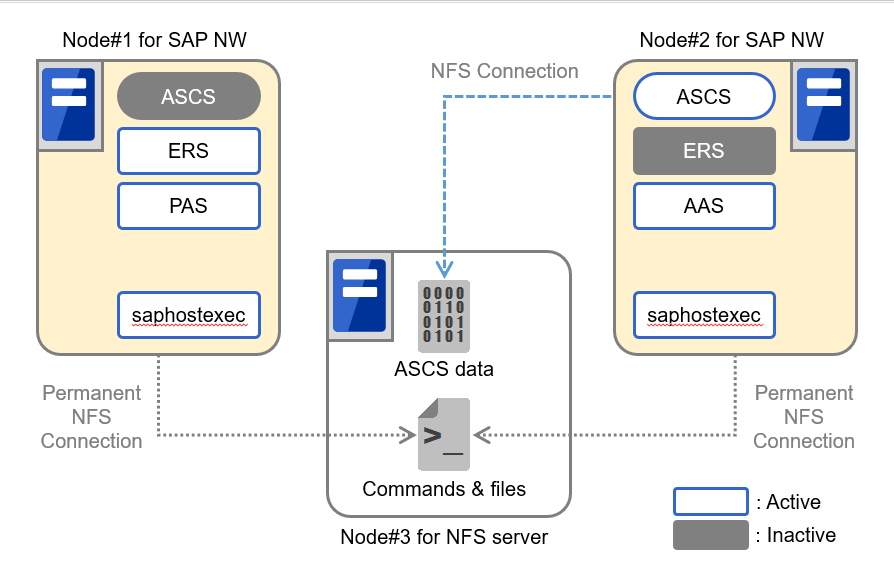
In this guide, a SAP NW cluster consists of an active node (Node#1) and standby node (Node#2). In addition, an NFS server is used to store SAP NW shared data and so on. Therefore, two nodes for a SAP NW cluster and one or more NFS server are required. If you want to make the NFS server redundant, configure a cluster with two or more NFS servers.
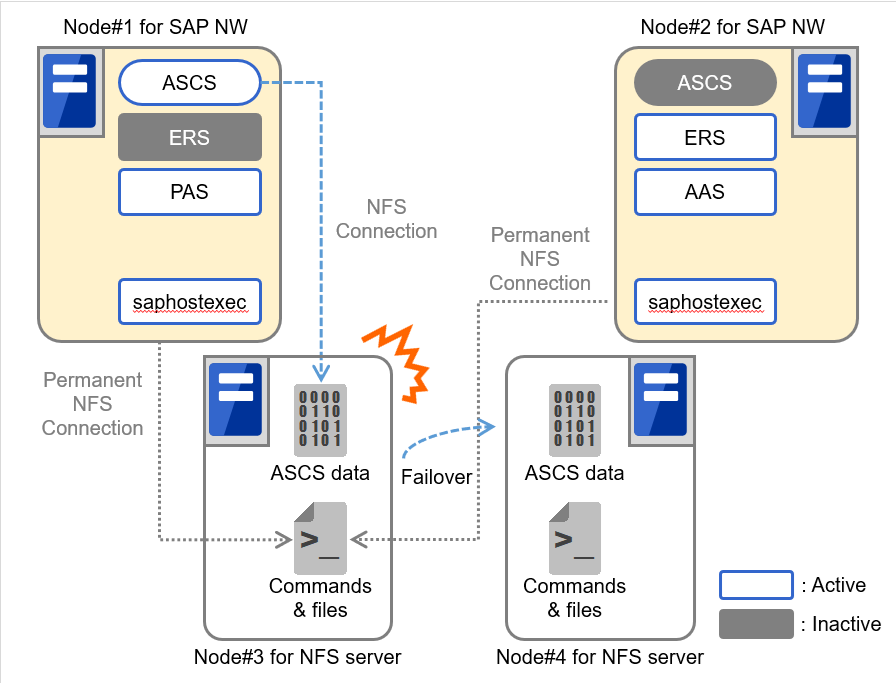
The following figure shows a configuration using a single NFS server (Node#3).
Fig. 3.1 System Configuration Using a Single NFS Server(1)
Fig. 3.2 System Configuration Using a Single NFS Server(2)
In this configuration, NW shared data and so on are provided from one NFS server. Therefore, this NFS server is a single point of failure of the SAP NW cluster.
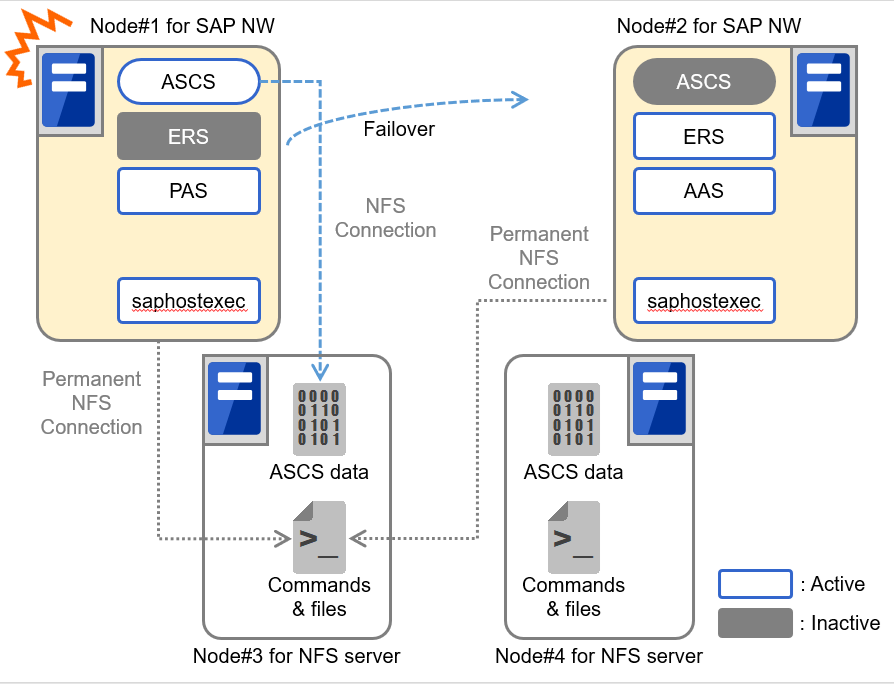
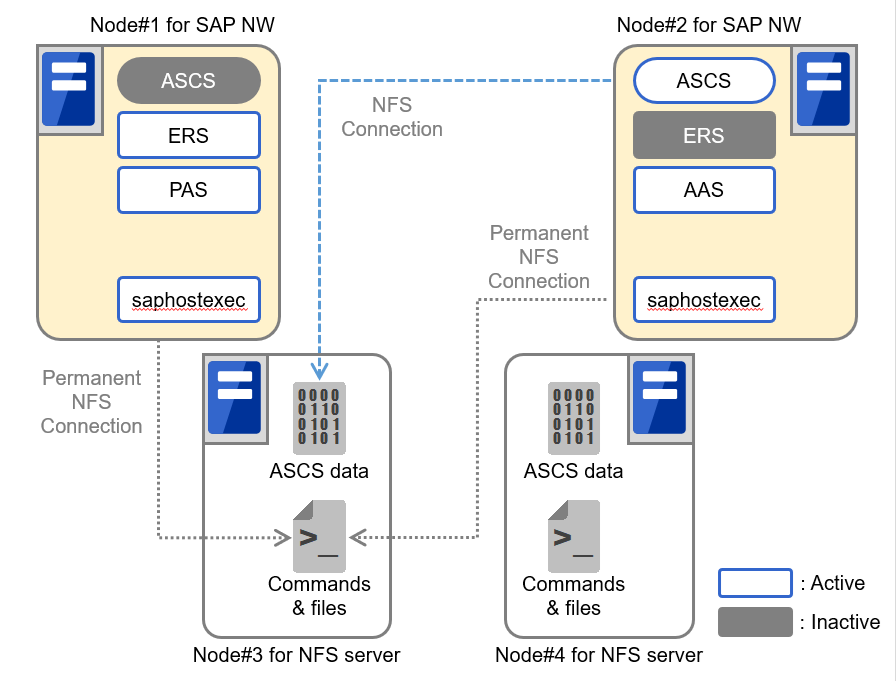
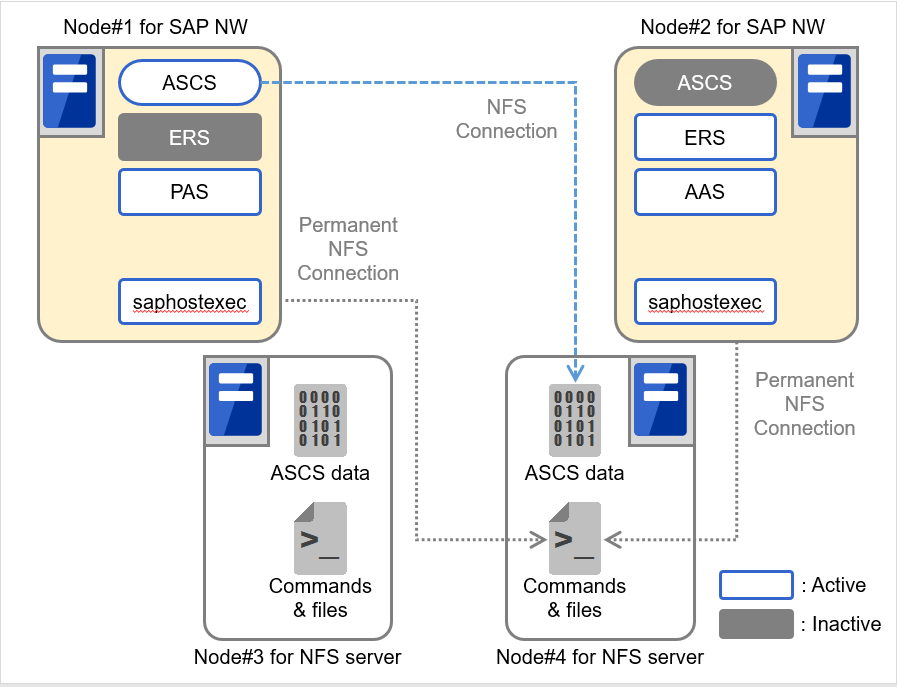
The following figure shows a configuration using two nodes (Node#3, Node#4) as an NFS server.
Fig. 3.3 System Configuration Using Two NFS Servers When a Failure Occurs in an SAP NW Server (1)
Fig. 3.4 System Configuration Using Two NFS Servers When a Failure Occurs in an SAP NW Server (2)
Fig. 3.5 System Configuration Using Two NFS Servers When a Failure Occurs in an NFS Server (1)
Fig. 3.6 System Configuration Using Two NFS Servers When a Failure Occurs in an NFS Server (2)
It is also necessary to configure two nodes used as an NFS server as a cluster in a unidirectional standby configuration by using EXPRESSCLUSTER. SAP NW shared data and so on (ASCS data, and commands and files in Figure 3.3 System Configuration Using Two Nodes as an NFS Server
) are stored in a shared disk or mirror disk to make information consistent between these two nodes. In this configuration, the NFS service can be failed over between two nodes. Therefore, the NFS server is not a single point of failure of the SAP NW cluster.
3.1.3. Measures to be taken when monitoring fails due to NFS disconnection
The EXPRESSCLUSTER custom monitor resource that monitors SAP NW components uses the SAP NW commands installed in the NFS server. Therefore, if NFS connection between a SAP NW cluster and NFS server is disconnected, the custom monitor resource cannot access the commands. This causes a monitoring process not to be complete. If this status lasts longer than the time set to Timeout of the custom monitor resource, the monitoring process fails.
To reduce the possibility that a monitoring process fails, set up a SAP NW cluster so that the disk monitor resource checks whether access to the NFS connection destination is available and the custom monitor resource monitors SAP NW components only when no error is detected by the disk monitor resource.
If monitoring SAP NW components frequently fails due to NFS disconnection, take the following measures:
Improving the network status between a SAP NW cluster and NFS server
Extending Timeout of the custom monitor resource
When monitoring SAP NW components fails due to NFS disconnection, there is a possibility that the SAP NW components are in abnormal state and cannot be restarted. In such a case, restart the node including these SAP NW components from EXPRESSCLUSTER.
In this guide, mount points for /sapmnt, /usr/sap/trans, and ASCS instance are created. Set up fstab of each node so that NFS is always mounted to /sapmnt and /usr/sap/trans, and use the EXPRESSCLUSTER EXEC resource to control mounting to the mount point for an ASCS instance.
When creating a cluster consisting of two NFS servers, it is required to assign the following floating IP. In addition, it is required to enable name resolution for the host name of the NFS server associated with the following floating IP from the node of the SAP NW cluster.
When creating a cluster on a cloud environment such as AWS and Microsoft Azure, use the AWS virtual ip resources and Azure DNS resources instead of the Floating IP resources. Note that name resolution must be possible for host names associated with virtual IPs for ASCS instances by the AWS virtual ip resource.
If an older version of this product is already installed, back up the bundled scripts and the configuration file of the Connector for SAP. The following shows an example to store the bundled scripts installed on /root/sample to /home/backup.
After the installation of EXPRESSCLUSTER has finished please enter the following command and install the Connector for SAP. The same rpm package is used for both x86_64 and IBM POWER.
# rpm -i expresscls_spnw-<Version of EXPRESSCLUSTER>.x86_64.rpm
The numbers included in the failover group names (e.g. 1 in ERS1) refer to the node on which this failover group is running. This means hostexec1 is on Node#1, hostexec2 on Node#2, and so on.
When ENSA2 is used, create only one failover group for the ERS instance.
If ENSA is used, it is necessary to create a failover group for the exclusive control of the ASCS and ERS instances. This section describes how to create a failover group.
Set the name of failover group for exclusive control according to the following manner. It's name consists of a common failover name component and a series of sequential numbers at the end of it.
The number 1, 2, ... at the end of the name must be set in order of the nodes where ERS instance is installed.
<common failover group name><number>
Example in this manual
Exclusive-Group1(Node#1)Exclusive-Group2(Node#2)
Note
The failover group name must not contain any spaces.
Note
If the failover group name does not conform to the naming conventions, exclusive control of ASCS/ERS instance cannot function normally.
Please add the following group resources to each failover group:
ASCS instance group
- Add a floating IP resource and assign the IP address settings from 3.2.2.Network Setting.
- Add a EXEC resource and assign the mount point for ASCS.
3.3.6. Specifying dependency between failover groups
Specify the dependency between failover groups.
The dependency between each instance in SAP NW (starting order) is shown below.
Database
->
ASCS
->
ERS
PAS
AAS
Each instance must be stopped in the reverse order.
Note
As outlined in 2.1.4.HA Database for SAP NW it is assumed there is a database available. This database is a prerequisite for the above dependencies and needs to be available initially. If this is not the case, then you cannot continue from here.
Note
Do not need to specify any dependency for hostexec.
For details how to specify dependencies in EXPRESSCLUSTER please refer to the following document:
3.4.1. Preparing Node#1 and Node#2 for SAP NW installation
Completely install EXPRESSCLUSTER, specify a floating IP and EXEC resource, start EXPRESSCLUSTER, and activate the floating IP and EXEC resource in Node#1 before installing SAP NW.
The location to save the SAP software logistics tool including the sapinst command described later depends on your environment and the installation media used (DVD-ROM or downloaded files). The sapinst command is a command used to install SAP NW.
3.4.2. Installation of ASCS and ERS instances (Node#1)
Perform this work on Node#1.
Specify the host name associated with the floating IP of ASCS instance as an environment variable SAPINST_USE_HOSTNAME and execute sapinst.
Enter the host name associated with the floating IP of ASCS instance for ASCS_Hostname.
Install ERS after the installation for ASCS is completed.
If ENSA is used, execute sapinst as follows:
# ./sapinst
If ENSA2 is used, execute sapinst with the specification of the host name associated with the floating IP for the ERS instance to the environment variable SAPINST_USE_HOSTNAME:
# env SAPINST_USE_HOSTNAME=ERS_Hostname ./sapinst
Note
For ERS_Hostname, set the host name associated with the floating IP for the ERS instance.
If ENSA2 is used, execute sapinst with the specification of the host name associated with the floating IP for the ERS instance to the environment variable SAPINST_USE_HOSTNAME:
# env SAPINST_USE_HOSTNAME=ERS_Hostname ./sapinst
Note
For ERS_Hostname, set the host name associated with the floating IP for the ERS instance.
To combine the EXPRESSCLUSTER Connector for SAP with SAP NW every instance needs according entries in their start profiles. Please perform the following steps.
Add the following specifications to every instance profile for SAP instances to activate the SAP HA Connector and combine it with EXPRESSCLUSTER.
A setting example in this manual is shown below. The path may vary according to your installation. In this environment the following settings are used:
Please verify to add this information to each instance profile.
The location of saphascriptco.so specified in service/halib differs depending on the version of NW.
If /usr/sap/<SID>/<INSTANCENAME><INO>/exe/saphascriptco.so does not exist, specify /usr/sap/hostctrl/exe/saphascriptco.so for service/halib.
3.4.7.2. Assigning the sudo privilege to the SAP NW user
Assign the sudo privilege to the SAP NW user so that the SAP HA Connector can be executed. Set up the privilege by using the visudo command as the root user. Add the following specification:
Defaults:%sapsys !requiretty
%sapsys ALL=(ALL) NOPASSWD: ALL
Note
Set up the groups automatically created during installation of SAP NW so that sudo can be executed to normally combine SAP NW and EXPRESSCLUSTER. If the SAP NW user cannot execute sudo, starting and stopping of SAP NW instances cannot be normally controlled.
Set up the EXEC resource to control starting and stopping of each instance.
A sample script to control starting and stopping of various SAP instances is available.
To control start and stop of SAP instances with this sample script set up the EXEC resource.
The sample script to control start and stop uses resource names as keys for control, so it is necessary to specify resource names appropriate to the control target.
Include the following string in the resource name:
instance_<SID>_<INO>
The words in <> indicate the following items:
- SID: SAP System ID
- INO: Instance number
Note
Modify the SAP user (SAPUSER), SAP System ID (SID), SAP profile path (PROFILE), and the instance number (INO) in the supplied sample script according to your environment.
For how to add the EXEC resource, refer to the following document:
Specify a resource name that conforms to the naming conventions for the EXEC resource that controls start and stop of SAP NW instances. If the resource name does not conform to the naming conventions starting and stopping of SAP NW instances cannot be normally controlled.
The option is incorrectly specified (specified option: args).
Correctly specify the option referring to the usage.
failed to get cluster resource name. (SID: ${sid}, INO: ${ino})
The name of the resource that controls the SAP instance of which SID is ${sid} and INO is ${ino} could not be acquired.
- Correctly specify the name of the resource that controls the SAP instance of which SID is ${sid} and INO is ${ino} according to the naming conventions.
- Correctly set up sudo.
- Start the cluster.
- Check the status of the system.
failed to get cluster group name.
The cluster group name could not be acquired.
- Correctly set up sudo.
- Start the cluster.
- Check the status of the system.
failed to get cluster node name.
The cluster node name could not be acquired.
- Correctly set up sudo.
- Start the cluster.
- Check the status of the system.
failed to get current node name. (ret=${ret})
The name of the node on which the group is currently operating could not be acquired.
- Correctly set up sudo.
- Start the cluster.
- Check the status of the system.
resource "${res_name}" is not ONLINE.
The resource with the resource name ${res_name} is not active.
- Correctly set up sudo.
- Start the cluster.
- Start the resource ${res_name}.
- Check the status of the system.
clpfunctions is missing.
There is no clpfunctions file.
- Install EXPRESSCLUSTER again.
- Check the status of the system.
clpstat failed. (ret=${ret})
Executing clpstat command has failed (return value:${ret}).
- Correctly set up sudo.
- Start the cluster.
- Check the status of the system.
Can't find cluster resource. (SID: $1, INO: $2)
The cluster resource controlling SID: $1 and INO: $2 could not be found.
- Following the naming conventions, correct the name of the resource which control SAP instance whose SID and INO are ${sid} and ${ino} respectively.
- Correctly set up sudo.
- Start the cluster.
- Check the status of the system.
Failed to analyze resource line.
The resource line could not be analyzed.
Check the status of the system.
Can't find cluster group. (resource: $1)
The cluster group related to resource: $1 could not be found.
- Correctly set up sudo.
- Start the cluster.
- Check the status of the system.
failed to control group resource (${res_name}) because group is stopped.
The group resource (${res_name}) could not be controlled because the group stopped.
- Correctly set up sudo.
- Start the group to which the resource belongs.
- Check the status of the system.
failed to start group resource (${res_name}) because group resource is not OFFLINE. (ret=${ret})
The group resource could not be active because the group resource (${res_name}) did not stop (return value: ${set}).
- Correctly set up sudo.
- Stop the resource.
- Check the status of the system.
failed to stop group resource (${res_name}) because group resource is not ONLINE. (ret=${ret})
The group could not stop because the group resource (${res_name}) was not active (return value: ${set}).
The below procedures may fail due to a timeout depending on the system load, when executed by the linkage connector.
Obtaining product information of EXPRESSCLUSTER when the cluster is started.
Checking the group resource status when Rolling Kernel Switch is activated.
In these cases adjust the parameters below in the following file.
/opt/nec/clusterpro/etc/clp_shi_connector.conf
Parameter
Value
Description
GVI_CHECKCOUNT
1 - 60
(The default is 30)
The number of retries EXPRESSCLUSTER will try to obtain product information when the cluster is started. The interval between these attempts is set by GVI_CHECK_INTERVAL as stated below.
Even if the count does not reach to the setting, obtaining product information finishes when one attempt succeeded.
GVI_CHECKINTERVAL
1 - 60
(The default is 10)
The interval in seconds between EXPRESSCLUSTER attempts to obtain product information. If obtaining product information will be done only once (GVI_CHECKCOUNT=1), then this value will be ignored.
FRA_CHECKCOUNT
1 - 60
(The default is 30)
The number of retries to check the status of the group resource when the Rolling Kernel Switch is done. The interval between the check is set by FRA_CHECK_INTERVAL as stated below.
Even if the count does not reach to the setting, the status check finishes when one attempt succeeded.
FRA_CHECKINTERVAL
1 - 60
(The default is 10)
The interval in seconds between checks of the status of the group resource. If the status check will be done only once (FRA_CHECKCOUNT=1), then this value will be ignored.
When the maintenance mode is used, adjust the parameter below in the following file:
/opt/nec/clusterpro/etc/clp_shi_connector.conf
Parameter
Value
Description
SMM_PATH
Directory to store the files which the Connector for SAP uses for the maintenance mode (default: none)
Set the directory to store the files which the Connector for SAP uses for the maintenance mode. Specify the directory on which each cluster node is allowed to write. Under the specified directory, do not manually create files or directories. Only use up to 240 single-bite characters.
With the parameter below in the following file, specify the ENSA version to be used.
The version of ENSA must be the same as its setting on the SAP NW side.
/opt/nec/clusterpro/etc/clp_shi_connector.conf
Parameter
Value
Description
ENSA_VERSION
1, 2
(Default: 2)
Set to 1 with ENSA used.
Set to 2 with ENSA2 used.
3.6.5. Setting abnormal process judgment for each instance
The bundled scripts allow you to check the statuses of processes composing each instance with sapcontrol -function GetProcessList. To determine whether the result is abnormal or not, you can choose from the following two patterns:
Judge the result as abnormal when not all the process statuses are GREEN.
Judge the result as abnormal when not all the process statuses are GREEN or YELLOW.
Specify either of the patterns with the parameter below in the following file.
If a different pattern is to be set for a specific process, customize the bundled script (e.g. for judging the result as normal when Process A is YELLOW, for judging as abnormal when Process B is YELLOW).
/opt/nec/clusterpro/etc/clp_shi_connector.conf
Parameter
Value
Description
YELLOW_AS_ERROR
0, 1
(Default: 1)
Set the value to 1 to judge the result as abnormal when not all the process statuses are GREEN. In this case, YELLOW leads to judging the result as abnormal.
Set the value to 0 to judge the result as normal even if any of the process statuses is YELLOW.
To update SAP NW, use Software Update Manager (hereafter referred to as SUM). The update procedure with SUM involves restarting SAP instances and therefore it may interfere with EXPRESSCLUSTER which tries to keep the SAP components available. To avoid such interference with EXPRESSCLUSTER, suspend EXPRESSCLUSTER's monitoring for all SAP components that SUM has to restart.
Please select from the following two options to suspend EXPRESSCLUSTER's monitoring.
Suspending the whole cluster
Suspending monitor resources for related SAP instances and instance services
Update SAP NW with SUM while the cluster or the monitor resources are suspended. After the update is completed, resume the suspended cluster or the suspended monitor resources.
For how to suspend and resume a cluster or a monitor resource, please refer to the following document.
The maintenance mode can be switched on/off by the sapcontrol command or from the SAP management console. For details on the maintenance mode and the sapcontrol command, see the SAP documents.
When the maintenance mode is enabled, the cluster is suspended from the Connector for SAP.
When the maintenance mode is disabled, the cluster is resumed from the Connector for SAP.
When the maintenance mode is used, avoid suspending or resuming the cluster from Cluster WebUI or with the clpcl command in order to avoid conflicts.
The following is an example to enable the maintenance mode with the sapcontrol command:
A node name , a failover group and a resource name must not contain any spaces. If they contain some spaces, starting and stopping of SAP NW instances cannot be controlled correctly.
Specify a failover group name according to the naming conventions for the failover group for exclusive control of ASCS/ERS instance. If the failover group name does not follow the naming conventions, exclusive control of ASCS/ERS instance cannot function correctly.
Naming conventions for EXEC resources
Specify a resource name that conforms to the naming conventions for the EXEC resource that controls starting and stopping of SAP NW instances. If the resource name does not conform to the naming conventions, starting and stopping of SAP NW instances cannot be normally controlled.
Attention when one node recovers
When the node where ERS instance was working gets recovered and joins the cluster, then the failover group of the ERS instance is not restarted automatically.
You need to validate the node is working healthy and then restart the failover group of ERS instance manually.
Privilege setup
Set up the groups automatically created during installation of SAP NW so that sudo can be executed to normally combine SAP NW and EXPRESSCLUSTER. If the SAP NW user cannot execute sudo, starting and stopping of SAP NW instances cannot be normally controlled.
Maintenance mode
When the maintenance mode is used, avoid suspending or resuming the cluster from Cluster WebUI or with the clpcl command in order to avoid conflicts.
For the "SMM_PATH" parameter in clp_shi_connector.conf, specify the directory on which each cluster node is allowed to write. Under the specified directory, do not manually create files or directories.
 In the figures of this guide, this icon represents EXPRESSCLUSTER.